
AWS-101 · Lesson 10 of 12 · 19 min
Cloud economics and total cost of ownership
▶ Video coming soon A video version of this lesson is on the way.
Lorraine Beaudry has approved many technology budgets, and she has a rule: never compare a price list with an invoice. "If you compare the monthly AWS bill with what the server cost to buy," she tells Mateo, "you will get the wrong answer every time." The right comparison is total cost of ownership (TCO): everything it costs to run a system over its life, in both worlds. The CLF-C02 exam guide's cloud economics task asks candidates to distinguish fixed and variable costs, identify on-premises costs, compare licensing strategies, explain rightsizing, identify the benefits of automation and explain economies of scale. This lesson takes each in turn using Cascade Ridge's numbers.
What on-premises really costs
The purchase price of a server is the most visible on-premises cost and often not the largest. Gwen and Lorraine list everything Cascade Ridge spends to run its server room, and the list surprises the board's finance committee.
| Cost category | Examples | Often overlooked? |
|---|---|---|
| Hardware | Servers, storage array, network switches, tape drive, replacement parts | No |
| Software licenses | Windows Server, SQL Server, backup software, support renewals | Sometimes |
| Facilities | Room space, power, cooling, fire suppression, physical security | Yes |
| Labor | Staff time for installation, patching, repairs and backups | Yes |
| Downtime and risk | Lost bookings and staff time during outages such as July 18 | Yes |
| Over-provisioning | Capacity bought for the peak that sits idle | Yes |
| Refresh | Replacing hardware every four to five years | Sometimes |
Mateo's time is the item the committee had never counted. He estimates about four hundred hours a year on hardware, backups and server room problems. At his salary, that alone is a real cost, and after the move those hours go to work the clinics actually request. Labor does not disappear in the cloud, but it shifts from maintaining equipment to managing services.
Fixed and variable costs, again
Lesson 1 introduced fixed and variable costs. In a TCO comparison the distinction matters because it changes how costs respond to the business. On premises, almost everything is fixed: if Cascade Ridge closed two clinics, the server room would cost the same. In AWS, most costs are variable: fewer clinics would mean fewer bookings, less storage growth and smaller bills. Some cloud costs can be made partly fixed on purpose, by committing to a level of use in exchange for a discount through Savings Plans or Reserved Instances, which AWS-104 covers.
Economies of scale
AWS buys hardware, power and network capacity in enormous volumes and runs it with heavy automation, so its cost per unit of computing is far lower than a small server room's. Economies of scale pass some of that advantage to customers through prices that have fallen over time. Lorraine compares it to Cascade Ridge's own purchasing group for medicines: the group gets better prices than any single clinic could, and AWS gets better prices than any single customer could.
Licensing: bring your own or included
Software licenses are a large part of Cascade Ridge's costs, and the cloud offers two main ways to handle them. With license-included pricing, the cost of the software license is built into the hourly price of the AWS resource; an EC2 instance running Windows Server, or an RDS database running SQL Server, includes the license, and no separate purchase is needed. With bring your own license (BYOL), the customer uses licenses it already owns, where the vendor's terms allow, and pays AWS only for the infrastructure.
Which is cheaper depends on what the organization already owns and on the vendor's license rules, which can be complex and sometimes require dedicated hardware such as Dedicated Hosts. Cascade Ridge owns SQL Server licenses bought in 2021, but their terms do not cover use on shared cloud infrastructure, so Gwen recommends license-included pricing for RDS. Hannah adds a task to check the Windows licenses for the EC2 servers with the reseller before cutover.
| Approach | How it works | Suits |
|---|---|---|
| License included | License cost built into the AWS hourly price | Organizations without suitable licenses, or that want simplicity and flexibility |
| Bring your own license (BYOL) | Use existing licenses where terms permit; pay AWS for infrastructure only | Organizations with licenses that allow cloud use, especially large ones |
Rightsizing
Rightsizing means matching the type and size of each resource to what the workload actually needs. On premises, servers are bought large because changing them is hard. In AWS, an instance that turns out to be too big can be changed to a smaller type in minutes. Rightsizing is often the quickest saving after a migration, because servers lifted and shifted keep their old, oversized specifications.
Gwen tells Mateo to start VetLedger's application servers at the size the vendor recommends, watch their processor and memory use for a month with Amazon CloudWatch, and then rightsize. AWS Compute Optimizer analyses usage and recommends better-fitting instance types, and AWS Cost Explorer shows where the money goes. AWS-104 covers these tools in depth.
# Rightsizing: the same work on a server that is too big versus one that fits.
# Illustrative hourly prices; average use measured over a month.
hours = 730
current = {"vcpus": 8, "price": 0.80, "avg_cpu_use": 0.12}
smaller = {"vcpus": 2, "price": 0.20}
needed_vcpus = current["vcpus"] * current["avg_cpu_use"]
print("Average vCPUs actually used:", round(needed_vcpus, 2))
print("Smaller server fits with headroom:", smaller["vcpus"] >= needed_vcpus * 1.5)
saving = (current["price"] - smaller["price"]) * hours
print("Monthly saving from rightsizing:", round(saving, 2), "currency units")Average vCPUs actually used: 0.96 Smaller server fits with headroom: True Monthly saving from rightsizing: 438.0 currency units
What this code does
It checks whether a server is oversized by multiplying its 8 virtual CPUs by its average use of 12 in 100, which shows less than one CPU is actually needed. It confirms a 2-CPU server still leaves room to spare for peaks. It then multiplies the difference in illustrative hourly prices by 730 hours to show the monthly saving from rightsizing.
Automation
Automation saves money in two ways. Directly, it lets resources run only when needed: test and training servers can start at eight in the morning and stop at six in the evening on weekdays, cutting their running hours by about two thirds. Indirectly, it reduces labor and errors: a server built from a template is built the same way every time, in minutes, without someone working through a checklist at midnight. The exam guide lists the benefits of automation as part of cloud economics for exactly these reasons.
# Scheduling non-production servers to run only during working hours.
always_on_hours = 24 * 7
office_hours = 10 * 5              # 10 hours a day, 5 days a week
servers = 6
price_per_hour = 0.25              # illustrative
weekly_always = always_on_hours * servers * price_per_hour
weekly_scheduled = office_hours * servers * price_per_hour
print("Weekly cost always on:  ", weekly_always)
print("Weekly cost on schedule:", weekly_scheduled)
print("Share of cost saved:", round(1 - weekly_scheduled / weekly_always, 2))Weekly cost always on: 252.0 Weekly cost on schedule: 75.0 Share of cost saved: 0.7
What this code does
It compares running six non-production servers all week, 168 hours, with running them only 10 hours a day on weekdays, using an illustrative hourly price. It prints the weekly cost of each schedule and the share of cost saved. Turning servers off outside working hours saves about 70 in 100 of their cost.
Building the TCO comparison
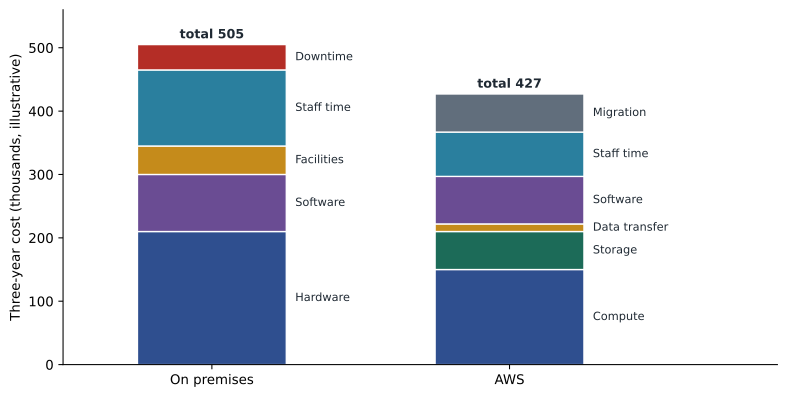
With every category listed, Gwen builds a three-year comparison. On the on-premises side she counts a storage array replacement in 2027, server refreshes, licenses, power and cooling, Mateo's hardware hours and an allowance for outages. On the AWS side she uses estimates from the AWS Pricing Calculator for EC2, RDS, S3, backups and data transfer, plus the cost of the migration itself: Gwen's contract, staff time and a month of running both environments in parallel. For larger estates, Migration Evaluator can collect on-premises usage data automatically and produce a business case; Cascade Ridge is small enough to do it by hand.
# Illustrative three-year TCO comparison (thousands of currency units).
on_prem = {"hardware and refresh": 210, "software": 90, "facilities": 45,
           "staff time": 120, "downtime allowance": 40}
cloud = {"compute": 150, "storage": 60, "data transfer": 12, "software, included": 75,
         "staff time": 70, "migration one-time": 60}
for name, costs in (("On premises", on_prem), ("AWS", cloud)):
    print(f"{name:12} total {sum(costs.values()):4}")
diff = sum(on_prem.values()) - sum(cloud.values())
print("Three-year difference:", diff, "thousand; lower total:", "AWS" if diff > 0 else "on premises")On premises total 505 AWS total 427 Three-year difference: 78 thousand; lower total: AWS
What this code does
It adds up illustrative three-year cost items for staying on premises (hardware, software, facilities, staff time and a downtime allowance) and for AWS (compute, storage, data transfer, software, staff time and a one-time migration). It prints both totals and the difference. This is a simple total cost of ownership (TCO) comparison, and in this example AWS comes out lower even after counting migration.
The result favors AWS, but by less than the board expected, and Lorraine likes it better for that. The strongest arguments in the business case are not the savings but the reduced risk of another July, the end of the 2027 storage purchase, and the hours returned to Mateo. Gwen adds a warning to the report: the cloud figures assume rightsizing, scheduling and regular reviews. Without that discipline, the bill can grow until the comparison reverses.
Common mistakes
MistakeComparing the cloud bill with the server purchase price.
InsteadCompare full TCO: hardware, software, facilities, labor, downtime, over-provisioning and refresh.
MistakeAssuming owned licenses can always be used in the cloud.
InsteadLicense terms vary; some do not allow use on shared cloud infrastructure.
MistakeLifting oversized servers and never rightsizing them.
InsteadMeasure actual use and resize; it is often the fastest saving.
MistakeLeaving the migration's one-time costs out of the business case.
InsteadConsulting, staff time and running two environments in parallel are real costs.
The cost of risk
One line in the TCO comparison causes a long discussion: the downtime allowance. Lorraine asks how anyone can put a number on an outage that has not happened. Gwen suggests starting from the one that did. On July 18, VetLedger was down for three hours. Staff worked on paper and re-entered records later, some bookings were lost, and the emergency hospital slowed down. Andre estimates the staff time and lost revenue; Dr. Kaur adds that the clinical risk cannot be priced but is the reason the board acted at all.
The committee agrees a cautious figure based on one such outage a year on premises, and a much smaller allowance for the cloud design with its Multi-AZ database. The number is uncertain, and the report says so, but leaving it out would imply that outages cost nothing, which everyone at Cascade Ridge knows is false.
Costs that move rather than disappear
Some costs do not vanish in the cloud; they change form. Data transfer is one: moving data into AWS is generally free, but moving it out to the internet, or between Regions, is usually charged. Cascade Ridge's estimate includes the cost of copying backups to the recovery Region and of clinics downloading images. Support is another: AWS offers support plans at different levels and prices, which AWS-104 covers, and Cascade Ridge will choose one suited to running production systems. Training is a third: the money once spent on hardware support contracts now partly funds courses for Mateo, Kwame and Hannah.
| Cost | On premises | In AWS |
|---|---|---|
| Hardware failure | Replacement parts and staff time | Included in service prices |
| Capacity for growth | Bought in advance | Paid as used |
| Data movement | Mostly free inside the building | Charged for data leaving AWS or crossing Regions |
| Vendor support | Hardware and software support contracts | An AWS support plan plus software support |
| Staff skills | Hardware and server skills | Cloud skills and training |
Lorraine asks Gwen to add these changed costs to the monthly review template, so that data transfer, support and training appear as their own lines rather than disappearing into a single total.
Worked problem
Is BYOL worth it?
A partner clinic owns Windows Server licenses that its vendor confirms can be used on dedicated cloud hardware only. Running its four small servers on a Dedicated Host would cost more per hour than four license-included instances. What should it do?
Show solution
- BYOL is allowed only on dedicated hardware, so the comparison is a Dedicated Host with BYOL against shared instances with licenses included.
- For four small servers, the dedicated hardware costs more than the license savings, so license-included instances are cheaper and simpler.
- If the clinic grew to many servers, the comparison could change, so it should revisit it when its needs grow.
Answer: License included is better for a small estate here; BYOL tends to pay off for larger estates with suitable licenses.
Lorraine signs off the business case with one condition: a monthly cost review starting in December. Mateo puts it in the calendar next to the game day. Lesson 11 covers the tools he will use to do all this work: the console, the CLI and the SDKs.
Summary and key terms
- Total cost of ownership compares all costs over a system's life, not price lists.
- On-premises costs include hardware, software, facilities, labor, downtime, over-provisioning and refresh.
- On premises costs are mostly fixed; cloud costs are mostly variable, though commitments can trade flexibility for discounts.
- Economies of scale lower AWS's unit costs.
- Licenses can be included in AWS prices or brought by the customer (BYOL) where terms allow.
- Rightsizing matches resources to actual need, and automation saves running hours and labor.
- The AWS Pricing Calculator estimates cloud costs, and Migration Evaluator helps build business cases for larger estates.
- Total cost of ownership
- All costs of running a system over its life.
- License included
- Software license cost built into the AWS resource price.
- BYOL
- Bring your own license: using existing licenses in AWS where terms allow.
- Rightsizing
- Matching resource types and sizes to actual workload needs.
- Over-provisioning
- Buying more capacity than is normally needed.
- AWS Pricing Calculator
- Estimates the cost of a planned AWS design.
- Migration Evaluator
- Collects on-premises data to build a migration business case.
- AWS Compute Optimizer
- Recommends better-fitting compute resources from usage data.
Practice problems
Work each problem on paper first, then reveal the answer to check.
Name three on-premises costs that a simple price comparison often misses.
Show answer
Facilities (power, cooling, space), staff labor, downtime and over-provisioning are common examples.
What is the difference between license included and BYOL?
Show answer
License included builds the license into the AWS price; BYOL uses licenses the customer already owns, where terms allow.
Why is rightsizing often a quick saving after a lift-and-shift migration?
Show answer
Servers moved as they are keep oversized specifications, which can be reduced once actual use is measured.
Lesson quiz · 5 questions
Score 60% or more to complete this lesson.
Create a free account to save your progress, take quizzes and earn a certificate.