
VIS-101 · Lesson 11 of 12 · 29 min
Composition in motion and sequence
A photograph is composed once; a moving image is composed continuously. In film, video and animation, subjects move within the frame, the camera moves through the scene, and shots follow one another in sequence, so composition becomes a matter of time as well as space. Photo essays, comics, carousels and storyboards face the same challenge with still frames: each image must work alone and as part of a sequence. Lessons 5 and 9 introduced balance in moving images, eye-trace and screen direction. This lesson develops them into the working tools of visual storytelling: the 180-degree rule and screen geography, staging and blocking, camera movement, shot progression and coverage, composing for vertical and multi-format video, and planning sequences with shot lists and storyboards.
Screen geography and the 180-degree rule
Viewers build a mental map of where people and objects are from what they see on screen. Continuity editing protects that map. Its central convention is the 180-degree rule: draw an imaginary line, the axis of action, through the two people in a conversation (or along the direction of movement), and keep the camera on one side of it for the whole scene. Then person A always appears on the left looking right and person B on the right looking left, and their eye lines match from shot to shot. If the camera crosses the line, the two suddenly appear to swap sides and seem to look in the same direction, which confuses the viewer.
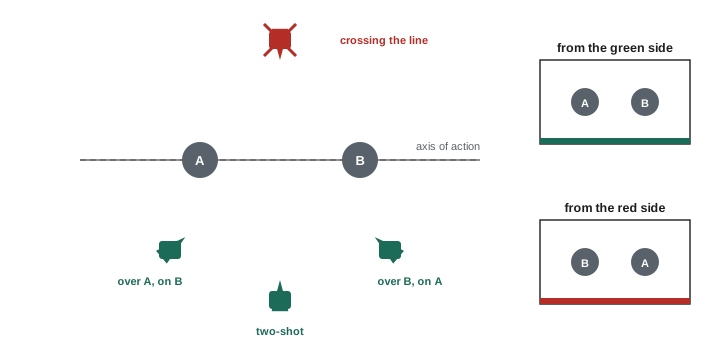
The same logic applies to movement: if a car travels left to right in one shot, it should keep travelling left to right in the next, unless the audience sees it turn. Chase scenes alternate the pursued and the pursuer moving in the same screen direction; characters approaching each other for a meeting move in opposite screen directions. Filmmakers can cross the line deliberately: by moving the camera across it in a continuous shot so the audience sees the change, by cutting to a neutral shot taken on the line itself, or by crossing it abruptly to create disorientation at a dramatic moment.
Worked problem
Planning a conversation scene
Two characters sit at a café table, Maya on the left and Sam on the right as seen in the establishing shot. The director wants a wide shot, over-the-shoulder shots of each, and close-ups. Where should the cameras go, and how should eye lines be framed?
Show solution
- Draw the axis through Maya and Sam and choose the side of the establishing shot.
- Over-the-shoulder on Sam: camera behind Maya's right shoulder, Sam frame right looking frame left; over-the-shoulder on Maya: camera behind Sam's left shoulder, Maya frame left looking frame right.
- Close-ups from the same side, keeping Maya looking frame right and Sam frame left, with look room on the side they face (Lesson 4).
- Match lens and camera height for the two singles so they cut together evenly, unless the story calls for one to dominate.
Answer: All cameras stay on the establishing side of the axis. Maya always faces right and Sam left, with eye lines just off the lens, so the audience never loses the geography and the shot-reverse-shot pattern balances each frame against the next (Lesson 5).
Staging and blocking
Blocking is the planned movement and positioning of actors in a scene; staging is how that action is arranged relative to the camera. Good staging uses the frame's depth, not just its width:
- Staging in depth places people at different distances, with one in the foreground and another in the background, so that both are visible, their relationship is clear, and the frame has layers (Lesson 7).
- Movement toward or away from the camera changes shot size within a single take: an actor walking from a wide shot into a close-up transforms the composition without a cut.
- Position signals power and relationship. The character who is higher in the frame, closer to the camera, more brightly lit or more central usually dominates. Shifts in these positions during a scene can show changes in power.
- Barriers and frames, such as doorways, furniture and windows, can separate characters visually to show emotional distance, or frame them together to show unity.
Directors often design blocking so that each important moment arrives at a well-composed frame, a "picture" that would work as a still, with movement carrying the viewer between these compositions.
Camera movement
Camera movement adds energy, reveals space, follows action and creates emotional effects. The main types:
| Movement | What it is | Typical effect |
|---|---|---|
| Pan | camera rotates horizontally on a fixed point | scans a scene, follows lateral action, reveals |
| Tilt | camera rotates vertically | reveals height, follows rising or falling action |
| Dolly (push in or pull out) | camera moves toward or away from the subject | push in increases intensity and intimacy; pull out reveals context or isolation |
| Truck (tracking) | camera moves sideways, parallel to the action | accompanies a walking subject; shows parallax and depth |
| Crane, jib or drone | camera rises, falls or flies | establishes setting, adds grandeur, transitions |
| Zoom | focal length changes; camera does not move | magnifies without changing perspective; can feel mechanical |
| Handheld | operator holds the camera | immediacy, documentary realism, anxiety |
| Stabilized (gimbal, Steadicam) | smooth movement while walking or running | floating, immersive following shots |
A dolly and a zoom are often confused but look different: dollying changes the camera position, so foreground and background shift relative to each other (parallax) and perspective changes, while zooming simply enlarges the image with no parallax (Lesson 7). The famous "dolly zoom", dollying in while zooming out to keep the subject the same size, makes the background seem to stretch or collapse around a character and is used to show vertigo or sudden realization.
Movement should be motivated, by the action, by a character's attention, or by the story, and composed at its start and end: a good moving shot begins on a strong frame, moves for a reason, and lands on another strong frame. When the camera follows a moving subject, keep lead room in the direction of travel (Lesson 3) and keep the subject's position in the frame steady so the viewer can focus on them.
Motion within the frame
Even with a static camera, motion within the frame shapes composition. The eye is strongly attracted to movement, more so than to brightness or colour, so a small moving element can dominate a still frame. Movement across the frame from left to right tends to feel natural and forward-moving to viewers who read left to right, while right-to-left movement can feel like resistance or return, though context matters more than any rule. Diagonal movement, from the background corner to the foreground, is more dynamic than movement parallel to the frame, because it uses depth. Movement into the frame fills empty space and restores balance; movement out of the frame creates anticipation (Lesson 5).
Shutter speed affects how motion looks. In video, the convention of a shutter angle of 180°, an exposure time of half the frame interval, such as 1/48 s at 24 frames per second or 1/60 s at 30, gives the natural motion blur viewers associate with cinema; much shorter exposures give a staccato, crisp look used in some battle and action scenes. In still photography, panning with a moving subject at a slow shutter speed blurs the background into streaks while keeping the subject relatively sharp, conveying speed.
Worked problem
Shutter speed for a panning shot
A cyclist passes at 10 m/s, 15 m from the camera. The photographer wants the background to streak noticeably while panning. If the camera turns at the rate needed to follow the cyclist, how far does a distant background point move across the scene during a 1/30 s exposure, compared with the cyclist?
Show solution
- Angular speed of the pan: \(10/15 = 0.67\) rad/s.
- In 1/30 s, the camera turns \(0.67/30 = 0.022\) rad, about 1.3°.
- A distant background point therefore smears across about 1.3° of the field of view, while the cyclist, tracked by the pan, stays nearly still.
Answer: The background smears through about 1.3°, roughly 3% of the width of a 50 mm lens's 40° field of view, enough for visible streaks while the cyclist stays sharp. Slower shutter speeds such as 1/15 s give stronger streaks but make it harder to keep the cyclist sharp.
Shot progression and coverage
Scenes are built from shots of different sizes and angles. A traditional progression starts wide to establish the setting and geography, moves to medium shots as action develops, and to close-ups at moments of emotion or importance, then returns wider to re-establish or end. Progressing from wide to close follows the audience's growing involvement; breaking the pattern, for example by opening a scene on an extreme close-up, creates mystery before revealing where we are.
Coverage is the set of shots filmed for a scene so that it can be edited: typically a master shot of the whole action, medium shots, singles and close-ups of each character, inserts of important objects, and cutaways to reactions or surroundings. Generous coverage gives the editor choices; a planned, minimal approach with long, carefully composed takes gives the director more control of rhythm and composition, at the cost of flexibility.
When cutting between shots, several compositional principles keep the sequence smooth:
- Change shot size or angle enough. A cut between two shots of similar size and angle, less than about 30° apart, looks like a jump (a jump cut), which can be used deliberately for energy but usually looks like an error.
- Match eye-trace. Place the point of interest in the incoming shot near where the viewer's eye was at the end of the outgoing shot (Lesson 9).
- Match action. Cut during a movement, such as a door opening or a person sitting, so the movement carries the eye across the cut.
- Keep consistent screen direction and eye lines.
- Vary rhythm. Longer, wider shots slow the pace; shorter, closer shots speed it up.
Composing for vertical and multi-format video
Video is now often delivered in several aspect ratios: 16:9 for television and the web, 9:16 for short-form vertical platforms, 1:1 and 4:5 for feeds (Lesson 1). Composing for vertical video changes priorities. The frame is tall and narrow, so it suits single people, faces, standing figures and vertical motion; wide establishing shots and two-person conversations side by side are difficult. Creators working natively in vertical often:
- Frame people closer, at medium close-up, filling the width with the face and shoulders.
- Stack elements vertically, with the subject in the middle and text above or below.
- Use vertical movement: tilts, subjects walking toward the camera, objects falling or rising.
- Keep important content out of zones covered by platform interface elements, such as captions and buttons along the bottom and right edges.
When one shoot must produce several formats, the cinematographer protects for the narrowest crop, keeping essential action within a central safe area (for 16:9 to 9:16, a band about a third of the width, as Lesson 1 calculated), or shoots at higher resolution and reframes each version in editing. Some productions shoot vertical and horizontal versions separately to compose each properly.
Sequences of still images
Photo essays, carousels, comics and picture books are sequences of stills, and the same principles apply in a different form. A strong photo essay typically includes an establishing image that sets the scene, a few key images at the emotional peaks, detail images of hands, objects or textures, portraits, and a closing image that resolves or echoes the opening. Varying shot size and alternating the position of the focal point from frame to frame sustains interest; pairing images that rhyme in shape, colour or gesture links them. In social media carousels, the first frame works as a thumbnail and must earn the swipe, and a visual element continuing across the boundary between frames, a technique called a seamless carousel, encourages viewers to keep swiping. Comics artists control time through panel size and shape: wide panels slow time, narrow panels speed it up, and the gutter between panels is where the reader imagines what happens.
Planning: shot lists and storyboards
Because composition in motion involves many interacting decisions, it is planned before shooting:
- A shot list records every shot needed: scene, shot number, size, angle, movement, lens, subject and action, and notes. It is the working document on set.
- A storyboard draws the key frame of each shot in sequence, like a comic, with arrows for movement. Rough stick figures are enough; the purpose is to work out framing, screen direction and continuity before the shoot.
- A floor plan (overhead diagram) shows the set, the actors' blocking and the camera positions and moves, making it easy to check the 180-degree rule and lighting.
- Animatics or previsualization combine storyboard frames or simple 3D animation with timing and sound, testing the rhythm of a sequence before it is filmed; they are standard in animation and effects-heavy films.
Common mistakes
MistakeCrossing the axis of action without a reason.
InsteadKeep cameras on one side, or cross visibly or via a neutral shot.
MistakeMoving the camera without a motivation or a strong end frame.
InsteadMotivate movement and compose its start and end.
MistakeCutting between shots of similar size and angle.
InsteadChange size or angle by at least about 30°, or use a jump cut deliberately.
MistakeComposing a 16:9 shot that must also be cut to 9:16 without a safe area.
InsteadProtect a central band for the narrow crop, or shoot separate versions.
MistakeArriving on set without a shot list.
InsteadPlan shots, coverage and continuity in advance.
Summary and key terms
- The 180-degree rule keeps screen direction and eye lines consistent across shots.
- Staging in depth, movement toward the camera and positions of power shape composition within a take.
- Pans, tilts, dollies, tracking, cranes, zooms and handheld movement each have characteristic effects.
- Motion attracts the eye strongly; shutter angle and panning control how motion looks.
- Shot progression and coverage build scenes; cuts need size or angle change, eye-trace and matched action.
- Vertical and multi-format video require tighter framing, vertical stacking and protected safe areas.
- Still sequences and planning tools such as shot lists, storyboards and floor plans apply the same principles.
- Axis of action
- The imaginary line through the subjects that cameras should not cross.
- 180-degree rule
- Keeping cameras on one side of the axis of action.
- Blocking
- The planned movement and positions of performers.
- Dolly
- Camera movement toward or away from the subject.
- Tracking shot
- Camera movement alongside the action.
- Dolly zoom
- Dollying and zooming in opposite directions to distort the background.
- Shutter angle
- Exposure time expressed as a fraction of the frame interval in degrees.
- Coverage
- The set of shots filmed for a scene.
- Jump cut
- A cut between similar framings that makes the image appear to jump.
- Storyboard
- A sequence of drawings showing the planned shots.
Practice problems
Work each problem on paper first, then reveal the answer to check.
What happens if the camera crosses the axis of action?
Show answer
Characters appear to swap sides and eye lines no longer match.
Give two ways to cross the line acceptably.
Show answer
Move across it in a continuous shot, or cut to a neutral shot on the line.
How does a dolly differ from a zoom?
Show answer
A dolly moves the camera and creates parallax; a zoom only magnifies.
Exposure time for a 180° shutter at 25 fps?
Show answer
1/50 s.
What is coverage?
Show answer
The set of shots filmed so a scene can be edited.
Minimum angle change to avoid a jump cut?
Show answer
About 30°.
Why does movement dominate a frame?
Show answer
The eye is strongly attracted to motion.
Name two tips for vertical video framing.
Show answer
Frame people closer; stack elements vertically; use vertical motion; avoid interface zones.
What does a floor plan show?
Show answer
Set layout, blocking and camera positions and moves.
What does a wide comics panel do to time?
Show answer
Slows it.
Lesson quiz · 5 questions
Score 60% or more to complete this lesson.
Create a free account to save your progress, take quizzes and earn a certificate.