
ROB-430 · Lesson 10 of 12 · 29 min
Accessibility and inclusive design
Robots are often promoted as tools that will help people with disabilities live more independently, and some do. But robots can also create new barriers: a touchscreen kiosk robot that a blind visitor cannot use, a voice-controlled assistant that does not understand a person with a speech impairment, a delivery robot parked across a curb ramp that a wheelchair user needs. This lesson introduces ways of thinking about disability, the principles of universal and inclusive design, practical accessibility requirements for robot interfaces and bodies, including the Web Content Accessibility Guidelines for screens, and the main accessibility laws in Canada and the United States. Accessibility is not a feature added at the end; it is a quality of the whole design, and it benefits far more people than designers usually expect.
Disability and design
Disability is common. Statistics Canada's 2022 Canadian Survey on Disability found that 27 per cent of Canadians aged 15 and over, about 8 million people, had one or more disabilities that limited their daily activities, and US public health surveys similarly estimate that roughly one in four adults lives with some type of disability. Rates rise with age, so as populations age, more of the people who meet robots in workplaces, hospitals and public spaces will have disabilities. Disabilities may be permanent, temporary, such as a broken arm, or situational, such as a worker wearing thick gloves or trying to hear an alert on a noisy floor.
Two models of disability shape design. The medical model locates disability in the person's body, as an impairment to be treated or compensated. The social model, developed by disabled activists and scholars in the United Kingdom in the 1970s and 1980s, distinguishes impairment from disability and argues that people are disabled largely by barriers in the environment: stairs rather than wheelchairs, inaccessible interfaces rather than blindness. For designers, the social model is empowering, because barriers are things we design and can remove. The disability rights movement's slogan "nothing about us without us" also makes a methodological point: people with disabilities should be involved as designers, testers and decision-makers, not only as subjects of study.
Universal and inclusive design
Universal design, a term associated with the architect Ronald Mace, aims to make products and environments usable by all people, to the greatest extent possible, without the need for adaptation. In 1997 a group of architects, product designers and engineers working with Mace at North Carolina State University published seven principles.
| Principle | Meaning | Robot example |
|---|---|---|
| Equitable use | Useful to people with diverse abilities | A delivery robot that can be summoned by app, voice or button |
| Flexibility in use | Accommodates a range of preferences and abilities | Adjustable height for a collaborative workstation |
| Simple and intuitive use | Easy to understand regardless of experience or language | A clear stop button with a universally recognized shape |
| Perceptible information | Communicates effectively regardless of sensory abilities | Status shown by light, sound and vibration together |
| Tolerance for error | Minimizes hazards and consequences of mistakes | Undo and confirmation for irreversible commands |
| Low physical effort | Usable efficiently and comfortably with little fatigue | Hand guiding with gravity compensation |
| Size and space for approach and use | Appropriate space regardless of body size, posture or mobility | Controls reachable from a seated position |
Inclusive design, as developed by Jutta Treviranus and her inclusive design research institute (IDRC) at OCAD University in Toronto, emphasizes recognizing diversity and uniqueness, using inclusive processes and tools, and seeing design within a broader system. Rather than designing for an imagined average user and then adding accommodations, inclusive design starts from people at the margins, whose needs reveal problems that affect many others. The curb cut is the classic example: ramps cut into curbs for wheelchair users also help people with strollers, delivery carts, luggage and bicycles. In robotics, a robot that announces its intentions by sound for blind pedestrians also helps sighted people who are looking at their phones.
Accessible robot interfaces
Many robots have touchscreens, apps or web dashboards. These should meet the Web Content Accessibility Guidelines, WCAG, published by the World Wide Web Consortium. The current version, WCAG 2.2, was published in October 2023. WCAG is organized around four principles, summarized as POUR: content must be perceivable, operable, understandable and robust. Each guideline has testable success criteria at levels A, AA and AAA, and laws and policies commonly require level AA. Examples include text alternatives for images, captions for audio, keyboard operability, sufficient colour contrast, minimum target sizes, not relying on colour alone, predictable navigation, clear error messages and compatibility with assistive technologies such as screen readers.
Colour contrast is a good example of a precise criterion. WCAG defines the contrast ratio between two colours using their relative luminance \( L \), computed from linearized red, green and blue values:
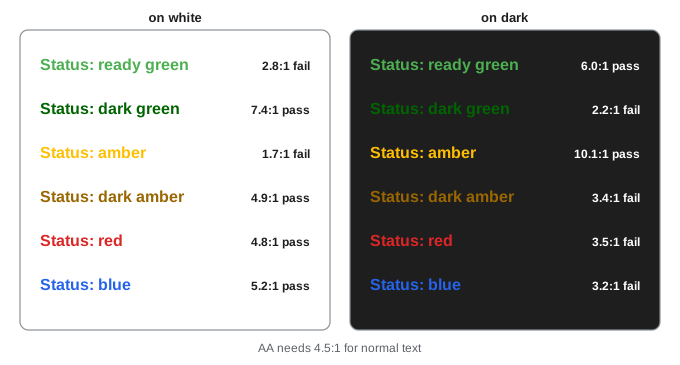
Level AA requires a contrast ratio of at least 4.5 to 1 for normal text and 3 to 1 for large text and for meaningful graphical elements such as icons and the boundaries of controls. Status colours on a robot's screen, such as a pale green "ready" label on a white background, often fail this test. Colour should also never be the only way information is conveyed: about 8 per cent of men of Northern European ancestry have some form of colour vision deficiency, most commonly red-green, so red and green status lights should differ in position, shape, text or flashing pattern as well.
Worked problem
Checking a status label
A robot dashboard shows a green status label (sRGB 76, 175, 80) on a white background. Its relative luminance is about 0.33, and white has luminance 1.0. Does it meet the 4.5 to 1 requirement for normal text? What about dark green (0, 100, 0), with luminance about 0.12?
Show solution
- Green on white: \( (1.0 + 0.05)/(0.33 + 0.05) = 1.05/0.38 \approx 2.8 \) to 1, which fails for text and even the 3 to 1 threshold for graphics.
- Dark green on white: \( 1.05/(0.12 + 0.05) = 1.05/0.17 \approx 6.2 \) to 1, which passes.
Answer: The bright green fails at about 2.8 to 1; a darker green at about 6.2 to 1 passes, and adding a text label or icon means colour is not the only cue.
# WCAG contrast ratio for status labels on a robot dashboard
import numpy as np
def lum(rgb):
    c = np.asarray(rgb, float) / 255
    c = np.where(c <= 0.04045, c / 12.92, ((c + 0.055) / 1.055) ** 2.4)
    return 0.2126 * c[0] + 0.7152 * c[1] + 0.0722 * c[2]
def ratio(a, b):
    la, lb = sorted([lum(a), lum(b)], reverse=True)
    return (la + 0.05) / (lb + 0.05)
white, dark = (255, 255, 255), (30, 30, 30)
status = {"ready green": (76, 175, 80), "dark green": (0, 100, 0), "amber": (255, 191, 0),
          "dark amber": (153, 102, 0), "red": (220, 38, 38), "blue": (37, 99, 235)}
for name, c in status.items():
    r1, r2 = ratio(c, white), ratio(c, dark)
print(f"{name:11s} on white {r1:4.1f}:1 {'AA' if r1 >= 4.5 else '--'} on dark {r2:4.1f}:1 {'AA' if r2 >= 4.5 else '--'}")ready green on white 2.8:1 -- on dark 6.0:1 AA dark green on white 7.4:1 AA on dark 2.2:1 -- amber on white 1.7:1 -- on dark 10.1:1 AA dark amber on white 4.9:1 AA on dark 3.4:1 -- red on white 4.8:1 AA on dark 3.5:1 -- blue on white 5.2:1 AA on dark 3.2:1 --
Beyond screens: bodies, voices and spaces
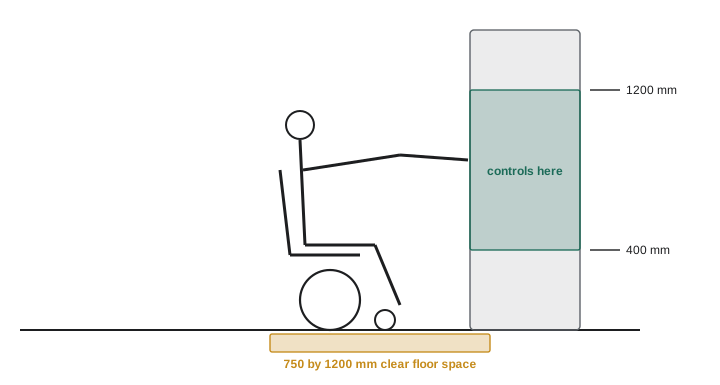
Robots are physical, so accessibility extends beyond the screen. Physical controls such as emergency stop buttons, start buttons and touch panels must be reachable and operable from a seated position and by people with limited grip strength or dexterity. Building accessibility standards give reach ranges that can guide robot designers.
In Canada, CSA B651, Accessible design for the built environment, gives dimensions for reach, clearances and controls, and many provincial building codes reference accessibility requirements. As a guide, controls intended for use from a wheelchair are commonly placed between about 400 and 1200 mm above the floor, with a clear floor space of about 750 by 1200 mm in front of them. Check the current edition of CSA B651 and the applicable building code for exact values.
Worked problem
Can a seated user reach the stop button?
A mobile robot's emergency stop button sits on top of its body, 1350 mm above the floor. Using a guideline upper reach of 1200 mm, how much lower must it be? What other change would help?
Show solution
- Required drop: \( 1350 - 1200 = 150 \) mm, so the button should be at 1200 mm or lower.
- Adding a second stop button on the robot's side at a lower height gives access from several directions and positions.
- A wireless stop on a pendant or wearable can help where reaching the robot is not possible.
Answer: Lower it by at least 150 mm, ideally adding a second, lower stop button and a remote stop option.
Speech interfaces must handle diverse voices. Speech recognition systems have been shown to make more errors for some groups, including speakers with certain accents and dialects and people with dysarthria or other speech impairments. A 2020 study by Allison Koenecke and colleagues found that several commercial recognizers made roughly twice as many errors for Black American speakers as for white speakers in their samples. Robots that rely on speech should offer alternatives, such as buttons, an app or gestures, and developers should test recognition with the full range of intended users. For Deaf and hard-of-hearing users, robots should show spoken output as text and avoid sound-only alerts; some Deaf people use sign languages such as American Sign Language or Langue des signes québécoise, which are full languages, not gestures added to English or French.
Mobile robots in public spaces affect people who never chose to interact with them. In 2019 a doctoral student who uses a wheelchair, Emily Ackerman, described being trapped in a street in Pittsburgh when a sidewalk delivery robot sat at the top of a curb cut, blocking her way onto the sidewalk as traffic approached. Incidents like this show that robots must treat curb ramps, tactile paving, doorways and narrow passages as spaces to keep clear, must yield to people using mobility aids, guide dogs or white canes, and must be tested with disabled pedestrians. Cities that permit sidewalk robots increasingly impose conditions on their behaviour.
Cognitive accessibility matters too. People with intellectual disabilities, dementia, brain injuries or limited literacy, and anyone under stress, benefit from plain language, consistent layouts, step-by-step guidance, forgiving error handling and the ability to take time. WCAG 2.2 added success criteria aimed partly at cognitive accessibility, such as accessible authentication that does not depend on memorizing or transcribing codes, and avoiding redundant entry of information.
| User group | Common barriers in robot systems | Design responses |
|---|---|---|
| Blind and low-vision users | Touchscreen-only controls, visual-only status, silent motion | Screen-reader-compatible apps, audio and haptic cues, tactile buttons |
| Deaf and hard-of-hearing users | Sound-only alerts, speech-only interaction | Visual and vibration alerts, text output, sign language options where feasible |
| Wheelchair and mobility-aid users | High controls, robots blocking ramps and passages | Seated reach ranges, keep-clear zones, yielding behaviour |
| People with limited dexterity | Small buttons, precise gestures, sustained grip | Large targets, switch and voice access, shared autonomy |
| People with speech impairments | Speech recognition errors | Alternative inputs; recognizers tested on diverse speech |
| People with cognitive disabilities | Complex menus, time limits, jargon | Plain language, consistent design, no unnecessary time pressure |
Accessibility law in Canada and the United States
In Canada, accessibility law operates federally and provincially. The Accessible Canada Act, passed in 2019, aims for a barrier-free Canada by 2040 in areas of federal jurisdiction, such as banking, telecommunications, transportation across borders and the federal government. It created Accessibility Standards Canada, which develops standards including CAN/ASC-EN 301 549 on accessible information and communication technology, which incorporates WCAG requirements. Ontario's Accessibility for Ontarians with Disabilities Act, 2005 (AODA) set a goal of an accessible Ontario by 2025 and requires many organizations to make websites and web content meet WCAG 2.0 level AA; Manitoba, Nova Scotia, British Columbia and other provinces have their own accessibility laws, and human rights codes across Canada prohibit discrimination on the basis of disability and include a duty to accommodate. In the United States, the Americans with Disabilities Act and Section 508 of the Rehabilitation Act play the corresponding roles.
| Topic | Canada | United States |
|---|---|---|
| Main federal law | Accessible Canada Act (2019) | Americans with Disabilities Act (1990) |
| Provincial or state law | AODA (Ontario, 2005) and other provincial acts; human rights codes | State laws vary; ADA applies nationwide |
| Digital accessibility standard | WCAG via CAN/ASC-EN 301 549 and AODA (WCAG 2.0 AA) | Section 508 (WCAG 2.0 AA); ADA Title II rule (WCAG 2.1 AA) |
| Built environment | CSA B651 and building codes | 2010 ADA Standards for Accessible Design |
| Employment | Duty to accommodate under human rights law | Reasonable accommodation under ADA Title I |
These laws rarely mention robots specifically, but they apply to robots through the services and workplaces where robots are deployed. A hospital that uses a robot kiosk for check-in must make check-in accessible; an employer that introduces a collaborative robot must accommodate workers with disabilities. Designing for accessibility from the start is far cheaper than retrofitting.
Testing with disabled users
Accessibility checklists catch many problems, but testing with people with disabilities catches problems checklists miss. Recruit participants with a range of disabilities relevant to the robot, pay them fairly for their expertise, make the study location and materials accessible, and allow extra time. Automated tools can check screen contrast and code-level issues, and screen-reader testing should be done by experienced users. Study designs from lesson 8 apply, with care: small, diverse samples of disabled users may not support statistical comparisons, and qualitative methods such as think-aloud sessions and interviews are often more informative.
<!-- Accessible robot status panel fragment (listing) -->
<section aria-labelledby="status-h">
<h2 id="status-h">Robot status</h2>
<p role="status" aria-live="polite">
<span class="icon" aria-hidden="true">▶</span> Moving to Station 4, ETA 2 minutes
</p>
<button type="button" class="stop" aria-describedby="stop-help">Stop robot</button>
<p id="stop-help">Stops the robot at once. You can also press the red button on its side.</p>
</section>Common mistakes
MistakeTreating accessibility as a special feature for a small group.
InsteadAbout one in four adults has a disability, and accessible designs help many others too.
MistakeUsing colour alone for robot status.
InsteadCombine colour with text, shape, position, sound or vibration, and meet WCAG contrast.
MistakeRelying only on speech for commands.
InsteadOffer alternative inputs and test recognition with diverse voices and speech patterns.
MistakePlacing robot controls where only standing users can reach them.
InsteadUse seated reach ranges and provide controls at several positions.
MistakeDesigning for disabled people without involving them.
InsteadFollow nothing about us without us: involve disabled people as designers and testers.
Summary and key terms
- Disability is common, can be permanent, temporary or situational, and rises with age.
- The social model locates disability in barriers that designers can remove.
- Universal design has seven principles; inclusive design starts from people at the margins.
- WCAG 2.2 organizes screen accessibility around perceivable, operable, understandable and robust content.
- AA contrast is 4.5 to 1 for normal text and 3 to 1 for large text and graphics.
- Physical controls, speech interfaces and robot motion in public spaces all need accessible design.
- Canada has the Accessible Canada Act and provincial laws such as AODA; the United States has the ADA and Section 508.
- Social model of disability
- The view that people are disabled mainly by barriers in society and the environment.
- Universal design
- Design usable by all people to the greatest extent possible without adaptation.
- Inclusive design
- Design that starts from human diversity and involves diverse people in the process.
- WCAG
- Web Content Accessibility Guidelines from the World Wide Web Consortium.
- POUR
- Perceivable, operable, understandable and robust: the four WCAG principles.
- Contrast ratio
- A measure of luminance difference between two colours, from 1:1 to 21:1.
- Curb cut effect
- Accessibility features benefiting many people beyond their original target group.
- Dysarthria
- A motor speech disorder that affects articulation and can challenge speech recognition.
- Duty to accommodate
- The legal obligation to adapt work or services for people with disabilities, short of undue hardship.
- Screen reader
- Software that reads screen content aloud or to a braille display.
Practice problems
Work each problem on paper first, then reveal the answer to check.
What share of Canadians aged 15 and over reported a disability in 2022?
Show answer
27 per cent.
State the four WCAG principles.
Show answer
Perceivable, operable, understandable and robust.
Luminances 0.9 and 0.1: contrast ratio?
Show answer
\( 0.95/0.15 \approx 6.3 \) to 1.
What is the AA contrast requirement for normal text?
Show answer
4.5 to 1.
Give an example of the curb cut effect in robotics.
Show answer
Audible intent announcements that help blind pedestrians also help distracted sighted people.
Name the Ontario accessibility law and its year.
Show answer
Accessibility for Ontarians with Disabilities Act, 2005.
Which US law prohibits disability discrimination in public accommodations?
Show answer
The Americans with Disabilities Act, Title III.
Why should status not rely on red and green alone?
Show answer
Colour vision deficiencies make them hard to distinguish for many people.
Name two alternatives to speech input.
Show answer
Buttons, apps, gestures, switches or eye gaze.
What did the 2019 Pittsburgh incident show?
Show answer
A sidewalk robot blocking a curb cut can trap a wheelchair user; robots must keep accessible routes clear.
Lesson quiz · 5 questions
Score 60% or more to complete this lesson.
Create a free account to save your progress, take quizzes and earn a certificate.