
PYTH-201 · Lesson 8 of 12 · 24 min
Sorting
▶ Video coming soon A video version of this lesson is on the way.
Sorted data is easier to use in almost every way. Lesson 7 showed that a sorted list can be searched in O(log n) and answers range questions directly. Sorted reports are easier to read: Anita wants the day's sales by time, Theo wants coffees from lowest stock to highest, and Rosa wants wholesale customers by revenue, biggest first. Grouping, finding duplicates and merging two lists all become simple passes once the data is in order.
Python sorts with one call, so why study sorting algorithms? Because they are the clearest examples of how algorithm design changes cost: the same task can take O(n²) or O(n log n) steps depending on the method. This lesson builds two simple quadratic sorts, then merge sort, a divide-and-conquer sort that is O(n log n), and outlines quicksort. It then turns to what you will use every day: Python's built-in sort, key functions, stability and sorting on several fields, and finishes with counting sort, which beats O(n log n) when the values fall in a small range.
Selection sort and insertion sort
Selection sort is the method most people invent first. Find the smallest item and swap it into position 0; find the smallest of the rest and swap it into position 1; and so on. Finding each smallest item scans the unsorted part, so the total work is about n²/2 comparisons whatever the input: O(n²) even for a list that is already sorted.
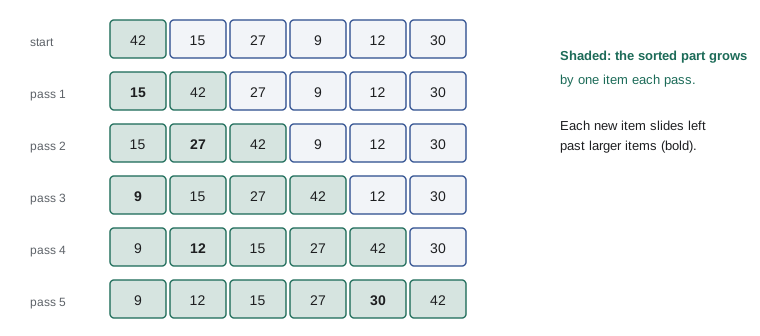
Insertion sort works the way many people sort a hand of cards. It keeps a sorted part at the front of the list, takes the next item and slides it left past every larger item until it reaches its place. On random data it also makes about n²/4 comparisons, O(n²), but on data that is already nearly sorted it is fast, close to O(n), because each item moves only a short distance. That property makes it useful for small or nearly sorted lists, and Python's own sort uses it on short runs.
def selection_sort(items):
    a, comparisons = list(items), 0
    for i in range(len(a)):
        smallest = i
        for j in range(i + 1, len(a)):
            comparisons += 1
            if a[j] < a[smallest]:
                smallest = j
        a[i], a[smallest] = a[smallest], a[i]
    return a, comparisons

def insertion_sort(items):
    a, comparisons = list(items), 0
    for i in range(1, len(a)):
        current, j = a[i], i - 1
        while j >= 0:
            comparisons += 1
            if a[j] <= current:
                break
            a[j + 1] = a[j]               # slide the larger item right
            j -= 1
        a[j + 1] = current
    return a, comparisons

stock = [42, 15, 27, 9, 12, 30]
print(selection_sort(stock))
print(insertion_sort(stock))
nearly = list(range(1, 101)); nearly[50], nearly[51] = nearly[51], nearly[50]
print("nearly sorted, 100 items:", selection_sort(nearly)[1], "vs", insertion_sort(nearly)[1], "comparisons")([9, 12, 15, 27, 30, 42], 15) ([9, 12, 15, 27, 30, 42], 12) nearly sorted, 100 items: 4950 vs 100 comparisons
Try it yourself
Insertion sort
Write insertion_sort(items) that returns a new sorted list using insertion sort: build the result by taking each item and sliding it left past larger items. Do not use sorted or list.sort.
Equal items must keep their original order (insertion sort does this naturally if you stop at items that are less than or equal to the current one).
def insertion_sort(items):
    a = list(items)
    for i in range(1, len(a)):
        if a[i] < a[i - 1]:
            a[i], a[i - 1] = a[i - 1], a[i]
    return a

print(insertion_sort([42, 15, 27, 9, 12, 30]))
Merge sort
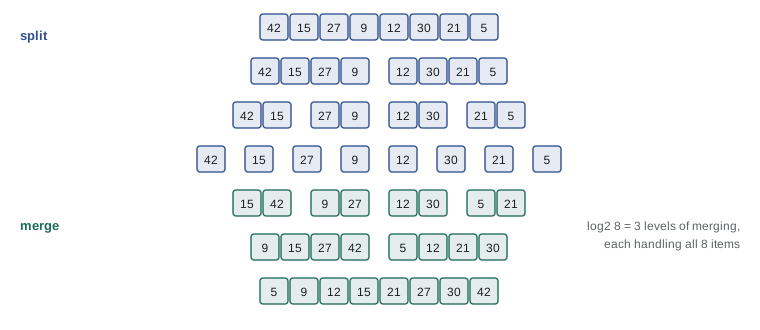
Merge sort applies the divide and conquer idea from lesson 6. Split the list into two halves, sort each half recursively, then merge the two sorted halves into one sorted list. A list of zero or one items is already sorted, which is the base case. Merging is the clever part: compare the front items of the two halves, take the smaller, and repeat. Each comparison places one item, so merging two halves of total length n takes about n steps.
Why is this faster? The halving produces about log₂ n levels of recursion, and at every level the merges together handle all n items once. So the total work is about n × log₂ n. For 100,000 orders that is about 1.7 million steps instead of roughly 5 billion for an O(n²) sort. Merge sort is also stable: when two items are equal, the merge takes the one from the left half first, so equal items keep their original order. Its cost is O(n) extra memory for the merged lists.
def merge(left, right):
    out, i, j = [], 0, 0
    while i < len(left) and j < len(right):
        if left[i] <= right[j]:          # <= keeps equal items in order: stable
            out.append(left[i]); i += 1
        else:
            out.append(right[j]); j += 1
    out.extend(left[i:])                 # one side is used up; copy the rest
    out.extend(right[j:])
    return out

def merge_sort(items):
    if len(items) <= 1:
        return list(items)
    mid = len(items) // 2
    return merge(merge_sort(items[:mid]), merge_sort(items[mid:]))

print(merge([9, 15, 42], [12, 27, 30]))
print(merge_sort([42, 15, 27, 9, 12, 30, 21, 5]))[9, 12, 15, 27, 30, 42] [5, 9, 12, 15, 21, 27, 30, 42]
Try it yourself
Merge two sorted lists
The cafe and the online shop each produce a list of sale times for the day, already sorted. Write merge(a, b) that returns one sorted list containing every item of both, in a single O(n) pass that compares the fronts of the two lists.
Do not call sorted or list.sort. When items are equal, take the one from a first.
def merge(a, b):
    return a + b

print(merge(['08:05', '09:40'], ['08:30', '10:15']))
Quicksort
Quicksort is the other famous O(n log n) sort. It picks one item, the pivot, and partitions the list into items smaller than the pivot, items equal to it and items larger, then sorts the smaller and larger parts recursively. With a good pivot, each partition splits the list roughly in half, giving about log₂ n levels of O(n) work: O(n log n) on average. With a bad pivot, such as always picking the first item of an already sorted list, one side is empty every time and the cost becomes O(n²). Choosing the pivot at random makes that worst case extremely unlikely.
import random

def quicksort(items):
    if len(items) <= 1:
        return list(items)
    pivot = random.choice(items)
    smaller = [x for x in items if x < pivot]
    equal = [x for x in items if x == pivot]
    larger = [x for x in items if x > pivot]
    return quicksort(smaller) + equal + quicksort(larger)

random.seed(201)
print(quicksort([42, 15, 27, 9, 12, 30, 21, 5, 27]))[5, 9, 12, 15, 21, 27, 27, 30, 42]
Production quicksorts partition the list in place rather than building new lists, which makes them fast and memory-light, and they are used in many languages' standard libraries. Unlike merge sort, typical quicksorts are not stable. Mathematicians have proved that any sort that works only by comparing pairs of items needs at least about n log₂ n comparisons in the worst case, so merge sort and a well-implemented quicksort are as good as comparison sorting can get.
Python's built-in sort
Python's list.sort() and sorted() use Timsort, a hybrid of merge sort and insertion sort designed by Tim Peters in 2002 for real-world data. It finds runs that are already in order, extends short runs with insertion sort and merges runs efficiently. It is O(n log n) in the worst case, close to O(n) on nearly sorted data, and stable. Use it: it is written in C, carefully tuned, and far faster than any sort you can write in Python.
list.sort() sorts a list in place and returns None; sorted() works on any iterable and returns a new list. Both take a key function, which is called once per item to produce the value to sort by, and a reverse flag. The operator module's itemgetter and attrgetter make common key functions shorter.
from operator import itemgetter

coffees = [
    {"sku": "RC-101", "name": "Sunrise Blend", "price": 18.50, "stock": 42},
    {"sku": "RC-102", "name": "Ethiopia Guji", "price": 22.00, "stock": 15},
    {"sku": "RC-104", "name": "Sumatra Dark", "price": 20.25, "stock": 9},
    {"sku": "RC-105", "name": "Decaf Swiss Water", "price": 19.00, "stock": 12},
]
print([c["sku"] for c in sorted(coffees, key=itemgetter("stock"))])          # lowest stock first
print([c["sku"] for c in sorted(coffees, key=itemgetter("price"), reverse=True)])
print([c["name"] for c in sorted(coffees, key=lambda c: c["name"].lower())])
result = coffees.sort(key=itemgetter("sku"))
print(result)['RC-104', 'RC-105', 'RC-102', 'RC-101'] ['RC-102', 'RC-104', 'RC-105', 'RC-101'] ['Decaf Swiss Water', 'Ethiopia Guji', 'Sumatra Dark', 'Sunrise Blend'] None
Stability and sorting on several fields
A sort is stable if items that compare equal stay in the order they had before sorting. Stability lets you sort by several fields in steps: sort by the least important field first, then by the more important field, and the earlier order survives within ties. Alternatively, sort once with a key that returns a tuple, because tuples compare field by field. To reverse one field of a numeric tuple key, negate it.
orders = [("Priya", 41.50), ("Ben", 22.00), ("Priya", 18.50), ("Ana", 41.50), ("Ben", 64.25)]

by_customer_then_biggest = sorted(orders, key=lambda o: (o[0], -o[1]))
print(by_customer_then_biggest)

step = sorted(orders, key=lambda o: o[0])           # least important field first...
step = sorted(step, key=lambda o: o[1], reverse=True)  # ...then the most important
print(step)[('Ana', 41.5), ('Ben', 64.25), ('Ben', 22.0), ('Priya', 41.5), ('Priya', 18.5)]
[('Ben', 64.25), ('Ana', 41.5), ('Priya', 41.5), ('Ben', 22.0), ('Priya', 18.5)]In the second result, Priya's and Ana's 41.50 orders are tied on total, so they keep the alphabetical order produced by the first sort. Stability is guaranteed by Python's sort and is worth knowing about, because it makes these step-by-step sorts correct.
Try it yourself
Sort the wholesale report
Each order is a tuple (customer, bags, order_id). Write report_order(orders) that returns a new list sorted by number of bags, largest first; orders with the same number of bags should be ordered by customer name A to Z.
Use sorted with a tuple key.
def report_order(orders):
    return sorted(orders, key=lambda o: o[1])

print(report_order([('Lakeview Cafe', 30, 7), ('Bayside Bakery', 60, 8), ('Alder Hotel', 30, 9)]))
Counting sort: beating n log n
The n log n limit applies to sorts that compare items. When the values are small whole numbers in a known range, you can sort without comparing at all. Counting sort counts how many times each value occurs, then writes out each value as many times as it was counted, in order. For n items with values from 0 to k, it takes O(n + k) time. Kai's roast batches are always between 0 and 50 bags, so sorting a year of batch sizes this way is a single pass plus a pass over 51 counters.
def counting_sort(values, largest):
    counts = [0] * (largest + 1)
    for v in values:
        counts[v] += 1
    out = []
    for value, how_many in enumerate(counts):
        out.extend([value] * how_many)
    return out

batches = [30, 28, 30, 12, 30, 29, 30, 15, 28, 30]
print(counting_sort(batches, 50))[12, 15, 28, 28, 29, 30, 30, 30, 30, 30]
Counting sort is not a general replacement: it needs whole-number keys in a modest range, and the counts list grows with the range, so sorting prices in cents up to a million would need a million counters. Its relatives, radix sort and bucket sort, extend the idea to larger keys. For everyday data, Python's sorted remains the right choice.
Worked problem
Choosing a sort for the nightly report
Each night, Anita's report sorts the day's sales, about 400 records, by time. The records arrive from the till almost in time order, but the online shop's orders are appended at the end. Which sort should Jordan use, and what does it cost?
Show solution
- The data is two long runs that are each already in time order: the till sales and the online orders.
- Timsort detects runs and merges them, so sorting this data costs close to O(n), not the full O(n log n).
- A hand-written insertion sort would also do well on the first run, but the online orders at the end may need to slide far left, giving O(n²) behaviour.
- sorted(sales, key=itemgetter("time")) is shorter, correct, stable and fast.
Answer: Use Python's built-in sort with a key; Timsort exploits the existing runs and costs close to linear time here.
Common mistakes
MistakeWriting your own sort for production code.
InsteadUse list.sort() or sorted(); they are tested, stable and fast.
MistakeWriting items = items.sort().
Insteadlist.sort() sorts in place and returns None; use sorted() to get a new list.
MistakeSorting by one field and then sorting again by another, expecting the first order to win.
InsteadSort by the least important field first, or use a tuple key.
MistakeUsing reverse=True when only one field of a multi-field sort should be reversed.
InsteadNegate that field in a tuple key, or use two stable sorts.
MistakeChoosing quicksort with a fixed first-item pivot for data that may be sorted.
InsteadPick the pivot at random, or rely on the built-in sort.
MistakeUsing counting sort for values with a huge range.
InsteadCounting sort needs small whole-number keys; otherwise use sorted().
Summary and key terms
- Selection sort and insertion sort are O(n²); insertion sort is close to O(n) on nearly sorted data.
- Merge sort splits, sorts halves recursively and merges them: O(n log n) time, O(n) extra space, and stable.
- Quicksort partitions around a pivot: O(n log n) on average, O(n²) with bad pivots; random pivots avoid that.
- Comparison sorts need about n log n comparisons in the worst case, so O(n log n) is the best possible.
- Python's sorted() and list.sort() use Timsort: stable, O(n log n), and fast on partly sorted data.
- Key functions, reverse, tuple keys and stable multi-step sorts handle real sorting requirements.
- Counting sort sorts small whole numbers in O(n + k) without comparisons.
- selection sort
- A sort that repeatedly selects the smallest remaining item.
- insertion sort
- A sort that slides each item left into a growing sorted part.
- merge sort
- A divide-and-conquer sort that merges sorted halves.
- quicksort
- A sort that partitions items around a pivot and sorts the parts recursively.
- pivot
- The item quicksort uses to split the list.
- stable sort
- A sort that keeps equal items in their original order.
- Timsort
- Python's built-in hybrid sort, combining merge sort and insertion sort.
- key function
- A function that returns the value to sort each item by.
- in place
- Changing the original data structure rather than building a new one.
- counting sort
- A non-comparison sort that counts occurrences of small whole-number values.
Practice problems
Work each problem on paper first, then reveal the answer to check.
How many comparisons does selection sort make on a list of 100 items?
Show answer
4,950 (99 + 98 + ... + 1), whatever the order.
Why does insertion sort do well on nearly sorted data?
Show answer
Each item only slides a short distance, so there is little work per item.
Merge [5, 9, 20] and [7, 8, 30]. List the comparisons in order.
Show answer
5<7, 9>7, 9>8, 9<30, 20<30, then 30 is copied: [5, 7, 8, 9, 20, 30].
How many levels of merging does merge sort need for 1,024 items?
Show answer
10.
What does coffees.sort(key=len) return?
Show answer
None; the list is sorted in place.
Write a key that sorts orders by date ascending and total descending, for tuples (date, total).
Show answer
key=lambda o: (o[0], -o[1]).
Lesson quiz · 5 questions
Score 60% or more to complete this lesson.
Create a free account to save your progress, take quizzes and earn a certificate.