
PYTH-201 · Lesson 7 of 12 · 24 min
Searching
▶ Video coming soon A video version of this lesson is on the way.
Searching is the most common thing programs do with data. The shop looks up a coffee by SKU, Anita finds the sales in a date range, Mei finds a loyalty member by phone number, and the website shows every coffee between 18 and 21 dollars. Lesson 5 showed that a dictionary answers exact lookups in O(1) on average. But many searches are not exact: they ask for the first item above a value, every item in a range, or the nearest match. For those, keeping data sorted and searching it cleverly is the key.
This lesson compares linear search with binary search, the algorithm that finds an item in a sorted list by repeatedly halving the part still to be searched. You will write binary search yourself, learn why it is easy to get subtly wrong, use the standard library's bisect module to do it correctly, answer range questions, and apply the same halving idea to questions that are not about lists at all.
Linear search
Linear search checks each item in turn until it finds a match or runs out of items. It is simple, works on any list, sorted or not, and is exactly what x in items and items.index(x) do. Its cost is O(n) in the worst case, when the item is last or missing. For short lists, or for a search done only once, linear search is perfectly sensible: sorting the data first would cost more than the search saves.
def linear_search(items, target):
    """Return (index, comparisons); index is -1 if target is missing."""
    for i, item in enumerate(items):
        if item == target:
            return i, i + 1
    return -1, len(items)

skus = ["RC-104", "RC-101", "RC-106", "RC-102", "RC-105", "RC-103"]
print(linear_search(skus, "RC-102"))
print(linear_search(skus, "RC-999"))(3, 4) (-1, 6)
Linear search also answers questions that no index can, such as the first order over 100 dollars placed by a new customer, because it can test any condition. When a condition is checked once over a list, a generator expression with next is the idiomatic Python form: next((o for o in orders if o.total > 100), None) stops at the first match.
Binary search
If the list is sorted, there is a far better way. Look at the middle item. If it is the target, you are done. If the target is smaller, it can only be in the left half; if larger, only in the right half. Either way, one comparison has discarded half of the remaining items. Repeat on the remaining half until the target is found or nothing remains. Because the search space halves each time, a sorted list of n items needs at most about log₂ n + 1 comparisons: 20 for a million items, 30 for a billion.
The algorithm keeps two indexes, lo and hi, marking the part of the list still to be searched. Each pass computes mid, the middle of that range, compares items[mid] with the target and moves lo or hi past mid. When lo passes hi, the range is empty and the target is not in the list.
def binary_search(items, target):
    """items must be sorted. Return (index, comparisons); index is -1 if missing."""
    lo, hi, comparisons = 0, len(items) - 1, 0
    while lo <= hi:
        mid = (lo + hi) // 2
        comparisons += 1
        if items[mid] == target:
            return mid, comparisons
        if items[mid] < target:
            lo = mid + 1                   # target is in the right half
        else:
            hi = mid - 1                   # target is in the left half
    return -1, comparisons

members = list(range(100_000, 1_100_000, 2))       # 500,000 sorted member numbers
for target in [100_000, 734_562, 1_099_998, 734_563]:
print(target, binary_search(members, target))100000 (0, 18) 734562 (317281, 16) 1099998 (499999, 19) 734563 (-1, 19)
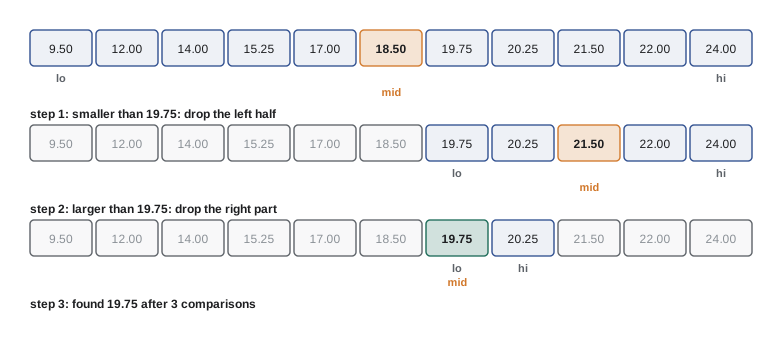
Binary search has a famous reputation for being easy to describe and hard to write correctly. The classic mistakes are off-by-one errors: using lo < hi instead of lo <= hi and missing the last remaining item, or setting lo = mid instead of lo = mid + 1, which can loop forever when lo and hi are next to each other. Testing at the edges, the first item, the last item, a missing item smaller than everything and one larger than everything, catches nearly all of them.
Try it yourself
Write binary search
Write binary_search(items, target) that returns the index of target in the sorted list items, or -1 if it is not there. Use the halving method with lo and hi indexes, not in, index or a loop over every item.
The starter has a classic off-by-one bug: it uses lo < hi, so it misses items in some positions.
def binary_search(items, target):
    lo, hi = 0, len(items) - 1
    while lo < hi:
        mid = (lo + hi) // 2
        if items[mid] == target:
            return mid
        if items[mid] < target:
            lo = mid + 1
        else:
            hi = mid - 1
    return -1

print(binary_search([9.5, 14.0, 18.5, 19.75, 22.0], 22.0))
The bisect module
Python's standard library already contains a carefully tested binary search in the bisect module. bisect_left(items, x) returns the position where x would be inserted to keep the list sorted, before any equal items; bisect_right returns the position after any equal items. To test whether x is present, check that the position is inside the list and holds x. insort inserts an item in the right place, though the insertion itself still shifts items, so insort is O(n) overall even though finding the position is O(log n).
from bisect import bisect_left, bisect_right, insort

prices = [9.50, 14.00, 18.50, 18.50, 19.75, 21.50, 22.00]
print(bisect_left(prices, 18.50), bisect_right(prices, 18.50))

def contains(sorted_items, x):
    i = bisect_left(sorted_items, x)
    return i < len(sorted_items) and sorted_items[i] == x

print(contains(prices, 19.75), contains(prices, 20.00))
insort(prices, 20.25)
print(prices)2 4 True False [9.5, 14.0, 18.5, 18.5, 19.75, 20.25, 21.5, 22.0]
bisect also accepts a key function, so you can search a list of records sorted by one field, such as Coffee objects sorted by price, without building a separate list of prices. The list must already be sorted by that same key, or the results are meaningless: binary search trusts the order completely and does not check it.
from bisect import bisect_left
from dataclasses import dataclass

@dataclass
class Coffee:
    sku: str
    price: float

menu = sorted([Coffee("RC-104", 20.25), Coffee("RC-101", 18.50), Coffee("RC-102", 22.00),
               Coffee("RC-105", 19.00), Coffee("RC-106", 21.50)], key=lambda c: c.price)
i = bisect_left(menu, 20.00, key=lambda c: c.price)
print("first coffee from 20.00 up:", menu[i].sku, menu[i].price)first coffee from 20.00 up: RC-104 20.25
Range queries
Binary search really pays off for range questions. To find every coffee priced from 18 to 21 dollars, find the first position with a price of at least 18 (bisect_left) and the first position with a price above 21 (bisect_right). Everything between those positions is in range. Both searches are O(log n), and slicing out the k results costs O(k), so the query is O(log n + k), however many items lie outside the range.
from bisect import bisect_left, bisect_right

def in_range(sorted_items, low, high):
    return sorted_items[bisect_left(sorted_items, low):bisect_right(sorted_items, high)]

prices = [9.50, 14.00, 18.00, 18.50, 19.00, 19.75, 20.25, 21.00, 21.50, 22.00]
print(in_range(prices, 18.00, 21.00))
print(len(in_range(prices, 23.00, 30.00)))

days = ["2026-11-01", "2026-11-03", "2026-11-04", "2026-11-08", "2026-11-09", "2026-11-12"]
print(in_range(days, "2026-11-03", "2026-11-09")) # ISO dates sort as text[18.0, 18.5, 19.0, 19.75, 20.25, 21.0] 0 ['2026-11-03', '2026-11-04', '2026-11-08', '2026-11-09']
The date example works because ISO dates, written year-month-day with leading zeros, sort correctly as plain text. Anita's sales file is already in time order, so finding a week's sales is two binary searches rather than a pass over the whole year.
Try it yourself
Count coffees in a price range
Write count_in_range(prices, low, high) that returns how many prices in the sorted list prices satisfy low <= price <= high.
Use bisect_left and bisect_right so the function is O(log n); do not loop over the list.
def count_in_range(prices, low, high):
    return sum(1 for p in prices if low < p < high)

print(count_in_range([9.5, 18.0, 19.0, 21.0, 22.0], 18.0, 21.0))
Binary search on the answer
The halving idea works on any yes-or-no question whose answer switches once, from no to yes, as a number increases. Such a question is called monotonic. Rosa asks: what is the smallest number of 30-bag roast batches Kai needs this week to fill all the wholesale orders? Checking a candidate number is easy (multiply and compare), and if some number of batches is enough, every larger number is enough too. Binary search over the possible answers finds the smallest that works in a handful of checks.
def enough(batches, orders, bags_per_batch=30):
    return batches * bags_per_batch >= sum(orders)

def fewest_batches(orders, most=1000):
    lo, hi = 0, most                       # the answer lies in [lo, hi]
    while lo < hi:
        mid = (lo + hi) // 2
        if enough(mid, orders):
            hi = mid                       # mid works: the answer is mid or smaller
        else:
            lo = mid + 1                   # mid is too few
    return lo

week = [42, 120, 75, 18, 64]               # bags ordered by five wholesale customers
print(fewest_batches(week), "batches for", sum(week), "bags")11 batches for 319 bags
Here the arithmetic answer is simply sum divided by 30, rounded up, so binary search is not needed. Its value shows when the check is harder, such as testing whether a delivery schedule fits into a number of driver hours, where no formula exists but checking one candidate is straightforward. This version uses lo < hi with hi = mid, a different but equally correct pattern for finding the first yes; being consistent within one function matters more than which pattern you choose.
Try it yourself
First day below the reorder point
stock is a list of the bags left of one coffee at the end of each day; it never increases. Write first_low_day(stock, point) that returns the index of the first day on which stock was below point, or -1 if it never was.
Use binary search, since the list is monotonic (non-increasing). For [42, 35, 30, 22, 14, 9, 5] and point 10, the answer is 5.
def first_low_day(stock, point):
    for i, bags in enumerate(stock):
        if bags <= point:
            return i
    return -1

print(first_low_day([42, 35, 30, 22, 14, 9, 5], 10))
Choosing a search strategy
Which approach is best depends on how often you search, how often the data changes and what kind of question you ask. The table summarizes the options covered so far, plus the trees of lesson 9, which keep data sorted while allowing fast insertion.
| Approach | Search cost | Set-up or update cost | Best for |
|---|---|---|---|
| Linear search | O(n) | None | Short or unsorted lists, one-off searches, any condition |
| Binary search (bisect) | O(log n) | Sort once O(n log n); insert O(n) | Sorted data searched often, range queries |
| dict or set | O(1) average | Build O(n); insert O(1) | Exact-match lookups |
| Balanced search tree | O(log n) | Insert O(log n) | Sorted data that changes often (lesson 9) |
Real systems combine these ideas. A database index, which PYTH-215 explores, is a tree designed so that each step of the search reads one block from disk, and it supports both exact lookups and range queries. A spreadsheet's lookup function with an approximate-match option is a binary search, which is why it requires the lookup column to be sorted and gives nonsense when it is not. Search engines first narrow millions of documents down with hash-based indexes of words, then rank the few thousand that match. Even git uses binary search: its bisect command, mentioned in PYTH-110, finds the commit that introduced a bug by testing the middle commit of a range and halving the range each time. Whenever you face a slow search, ask whether the data could be kept sorted or indexed by the thing you search for.
Worked problem
Is sorting first worth it?
Mei needs to check 2,000 phone numbers from a promotion signup sheet against 50,000 loyalty members to find who is already a member. Compare doing a linear search for each number, sorting the members once and binary searching, and building a set.
Show solution
- Linear search for each of 2,000 numbers among 50,000 members: about 2,000 × 50,000 = 100 million comparisons in the worst case.
- Sorting 50,000 members costs about 50,000 × log₂ 50,000, roughly 800,000 steps, and then 2,000 binary searches cost about 2,000 × 16 = 32,000 comparisons: under a million steps in total.
- Building a set of members is about 50,000 steps, and 2,000 lookups are about 2,000 more: the fastest option for exact matches.
- If Mei also needed ranges, such as every number in an area code, the sorted list would be the better structure.
Answer: Use a set for exact matching (about 52,000 steps); sorted data with binary search is also fast and supports ranges; repeated linear search is about 100 times slower.
Common mistakes
MistakeRunning binary search on data that is not sorted.
InsteadSort first, by the same key you search with, or use a dict or linear search.
MistakeUsing while lo < hi with hi = mid - 1, which skips the last remaining item.
InsteadPair lo <= hi with mid ± 1, or lo < hi with hi = mid, and test the edges.
MistakeSetting lo = mid instead of lo = mid + 1.
InsteadMove past mid, or the search can loop forever on two items.
MistakeSorting a list before every search.
InsteadSort once and keep it sorted, or use a set for exact matches.
MistakeAssuming insort is O(log n).
InsteadFinding the position is O(log n), but inserting shifts items, so insort is O(n).
MistakeUsing bisect_left when equal items should be counted on the right.
Insteadbisect_left gives the position before equal items, bisect_right the position after.
Summary and key terms
- Linear search works on any data and any condition, at O(n) cost.
- Binary search finds an item in a sorted list in O(log n) comparisons by halving the range each time.
- Binary search is easy to get wrong; test the first item, last item and missing items at both ends.
- The bisect module provides tested binary search: bisect_left, bisect_right and insort.
- Range queries need two binary searches and cost O(log n + k) for k results.
- Binary search also finds the smallest answer to any monotonic yes-or-no question.
- Choose linear search, binary search, a dict or a tree based on how often you search and update.
- linear search
- Checking items one by one until a match is found.
- binary search
- Searching a sorted sequence by repeatedly halving the range that could hold the target.
- search space
- The part of the data that could still contain the target.
- off-by-one error
- A bug where a loop or index is wrong by exactly one.
- bisect_left
- The position to insert x before any equal items, keeping a list sorted.
- bisect_right
- The position to insert x after any equal items.
- insort
- Insert an item into a sorted list at the correct position.
- range query
- A search for every item between two values.
- monotonic
- Never changing direction: a yes-or-no answer that switches only once as a number grows.
- key function
- A function that extracts the value used for sorting or searching.
Practice problems
Work each problem on paper first, then reveal the answer to check.
At most how many comparisons does binary search need for 1,000 sorted items?
Show answer
About 10 (2 to the 10th power is 1,024).
Trace binary search for 22.0 in [9.5, 14.0, 18.5, 19.75, 22.0]. Which indexes are checked?
Show answer
mid = 2 (18.5), then mid = 3 (19.75), then mid = 4 (22.0): found.
What do bisect_left and bisect_right return for 18.5 in [9.5, 18.5, 18.5, 22.0]?
Show answer
1 and 3.
Why is insort O(n) even though bisect is O(log n)?
Show answer
Inserting into a list shifts the later items.
What is the cost of finding all k prices between two values in a sorted list?
Show answer
O(log n + k).
Give an example of a monotonic question from Ridgeline's business.
Show answer
For example: is this many batches enough to fill the week's orders?
Lesson quiz · 5 questions
Score 60% or more to complete this lesson.
Create a free account to save your progress, take quizzes and earn a certificate.