
PYTH-201 · Lesson 2 of 12 · 25 min
Lists and arrays
▶ Video coming soon A video version of this lesson is on the way.
The Python list is the data structure you have used most, from the coffee list in PYTH-101 to the order lines in PYTH-102. It is also the foundation for understanding every other structure in this course, because its speed comes from the way it is laid out in memory. Some list operations take the same tiny amount of time whether the list holds ten items or ten million; others get slower in direct proportion to the length. Knowing which is which is the single most useful piece of performance knowledge a Python programmer can have.
This lesson looks inside the list. It explains what an array is, how Python's list builds a growable array on top of one, why appending is fast but inserting at the front is slow, what slicing and copying really cost, and how to work with two-dimensional data such as Ridgeline's weekly sales grid. It ends with the array module and a preview of when a different structure is the better choice.
Arrays: items side by side
An array stores items in one continuous block of memory, one after another, each taking the same amount of space. That layout makes finding an item by its position extremely fast. If the block starts at memory address a and each slot takes s bytes, item i is at address a + i × s: one multiplication and one addition, whatever the length of the array. This is why indexing is O(1), constant time.
The same layout makes some changes expensive. To insert a new item at position 0, every existing item must move one slot along to make room, and removing the first item means moving every other item back. Both are O(n). Changing an item that is already there, by contrast, is O(1): the slot is found by arithmetic and overwritten.
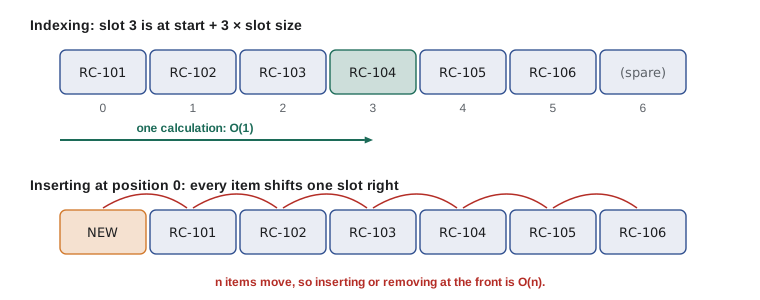
A Python list is an array with two refinements. First, its slots do not hold the items themselves but references (memory addresses) to objects stored elsewhere, which is why one list can hold strings, numbers and Coffee objects side by side while every slot stays the same size. Second, the list grows automatically when it fills up, which the next section explains.
sales = [18.50, 22.00, 19.75, 20.25]
sales[2] = 19.95                   # O(1): overwrite a slot
print(sales[0], sales[-1], sales[2])

mixed = ["RC-101", 42, 18.5, None]
print([type(x).__name__ for x in mixed])18.5 20.25 19.95 ['str', 'int', 'float', 'NoneType']
Dynamic arrays and amortized append
A raw array has a fixed size, chosen when it is created. Python's list hides this by allocating more slots than it currently needs. When you append and a spare slot is free, the item goes straight in: O(1). When the spare slots run out, Python allocates a bigger block, copies every reference across and frees the old block, which is O(n). Because each resize makes the block larger by a proportion of its current size, resizes become rarer as the list grows.
Averaged over many appends, the occasional expensive copy is spread so thinly that each append costs a constant amount. This is called amortized O(1). You can watch the capacity jump by checking the list's memory size with sys.getsizeof as items are added; the exact sizes depend on the Python version and the machine, but the pattern of occasional jumps is always there.
import sys

items = []
last = sys.getsizeof(items)
jumps = 0
for i in range(64):
    items.append(i)
    size = sys.getsizeof(items)
    if size != last:
        jumps += 1
        last = size
print(f"64 appends caused {jumps} resizes")
print("resizes are rare:", jumps < 64 // 4)64 appends caused 8 resizes resizes are rare: True
Amortized cost is a promise about a long sequence of operations, not each single one. A program that needs every individual operation to be quick, such as a point-of-sale screen, can still feel the occasional resize on a very large list, but for almost all purposes appending to a list is effectively constant time.
def copies_made(n, growth=2):
    """Simulate a doubling array: how many item copies do n appends cause?"""
    capacity, size, copies = 1, 0, 0
    for _ in range(n):
        if size == capacity:
            copies += size          # copy every item into the bigger block
            capacity *= growth
        size += 1
    return copies

for n in [10, 1_000, 1_000_000]:
    c = copies_made(n)
print(f"{n:>9,} appends: {c:>9,} copies, {c / n:.2f} per append") 10 appends: 15 copies, 1.50 per append
1,000 appends: 1,023 copies, 1.02 per append
1,000,000 appends: 1,048,575 copies, 1.05 per appendThe cost of common list operations
Once you picture a list as an array of references, the cost of each operation follows directly. Working at the end of the list is cheap; working at the front or in the middle means shifting the items after the change point; searching means looking at items one at a time. The table summarizes the operations you use every day.
| Operation | Example | Cost | Why |
|---|---|---|---|
| Index or assign | items[i], items[i] = x | O(1) | Address found by arithmetic |
| Append | items.append(x) | O(1) amortized | Spare capacity, rare resizes |
| Pop from the end | items.pop() | O(1) | Nothing moves |
| Insert or pop at the front | items.insert(0, x), items.pop(0) | O(n) | Every item shifts |
| Membership or search | x in items, items.index(x) | O(n) | Items checked one by one |
| Slice | items[a:b] | O(b - a) | A new list is built |
| Copy | items.copy(), list(items) | O(n) | Every reference copied |
| Sort | items.sort() | O(n log n) | Lesson 8 |
| Length | len(items) | O(1) | The size is stored |
The difference between front and back is easy to measure. The listing below removes 20,000 orders from a list, once from the front and once from the back, counting how many item moves the front version implies. Run it to see the times on your own machine.
import time

def drain_front(n):
    queue = list(range(n))
    while queue:
        queue.pop(0)                 # shifts every remaining item

def drain_back(n):
    stack = list(range(n))
    while stack:
        stack.pop()                  # nothing shifts

for f in (drain_front, drain_back):
    start = time.perf_counter()
    f(20_000)
    print(f"{f.__name__}: {time.perf_counter() - start:.4f} s")
print("item moves implied by drain_front:", sum(range(20_000)))drain_front: 0.0412 s drain_back: 0.0011 s item moves implied by drain_front: 199990000
Draining from the front implies almost 200 million item moves. If a program needs to remove items from the front regularly, such as orders waiting to be packed in arrival order, a list is the wrong structure; lesson 3 introduces collections.deque, which adds and removes at both ends in O(1).
Try it yourself
Running totals in one pass
Anita wants a running total of the day's sales: for sales [18.5, 22.0, 3.25] the running totals are [18.5, 40.5, 43.75].
Write running_totals(sales) that returns the list of running totals in a single O(n) pass. The starter calls sum on a growing slice each time, which is O(n²). Round each total to 2 decimal places.
def running_totals(sales):
    totals = []
    for i in range(len(sales)):
        totals.append(round(sum(sales[:i + 1]), 2))
    return totals

print(running_totals([18.5, 22.0, 3.25]))
Slicing and copying
Slicing looks cheap but builds a brand-new list, copying references to every item in the slice: items[a:b] costs O(b - a) time and memory. That is usually fine, but a loop that slices on every pass, such as the starter in the exercise above, quietly becomes quadratic. When you only need to look at a range, loop over the indexes, or use itertools.islice, instead of copying.
Copies are also shallow. Copying a list copies the references, not the objects they point to, so two lists can end up sharing the same inner objects. That matters as soon as the items are mutable, such as lists or dictionaries. copy.deepcopy copies the inner objects as well, at a higher cost.
import copy

week = [["RC-101", 5], ["RC-104", 2]]
shallow = week.copy()
deep = copy.deepcopy(week)
week[0][1] = 99                      # change an inner list
print(shallow[0], deep[0])
print(shallow[0] is week[0], deep[0] is week[0])['RC-101', 99] ['RC-101', 5] True False
Two-dimensional data
Kai keeps a weekly grid of bags roasted: one row per coffee and one column per day. In Python, a natural representation is a list of lists, where grid[r][c] is the value at row r and column c. Reading or writing one cell is O(1), a pass over every cell is O(rows × columns), and summing a column means visiting one cell in every row.
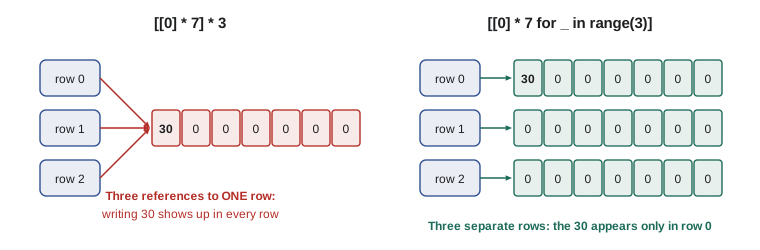
There is one classic trap. Writing [[0] * 7] * 3 does not make three separate rows: it makes one row and three references to it, so changing one cell appears to change a whole column. Build each row separately with a comprehension instead.
days = ["Mon", "Tue", "Wed", "Thu", "Fri", "Sat", "Sun"]
wrong = [[0] * 7] * 3
wrong[0][0] = 30
print("wrong:", [row[0] for row in wrong])

grid = [[0] * 7 for _ in range(3)]          # three separate rows
grid[0][0], grid[1][2], grid[2][4] = 30, 30, 30
print("right:", [row[0] for row in grid])

coffees = ["RC-101", "RC-104", "RC-106"]
grid[0][3] = 30
for name, row in zip(coffees, grid):
    print(name, sum(row))
print("Wed total:", sum(row[days.index("Wed")] for row in grid))wrong: [30, 30, 30] right: [30, 0, 0] RC-101 60 RC-104 30 RC-106 30 Wed total: 30
Try it yourself
Column totals for the roast grid
Write column_totals(grid) that takes a list of rows (each row a list of numbers, all the same length) and returns a list with the total of each column.
For [[30, 0, 30], [0, 30, 0]] the result is [30, 30, 30]. An empty grid returns [].
def column_totals(grid):
    return [sum(row) for row in grid]

print(column_totals([[30, 0, 30], [0, 30, 0]]))
The array module and when to use something else
Because a list stores references, each number in it is a full Python object, which takes far more memory than the raw value. The standard library's array module stores numbers of one type directly in a compact block, like arrays in C. It supports the same indexing, slicing and appending as a list, with the same costs, but uses much less memory for large numeric data. You choose the type with a code such as 'd' for floating-point numbers or 'i' for integers.
import array, sys

weights = [round(10.2 + k * 0.01, 2) for k in range(10_000)]
packed = array.array("d", weights)
print(packed[0], packed[-1], len(packed))
print("array uses less memory:", sys.getsizeof(packed) < sys.getsizeof(weights) + 24 * len(weights))
packed.append(10.15)
print(packed.typecode, len(packed))10.2 110.19 10000 array uses less memory: True d 10001
For serious numeric work, PYTH-250 introduces NumPy, whose arrays add fast whole-array arithmetic. For everyday programs the list remains the right default. Reach for something else when the access pattern fights the array layout: frequent removal from the front calls for a deque (lesson 3), frequent membership tests call for a set or dictionary (lesson 5), and keeping items in sorted order while inserting calls for the bisect module (lesson 7) or a heap (lesson 10).
Worked problem
Removing out-of-stock coffees efficiently
Theo has a list of 5,000 product records and wants to remove every record whose stock is 0. His first version loops through the list and calls products.remove(p) for each empty one. Why is that slow, and what is better?
Show solution
- remove(p) must first find p, an O(n) search, and then shift every later item back, another O(n). Doing that for each empty record makes the whole loop O(n²) in the worst case.
- Removing items from a list while looping over it also skips the item after each removal, which is a correctness bug as well as a speed problem.
- Instead, build a new list in one pass: products = [p for p in products if p["stock"] > 0]. That is O(n) time and O(n) extra space.
- If other parts of the program hold a reference to the same list and must see the change, assign to a full slice: products[:] = [p for p in products if p["stock"] > 0].
Answer: Calling remove in a loop is O(n²) and skips items; a comprehension that keeps the wanted records is O(n) and correct.
products = [{"sku": f"RC-{k}", "stock": k % 3} for k in range(100, 109)]
products[:] = [p for p in products if p["stock"] > 0]
print([p["sku"] for p in products])['RC-100', 'RC-101', 'RC-103', 'RC-104', 'RC-106', 'RC-107']
Try it yourself
Remove duplicates while keeping order
Write dedupe(skus) that returns a new list with repeated SKUs removed, keeping the first occurrence of each and the original order.
For ["RC-101", "RC-104", "RC-101", "RC-106", "RC-104"] the result is ["RC-101", "RC-104", "RC-106"]. Make it O(n) by remembering what you have seen in a set, rather than checking in on the result list.
def dedupe(skus):
    return sorted(set(skus))

print(dedupe(['RC-104', 'RC-101', 'RC-104']))
Common mistakes
MistakeUsing a list as a queue with pop(0) or insert(0, x).
InsteadUse collections.deque for adding and removing at the front.
MistakeCalling remove() or index() inside a loop over a long list.
InsteadBuild a new list in one pass, or use a set or dictionary for lookups.
MistakeSlicing inside a loop, which copies data on every pass.
InsteadLoop over indexes or use itertools.islice when you only need to read a range.
MistakeBuilding a grid with [[0] * 7] * 3.
InsteadUse [[0] * 7 for _ in range(3)] so each row is a separate list.
MistakeAssuming list.copy() copies the objects inside.
InsteadIt copies references; use copy.deepcopy for nested mutable data.
MistakeRemoving items from a list while looping over it.
InsteadLoop over a copy, or build the filtered list with a comprehension.
Summary and key terms
- An array stores items side by side, so finding an item by index is O(1) arithmetic.
- A Python list is a dynamic array of references that grows by allocating extra capacity, making append amortized O(1).
- Operations at the end of a list are cheap; inserting or removing at the front or middle is O(n) because items shift.
- Membership tests, index and remove scan the list and are O(n).
- Slices and copies build new lists, and copies are shallow unless you use copy.deepcopy.
- Two-dimensional data fits a list of lists; build rows separately to avoid shared references.
- The array module stores numbers compactly; other access patterns call for deques, sets, heaps or bisect.
- array
- A block of memory holding equal-sized items side by side, indexed by position.
- dynamic array
- An array that grows automatically by allocating a larger block when full.
- capacity
- The number of slots allocated, which can exceed the number of items stored.
- amortized cost
- The average cost per operation over a long sequence of operations.
- reference
- The memory address of an object; Python lists store references, not objects.
- shallow copy
- A copy of a container that shares the objects inside it.
- deep copy
- A copy that also copies every nested object.
- slice
- A new list made from a range of positions, such as items[2:5].
- list of lists
- A list whose items are lists, used for grids and tables.
- array module
- A standard library module for compact arrays of one numeric type.
Practice problems
Work each problem on paper first, then reveal the answer to check.
Why is items[5000] just as fast as items[5] in a list of a million items?
Show answer
The slot address is computed by arithmetic, O(1), without visiting other items.
What is the cost of items.insert(0, x) for a list of n items, and why?
Show answer
O(n), because every existing item shifts one slot along.
A list of 1,000 items has capacity for 1,100. What does the next append cost?
Show answer
O(1): a spare slot is available, so no copying is needed.
What does grid = [[0] * 4] * 4; grid[0][0] = 1 do to grid[3][0]?
Show answer
It becomes 1 too, because all four rows are the same list.
What is the cost of items[100:200]?
Show answer
O(100): a new list of 100 references is built.
When would you choose array.array("d") over a list of floats?
Show answer
For large amounts of numeric data where memory matters.
Lesson quiz · 5 questions
Score 60% or more to complete this lesson.
Create a free account to save your progress, take quizzes and earn a certificate.