
PYTH-101 · Lesson 6 of 12 · 24 min
Loops: while and for
▶ Video coming soon A video version of this lesson is on the way.
Computers earn their keep by repeating work tirelessly. Adding up a day's sales, checking every coffee for low stock, printing a line for each bag label, asking again until a person types a valid number: all of these are repetition. Python repeats code with loops. The while loop repeats as long as a condition stays true; the for loop repeats once for each item in a sequence. This lesson covers both, along with the patterns that make loops useful: counters, running totals, searching, and the break and continue statements.
Loops are also where programs can go wrong in a new way: a loop whose condition never becomes false runs forever. You will learn how to spot and avoid that, and why the editor on this page stops any run that goes on for more than ten seconds.
The while loop
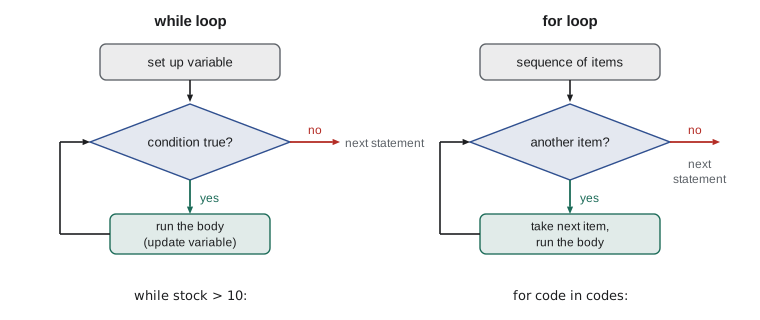
A while loop looks like an if statement with the keyword while. Python checks the condition; if it is true, it runs the body, then goes back and checks the condition again. It keeps going until the condition is false, then continues with the line after the loop. Each pass through the body is called an iteration.
bags = 3
while bags > 0:
    print("Labelling bag", bags)
    bags = bags - 1
print("All bags labelled")Labelling bag 3 Labelling bag 2 Labelling bag 1 All bags labelled
Three things make this loop work. The variable bags is set before the loop, so the condition has something to test. The condition decides whether another iteration happens. And the body changes bags, so that the condition will eventually become false. Leave out the last step and the loop never ends, because bags stays at 3 forever. That is the classic infinite loop.
An infinite loop is not always a mistake. Programs such as web servers and the menu-driven tool in lesson 12 deliberately loop forever and leave the loop from inside, with break, when the user chooses to quit. The danger is an accidental one. If a program in a terminal seems to hang, press Ctrl+C to interrupt it. In this page's editor, a run that lasts more than ten seconds is stopped automatically and you are told to look for a loop that never ends.
Counting and accumulating
Two patterns appear in almost every loop. A counter is a variable that starts at zero and goes up by one each time something happens. An accumulator, or running total, starts at zero and has an amount added each time. Both are set up before the loop, updated inside it, and used after it.
sale = 1
total = 0.0
count = 0
while sale <= 5:
    amount = 4.95 + sale       # pretend amounts for five sales
    total += amount
    count += 1
    sale += 1
print("Sales:", count)
print(f"Total: {total:.2f}")
print(f"Average: {total / count:.2f}")Sales: 5 Total: 39.75 Average: 7.95
While loops shine when you cannot know in advance how many iterations are needed. A common case is a sentinel loop, which keeps reading values until a special value, the sentinel, signals the end. At the end of a shift, Mei can type each cash sale and then a blank line to finish; the loop adds them up.
total = 0.0
count = 0
entry = input("Sale amount (blank to finish): ")
while entry != "":
    total += float(entry)
    count += 1
    entry = input("Sale amount (blank to finish): ")
print(f"{count} cash sales, total {total:.2f}")Sale amount (blank to finish): 5.25 Sale amount (blank to finish): 3.75 Sale amount (blank to finish): 9.00 Sale amount (blank to finish): 3 cash sales, total 18.00
When you run this listing on the page, put the sale amounts in the Input box one per line and leave the last line blank. The input function is called in two places: once before the loop, so the first condition has something to test, and once at the end of the body, to fetch the next value. This read-before and read-at-the-end shape is called a priming read, and it is the standard way to write a sentinel loop with while.
Input validation is another natural job for a while loop: keep asking until the answer is acceptable. The loop condition describes a bad answer, and the body explains the problem and asks again. Lesson 11 makes this sturdier by catching conversion errors, but the shape is already useful.
qty = input("Bags to sell: ")
while not qty.isdigit() or int(qty) == 0:
    print("Please type a whole number of 1 or more.")
    qty = input("Bags to sell: ")
print("Selling", int(qty), "bags")Bags to sell: two Please type a whole number of 1 or more. Bags to sell: 0 Please type a whole number of 1 or more. Bags to sell: 2 Selling 2 bags
The for loop
A for loop goes through the items of a sequence one at a time. The header names a loop variable and the sequence: for letter in 'latte': runs the body five times, with letter set to l, a, t, t and e in turn. You do not manage a counter or a condition yourself; Python handles the stepping and stops after the last item. Because there is nothing to forget, for loops are safer than while loops whenever the items are known in advance.
for letter in "Guji":
    print(letter)
code = "RC-104"
digits = 0
for ch in code:
    if ch.isdigit():
        digits += 1
print("Digits in", code, ":", digits)G u j i Digits in RC-104 : 3
The built-in function range produces a sequence of whole numbers for a loop to work through. range(5) gives 0, 1, 2, 3 and 4; range(1, 6) gives 1 to 5; range(0, 31, 10) gives 0, 10, 20 and 30. Like slices, range stops before its end value, so range(1, 6) never includes 6. range is the tool for 'do this n times' and for numbering things.
for i in range(3):
    print("Shot", i)
for bag in range(1, 6):
    print(f"Label B-0412-{bag:02d}")
for minutes in range(0, 16, 5):
print("Check temperature at", minutes, "minutes")Shot 0 Shot 1 Shot 2 Label B-0412-01 Label B-0412-02 Label B-0412-03 Label B-0412-04 Label B-0412-05 Check temperature at 0 minutes Check temperature at 5 minutes Check temperature at 10 minutes Check temperature at 15 minutes
The loop variable is an ordinary variable that is reassigned on each iteration. Give it a meaningful name, such as bag or minutes, rather than always i. If you do not need the value at all, the convention is to call it _, as in for _ in range(3):, which tells the reader the number itself does not matter. For loops can go through many other kinds of sequence, including the lists of lesson 8, the dictionaries of lesson 9 and the lines of a file in lesson 10.
Try it yourself
Bag labels
Kai has roasted batch B-0412 into bags bags. Print one label line per bag, numbered from 1, in the form B-0412-01, B-0412-02 and so on, with the bag number always shown with two digits. For 4 bags there are exactly 4 lines, ending with B-0412-04.
batch = "B-0412"
bags = 4
# print one label per bag
break and continue
Two statements change the flow inside a loop. break leaves the loop immediately, skipping any remaining iterations; the program continues with the first line after the loop. continue skips the rest of the current iteration and goes straight on to the next one. Both are usually placed inside an if, so that they happen only in particular cases.
# Find the first minute the roast passes 200 degrees
temps = "182,189,194,198,203,207,211"
minute = 0
for reading in temps.split(","):
    minute += 1
    if int(reading) > 200:
        print("First crack zone reached at minute", minute)
        break
# Skip blank entries when adding sales
total = 0.0
for entry in "5.25,,3.75, ,9.00".split(","):
    if not entry.strip():
        continue
    total += float(entry)
print(f"Total of the real entries: {total:.2f}")First crack zone reached at minute 5 Total of the real entries: 18.00
break is ideal for searches: as soon as the item is found, there is no reason to keep looking. continue is ideal for filtering: skip the items you do not want and keep the body for the ones you do. Both can make loops clearer, but a loop with several break and continue statements scattered through it becomes hard to follow, so use them sparingly.
Loops in Python can have an else clause, which runs only if the loop finished without hitting break. It answers the question 'did the search fail?' without an extra variable. It is a less familiar feature, so many programmers prefer a Boolean flag variable such as found = False that is set to True when the item turns up; both work.
wanted = "RC-108"
for code in "RC-101 RC-102 RC-103 RC-104 RC-105 RC-106".split():
    if code == wanted:
        print("Found", wanted)
        break
else:
print(wanted, "is not on the coffee list")RC-108 is not on the coffee list
Nested loops
A loop can contain another loop. The inner loop runs completely for each iteration of the outer loop, so the body of the inner loop runs outer times inner times in total. Nested loops are natural for grids and tables, such as a price table for each drink in each cup size, and for comparing every item with every other item.
sizes = "Small Medium Large".split()
extra = 0.0
print(f"{'':<10}", end="")
for size in sizes:
    print(f"{size:>8}", end="")
print()
for drink, base in (("Latte", 4.75), ("Mocha", 5.25)):
    print(f"{drink:<10}", end="")
    extra = 0.0
    for size in sizes:
        print(f"{base + extra:>8.2f}", end="")
        extra += 0.50
print()Small Medium Large Latte 4.75 5.25 5.75 Mocha 5.25 5.75 6.25
The setting end='' tells print not to move to a new line, so the inner loop can print a whole row piece by piece; the bare print() afterwards ends the row. The outer loop here goes through pairs of values written in parentheses, which are tuples, the subject of lesson 8. Watch the cost of nested loops on big data: two nested loops over 10,000 items each run the inner body a hundred million times, which takes a while even for a computer.
Choosing between while and for
Use a for loop when you are going through a known collection of items or a known range of numbers: every coffee, every line, every bag from 1 to 30. Use a while loop when the number of iterations depends on something that happens during the loop: until the user types quit, until the stock runs out, until the temperature passes a threshold. If you find yourself writing a while loop with a counter that goes from 0 to n, a for loop over range(n) is simpler and safer.
Worked problem
How many days until reorder?
Theo has 42 bags of Sunrise Blend and sells about 6 a day. The reorder point is 10 bags. He wants a script that simulates each day's sales and reports on which day the stock first falls to the reorder point or below. Decide which loop to use and trace it.
Show solution
- The number of days is not known in advance; it depends on the stock, so a while loop fits.
- Set up: stock = 42, day = 0.
- Condition: keep going while stock > 10.
- Body: day += 1 and stock -= 6.
- Trace: after day 1 the stock is 36, then 30, 24, 18, 12 and, after day 6, 6. At that point 6 > 10 is False, so the loop ends with day = 6.
Answer: The stock first reaches the reorder point or below on day 6, when 6 bags remain.
stock = 42
day = 0
while stock > 10:
    day += 1
    stock -= 6
    print(f"End of day {day}: {stock} bags")
print("Reorder on day", day)End of day 1: 36 bags End of day 2: 30 bags End of day 3: 24 bags End of day 4: 18 bags End of day 5: 12 bags End of day 6: 6 bags Reorder on day 6
Try it yourself
Total weight of a roast log
The string log holds the roasted weights in kilograms of a week of batches, separated by commas. Use a for loop to add them up into total_kg and count them into batches, then print both, with the total rounded to one decimal place.
For the starter data the output is 5 batches, 50.7 kg.
log = "10.2,10.1,10.3,9.9,10.2"
total_kg = 0
batches = 0
# add up the weights here
print(f"{batches} batches, {total_kg:.1f} kg")
Try it yourself
First low-stock coffee
stock_counts lists the bags in stock for coffees RC-101, RC-102 and so on, in order. Find the position, counting from 1, of the first coffee with fewer than 10 bags, store it in first_low, print it and stop searching. If no coffee is low, first_low should stay 0.
For the starter data the fourth coffee has 9 bags, so first_low is 4.
stock_counts = "42,15,27,9,12,30"
first_low = 0
print(first_low)
Common mistakes
MistakeForgetting to change the loop variable inside a while loop, so it never ends.
InsteadMake sure every iteration moves the condition towards false.
MistakeExpecting range(1, 10) to include 10.
Insteadrange stops before its end; use range(1, 11) for 1 to 10.
MistakeSetting a running total to zero inside the loop.
InsteadInitialize counters and totals before the loop, update them inside it.
MistakeIndenting the final print inside the loop, so it prints every time.
InsteadLines that should run once after the loop go back to the outer indentation.
MistakeUsing a while loop with a manual counter for a fixed number of repetitions.
InsteadUse for i in range(n); it cannot forget to increment.
MistakeChanging a sequence while looping over it.
InsteadLoop over a copy, or build a new sequence; lesson 8 shows how.
Summary and key terms
- while repeats its body as long as its condition is true; the body must eventually make the condition false.
- Counters and running totals are set before a loop, updated inside it and used after it.
- A sentinel loop reads values until a special value, such as a blank line, signals the end.
- for goes through each item of a sequence, such as the characters of a string or the numbers from range.
- range(start, stop, step) stops before stop.
- break leaves a loop at once; continue skips to the next iteration; a loop else runs when no break happened.
- Nested loops run the inner loop fully for each outer iteration.
- Use for when the items are known, while when the number of repetitions depends on what happens.
- loop
- A statement that repeats a block of code.
- iteration
- One pass through the body of a loop.
- while loop
- A loop that repeats while its condition is true.
- for loop
- A loop that runs once for each item of a sequence.
- infinite loop
- A loop whose condition never becomes false.
- counter
- A variable that counts how many times something happens.
- accumulator
- A variable that builds up a running total.
- sentinel
- A special input value that signals the end of the data.
- range
- A built-in that produces a sequence of whole numbers.
- break / continue
- Statements that leave a loop or skip to its next iteration.
Practice problems
Work each problem on paper first, then reveal the answer to check.
What numbers does range(2, 11, 3) produce?
Show answer
2, 5 and 8.
How many times does the body of for a in range(4): for b in range(3): run?
Show answer
12 times.
Write a loop that prints the even numbers from 0 to 20.
Show answer
for n in range(0, 21, 2): print(n)
Why might while total < 100: total + 5 never end?
Show answer
total + 5 calculates a value but does not store it; it should be total += 5.
Write a loop that counts the vowels in the string "espresso".
Show answer
count = 0; for ch in "espresso": if ch in "aeiou": count += 1. The answer is 3.
When does a for loop else clause run?
Show answer
When the loop finishes all its items without executing break.
Lesson quiz · 5 questions
Score 60% or more to complete this lesson.
Create a free account to save your progress, take quizzes and earn a certificate.