
PYTH-101 · Lesson 2 of 12 · 27 min
Values, types and variables
▶ Video coming soon A video version of this lesson is on the way.
Every program works with values: the number of bags on a shelf, the price of a latte, the name of a coffee, whether the roaster is switched on. Before a program can calculate anything, it needs a way to hold those values and refer to them. This lesson covers the kinds of value Python works with, called types, and the names you give values so that you can use them again, called variables. By the end you will be able to store Ridgeline's stock figures in well-named variables, convert between text and numbers, and read a value typed in by a person.
These ideas look simple, and in a sense they are, but they shape everything that follows. Most beginner bugs come from a value being a different type from the one the programmer assumed, or from a variable holding a different value from the one they thought. Time spent understanding exactly what a variable is will repay itself in every later lesson.
Values and types
A value is a single piece of data. The number 42 is a value; so is the text Sunrise Blend, and so is the price 18.50. Every value in Python has a type, which decides what the value can do. You can multiply two numbers, but multiplying two pieces of text makes no sense; you can make text uppercase, but not a number. Python checks the type of each value when it uses it, and that check is the source of many helpful error messages.
Four types cover almost everything in this course's early lessons. An int, short for integer, is a whole number such as 42, 0 or -7. A float, short for floating-point number, is a number with a decimal point, such as 18.50 or 0.15. A str, short for string, is text, written inside quotation marks, such as 'Ethiopia Guji'. A bool, short for Boolean, is one of just two values, True or False, and is used for yes-or-no facts such as whether a coffee needs reordering. Python also has a special value, None, that means no value at all; it appears when something has not been set yet or a function has nothing to give back.
| Type | Python name | Ridgeline examples | Typical use |
|---|---|---|---|
| Integer | int | 42 bags, 340 grams, 10 points | Counting things |
| Floating-point number | float | 18.50, 0.15, 10.2 kg | Measurements and money in simple programs |
| String | str | 'Sunrise Blend', 'RC-101', 'B-0412' | Names, codes and messages |
| Boolean | bool | True, False | Yes-or-no facts such as in stock or not |
| None | NoneType | None | A value that has not been set |
The built-in function type tells you the type of any value. It is a useful tool when a program behaves strangely: printing the type of a suspicious value often reveals that it is a string of digits rather than a number, or a float where you expected an integer.
print(type(42))
print(type(18.50))
print(type("Sunrise Blend"))
print(type(True))
print(type(None))
print(type("42"))<class 'int'> <class 'float'> <class 'str'> <class 'bool'> <class 'NoneType'> <class 'str'>
Look at the last line. The value '42' in quotation marks is a string that happens to contain digits, not a number. To Python, '42' and 42 are entirely different things, as different as the word forty-two written on a sticky note and a pile of forty-two coffee bags. Keeping that difference in mind will save you a great deal of confusion when you start reading input from people and files, which always arrives as text.
Variables: names for values
A variable is a name that refers to a value. You create one with an assignment statement, which has a name on the left, an equals sign, and an expression on the right. Python works out the value of the right-hand side first, then attaches the name on the left to that value. After that, wherever you write the name, Python uses the value.
sku = "RC-101"
name = "Sunrise Blend"
price = 18.50
stock = 42
reorder_point = 10
print(name, "costs", price, "and there are", stock, "bags")
print("Stock value:", price * stock)
print("Bags above the reorder point:", stock - reorder_point)Sunrise Blend costs 18.5 and there are 42 bags Stock value: 777.0 Bags above the reorder point: 32
The equals sign in Python does not mean 'is equal to' in the mathematical sense. It is an instruction: make this name refer to this value. Reading it as 'gets' or 'is set to' helps. That is why a line like stock = stock - 3, which would be nonsense as an equation, is perfectly sensible in a program: work out the current stock minus three, then make stock refer to the result.
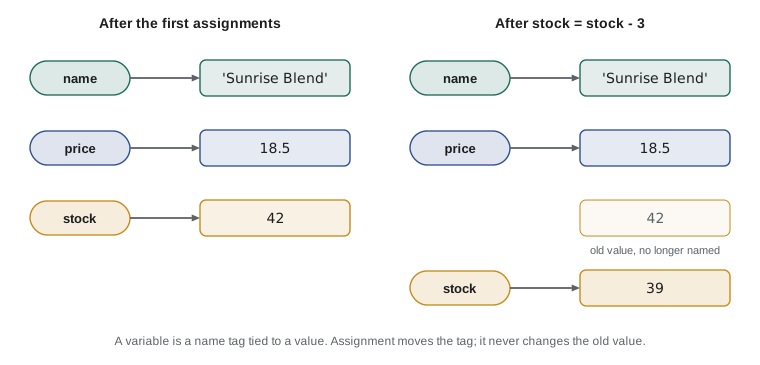
A good mental picture, shown in the figure, is that a variable is a name tag tied to a value, rather than a box that contains it. When you assign a new value to the name, the tag moves to the new value. The difference matters later, when two names can be tied to the same list, but even now it explains why assignment never changes the old value: it just points the name somewhere else.
Once Theo sells three bags of Sunrise Blend and Kai roasts a fresh batch of thirty, the stock changes. The program below follows those events. Press Edit and run, then try changing the number of bags sold to see the final figure change.
stock = 42
print("Opening stock:", stock)
stock = stock - 3      # three bags sold online
print("After online orders:", stock)
stock = stock + 30     # a fresh batch is bagged
print("After roasting:", stock)
stock -= 5             # five bags sold in the cafe
print("Closing stock:", stock)Opening stock: 42 After online orders: 39 After roasting: 69 Closing stock: 64
The last update uses an augmented assignment, -=, which is shorthand for stock = stock - 5. Python has the same shorthand for the other arithmetic operators, such as += and *=. These short forms are common in real code, especially for running totals and counters, so it is worth getting used to them early.
Naming rules and conventions
Python has a few strict rules for variable names. A name may contain letters, digits and underscores, but it must not begin with a digit and it must not contain spaces or punctuation. Names are case-sensitive, so stock, Stock and STOCK are three different variables. A name cannot be one of Python's reserved keywords, such as if, for, while, def, class, True or None, because those words already have a meaning in the language.
| Name | Allowed? | Why |
|---|---|---|
| bags_in_stock | Yes | Letters and underscores |
| price2 | Yes | A digit is fine after the first character |
| 2nd_price | No | Starts with a digit |
| reorder point | No | Contains a space |
| roast-weight | No | A hyphen means subtraction |
| class | No | A reserved keyword |
| Stock | Yes, but avoid | Legal, but capitalized names are used for classes |
Beyond the rules, Python programmers follow a style guide called PEP 8. It recommends lowercase names with words separated by underscores, a style known as snake_case: roasted_kg rather than roastedKg or RoastedKG. Names written entirely in capitals, such as REORDER_POINT, signal a constant, a value that is set once and not meant to change while the program runs. Python does not enforce this; it is a message from one programmer to another.
The most important convention is not in any rulebook: choose names that say what the value means. A variable called x tells the reader nothing, while bags_sold_today tells them almost everything. Long names cost a little typing; unclear names cost hours of puzzling later. Single letters are fine in a few traditional places, such as i for a loop counter, but for anything that represents a real quantity, spell it out, and include the unit when there could be doubt, as in green_kg or roast_minutes.
Numbers in more detail
Integers in Python can be as large as you like; Python simply uses more memory for very large numbers. You can write large integers with underscores to make them readable, as in 1_000_000, and Python ignores the underscores. Floats are different. They are stored in a fixed amount of memory using binary fractions, which means most decimal fractions cannot be represented exactly. The result is small rounding errors that surprise everyone the first time.
print(0.1 + 0.2)
print(0.1 + 0.2 == 0.3)
print(round(0.1 + 0.2, 2))
print(18.50 * 3)
print(1_000_000 + 1)
print(7 / 2, type(7 / 2))0.30000000000000004 False 0.3 55.5 1000001 3.5 <class 'float'>
The value 0.30000000000000004 is not a bug in Python; every language that uses standard floating-point numbers behaves the same way. For everyday calculations the error is far too small to matter, and rounding the result for display, with round or with the formatting tools in lesson 4, hides it. It does matter when you compare floats for exact equality, so avoid testing whether two floats are exactly equal. For money in real accounting software, programmers use whole numbers of cents or Python's decimal module; Anita's bookkeeping tools in later courses will do that, while this course uses floats to keep the examples simple.
The last line shows another point: dividing two integers with / always gives a float, even when the answer is a whole number, so 8 / 2 is 4.0. Lesson 3 introduces the // operator for whole-number division and explains when to use each.
Converting between types
Values can be converted from one type to another with functions named after the types: int, float, str and bool. Converting is often essential. Text read from a keyboard or a file is always a string, so before you can do arithmetic with it you must convert it to a number. Going the other way, you sometimes need to turn a number into a string to join it to other text.
bags_text = "42"
bags = int(bags_text)
print(bags + 3)
price = float("18.50")
print(price * 2)
print(int(19.99))            # int() drops the fraction, it does not round
print(round(19.99))
label = "Bags: " + str(bags)
print(label)
print(bool(0), bool(42), bool(""), bool("Kai"))45 37.0 19 20 Bags: 42 False True False True
Two details deserve attention. First, int applied to a float throws away the fractional part rather than rounding, so int(19.99) is 19; use round if rounding is what you want. Second, bool turns zero, empty strings and None into False and almost everything else into True. That rule, called truthiness, becomes useful in lesson 5.
Not every conversion succeeds. Asking for int('forty-two') or int('18.50') makes no sense to Python, so it stops with a ValueError. The message is clear about what went wrong, and lesson 11 shows how a program can catch such errors and ask again instead of stopping.
print(int("18.50"))
Traceback (most recent call last):
  File "convert.py", line 1, in <module>
    print(int("18.50"))
          ^^^^^^^^^^^^
ValueError: invalid literal for int() with base 10: '18.50'
Reading input from a person
So far every value has been written into the program itself, which is called hard-coding. Real tools let people supply values while the program runs. The input function displays a prompt, waits for the person to type a line and press Enter, and returns what they typed as a string. To use the answer as a number, convert it.
name = input("Coffee name: ")
bags = int(input("Bags in stock: "))
price = float(input("Price per bag: "))
print(name, "stock is worth", bags * price)Coffee name: Colombia Huila Bags in stock: 27 Price per bag: 19.75 Colombia Huila stock is worth 533.25
When you run this listing in the page, the editor shows an Input box: type one answer per line, such as Colombia Huila, 27 and 19.75, and Python reads them in order as if you had typed them at the keyboard. In a terminal, the program pauses at each prompt instead. See how the int and float calls wrap the input calls: Python runs input first, gets a string, and passes it straight to the conversion. If you forget the conversion, bags * price fails, because Python will not multiply a string by a float.
A common slip is to compare or add input without converting it. If two people each type 3 and the program adds the raw answers, the result is '33', because adding two strings joins them. The next lesson explains why; the cure is always to convert first.
Worked problem
Planning a roast-yield calculator
Kai wants a script that asks for the green weight and roasted weight of a batch in kilograms and prints the weight lost in kilograms and as a fraction of the green weight. Plan the variables and conversions, then check it with a 12 kg batch that roasts to 10.2 kg.
Show solution
- Input: two numbers typed by Kai, each read with input and converted with float, because weights have decimals.
- Variables: green_kg and roasted_kg for the inputs, lost_kg for the difference and loss_fraction for lost_kg / green_kg.
- Processing: lost_kg = green_kg - roasted_kg, then loss_fraction = lost_kg / green_kg.
- Output: print both, rounding the fraction to three places with round(loss_fraction, 3).
- Check by hand: 12 - 10.2 = 1.8 kg lost, and 1.8 / 12 = 0.15, which matches the usual 15 out of 100 loss in roasting. The float result for lost_kg may print as 1.8000000000000007, so round it to 2 places as well.
Answer: The program prints 1.8 kg lost and a loss fraction of 0.15.
green_kg = 12.0       # in the real program: float(input("Green kg: "))
roasted_kg = 10.2     # in the real program: float(input("Roasted kg: "))
lost_kg = green_kg - roasted_kg
loss_fraction = lost_kg / green_kg
print("Unrounded loss:", lost_kg)
print("Weight lost (kg):", round(lost_kg, 2))
print("Loss as a fraction:", round(loss_fraction, 3))Unrounded loss: 1.8000000000000007 Weight lost (kg): 1.8 Loss as a fraction: 0.15
Try it yourself
Variables for a new coffee
Ridgeline is adding Guatemala Antigua to the list. Create four variables: sku set to the string RC-107, name set to Guatemala Antigua, price set to the float 20.75 and stock set to the integer 24. Then print the stock value, price * stock, which should be 498.0.
# Create the four variables here

print(price * stock)
How Python stores values
Behind the scenes, every value in a running Python program is an object stored somewhere in the computer's memory, and every variable is a reference to one of those objects. The built-in function id returns a number that identifies an object while the program runs; two names that refer to the same object have the same id. You will rarely need id in practice, but it makes the name-tag picture concrete.
stock = 42
also_stock = stock
print(id(stock) == id(also_stock))
stock = stock + 1
print(stock, also_stock)
print(id(stock) == id(also_stock))True 43 42 False
After also_stock = stock, both names are tied to the same value, 42. When stock is reassigned to 43, only the stock tag moves; also_stock still refers to 42. Numbers, strings and Booleans can never be changed in place, a property called being immutable, so this behaviour is always safe with them. Lists, which arrive in lesson 8, can be changed in place, and there the shared-tag picture becomes essential.
Python is also dynamically typed: a variable has no fixed type of its own, so the same name can refer to an int now and a string later. That flexibility is convenient but can hide mistakes, which is why many teams add optional type hints, a notation covered in PYTH-102, and why clear names matter so much.
Try it yourself
Total from typed input
Theo types two numbers: the bags sold online and the bags sold in the cafe. The starter reads them with input but prints the wrong answer, because input always gives back strings. Fix the program so that it prints the total as a number.
The Input box already holds 3 and 5, so the correct output ends with Total bags sold: 8.
online = input("Online: ")
cafe = input("Cafe: ")
print("Total bags sold:", online + cafe)
Common mistakes
MistakeDoing arithmetic with input before converting it, so '3' + '5' gives '35'.
InsteadConvert with int() or float() as soon as the value is read: bags = int(input(...)).
MistakeReading = as a test of equality and writing 42 = stock.
InsteadAssignment always has the name on the left: stock = 42. The test for equality is ==, covered in lesson 3.
MistakeExpecting int(19.99) to give 20.
Insteadint() drops the fraction; use round(19.99) to round to the nearest whole number.
MistakeComparing two floats for exact equality, such as 0.1 + 0.2 == 0.3.
InsteadRound both sides first, or check whether the difference is very small.
MistakeUsing vague names such as x, data2 or temp for real quantities.
InsteadName variables for what they mean, with units where useful: roasted_kg, bags_sold_today.
MistakeQuoting numbers by accident, as in stock = "42".
InsteadWrite numbers without quotation marks unless you really want text.
Summary and key terms
- Every value has a type; the basic ones are int, float, str and bool, plus the special value None.
- type(value) shows the type, which is the first thing to check when a program misbehaves.
- An assignment such as stock = 42 makes a name refer to a value; the right-hand side is worked out first.
- Variables can be reassigned; augmented assignments such as stock -= 5 update them in place of a longer line.
- Names use letters, digits and underscores, cannot start with a digit and are case-sensitive; PEP 8 recommends snake_case.
- Floats are approximate; round for display and avoid exact comparisons of floats.
- int(), float(), str() and bool() convert between types; input() always returns a string.
- value
- A single piece of data, such as 42 or Sunrise Blend.
- type
- The kind of a value, which decides what operations it supports.
- variable
- A name that refers to a value.
- assignment
- A statement that makes a name refer to the value of an expression.
- integer (int)
- A whole number of any size.
- floating-point number (float)
- A number with a fractional part, stored approximately.
- string (str)
- A sequence of characters: text.
- Boolean (bool)
- The type with only two values, True and False.
- type conversion
- Turning a value of one type into the corresponding value of another type.
- immutable
- Unable to be changed in place; ints, floats, strings and Booleans are immutable.
Practice problems
Work each problem on paper first, then reveal the answer to check.
What does type(10.2) return, and what does type("10.2") return?
Show answer
float for the first, str for the second, because the quotation marks make it text.
After a = 5, b = a, a = a + 1, what are a and b?
Show answer
a is 6 and b is still 5; reassigning a moves only the a tag.
Which names are illegal: roast_kg, 3bags, total-sales, Price, for?
Show answer
3bags (starts with a digit), total-sales (hyphen) and for (a keyword). Price is legal but not PEP 8 style for a variable.
What does int(float("7.9")) give?
Show answer
7, because float("7.9") is 7.9 and int() drops the fraction.
Why does print("Bags: " + 42) fail, and how do you fix it?
Show answer
A string cannot be joined to an int with +. Use str(42), or print("Bags:", 42).
Write one line that reads a price typed by the user and stores it as a float.
Show answer
price = float(input("Price: "))
Lesson quiz · 5 questions
Score 60% or more to complete this lesson.
Create a free account to save your progress, take quizzes and earn a certificate.