
PYTH-101 · Lesson 5 of 12 · 23 min
Making decisions with if statements
▶ Video coming soon A video version of this lesson is on the way.
Up to now every program has run straight through, line by line, doing the same thing every time. Useful programs make decisions. Should this coffee be reordered? Does this customer get a free drink? Is the typed quantity a sensible number? Python makes decisions with the if statement, which runs a block of code only when a condition is True. This lesson covers if, else and elif, indentation and blocks, nested decisions, truthiness, and the newer match statement, all through decisions that Ridgeline's staff make every day.
Decisions are where programs start to feel intelligent, and also where bugs start to hide, because a program now has several paths and each one needs testing. Along the way you will learn to trace every path through a decision and to choose test values that exercise each of them.
The if statement
An if statement has a header line and a body. The header is the keyword if, a condition, and a colon. The body is one or more statements indented underneath. When Python reaches the if, it evaluates the condition; if the result is True, it runs the body, and if it is False, it skips the body. Either way, the program then carries on with the first line after the body.
stock = 9
reorder_point = 10
print("Checking Sumatra Dark")
if stock < reorder_point:
    print("Low stock: add Sumatra Dark to the roast plan")
    print("Bags needed to reach 30:", 30 - stock)
print("Check finished")Checking Sumatra Dark Low stock: add Sumatra Dark to the roast plan Bags needed to reach 30: 21 Check finished
Run the listing, then change stock to 25 and run it again. With 9 bags both indented lines run; with 25 bags neither does, but the first and last lines run in both cases. That is the whole idea of an if statement: some lines always run, and some run only when the condition holds.
Indentation is not decoration in Python; it is how the language knows which lines belong to the body. The standard is four spaces per level, and every line in a body must be indented by the same amount. The body ends at the first line that returns to the outer level. Most editors insert four spaces when you press Tab, and the editor on this page does too. Mixing tabs and spaces, or indenting one line by three spaces and the next by four, produces an IndentationError.
if stock < reorder_point:
    print("Low stock")
      print("Roast soon")
  File "check.py", line 3
    print("Roast soon")
IndentationError: unexpected indent
if and else
Often a program must do one thing when a condition holds and something else when it does not. The else clause provides the second path. It has no condition of its own, because it covers every case the if did not. Exactly one of the two bodies runs, never both and never neither.
order_total = 42.00
if order_total >= 50:
    shipping = 0.00
    print("Free shipping")
else:
    shipping = 8.00
    print("Add", 50 - order_total, "for free shipping")
print(f"Total to pay: {order_total + shipping:.2f}")Add 8.0 for free shipping Total to pay: 50.00
Both branches set the variable shipping, so it is guaranteed to exist when the last line uses it. If only one branch set it, the program would work on some days and crash with a NameError on others, depending on the order total. Making sure every path leaves the program's variables in a sensible state is a habit worth forming now.
Several choices with elif
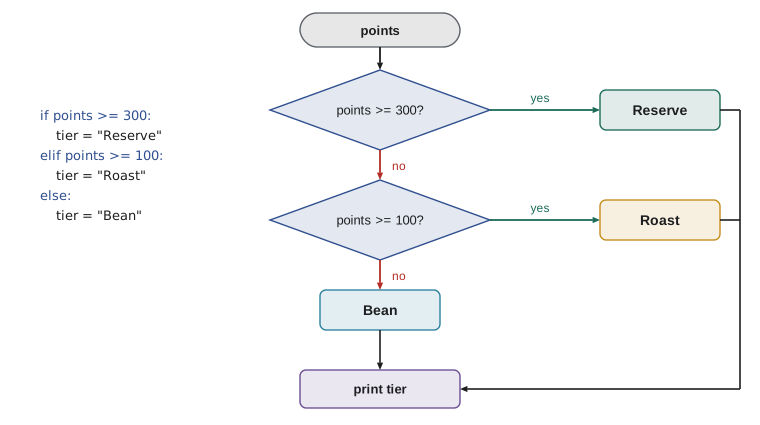
When there are more than two possibilities, chain the tests with elif, short for else if. Python checks each condition in order and runs the body of the first one that is True, then skips the rest. A final else catches everything that matched none of the conditions. Ridgeline's loyalty program has three tiers, which makes a natural elif chain, as the flowchart shows.
points = 180
if points >= 300:
    tier = "Reserve"
elif points >= 100:
    tier = "Roast"
else:
    tier = "Bean"
print(f"{points} points: {tier} tier")180 points: Roast tier
The order of the tests matters. Because Python stops at the first true condition, the second test does not need to say points < 300: if the program got that far, the first test already failed. If the tests were written in the opposite order, starting with points >= 100, a customer with 450 points would be put in the Roast tier, because that test would succeed first. When conditions overlap, put the most specific one first, or write conditions that do not overlap at all, such as 100 <= points < 300.
To test a decision properly, choose values that exercise every branch and the boundaries between them. For the tiers that means at least 0, 99, 100, 299, 300 and something large. Boundary values are where off-by-one mistakes hide: writing points > 100 instead of points >= 100 would give a customer with exactly 100 points the wrong tier, and only a test with exactly 100 would reveal it.
| Test value | Expected tier | Why test it |
|---|---|---|
| 0 | Bean | The smallest possible value |
| 99 | Bean | Just below the first boundary |
| 100 | Roast | Exactly on the boundary |
| 299 | Roast | Just below the next boundary |
| 300 | Reserve | Exactly on the next boundary |
| 1250 | Reserve | A large value |
Try it yourself
Shipping fee
Online orders of 50.00 or more ship free; smaller orders pay 8.00, and orders under 20.00 pay 12.00 because they go by a slower, costlier service for small parcels. Set shipping to the right fee for order_total with if, elif and else, then print it with two decimal places.
The Input box holds an order total of 64.50, so this run should print Shipping: 0.00. Try other totals such as 35 and 12.99 by changing the input.
order_total = float(input("Order total: "))
shipping = 8.00
print(f"Shipping: {shipping:.2f}")
Nested decisions and combined conditions
The body of an if can contain another if. This nesting expresses decisions that depend on earlier decisions. Kai can roast a coffee only if it is low and there is enough green coffee for a batch; and if there is not enough green coffee, Theo should order more. The nested version makes the two levels of the decision visible.
stock = 9
reorder_point = 10
green_kg = 8
if stock < reorder_point:
    if green_kg >= 12:
        print("Roast a batch today")
    else:
        print("Low stock, but only", green_kg, "kg of green coffee: order more")
else:
print("Stock is fine")Low stock, but only 8 kg of green coffee: order more
Nesting is sometimes the clearest way to write a decision, but deep nesting, three or four levels, is hard to read. Often the logical operators from lesson 3 can flatten it. The condition stock < reorder_point and green_kg >= 12 replaces one level of nesting. Choose whichever form makes the decision easiest to understand, and remember that a reader has to keep every enclosing condition in mind while reading a deeply nested line.
A useful technique for flattening code is to handle the special cases first. If an input is invalid, say so and stop; then the rest of the code can assume the input is fine. You will see this pattern with functions in lesson 7, where a return statement makes it particularly neat.
Truthiness
An if statement does not strictly need a Boolean. Python accepts any value as a condition and decides whether it counts as true, a property called truthiness. The values that count as false are False, None, zero in any numeric type, and empty collections, including the empty string, the empty list and the empty dictionary. Everything else counts as true.
note = ""
if note:
    print("Order note:", note)
else:
    print("No note on this order")
items = 3
if items:
print("Basket has", items, "items")No note on this order Basket has 3 items
Truthiness makes some checks short and natural. if note: reads as 'if there is a note', and if not name: reads as 'if no name was given', which is the standard way to detect a blank answer to input. Use it where it reads well, but prefer an explicit comparison when the meaning would otherwise be unclear; if stock == 0: says more about intention than if not stock:.
The conditional expression
For a simple choice between two values, Python has a one-line form called a conditional expression: value_if_true if condition else value_if_false. It is an expression, not a statement, so it can appear on the right of an assignment or inside an f-string. It is ideal for small choices such as singular and plural words, and it becomes hard to read if you try to cram complicated logic into it.
bags = 1
print(f"{bags} {'bag' if bags == 1 else 'bags'} of Sunrise Blend")
bags = 4
print(f"{bags} {'bag' if bags == 1 else 'bags'} of Sunrise Blend")
stock = 12
status = "OK" if stock >= 10 else "LOW"
print(status)1 bag of Sunrise Blend 4 bags of Sunrise Blend OK
Choosing among fixed values with match
Since Python 3.10, the match statement offers another way to choose among options, especially when comparing one value against several fixed possibilities. Each case lists a pattern, and the first matching case runs. The pattern _ matches anything and acts like else. A vertical bar lets one case match several values. For Ridgeline's command-line tool in lesson 12, match is a tidy way to pick the action for a command such as sell, restock or quit.
command = "restock"
match command:
    case "sell":
        print("Recording a sale")
    case "restock" | "roast":
        print("Adding bags to stock")
    case "quit" | "exit":
        print("Goodbye")
    case _:
print("Unknown command:", command)Adding bags to stock
Patterns can do much more than compare simple values; they can take apart lists and dictionaries, a feature called structural pattern matching that PYTH-102 explores. For simple choices like this one, an if and elif chain does the same job, and both are fine. Use match when it makes the list of possibilities easier to see.
Worked problem
Validating a quantity
When Mei rings up a sale, she types the quantity. Jordan wants the program to reject a blank answer, anything that is not a whole number, and any number below 1 or above 50, and otherwise accept it. Write the decision and list the test cases.
Show solution
- Read the answer and clean it: text = input('Quantity: ').strip().
- Blank first: if not text, print 'Please enter a quantity'.
- Not a number: elif not text.isdigit(), print 'Use digits only'. isdigit rejects '-3', '2.5' and 'two'.
- Range: elif not 1 <= int(text) <= 50, print 'Quantity must be 1 to 50'. The int conversion is safe here, because the earlier branch ruled out non-digits.
- Otherwise: else, qty = int(text) and print it. Tests: '' (blank), 'two' (not digits), '0' and '51' (out of range), '1' and '50' (boundaries accepted), '7' (normal).
Answer: Four branches cover every input, and seven test values exercise each branch and both boundaries.
for text in ["", "two", "0", "51", "1", "50", " 7 "]:
    text = text.strip()
    if not text:
        message = "Please enter a quantity"
    elif not text.isdigit():
        message = "Use digits only"
    elif not 1 <= int(text) <= 50:
        message = "Quantity must be 1 to 50"
    else:
        message = f"Accepted: {int(text)}"
print(f"{text!r:8} -> {message}")'' -> Please enter a quantity 'two' -> Use digits only '0' -> Quantity must be 1 to 50 '51' -> Quantity must be 1 to 50 '1' -> Accepted: 1 '50' -> Accepted: 50 '7' -> Accepted: 7
The listing uses a for loop, from the next lesson, to try all seven inputs in one run, and the !r inside the f-string shows each value with its quotation marks so that the blank one is visible. Testing a decision against a planned list of values like this is far more reliable than trying a couple of inputs by hand.
Try it yourself
Stamp card
Every tenth drink on a stamp card is free. Given the drink number n typed into the Input box, print Free drink! when n is a multiple of 10, One more for a free drink when the next drink will be free, and otherwise Stamps until free: followed by the number of drinks still to buy before the free one.
For n = 26 the output is Stamps until free: 3, because drinks 27, 28 and 29 come before free drink 30.
n = int(input("Drink number: "))
print("Stamps until free:", 10 - n % 10)
Common mistakes
MistakeForgetting the colon at the end of an if, elif or else line.
InsteadEvery header line ends with a colon; Python reports a SyntaxError if it is missing.
MistakeIndenting a body line by a different amount from the others.
InsteadUse four spaces for every level and let the editor insert them.
MistakePutting overlapping elif tests in the wrong order, so a broad test catches values meant for a narrow one.
InsteadOrder tests from most to least specific, or write ranges that do not overlap.
MistakeWriting if answer == "yes" or "y", which is always true.
InsteadEach side needs a full comparison: answer == "yes" or answer == "y", or answer in ("yes", "y").
MistakeSetting a variable in only some branches and using it afterwards.
InsteadGive it a value in every branch, or before the if statement.
MistakeTesting only one or two values.
InsteadTest every branch, and test each boundary exactly.
Summary and key terms
- if runs its indented body only when the condition is True; else gives an alternative path.
- elif chains several conditions; Python runs the body of the first true one and skips the rest.
- Indentation of four spaces marks a block; inconsistent indentation is an error.
- Nested ifs express decisions within decisions; and/or can often flatten them.
- Truthiness: False, None, 0 and empty collections count as false; everything else counts as true.
- value_a if condition else value_b is a one-line conditional expression.
- match compares one value against several patterns, with _ as the catch-all.
- Test every branch and every boundary value.
- condition
- An expression whose truth decides which code runs.
- if statement
- A statement that runs its body only when its condition is true.
- branch
- One of the alternative paths through a decision.
- block (body)
- A group of statements indented under a header line.
- elif
- An extra condition tested only if the earlier ones were false.
- nested if
- An if statement inside the body of another.
- truthiness
- Whether a value counts as true or false when used as a condition.
- conditional expression
- An expression of the form a if condition else b.
- match statement
- A statement that compares a value against patterns in case clauses.
- boundary value
- A test value at the edge between two branches.
Practice problems
Work each problem on paper first, then reveal the answer to check.
What does this print when stock is 10: if stock < 10: print("low") else: print("ok")?
Show answer
ok, because 10 < 10 is False.
Rewrite if a: if b: print("yes") as a single if.
Show answer
if a and b: print("yes")
Which values of points should you test for tiers at 100 and 300?
Show answer
99, 100, 299 and 300, plus a small and a large value.
What does the expression "free" if 30 % 10 == 0 else "paid" give?
Show answer
'free'
Why is if answer == "y" or "Y": always true?
Show answer
The right side, "Y", is a non-empty string, which is truthy on its own.
Write a condition that is true when name is blank or only spaces.
Show answer
not name.strip()
Lesson quiz · 5 questions
Score 60% or more to complete this lesson.
Create a free account to save your progress, take quizzes and earn a certificate.