
MSBA-281 · Lesson 9 of 12 · 18 min
Agent capacity, billing and credits
▶ Video coming soon A video version of this lesson is on the way.
Kestrelbay's owners had approved the agent stage on one condition: no surprise bills. Ravi Castellane-Duff, who sat on the steering group and approved anything to do with data and money, put it more bluntly. "The licences I understand. Eighteen sellers, eighteen licences. What I don't understand is a bill that goes up when the agent works harder." Mirela spent a morning with Ravi and the finance team on exactly that question. This lesson covers what they worked out: how agent usage is measured, the two ways to pay for it, how capacity is assigned and watched, and what happens when it runs out.
Licences and consumption are different things
Dynamics 365 Sales is licensed per user: Kestrelbay's sellers had Sales Enterprise licences. Many Copilot features in Sales are included with those licences. The Sales agents are different. Microsoft bills selected Copilot and agent capabilities in Dynamics 365 Sales per use, because the work they do, such as researching a lead, writing an email or refreshing research on an opportunity, happens whether or not a seller is logged in. The usage unit is the Copilot Credit.
Copilot Credits are the same unit used across Microsoft Copilot Studio. Microsoft renamed Copilot Studio messages to Copilot Credits on September 1, 2025, keeping the same quantities, so older documents and some current pages still say messages. The Dynamics 365 Sales billing page, for example, still describes consumption in Copilot Studio messages and names the Sales Qualification Agent, Sales Opportunity Agent, Sales Close Agent and Recommended Actions Agent among the capabilities that consume them. When you see "messages" in a Dynamics 365 billing context, read it as Copilot Credits.
How much work costs
The number of credits an event consumes depends on its complexity. Microsoft publishes billing rates for Copilot Studio, and those rates are the basis for agent consumption. When this course was written, the rate table included, among others: a classic answer at 1 credit, a generative answer at 2 credits, an agent action at 5 credits, tenant graph grounding at 10 credits, and agent flows at 13 credits per 100 actions. A single piece of agent work, such as researching one lead and drafting one email, is made up of several such events, so the cost per lead is not a single published number. Microsoft provides an agent usage estimator in its Copilot Studio documentation to help plan, and the Power Platform Licensing Guide is the reference for current rates.
Because the cost per record depends on the configuration, the reliable way to know it is to measure it. Mirela proposed a two-week measurement in the test environment: run the Sales Qualification Agent on a known number of test leads and the Sales Opportunity Agent on the pilot deals, then divide the credits used by the records processed.
Two ways to pay
There are two billing models, and an organization can use both.
| Prepaid capacity | Pay-as-you-go | |
|---|---|---|
| What you buy | A Copilot Credits capacity subscription in advance | Nothing in advance; you pay for what agents consume each month |
| Where you buy it | Microsoft 365 admin center, or a partner through Partner Center | An Azure subscription linked to the Power Platform environment through a billing policy |
| How it reaches Sales | Assign capacity to the Power Platform environment, then link the Sales environment | Link the Sales environment to the environment with pay-as-you-go |
| Price signal | A capacity pack was listed at 200 US dollars a month for 25,000 credits; pre-purchase plans offer discounts | Billed at pay-as-you-go rates through Azure |
| Best for | Predictable, steady usage | Pilots, spikes and uncertain usage |
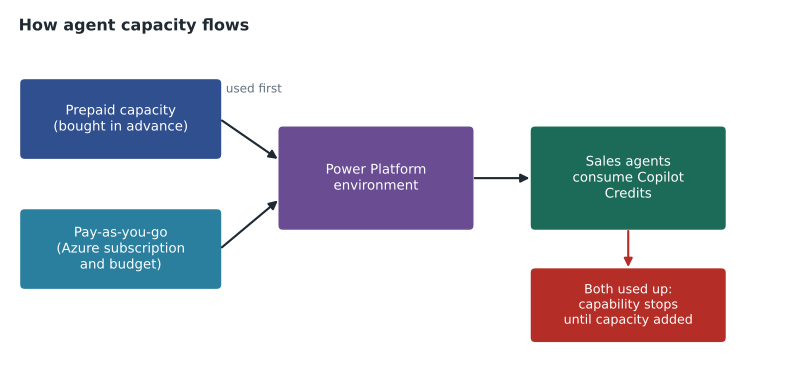
When both are in place, prepaid capacity is used first, and pay-as-you-go covers the rest. Capacity on a Power Platform environment is shared with other Dynamics 365 Sales environments and other Microsoft services on the tenant that draw on the same pool, so a Copilot Studio agent built by the marketing team can use the same credits as the sales agents. All instances of the Sales Opportunity Agent share one capacity pool too.
What happens when capacity runs out
Dynamics 365 Sales regularly checks the available capacity and shows in-app notifications when it is low or used up. For prepaid capacity, the fix is to allocate more from the tenant's total or buy more. For pay-as-you-go, the fix is to adjust the budget in Microsoft Cost Management or allocate more. Microsoft's documentation is clear about the consequence: when quota is depleted, the AI capability is unavailable until more capacity is added. An agent that stops mid-month leaves leads unresearched and risk cards stale, so capacity planning is an operational task, not just a finance task.
Where to see usage
Two places show consumption. The Power Platform admin center shows Copilot capacity and usage for both billing models, by environment and, for agents, by agent. Microsoft Cost Management in the Azure portal shows detailed pay-as-you-go usage and lets finance set budgets with alerts. The agent pages themselves, such as the Sales Close Agent's documentation in its time, linked to viewing an agent's usage in the admin center.
Ravi asked for a monthly view he could read without logging in to anything technical. Mirela agreed to export the admin center usage for the sales environment on the first working day of each month and add it to the steering group pack with three lines: credits used by each agent, records processed by each agent, and credits per record.
Building a budget
Mirela and the finance team built the first budget from the measurement in the test environment. The numbers below are Kestrelbay's invented figures for the story, but the method is the one to use.
Worked problem
Estimating monthly credits for two agents
In the test environment, the Sales Qualification Agent in research-only mode used 2,400 credits to process 120 test leads. The Sales Opportunity Agent used 1,620 credits over three weeks for 27 opportunities on the default three-day refresh. Kestrelbay expects 190 web leads a month in scope and 30 pilot opportunities. Estimate monthly credits and decide on a billing model.
Show solution
- Credits per lead: 2,400 divided by 120 is 20 credits per lead. For 190 leads: 3,800 credits a month.
- Credits per opportunity: 1,620 over three weeks for 27 deals is 60 credits per deal over three weeks, or about 20 per deal per week. For 30 deals over about 4.3 weeks: roughly 2,600 credits a month.
- Add a margin for engage mode, which sends and reads emails, and for growth: Mirela added 50 percent, giving about 9,600 credits a month.
- Compare with a capacity pack of 25,000 credits: one pack covers the estimate with room for spikes, such as boat show weeks.
Answer: About 9,600 credits a month; buy one prepaid pack for predictability and link a pay-as-you-go subscription with a modest Azure budget as a safety net, so the agents do not stop if usage spikes.
Finance liked the result for a reason that had nothing to do with the total: it was explained. The cost per lead could be compared with the time a seller would have spent on research, and the cost per opportunity with the value of one saved deal.
Controlling consumption
Several configuration choices affect cost directly, and most have been introduced in earlier lessons.
| Choice | Effect on credits |
|---|---|
| Narrow selection criteria | Fewer records processed; the strongest single control |
| Refresh frequency on the Sales Opportunity Agent | Daily refresh costs more than every three or seven days |
| Research-only versus research and engage | Engage mode adds sending, reading and replying |
| Number of agent instances | More instances share the same pool and can consume it faster |
| Knowledge sources | Large or noisy sources can make research heavier |
| Stopping or pausing agents in quiet periods | Stops new work; insights may become outdated |
Microsoft's pilot guidance for the Sales Opportunity Agent makes the same point: tune during a pilot to limit credit consumption before scaling. Kestrelbay wrote a simple rule into its agent runbook: no selection criteria change goes to production without an estimate of its effect on monthly credits.
Watching preview billing
Billing can change when a feature moves from preview. Microsoft's October 2026 announcement of the Sales Development agent stated that it would start consuming Copilot Credits on November 16, 2026. An organization trying the preview before that date might have seen no cost in its first weeks and a cost afterwards. Kestrelbay's runbook added a line for every preview it tried: the date billing starts, and who checks the first month's usage.
Who can buy and assign capacity
Capacity involves several administrator roles, and confusion about who does what causes delays. Buying prepaid capacity is done in the Microsoft 365 admin center by someone with billing permissions, or by a partner. Assigning capacity to environments and setting up pay-as-you-go billing policies is done in the Power Platform admin center by a Power Platform administrator. Linking an Azure subscription for pay-as-you-go needs permissions on that subscription, usually from the Azure owner. And budgets in Microsoft Cost Management are set by whoever manages Azure costs. Kestrelbay wrote the four names into its runbook so that a low-capacity warning on a Friday afternoon had an obvious owner.
| Task | Where | Typical role |
|---|---|---|
| Buy prepaid capacity | Microsoft 365 admin center or Partner Center | Billing administrator or partner |
| Assign capacity to an environment | Power Platform admin center | Power Platform administrator |
| Create a pay-as-you-go billing policy | Power Platform admin center with an Azure subscription | Power Platform administrator and Azure subscription owner |
| Set budgets and alerts | Microsoft Cost Management | Azure cost manager or finance |
Comparing cost with value
A credit budget answers "what will it cost?" The steering group also wanted to know "is it worth it?" Mirela compared the measured cost with two simple values. For the Sales Qualification Agent, the value was seller time: at about 20 credits per lead and the listed capacity pack price, a lead cost well under a dollar of capacity, against more than ten minutes of seller research time saved. For the Sales Opportunity Agent, the value was saved deals: if the agent helped save one refit worth 60,000 a quarter, its capacity cost for the quarter was small by comparison. Neither calculation was precise, but both were explicit, and both could be checked against the measures in lesson 11.
Ravi asked one more question that every budget holder should ask: what happens to cost if the agent becomes popular? The answer was that cost follows the selection criteria, not the number of sellers. Adding sellers does not add credits; widening the criteria does. That is why the runbook rule tied every criteria change to a credit estimate.
A monthly capacity routine
Kestrelbay's runbook set out a five-step routine for the first working day of each month, owned by Mirela and read by Ravi. Export last month's consumption by agent from the Power Platform admin center. Divide credits by records processed for each agent and compare with the previous month. Check the Azure Cost Management report for any pay-as-you-go spending and compare it with the budget. List any configuration changes made during the month and their expected effect. Recommend one of three actions for the next month: no change, adjust the budget or change the scope.
The routine took about half an hour. In its first run, for November, it showed that the Sales Opportunity Agent had used more credits in its first week than in later weeks, because the initial research on 27 deals was heavier than the refreshes that followed. That pattern, a heavier first run when an agent or instance starts, is worth expecting whenever scope is widened: the month in which a new instance starts will cost more than a steady month.
| Monthly step | Output |
|---|---|
| Export consumption by agent | Credits per agent |
| Divide by records processed | Credits per record, compared with last month |
| Check pay-as-you-go spending | Spend against budget |
| List configuration changes | Expected effect on next month |
| Recommend | No change, adjust budget, or change scope |
Common mistakes
MistakeAssuming agent work is covered by user licences.
InsteadPlan for Copilot Credits consumption in addition to licences.
MistakeReading "messages" in Dynamics 365 billing pages as a different unit.
InsteadTreat Copilot Studio messages as the former name of Copilot Credits, with the same quantities.
MistakeRunning only prepaid capacity with no safety net.
InsteadAdd pay-as-you-go with a budget, or monitor closely, because depleted quota stops the capability.
MistakeGuessing cost per record.
InsteadMeasure credits per record in a test environment and build the budget from that.
Summary and key terms
- Selected Copilot and agent capabilities in Dynamics 365 Sales are billed per use in Copilot Credits, formerly called Copilot Studio messages.
- Prepaid capacity is bought in advance and assigned to environments; pay-as-you-go uses an Azure subscription and budget; prepaid is consumed first.
- Capacity is shared across environments and services that draw on the same pool, and across agent instances.
- When quota is depleted, the AI capability stops until more capacity is added; in-app notifications warn when it is low.
- Usage is visible in the Power Platform admin center and Azure Cost Management; selection criteria and refresh frequency are the main cost controls.
- Copilot Credit
- The unit in which Copilot Studio and agent usage is measured and billed.
- Prepaid capacity
- Copilot Credits bought in advance and assigned to environments.
- Pay-as-you-go
- Billing for actual consumption through a linked Azure subscription.
- Billing policy
- The link between a Power Platform environment and an Azure subscription for pay-as-you-go.
- Budget
- A spending limit with alerts in Microsoft Cost Management.
- Agent usage estimator
- A Microsoft tool for planning agent consumption.
Practice problems
Work each problem on paper first, then reveal the answer to check.
An organization has prepaid capacity and pay-as-you-go. Which is consumed first?
Show answer
Prepaid capacity.
What happens to an agent capability when quota is depleted?
Show answer
It is unavailable until more capacity is added.
Where can finance see pay-as-you-go spending and set a budget?
Show answer
Microsoft Cost Management in the Azure portal.
Lesson quiz · 5 questions
Score 60% or more to complete this lesson.
Create a free account to save your progress, take quizzes and earn a certificate.