
MSBA-281 · Lesson 8 of 12 · 18 min
Sales Research Agent and the research canvas
▶ Video coming soon A video version of this lesson is on the way.
In the second week of November, Kestrelbay's owners asked Ottilie a question she could not answer quickly: why had refit revenue in the northern territory fallen by a third compared with last autumn, when the number of refit enquiries was about the same? In the old days she would have asked the finance team for a spreadsheet and waited a week. Mirela suggested she ask the Sales Research Agent instead, and sat with her while she typed the question in plain words.
This lesson covers what the Sales Research Agent is, how people use the research canvas, what data it can draw on, how administrators set it up and control it, and how to read its answers critically. Unlike the qualification and opportunity agents, the Sales Research Agent does not work through records on a schedule. It works when a person asks it a question, and its job is analysis rather than action.
What the Sales Research Agent does
Microsoft describes the Sales Research Agent as helping sales teams solve complex business questions through a dialogue with their sales data in natural language. Sellers and sales managers use it in the Sales Hub app, in a research canvas, where they type a question or choose a starter prompt. The agent creates a research plan, queries the data and returns a research blueprint: data visualizations, a narrative overview, a summary of the research, key findings and suggested next steps based on the business context and data.
Two features make the answers checkable. Show work explains the data the agent used and the steps it took to reach its conclusions. And the canvas supports follow-up: a user can ask another question, change a visualization or add data, and the research continues from where it was. Microsoft's training also describes multibranch research journeys, AI-suggested prebuilt topics, an AI cursor for interacting with the canvas, visible reasoning and saved workspaces that can be refreshed later.
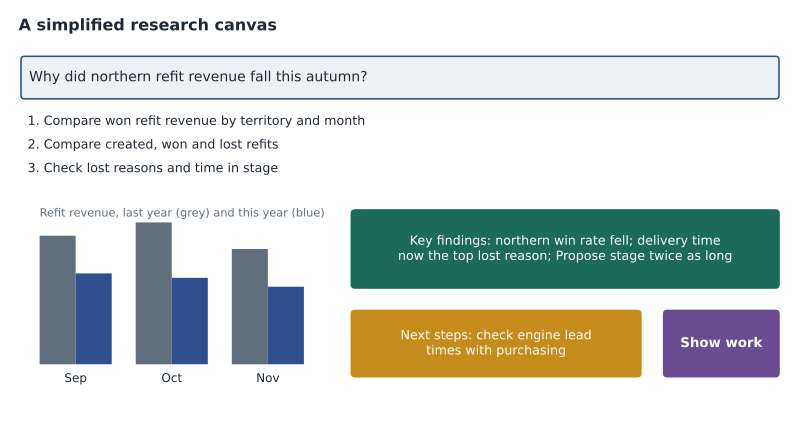
How Ottilie's question was answered
Ottilie typed: "Why did refit revenue in the northern territory fall this autumn compared with last autumn, when refit enquiries were similar?" The agent's plan had three steps: compare won refit revenue by territory and month for both years; compare refit opportunities created, won and lost; and look at lost reasons and time in stage. Its blueprint showed two charts and three findings. Win rates on northern refits had dropped from about one in two to one in three; the lost reason Delivery time had grown from almost nothing to the most common reason; and average time in the Propose stage for northern refits was nearly twice that of the south.
Ottilie clicked Show work and saw that the comparison of last autumn used data migrated from the old system, where lost reasons had not been recorded consistently. That changed her reading: the delivery-time finding was solid for this year, but the comparison with last year was weaker than the chart suggested. She asked a follow-up: "Which northern refit deals lost on delivery time, and what products were on their quotes?" The answer pointed to a single supplier of marine engines whose lead times had stretched. That became a purchasing conversation, not a sales one.
Data sources
By default the Sales Research Agent uses Dynamics 365 Sales data. Administrators and users can add other sources: Microsoft Fabric lakehouses, other Dataverse environments, and offline files in CSV, Excel or PDF format that a user uploads for a piece of research. That last option is useful for one-off questions, such as comparing pipeline with a supplier's price list, but it means a user can bring data into the analysis that the organization does not otherwise hold in Dynamics 365, so the usual rules about personal and confidential information apply.
The agent may use Bing Search, but only based on the user's prompt and only if the Bing search consent setting is turned on in the Power Platform admin center. Otherwise it uses only internal data the user is already allowed to access. That second point is important: the agent respects security roles. A seller who can see only their own opportunities gets answers based on their own opportunities, and a manager gets answers based on what the manager can see.
| Source | When it is used | Points to check |
|---|---|---|
| Dynamics 365 Sales data | Always, within the user's security permissions | Data quality, especially migrated history |
| Fabric lakehouse | When connected by an administrator | Whether the data is current and governed |
| Other Dataverse environments | When connected | Permissions and consistency of definitions |
| Uploaded CSV, Excel or PDF | For the research the user adds it to | Confidentiality and accuracy of the file |
| Bing Search | Only if consent is enabled and the prompt calls for it | Reliability of web sources |
Setting up and governing the agent
System administrators and makers configure the Sales Research Agent in the Power Platform admin center, following Microsoft's setup article. Governance decisions include which users can use it, which additional data sources are connected, and whether Bing search consent is enabled. Microsoft also states that there are additional costs associated with using the Sales Research Agent, because its work consumes the tenant's capacity like other agents, and its FAQ page was labelled as preview when this course was written. Treat it as a feature whose behaviour and pricing may change.
Kestrelbay's decisions were deliberately conservative. The agent was enabled for Ottilie, the two sales managers and Mirela, not for every seller, until the cost per question was understood. Bing search consent stayed off, because the owners wanted answers based on Kestrelbay's own data. No lakehouse or other environment was connected. Uploaded files were allowed, with a rule written into the sales handbook that customer lists and personal data must not be uploaded from outside the company's systems.
Responsible use
Microsoft's documentation states that the Sales Research Agent is not designed for social scoring, must be used in accordance with the Microsoft Product Terms and the Generative AI Code of Conduct, and that organizations must evaluate their own legal and regulatory obligations. In a sales team, the practical risks are less dramatic but real: an answer that sounds authoritative but rests on poor data, a chart that compares unlike periods, or a manager using a quick answer to judge an individual seller unfairly.
Mirela gave the managers four rules. Always open Show work before acting on a finding. Check whether the period compared includes migrated or incomplete data. Treat a finding about a person, such as a seller's win rate, as a starting point for a conversation, never as a judgement on its own. And when the answer matters, such as anything that goes to the owners, ask a second, differently worded question and see whether it agrees.
Worked problem
Checking a research answer
A sales manager asks, "Which seller has the worst win rate on fleet contracts this year?" The agent names Callan with 1 win in 6. Should the manager raise it in Callan's review?
Show solution
- Open Show work: the answer counts six fleet opportunities owned by Callan this year.
- Check the context: Callan is an inside seller who took over four fleet deals from a field rep who left, all already late in the cycle.
- Check sample size: six deals is too few to judge a win rate.
- Ask a better question: "How do win rates on fleet contracts vary by how the deal started and who owned it at the start?"
Answer: No. The number is accurate but misleading; use it to start a conversation about inherited deals, not as a performance judgement.
Good questions to ask
The Sales Research Agent is most useful for questions that would otherwise need someone to combine several reports. Good questions are specific about the measure, the period and the comparison, and they name the business decision they inform.
| Weak question | Better question |
|---|---|
| How is sales going? | How does won revenue this quarter compare with the same quarter last year, by deal type? |
| Why are we losing? | What are the most common lost reasons for refit projects above 40,000 in the last six months, and how have they changed? |
| Which deals are bad? | Which open fleet contracts have had no activity in 21 days and a close date in the next 60 days? |
| Are the agents working? | How do conversion rates of agent-handed-over leads compare with seller-created leads since October? |
Saving and sharing research
Research can be saved as a workspace and refreshed later, which suits recurring questions such as a monthly look at lost reasons. Ottilie saved the northern refit research and refreshed it in December to see whether the engine supplier problem had been solved. When she shared a finding with the owners, she exported the chart and narrative into her monthly report and added a sentence about the data limits that Show work had revealed. Microsoft's training also mentions a Business Function Builder for tailoring the agent to particular business functions, which was in preview.
How it differs from Power BI
Kestrelbay also had Power BI reports, built in lesson 10. The two tools complement each other. A Power BI report is a designed, governed view of agreed measures that many people read the same way; it is the right place for the numbers the business manages by. The Sales Research Agent is for questions nobody designed a report for, explored in conversation. When a research question turns out to be asked every month, that is a sign it should become a Power BI report.
Data the agent cannot see
The Sales Research Agent answers only from the data it can reach and the user is allowed to see. At Kestrelbay, some important facts lived elsewhere: supplier lead times sat in the warehouse system, marketing spend in a finance spreadsheet and customer satisfaction in a survey tool. When Ottilie asked why refits were slipping, the agent could see that delivery time was the top lost reason, but not why delivery times had grown; that needed a person to check the supplier data. Good users know the boundary of the data and ask the agent the part of the question it can answer.
An uploaded file can extend that boundary for one piece of research. Ottilie uploaded a CSV of engine lead times from the purchasing team, with no personal data in it, and asked whether lost northern refits had quoted engines with lead times above eight weeks. The answer, with Show work open, confirmed the link for the deals in question. She then deleted the file from the workspace, as the handbook rule required for anything not held in Dynamics 365.
| Question part | Answerable by the agent? | Where the rest lives |
|---|---|---|
| Which lost reasons grew? | Yes, from Sales data | Not applicable |
| Which products were on those quotes? | Yes, from quotes in Sales | Not applicable |
| Why did supplier lead times grow? | No | Purchasing and supplier records |
| Did marketing spend change? | Only if the data is added | Finance spreadsheet |
Who should use it
Kestrelbay limited the Sales Research Agent to managers at first, but the right audience differs by organization. Sellers benefit from questions about their own accounts, such as which customers have not ordered since the spring. Managers benefit from questions across teams. Sales operations staff benefit most of all, because they spend much of their week answering questions that the agent can answer in minutes. The decision should weigh cost, data sensitivity and training: a user who does not know how to read Show work is better off with a designed report.
Common mistakes
MistakeActing on a research finding without opening Show work.
InsteadCheck the data and steps behind every finding that will drive a decision.
MistakeTurning on Bing search consent by default.
InsteadDecide deliberately whether web data should be used, and record the decision.
MistakeUsing quick answers to judge individual sellers.
InsteadTreat findings about people as the start of a conversation, with context and sample size in mind.
MistakeRebuilding the same research question every month.
InsteadSave and refresh workspaces, and turn recurring questions into Power BI reports.
Summary and key terms
- The Sales Research Agent answers business questions about sales data in natural language in a research canvas in the Sales Hub app.
- It returns a research blueprint with charts, narrative, findings and next steps, and Show work explains its data and steps.
- It uses Dynamics 365 Sales data within the user's permissions, and can add Fabric lakehouses, other Dataverse environments and uploaded CSV, Excel or PDF files.
- Bing search is used only when the consent setting is on and the prompt calls for it.
- Administrators configure it in the Power Platform admin center; it has additional costs and must not be used for social scoring.
- Sales Research Agent
- The agent that answers questions about sales data in natural language.
- Research canvas
- The workspace where users ask questions and see the agent's research.
- Research blueprint
- The agent's answer: charts, narrative, findings and next steps.
- Show work
- The feature that explains the data and steps behind a finding.
- Bing search consent
- An admin setting that allows web search to be used in agent research.
- Social scoring
- Rating people on personal behaviour or traits, which the agent is not designed for.
Practice problems
Work each problem on paper first, then reveal the answer to check.
What did Show work reveal about Ottilie's comparison with last autumn?
Show answer
That last year's data was migrated with inconsistent lost reasons, so the year-on-year comparison was weaker than it looked.
Which file types can a user upload for research?
Show answer
CSV, Excel and PDF.
When does the Sales Research Agent use Bing Search?
Show answer
Only when the Bing search consent setting is enabled and the user's prompt calls for it.
Lesson quiz · 5 questions
Score 60% or more to complete this lesson.
Create a free account to save your progress, take quizzes and earn a certificate.