
MSBA-252 · Lesson 9 of 12 · 19 min
Connections and connection references
▶ Video coming soon A video version of this lesson is on the way.
Two weeks before the invoice solution was due to move from test to production, Rupert asked a question that stopped the room: "Whose account does each flow sign in as?" Signe opened the flows one by one. The Intake flow used Maribeth's Outlook connection, because she had helped build it. The Match flow used Signe's own custom connector connection. The Approve flow used a connection that belonged to a contractor whose account was due to be disabled at the end of the month. If any of those people left, changed roles or reset their passwords, invoices would stop. This lesson is about getting that question right.
AB-410's objectives include deploying a Power Platform solution and ALM strategy and evaluating connectors, and both depend on understanding connections. Lesson 11 covers governance more broadly, and the separate course on environments, governance and ALM goes deeper into pipelines; here the focus is on the identity and plumbing that every flow relies on.
Connectors, connections and connection references
Three terms are easy to confuse. A connector is the definition of how to talk to a service: its triggers, actions and authentication method. A connection is an authenticated instance of a connector, created when someone signs in, and it belongs to that person or identity in a particular environment. A connection reference is a solution component that points to a connection, so that the flows and apps in a solution refer to the reference rather than to a specific person's connection.
| Term | What it is | Example at Lumenvale |
|---|---|---|
| Connector | The definition of a service's API for Power Platform | Office 365 Outlook; the LedgerPoint reporting custom connector |
| Connection | A signed-in instance of a connector owned by an identity | The finance automation account's Outlook connection in Finance Prod |
| Connection reference | A solution component that points flows to a connection | lv_FinanceOutlook, used by Intake and Notify |
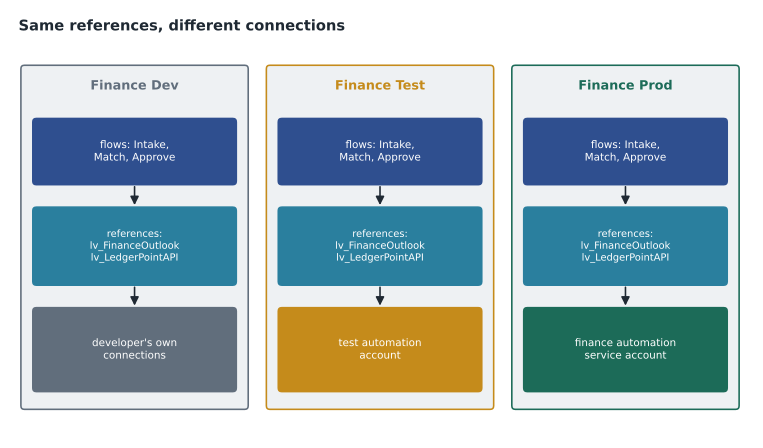
When a flow is created inside a solution and uses a connector, Power Automate creates or reuses a connection reference automatically. Every action that uses that connector in every flow in the solution goes through the reference. When the solution is imported into another environment, the person importing chooses which connection each reference should use there, or creates one. That one step is what lets the same flows sign in as a test account in test and a production account in production, without anyone editing a flow.
Whose identity?
Every connection signs in as some identity, and choosing that identity is a security and continuity decision. There are three common choices.
A person's account. Easy for prototypes and personal productivity flows, but fragile for business processes: the flow stops when the person leaves, changes password or loses a licence, and every action appears to have been done by them. Sending supplier emails from a clerk's personal mailbox also confuses suppliers when the clerk moves on.
A dedicated service account. A user account created for automation, such as lv-finance-automation, licensed appropriately, with only the access its flows need, and with its credentials managed by IT and protected with multifactor authentication or other controls that suit unattended use. Actions appear as the service account, which makes audit trails clearer. Lumenvale's finance flows moved to a service account that had access to the AP shared mailbox, the finance SharePoint site and the Finance environment.
A service principal. An application identity registered in Microsoft Entra ID, which some connectors, including Dataverse, support for connections. Service principals are not people, do not need a user licence in the same way, and are managed through application credentials. They are well suited to server-to-server work, but not every connector supports them, and some actions, such as sending email as a mailbox, still need a user or mailbox identity.
| Identity | Good for | Watch for |
|---|---|---|
| Personal account | Prototypes and personal flows | Breaks when the person leaves; actions appear as them |
| Service account | Business process flows with Microsoft 365 connectors | Licensing, credential management, least privilege |
| Service principal | Dataverse and other connectors that support it | Not supported by every connector or action |
A flow's owner and its connections are separate things. A flow can have several co-owners, which protects against one person leaving, but the connections inside it still sign in as whoever created them unless they are changed. Rupert's rule for production became: flows in production are owned by a security group plus the service account, and every connection reference in production points to a service account or service principal connection, never to a person.
Connections for flows that people start
Instant flows started from an app or a button raise a further question: should the flow act as the person who started it, or as the flow's own connection? In the flow's run-only settings, a maker can choose for each connection whether run-only users provide their own connection or use the one the maker set. Using the person's own connection means the action happens with their permissions and appears as them, which is right for things like sending an email from the person. Using the flow's connection means everyone acts with the flow's permissions, which is right only when the flow itself enforces who may do what.
The clerks' "Re-run extraction" button used the flow's connections, because the clerks did not have direct access to the AI capacity or the SharePoint folder, and the flow checked that the person pressing the button held the Accounts Payable Clerk security role before doing anything.
Environment variables beside connection references
Connection references solve "who signs in"; environment variables solve "what values change between environments". An environment variable is a solution component with a definition and, in each environment, a current value. Types include text, number, yes or no, JSON, data source (for example, a SharePoint site or list), and secret, which stores a reference to a secret in Azure Key Vault rather than the secret itself. Like connection references, environment variables are set when a solution is imported, and flows read them as parameters.
| Environment variable | Type | Dev value | Prod value |
|---|---|---|---|
| AP mailbox address | Text | ap-test mailbox | ap mailbox |
| Invoice document library | Data source | Test site library | Finance site library |
| Approval threshold 1 | Number | 5000 | 5000 |
| Confidence threshold | Number | 0.8 | 0.8 |
| LedgerPoint API key | Secret (Azure Key Vault) | Test key reference | Production key reference |
Moving the solution
Lumenvale's invoice solution lived in three environments, Finance Dev, Finance Test and Finance Prod, following the same pattern Maribeth's registrar solution used. Signe built in Dev in an unmanaged solution. A pipeline in Power Platform exported it as a managed solution and deployed it to Test, and, after testing and Rupert's approval, to Prod. During each deployment the pipeline asked for the connection for each connection reference and the value for each environment variable that did not have one yet. Because every flow used references and variables, nothing had to be edited after deployment.
When connections break
Connections fail for predictable reasons: a password changed, a token expired, multifactor requirements changed, a licence was removed, or access to the underlying resource was revoked. When that happens, flows using the connection fail with authentication errors, and the connection shows an error in the Connections list. Fixing it usually means signing in again on the connection, or pointing the connection reference at a new connection. Owners of flows whose connections have problems receive notifications, and administrators can see connections across an environment in the admin tools.
Lumenvale reduced surprises in three ways. The service account's password policy and sign-in controls were agreed with IT security before go-live, so they would not suddenly change. A monthly check listed every connection in Finance Prod and its owner, flagging any that belonged to a person. And the Catch scopes in every flow treated authentication errors as urgent, posting to the IT operations channel as well as to accounts payable.
Worked problem
Fixing the connection inventory
Signe's review found: Intake uses Maribeth's Outlook connection; Match uses Signe's custom connector connection; Approve uses a contractor's Approvals and Dataverse connections; Notify sends supplier emails from a clerk's mailbox. All flows are in the solution. What should change before production?
Show solution
- Create connections in Finance Prod for the finance automation service account: Outlook (with access to the AP mailbox), SharePoint, Dataverse (or a service principal), Approvals and the LedgerPoint custom connector.
- Point each connection reference in the solution to those connections during deployment, so no flow uses a personal connection.
- Change Notify to send from the AP shared mailbox through the service account, so suppliers always see the same sender.
- Add a security group and the service account as co-owners of every production flow, and remove the contractor.
- Move the LedgerPoint API key into Azure Key Vault and reference it with a secret environment variable.
Answer: Production flows should depend on identities the organization controls, through connection references and environment variables, so that no individual's departure or password change can stop the process.
Connection references also make reviews easier. Because every connector use in a solution goes through a reference, an administrator can see at a glance which services a solution touches and which identity it uses in each environment, without opening every flow. Rupert asked for that list as part of every production release request.
Custom connectors and gateways
Custom connectors add their own connection decisions. A custom connector's definition specifies its authentication type, such as no authentication, an API key, basic authentication, or OAuth 2.0 with a provider such as Microsoft Entra ID. With an API key or basic authentication, each connection stores a credential; with OAuth, each connection signs in as a user or uses a configured identity. The LedgerPoint reporting connector used an API key, which is why the team moved the key into Azure Key Vault and kept a separate key for each environment. Custom connectors are solution components too, so they moved with the solution and their connections were mapped through connection references.
Some systems live inside the organization's network rather than on the internet. To reach them, a connection can use an on-premises data gateway, software installed on a server inside the network that relays requests securely from the cloud. Gateways are shared infrastructure, usually managed by IT, with their own administrators, high-availability clusters and update schedule. LedgerPoint's reporting API was published through the college's API gateway on the internet, so it did not need one, but the athletics team's later project to read from an on-premises SQL Server database did.
Sharing connections
Most connections cannot be shared with other people, which is a protection: a person cannot hand their mailbox access to someone else through a flow. A few connection types can be shared, and custom connectors can be shared so other makers can create their own connections to them. When a flow is shared with co-owners, they can use the flow's connections inside that flow but cannot take the connections elsewhere. Understanding these rules helps when a co-owner says "I can edit the flow but I cannot create a new action with that connection": they need their own connection, or the flow should use a connection reference that points to the service account.
A connection checklist for release
Before any deployment to Finance Prod, Signe ran a short checklist. Is every connector in the solution used through a connection reference? Does every reference in production point to a service account or service principal connection? Does that identity have exactly the access needed, and no more? Are secrets stored in Azure Key Vault? Do run-only settings match the design for each instant flow? Are the connections' owners, and the people notified when they fail, still the right people? Six questions, five minutes, and most connection incidents prevented before they happen.
Common mistakes
MistakeRunning business process flows on personal connections.
InsteadUse service accounts or service principals through connection references.
MistakeEditing flows after each deployment to change mailboxes or sites.
InsteadUse environment variables set at import.
MistakeStoring API keys as plain text variables.
InsteadUse secret environment variables backed by Azure Key Vault.
MistakeLetting run-only users act with the flow's connection without any check.
InsteadChoose per connection, and enforce permissions in the flow when it acts as itself.
Summary and key terms
- A connector defines a service; a connection is a signed-in instance; a connection reference points solution components to a connection.
- Connection references let the same flows use different connections in each environment.
- Choose identities deliberately: personal accounts for prototypes, service accounts or service principals for business processes.
- Flow ownership and connection identity are separate; production flows need group ownership and organizational connections.
- Run-only settings decide whether people who start a flow use their own connections or the flow's.
- Environment variables hold values that differ by environment, including secrets stored in Azure Key Vault.
- Pipelines set connection references and environment variables during deployment, so flows need no edits.
- Connector
- The definition of how Power Platform talks to a service.
- Connection
- An authenticated instance of a connector owned by an identity.
- Connection reference
- A solution component that points flows and apps to a connection.
- Service account
- A user account dedicated to automation rather than to a person.
- Service principal
- An application identity in Microsoft Entra ID that some connectors can use.
- Environment variable
- A solution component with a value that can differ in each environment.
- Run-only user
- Someone allowed to run a flow without being able to edit it.
Practice problems
Work each problem on paper first, then reveal the answer to check.
What is the difference between a connection and a connection reference?
Show answer
A connection is a signed-in instance owned by an identity; a connection reference is a solution component that points to a connection.
Why should production flows not use personal connections?
Show answer
They break when the person leaves or changes credentials, and actions appear to be done by that person.
Which environment variable type should hold the LedgerPoint API key?
Show answer
A secret environment variable referencing Azure Key Vault.
What did the pipeline ask for during deployment to production?
Show answer
The connection for each connection reference and values for environment variables without one.
Lesson quiz · 5 questions
Score 60% or more to complete this lesson.
Create a free account to save your progress, take quizzes and earn a certificate.