
MSBA-252 · Lesson 7 of 12 · 20 min
AI actions and document processing
▶ Video coming soon A video version of this lesson is on the way.
The Extract flow was where the invoice project either worked or did not. About 1,800 PDFs a month arrived from several hundred suppliers, each with its own layout: some typed, some scanned, a few photographed on a phone in a Lakeshore workshop. Before the project, a clerk read each one and typed the supplier, invoice number, date, purchase order, amounts and line items. If the flow could read them reliably, everything downstream could run; if it could not, the project would simply move the typing from one screen to another.
This lesson covers the AI features that Power Platform makes available inside flows: prompts, which use generative AI models to classify, summarize, extract or write text, and AI models for tasks such as document processing. AB-410 tests this directly under "Create prompts and models in AI Hub": building prompts from templates or from blank, adding inputs and knowledge, customizing settings including the model, and consuming prompts and AI models in apps and in cloud flows.
AI hub, prompts and models
Power Platform gathers its AI capabilities in an area makers reach from Power Apps and Power Automate, which the AB-410 study guide calls AI Hub. These capabilities grew out of a product called AI Builder, and the AI Builder name still appears in documentation, licensing and some action names. Two kinds of building block matter for flows.
A prompt is a reusable instruction to a generative AI model, with defined inputs and an output. A maker writes the instruction once, tests it, and then any flow or app can run it with different input values. Prompts can be created from templates for common tasks, such as summarizing text or classifying a message, or from blank. They can include knowledge, such as rows from a Dataverse table that the model should use when answering, and their settings let the maker choose the model and adjust options such as how creative or literal the responses should be. Prompts can return plain text or a structured output, such as JSON with named fields, which is much easier for a flow to use.
An AI model is a trained model for a specific task. Some are prebuilt, ready to use without training, for tasks such as extracting information from invoices and receipts, reading text from images, detecting the language of text or analysing sentiment. Others are custom: the maker trains them on the organization's own examples, such as a document processing model trained on a few dozen sample documents of each layout. Both kinds are called from flows through actions and from canvas apps through formulas and controls.
| Task at Lumenvale | Best building block | Why |
|---|---|---|
| Read supplier, number, date, totals and line items from invoice PDFs | Prebuilt invoice processing model | Designed for invoices; returns fields with confidence scores |
| Read a few unusual layouts the prebuilt model handled poorly | Custom document processing model | Trained on the organization's own samples |
| Decide whether an incoming email is an invoice, a credit note, a statement or a question | Prompt with structured output | Classification of free text with reasons |
| Summarize a long supplier email for the clerk | Prompt from a summary template | Generative text task |
| Draft a polite reply asking a supplier for a missing purchase order | Prompt with inputs and knowledge | Generative writing grounded in the invoice record |
Document processing in the Extract flow
Signe started with the prebuilt invoice processing model, which reads common invoice fields without training. In the flow, the action that runs it takes the document content, from the PDF saved by the Intake flow, and returns fields such as vendor name, invoice ID, invoice date, due date, purchase order, subtotal, tax, total and line items. Each field comes with a confidence score between 0 and 1, which says how sure the model is that it read the field correctly.
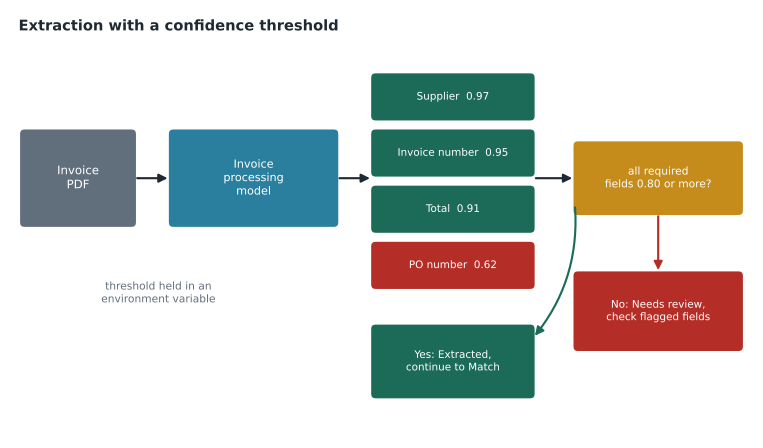
Confidence scores are what make document processing safe to automate. Lumenvale set a threshold of 0.80 for required fields, held in an environment variable. If every required field met it, the flow wrote the values to the invoice row and set status Extracted. If any required field fell below it, the flow still wrote the values but set status Needs review and listed the low-confidence fields, so a clerk could check just those fields against the PDF rather than retyping the invoice. In the first three weeks of the pilot, about 84 percent of invoices passed straight through, and most reviews took under a minute.
For the remaining layouts, mostly handwritten or unusual forms from small trades suppliers, Signe trained a custom document processing model. Custom models are trained by uploading sample documents grouped into collections by layout, tagging the fields to extract on each sample and training the model, then publishing it. Microsoft recommends a minimum number of samples per layout, and more samples generally improve accuracy. The flow called the prebuilt model first and, for suppliers known to use those layouts, the custom model instead.
Extract flow (outline)
  Trigger: When a row is modified (Invoice, status = Received)
  Get file content (SharePoint: invoice PDF)
  Extract information from invoices (prebuilt model)
  Compose: lowest required confidence
    min(outputs('Extract')?['body/fields/invoiceId/confidence'],
        outputs('Extract')?['body/fields/invoiceTotal/confidence'],
        outputs('Extract')?['body/fields/vendorName/confidence'])
  Condition: lowest required confidence >= Confidence Threshold (environment variable)
    Yes: Update a row  status = Extracted
    No:  Update a row  status = Needs review, reason = Low confidence: (field list)
Prompts in flows
The second AI job in the project was sorting the mailbox. Not every attachment was an invoice: some were credit notes, some were statements, some were contracts sent to the wrong address, and about one email in ten was a question with no attachment at all. Maribeth, who had written several prompts for the Registrar Helper, built a prompt called "Classify finance email".
The prompt had two inputs, the email subject and the first part of the body, and an instruction that told the model what categories existed, what each meant and what to return. Its output format was JSON with three fields: category, confidence (low, medium or high, as the model's own assessment) and a one-sentence reason. Structured output meant the Intake flow could use a Switch on the category without parsing free text. Maribeth tested the prompt against 120 real emails from the archive, with supplier names removed, and adjusted the instruction until it got all but three right.
Prompt: Classify finance email
Inputs: Subject (text), BodyStart (text)
Instruction:
  You sort emails sent to a college accounts payable mailbox.
  Classify the email as exactly one of: invoice, credit_note, statement,
  remittance_query, payment_status_query, other.
  Use only the subject and body below. If unsure, choose other.
  Subject: [Subject]
  Body: [BodyStart]
Output: JSON { "category": text, "confidence": "low" | "medium" | "high", "reason": text }
A third prompt, "Draft supplier query", added knowledge. When an invoice was missing a purchase order, the prompt took the invoice number and supplier as inputs, read the invoice row and the supplier's contact details from Dataverse as knowledge, and drafted a short, polite email asking for the purchase order number. The flow did not send it. It created the draft and assigned it to a clerk, who read, edited if needed and sent it. Generative output that goes to people outside the organization should, at least at first, pass through a human.
Settings and model choice
Prompt settings include the model the prompt uses. Microsoft offers several generative models in prompts and changes the list as new models arrive, so the exam objective is about knowing that you can choose and why: smaller models are faster and consume less capacity, larger models handle harder reasoning and longer content. Settings also control the response's temperature, meaning how varied or predictable the wording is. Classification and extraction tasks should be as predictable as possible; drafting tasks can allow a little more variety. Whatever the model, changing it is a change to the solution and should be retested against the same examples.
Testing AI output
AI output must be tested like any other part of a flow, but with more examples, because models do not fail in neat, repeatable ways. Lumenvale kept a test set for each AI component: 200 invoices with known correct fields for extraction, and 120 emails with known categories for classification. Every change to a prompt, model, threshold or custom model was run against the test set, and the results were compared with the previous version before the change went to production. Kwabena tracked two measures from production as well: the share of invoices that passed straight through, and the share of those that clerks later corrected. A rising correction rate would mean the threshold was too low.
Licensing: AI Builder credits and Copilot Credits
AI features consume capacity, and the way they are paid for changed during 2026. Microsoft ended sale of AI Builder capacity add-ons to new customers on November 1, 2025. On November 1, 2026, those add-ons reached end of life, and future premium licences stopped including seeded AI Builder credits; existing credits keep working until the licence or contract term ends. In their place is Copilot Credits. Microsoft's documentation describes a dual mode: AI features in Power Apps and Power Automate use AI Builder credits first while any remain, then Copilot Credits, and if neither is available, the AI features fail. There is no automatic conversion and no fixed exchange rate; each AI capability has its own rate.
For Lumenvale, that meant budgeting AI consumption in Copilot Credits from 2027 and monitoring daily usage per environment in the Power Platform admin center. It also meant designing flows to fail gracefully if AI capacity ran out: the Extract flow's Catch scope set status Needs review with the reason "AI unavailable", so invoices went to clerks rather than vanishing.
Worked problem
Setting a confidence threshold
In a test of 200 invoices, a threshold of 0.70 sends 9 percent to review, and clerks later find 6 wrong values among the invoices that passed. A threshold of 0.90 sends 31 percent to review and finds no wrong values among those that pass. A threshold of 0.80 sends 18 percent to review and finds 1 wrong value. Which threshold should Lumenvale choose, and what else should it do?
Show solution
- At 0.70 too many errors pass unchecked into approval and payment.
- At 0.90 almost a third of invoices still need a person, which keeps much of the old workload.
- At 0.80, 82 percent pass with one error in 200, and the error would still be caught at the purchase order match or by the approver.
- Choose 0.80, keep it in an environment variable, and review it monthly using the correction rate from production.
Answer: Choose the threshold that balances review workload against the cost of errors, considering the later checks in the process, and keep measuring after go-live.
One more lesson from testing concerned scanned invoices. Photographs taken on phones in the workshops were often skewed or shadowed, and the model's confidence on those dropped sharply. Rather than lowering the threshold, Ysaline asked the Lakeshore trades staff to use the scanning feature in the Microsoft 365 mobile app, which straightens and crops documents, before emailing invoices. That small change to the process improved extraction more than any model setting.
Prompts and models in apps
AB-410 also asks you to consume prompts and AI models in apps, and the same building blocks serve canvas apps. A canvas app can add a prompt or model as a data source and call it from a Power Fx formula, passing inputs from controls and showing the output in a label, a text input or a gallery. In the clerks' review app, a "Suggest correction" button ran a prompt that compared the extracted fields with the PDF's text and proposed corrected values for the low-confidence fields, which the clerk could accept or edit. Model-driven apps can use some AI features too, such as prompt columns and row summaries in Dataverse, which AB-410 covers under building data models.
Whether a prompt runs from a flow or an app, the same rules apply. Its inputs should carry only the data the task needs, its output should be checked before it changes anything important, and its use should respect the data policies and privacy rules of the environment. Lumenvale's privacy officer reviewed each prompt's inputs and knowledge before it went to production, and the team documented what data each one could see.
Common mistakes
MistakeWriting AI output straight into records without checking confidence.
InsteadUse confidence scores and thresholds to send uncertain results to people.
MistakeReturning free text from prompts that flows must parse.
InsteadAsk for structured JSON output with named fields.
MistakeSending generated emails to outsiders automatically from day one.
InsteadCreate drafts for a person to review until quality is proven.
MistakeChanging a prompt or model without retesting.
InsteadKeep a test set and compare results before every change goes live.
Summary and key terms
- AI Hub offers prompts for generative tasks and AI models for tasks such as document processing.
- Prompts have inputs, instructions, optional knowledge, settings including the model, and text or JSON output.
- Prebuilt models need no training; custom document processing models learn from tagged samples.
- Confidence scores and thresholds decide which results continue automatically and which go to review.
- Prompts and models are consumed in cloud flows through actions and in canvas apps through formulas.
- Test AI components with fixed test sets and track correction rates in production.
- AI Builder credits are being replaced by Copilot Credits; design flows to fail safely if capacity runs out.
- Prompt
- A reusable instruction to a generative AI model with defined inputs and output.
- Prebuilt model
- An AI model ready to use without training, such as invoice processing.
- Custom document processing model
- A model trained on an organization's own sample documents to extract fields.
- Confidence score
- A value between 0 and 1 showing how sure a model is about a result.
- Structured output
- Prompt output in a defined format, such as JSON with named fields.
- Knowledge (in a prompt)
- Data, such as Dataverse rows, that the model uses when responding.
- Copilot Credits
- The capacity unit that replaces AI Builder credits for AI features.
Practice problems
Work each problem on paper first, then reveal the answer to check.
What did the Extract flow do with invoices below the confidence threshold?
Show answer
It saved the values but set status Needs review and listed the low-confidence fields for a clerk to check.
Why did the classification prompt return JSON?
Show answer
So the flow could branch on a named category field without parsing free text.
What happens when AI features run out of both AI Builder credits and Copilot Credits?
Show answer
They fail, so flows should catch the failure and route items to people.
When should a custom document processing model be used instead of the prebuilt invoice model?
Show answer
For layouts the prebuilt model reads poorly, trained on the organization's own samples.
Lesson quiz · 5 questions
Score 60% or more to complete this lesson.
Create a free account to save your progress, take quizzes and earn a certificate.