
MSBA-204 · Lesson 9 of 12 · 18 min
eDiscovery cases and holds
▶ Video coming soon A video version of this lesson is on the way.
On November 12, 2026, a family complained that a case manager had used a Copilot summary of their mother's care plan when explaining a medication change; the pharmacist had in fact approved the change, but the family's letter mentioned a lawyer. Corvallin's legal counsel asked Ines the next day to preserve everything relevant. That request is what eDiscovery is for: identifying, preserving, collecting, reviewing and exporting content for legal, regulatory or internal investigations. This lesson covers the unified eDiscovery experience in the Microsoft Purview portal. eDiscovery is outside AB-650's skill list, but a Microsoft 365 administrator is usually the person legal counsel calls.
One experience, not three
Older material describes three eDiscovery tools: Content search, eDiscovery (Standard) and eDiscovery (Premium). Microsoft retired the classic experience in 2025 and replaced it with a single eDiscovery solution in the Purview portal. The classic Content search option is retired; the new Content search lists all existing content searches in the organization, which all belong to one case named Content search. Everything else happens in cases, and the features available in a case depend on licensing: holds, searches and exports work with E3, while premium capabilities such as review set analytics need E5-level licensing, and some capabilities use pay-as-you-go billing.
Roles
eDiscovery permissions come from role groups. An eDiscovery Manager can create cases and work in cases they create or are added to as members. An eDiscovery Administrator has the same permissions and can also access and manage every case in the organization, which is why Corvallin limited that group to Ines. Neither group supports expiring assignments. Case members control who can see a case's contents, so Ines added only herself, the privacy officer and Corvallin's external counsel's liaison to the complaint case.
| Role group | Can do | Corvallin members |
|---|---|---|
| eDiscovery Manager | Create cases; work in cases they are members of: holds, searches, review sets, exports | Privacy officer |
| eDiscovery Administrator | Everything a manager can do, in every case | Ines |
| Case members | Access one case's contents | Set per case |
Creating the case and adding data sources
Ines created a case called CASE-2026-011 Care plan complaint and added data sources. Choosing a person in the new experience creates data sources for their mailbox and OneDrive and suggests related SharePoint sites, which can be included or excluded. She added the case manager, the branch manager and the pharmacist liaison as people, and the Branch 2 Clinical team's site. eDiscovery searches can cover Exchange mailboxes, SharePoint sites, OneDrive, Teams conversations, and Copilot and AI application data, so the case manager's Copilot interactions were in scope automatically through her mailbox.
Holds
A hold preserves content in its locations until the location is removed from the hold or the hold is deleted. Holds can cover Exchange mailboxes, OneDrive accounts and the mailboxes and sites of Teams, Microsoft 365 groups and Viva Engage groups, and they can be query-based, preserving only content that matches conditions, or preserve everything in the location. While a hold applies, deleted or edited content is kept in the same hidden places that retention uses: Recoverable Items for mailboxes and the Preservation Hold library for sites. A hold can take a while to apply across locations, so the hold's status should be checked rather than assumed. The hold management dashboard shows holds across all cases, and a hold report lists them for the whole organization.
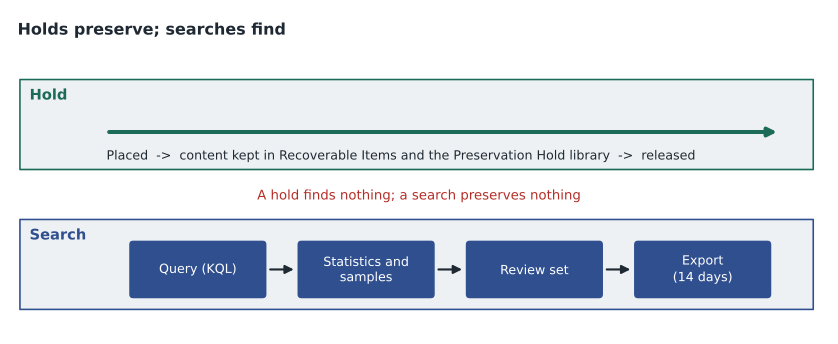
Ines placed a hold on all content in the three people's mailboxes and OneDrive accounts and on the branch site, with no query, because counsel did not yet know what would matter. A narrower query-based hold was possible, but over-preserving three mailboxes for a few months cost little, while missing a relevant message could cost a great deal.
| Preservation option | Scope | Best for |
|---|---|---|
| eDiscovery hold in a case | Chosen locations, all content or query-based | Legal matters and investigations, with an audit trail in the case |
| Litigation Hold on a mailbox | A whole mailbox, including deleted items and the archive | Preserving one mailbox completely, often for a departing employee |
| Retention policy or label | Locations or items by policy | Routine compliance retention, not specific matters |
Searching
Searches in a case can be built with a condition builder or written in Keyword Query Language (KQL), which supports autocompletion. Search statistics show how many items match per location and per condition, and samples let reviewers check whether results are what they expected before collecting anything. Searches can be revised and rerun. Results can be exported directly or added to a review set.
("care plan" OR "medication change" OR CL482913) AND
(sent>=2026-10-01 AND sent<=2026-11-13)

# Separate search for files in the branch site, by date modified
("care plan" OR CL482913) AND lastmodifiedtime>=2026-10-01
KQL rewards precision. Phrases need quotation marks, Boolean operators must be uppercase, and date properties differ by content type: sent and received for email, lastmodifiedtime and created for documents. Ines checked statistics for each condition and found that the client ID alone matched 311 items, most of them routine visit notes; combined with the date range and the phrases, the search returned 64 items.
Review sets
A review set is a secure Microsoft-provided Azure Storage location into which collected items are copied. In a review set, reviewers can search and filter, use an advanced review set explorer (in preview) with KQL, view items, tag them, for example as relevant, not relevant or privileged, and run analytics such as near-duplicate detection, email threading and themes, which reduce how much a reviewer has to read. Content protected by Microsoft Purview Message Encryption, sensitivity labels or Azure Rights Management is decrypted automatically when it is added to search results or review sets, which mattered because most of the relevant documents were labelled Confidential / Clinical. Cloud attachments, files linked in Teams messages and email, can be collected as the version that was shared.
Worked problem
Deciding what to collect
The search returns 64 items: 38 emails, 11 Teams messages, 9 documents and 6 Copilot interactions. Counsel wants to see everything relevant but not unrelated client information. What should Ines do?
Show solution
- Add the 64 items to a review set so they are copied into secure storage, with cloud attachments included.
- Run email threading so related messages are reviewed together.
- Have the privacy officer tag items as relevant, not relevant or privileged; communications with counsel are tagged privileged.
- Export only items tagged relevant, after counsel reviews the tags.
Answer: Collect to a review set, use threading, tag for relevance and privilege, and export only the relevant set for counsel.
Exports
Search exports download mailbox items as PST files or individual messages, and SharePoint and OneDrive content as native files. Export packages expire 14 days after creation and are deleted automatically if not downloaded, so Ines downloaded the package the same day to an encrypted folder that only she and counsel's liaison could open. Review set exports let the reviewer choose the documents and options, such as including tags and converting to a standard format. Every eDiscovery action, including searches, exports and changes to holds, is recorded in the audit log.
Operational limits
eDiscovery has limits on concurrent processes, daily jobs and items, shown in a Process report that eDiscovery administrators and managers can open. Large matters should be planned so searches are refined before collection rather than collecting everything and filtering later. Conditional Access policies on the administrator's account can block some operations, and an administrator without a SharePoint licence may find some SharePoint capabilities limited, both of which Teodor discovered while testing with a break-glass account that had no licences.
Closing a case
When counsel confirms a matter is finished, holds must be released, or content that would otherwise be deleted by retention will be kept indefinitely. Closing a case releases its holds, which is why Ines's case checklist included "confirm with counsel in writing" before closing. The complaint case remained open in late November while counsel exchanged letters with the family's lawyer.
Copilot and AI data in eDiscovery
Microsoft 365 Copilot interactions are stored with the user's mailbox, so eDiscovery can search, hold and export them like other content. A search can target Copilot activity specifically, and holds on a person's mailbox preserve their Copilot prompts and responses along with their email. For the complaint case this was the central evidence. The case manager's six Copilot interactions in the date range showed the prompt she used, "Summarize the medication changes in this care plan for the family", and Copilot's response, which accurately reflected the plan and noted that the pharmacist had approved the change. That interaction was tagged relevant and was the first item counsel read.
Retention matters here too. Corvallin's retention policy for the Microsoft Copilot experiences location deleted interactions after two years. The eDiscovery hold overrode that for the people in the case, so the interactions would survive as long as the case needed them, even if it ran longer than two years.
Holds and retention together
| Content | Normal lifecycle | Under the complaint hold |
|---|---|---|
| Case manager's email | Retained 7 years | Retained until the hold is released, then normal lifecycle resumes |
| Teams chats | Deleted after 3 years | Kept until the hold is released |
| Copilot interactions | Deleted after 2 years | Kept until the hold is released |
| Files in the branch site | Client records retained 7 years after discharge | Kept until the hold is released or longer if retention requires |
Privilege and confidentiality during review
Some of the collected items were emails between Ines and Corvallin's counsel about the complaint. Those are privileged in most legal settings, and producing them by mistake can waive privilege. The review set tags included Privileged, and counsel's liaison reviewed every item tagged that way before any export. The case members list was kept short for the same reason. eDiscovery also respects that the content is personal health information: the export went only to counsel, through the encrypted folder, and the privacy officer recorded the disclosure in the client's file as required by Corvallin's own privacy procedures.
A case checklist
Ines turned the first case into a checklist for future ones, kept in the eDiscovery section of the IT decision log:
| Stage | Checklist items |
|---|---|
| Open | Written request from counsel or the privacy officer; case created with a standard name; members limited |
| Preserve | Holds placed the same day; hold status confirmed; departing custodians flagged to IT |
| Search | Queries recorded with statistics; samples checked; date ranges agreed with counsel |
| Review | Review set created; tags agreed; privileged items reviewed by counsel |
| Export | Downloaded within 14 days to a restricted location; recipients recorded |
| Close | Counsel confirms in writing; holds released; case closed; notes kept |
eDiscovery for departing custodians
People in a case sometimes leave the organization while the case is open. If their account is deleted, their mailbox becomes an inactive mailbox because it is on hold, and it can still be searched; their OneDrive is preserved by the hold too. But someone must remember to keep the hold in place and to tell IT not to treat the account as an ordinary departure. Ines added a flag to Ama's offboarding checklist: before deleting any account, check whether the person is a custodian in an open eDiscovery case, using the hold management dashboard. The check takes a minute and prevents the most common way evidence is lost in small organizations.
When to involve counsel
Administrators can run searches quickly, which makes it tempting to start before anyone has decided what the matter is. Corvallin's rule was simple: an eDiscovery case is opened only on a written request from counsel or the privacy officer, and searches beyond preservation wait until counsel has agreed the scope. That protects the people whose content is searched as well as the organization.
Ines also learned to write a short case summary at the top of the case's notes: who requested it, the date of the request, the scope agreed with counsel, the holds placed and their status. Anyone picking up the case later, including her own deputy if she were away, could understand it in two minutes.
Common mistakes
MistakeSearching without placing a hold first.
InsteadPlace holds as soon as preservation is requested; searches do not preserve anything.
MistakeLeaving export packages to download later.
InsteadDownload within 14 days; packages are deleted automatically.
MistakeGiving several people eDiscovery Administrator.
InsteadKeep it to one or two; managers can work in their own cases.
MistakeClosing a case without confirming with counsel.
InsteadClosing releases holds; confirm in writing first.
Summary and key terms
- eDiscovery in the Purview portal is a single case-based experience; classic tools have been retired.
- Data sources come from people, groups and sites; holds preserve content until released.
- Searches use a condition builder or KQL, with statistics and samples before collection.
- Review sets copy items to secure storage for tagging, analytics and automatic decryption.
- Export packages expire after 14 days, and every action is audited.
- eDiscovery case
- A container for one matter's members, data sources, holds, searches, review sets and exports.
- Hold
- Preservation of content in chosen locations until it is released.
- Data source
- A person, group or site whose mailboxes and sites are included in a case.
- Keyword Query Language (KQL)
- The query syntax used to search Microsoft 365 content.
- Review set
- A secure copy of collected items for review, tagging and analytics.
- Litigation Hold
- A mailbox setting that preserves all mailbox content, including deleted items.
Practice problems
Work each problem on paper first, then reveal the answer to check.
How long are search export packages kept before automatic deletion?
Show answer
14 days.
Which role group can access every case in the organization?
Show answer
eDiscovery Administrator.
What happens to labelled, encrypted content when it is added to a review set?
Show answer
It is decrypted automatically.
Lesson quiz · 5 questions
Score 60% or more to complete this lesson.
Create a free account to save your progress, take quizzes and earn a certificate.