
MSAZ-131 · Lesson 6 of 12 · 18 min
Microsoft Security Copilot
▶ Video coming soon A video version of this lesson is on the way.
Ama Boateng had spent forty minutes writing up the November 11 phishing incident: what happened, what was checked, what was found and what was done. When she showed it to Sunil Rao, he asked how long it would have taken if the incident had involved twenty mailboxes and three devices instead of one of each. "All day," she said. Sunil used that answer to introduce the sixth security hour, on Microsoft Security Copilot, a generative AI assistant for security work. He was clear about what he wanted from it and what he did not. "I want it to help you read faster, summarize faster and write the first draft of the boring parts. I do not want it to make decisions for you."
A note on the exam first. Security Copilot appeared in earlier versions of the SC-900 skills outline. The outline dated October 21, 2026 does not list it as a separate item, but Copilot features now appear inside the Defender, Entra, Intune and Purview portals that the outline does cover, so candidates are likely to see it mentioned. Check the current outline before your exam, and treat this lesson as the background you need to recognize what Security Copilot is and where it fits.
What Security Copilot is
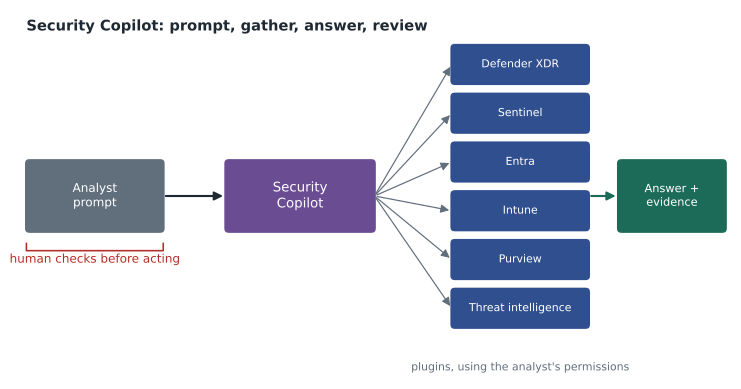
Security Copilot combines a large language model with security-specific capabilities: access to the organization's security data through the Microsoft products it is connected to, Microsoft's threat intelligence, and tools, called plugins, that let it query those products and other services. A security professional asks a question or gives an instruction in natural language, such as "Summarize this incident for a manager" or "Which devices show signs of the same activity?", and Security Copilot gathers the relevant data, reasons over it and responds in plain language, with links to the evidence.
Security Copilot works with the permissions of the person using it. If Ama cannot see a mailbox in Defender, Security Copilot cannot see it for her either. That design follows the Zero Trust and least-privilege principles from MSAZ-130: an assistant should not become a back door around access controls.
Two ways to use it: standalone and embedded
Security Copilot has a standalone experience, its own portal where analysts can hold longer conversations, combine data from several products in one session and run saved sequences of prompts. It also has embedded experiences inside other Microsoft security products, where Copilot appears as a panel or button in context. In the Microsoft Defender portal, it can summarize an incident, explain what a suspicious script does in plain language, suggest response steps and draft an incident report. In Microsoft Entra, it can help investigate risky users and sign-ins. In Intune, it can help explain device policies and configurations. In Microsoft Purview, it can summarize data loss prevention alerts and insider risk cases. The embedded features save switching between tools; the standalone portal suits broader investigations.
| Experience | Where it appears | Example use at Harrow & Finch |
|---|---|---|
| Standalone | The Security Copilot portal | Ama asks for a weekly summary of high-severity incidents across Defender and Sentinel |
| Embedded in Defender | Incident and alert pages in the Microsoft Defender portal | A one-paragraph summary of the November 11 phishing incident for Grace Oduya |
| Embedded in Entra | Risky user and sign-in investigation | Why was a store manager's sign-in marked as risky? |
| Embedded in Purview | DLP alerts and insider risk cases | A summary of what a DLP alert matched and who was involved |
Promptbooks, plugins and agents
Promptbooks are saved sequences of prompts that carry out a common task in a consistent way. A promptbook for incident investigation might summarize the incident, list the affected entities, check them against threat intelligence, assess the impact and draft a report, one step after another. Microsoft provides promptbooks, and organizations can write their own, which helps a small team like Sunil's apply the same quality of analysis whoever is on duty.
Plugins connect Security Copilot to data and tools. Microsoft plugins connect to its own security products; others connect to third-party security tools and websites, and organizations can build their own. An administrator decides which plugins are enabled, which controls what data Copilot can reach.
Agents are a newer development. A Security Copilot agent is designed to carry out a defined, repeated task with less prompting, such as triaging phishing reports that users submit, reviewing Conditional Access policies for gaps or prioritizing data loss prevention alerts, and to report what it did and why. Microsoft has introduced agents built into Defender, Entra, Intune and Purview; they are not switched on automatically, so an organization chooses which to set up and deploy. Sunil was interested in the phishing triage agent, because users at Harrow & Finch reported about forty suspicious messages a week and most were harmless marketing, but he wanted to watch its decisions for a month before trusting it.
Capacity and licensing
Security Copilot uses Security Compute Units (SCUs), units of processing capacity that power prompts and agents. Organizations can buy capacity, and Microsoft has also announced that eligible Microsoft 365 E5 and E7 customers receive Security Copilot as part of their licence, with a monthly allowance of SCUs. According to Microsoft's inclusion page, last updated in June 2026, the allowance is 400 SCUs a month for every 1,000 paid user licences, scaled down proportionally for smaller organizations and capped at 10,000 SCUs a month; units reset monthly and do not roll over. Licensing terms change, so treat these figures as an example of how capacity is allocated rather than something to memorize for the exam.
# Monthly Security Copilot units under the published inclusion formula (check current terms).
def monthly_units(seats):
    return min(seats * 400 / 1000, 10000)
for n in (400, 950, 4000, 30000):
print(f"{n:6d} paid licences -> {monthly_units(n):7.0f} units a month")400 paid licences -> 160 units a month 950 paid licences -> 380 units a month 4000 paid licences -> 1600 units a month 30000 paid licences -> 10000 units a month
What this code does
Applies the published inclusion formula for Security Copilot capacity to several numbers of paid licences: a fixed number of units per thousand licences, up to a monthly cap. It prints the monthly units each organisation size would get. The terms can change, so the course says to check the current ones.
Harrow & Finch has about 950 staff, so if it were on an eligible plan the formula would give it 380 units a month. Dana Whitcombe asked whether that was a lot. Sunil said nobody could answer until the team had used it for a month, which is why the usage dashboard in the standalone portal matters: it shows which experiences and agents consume capacity, so the team can see whether the allowance fits.
Using a security AI responsibly
Sunil spent the second half of the hour on the risks, because the same habits apply to every AI tool in this series of courses. Generative AI can produce fluent answers that are wrong. A summary can leave out the one detail that matters. A suggested response can be reasonable in general and wrong for a particular business. Security Copilot reduces these risks by grounding answers in the organization's data and showing the evidence behind them, but it cannot remove them.
His rules for the team were short. Read the evidence, not only the summary: every answer links back to the alerts, logs and records it used, so check them. Keep a human in charge of any action that affects people or systems, such as disabling an account or isolating a device. Use promptbooks for consistency, so that important checks are not skipped. Record in the incident notes when an AI summary was used, so that anyone reviewing the case later knows. Report answers that are wrong through the feedback options, which helps the product improve. Arjun Mehta, the AI engineer who leads the AI courses, added that the question he asks of every AI system applies here too: what would a wrong answer cost?
| Good use | Poor use |
|---|---|
| Summarizing a long incident for a manager, then checking it against the evidence | Pasting the summary into a report without reading the incident |
| Explaining an unfamiliar script or command line in plain language | Running a suggested command without understanding it |
| Drafting a hunting query that the analyst reviews and tests | Treating no results from a query as proof that nothing happened |
| Triaging user-reported phishing with an agent whose decisions are reviewed | Letting an agent close incidents nobody ever checks |
Microsoft states that customer data used in Security Copilot is handled under its enterprise data protection commitments and is not used to train the underlying foundation models; organizations can review the data sharing settings. Carmen Ortiz, the privacy officer, asked for those settings to be reviewed by the AI review group before any agent is switched on, as she had for the customer-service assistant pilot.
Writing good prompts for security work
Ama tried a few prompts during the session and learned quickly that vague prompts give vague answers. "Tell me about this incident" produced a long, general summary. "Summarize incident 4471 for a store operations director in five sentences, say whether any customer data was exposed, and list what the staff member should do next" produced something Grace Oduya could read in a minute. Sunil gave the team four habits. Say who the answer is for. Say what form it should take, such as a table, a list of steps or a fixed number of sentences. Give the scope, such as an incident number, a time range or a device name. And ask for the evidence, so the answer links back to the records it used.
Promptbooks capture good prompts so nobody has to reinvent them. Ama wrote the team's first custom promptbook, Phishing report review: summarize the message and its sender, list other recipients, check the links and attachments against threat intelligence, list any clicks and sign-ins that followed, and draft a short note to the reporting user. She planned to test it on the next twenty reported messages in December and compare its output with her own manual reviews before the team relied on it.
Sunil added a caution about scripts and queries. Security Copilot can explain a script found on a device or draft a KQL hunting query, which saves time, but the explanation of a script is a reading aid, not proof of what the script did, and a drafted query must be read and tested like any other. A query that returns no results may simply be wrong. The device's own timeline in Defender for Endpoint remains the record of what actually happened.
Where Security Copilot fits in the course
Ama placed Security Copilot on her one-page map as a layer across the other products rather than a product of its own. It does not collect data, detect threats or enforce policies by itself; Defender, Sentinel, Entra, Intune and Purview do that. What it adds is speed in reading, summarizing and drafting, and, through agents, help with repetitive triage. That placement helped her remember the exam's likely angle: a question about which product detects, blocks or records something will name one of the underlying products, while a question about summarizing, explaining or drafting in natural language points to Security Copilot.
Worked problem
Embedded or standalone?
Which Security Copilot experience fits each task? (1) Summarizing one incident while working it in the Defender portal; (2) a weekly briefing that combines Sentinel incidents, Defender alerts and threat intelligence; (3) understanding why a sign-in was flagged as risky while reviewing it in Entra.
Show solution
- Working a single incident in the Defender portal suits the embedded experience there.
- Combining several products and threat intelligence in one session suits the standalone portal, perhaps with a promptbook.
- Reviewing a risky sign-in in Entra suits the embedded experience in Entra.
Answer: Embedded, standalone and embedded. Both kinds use the analyst's permissions and show their evidence.
Common mistakes
MistakeThinking Security Copilot can see data the user cannot.
InsteadIt works with the permissions of the person using it.
MistakeTreating AI summaries as final.
InsteadCheck the linked evidence; summaries can omit or misstate details.
MistakeAssuming agents start working as soon as they are licensed.
InsteadAgents must be set up and deployed, and their decisions should be reviewed.
MistakeMemorizing capacity figures for the exam.
InsteadKnow what Security Compute Units are; licensing details change.
Summary and key terms
- Microsoft Security Copilot is a generative AI assistant for security professionals that combines a large language model with security data, Microsoft threat intelligence and plugins.
- It has a standalone portal and embedded experiences in Defender, Entra, Intune, Purview and Sentinel.
- Promptbooks run saved sequences of prompts, plugins connect data sources and agents carry out defined tasks such as phishing triage once deployed.
- It uses the user's own permissions and consumes Security Compute Units.
- Answers should be checked against the evidence, and humans should stay in charge of consequential actions.
- Security Copilot
- Microsoft's generative AI assistant for security operations, identity, device and data protection work.
- Promptbook
- A saved sequence of prompts that performs a common task consistently.
- Plugin
- A connector that lets Security Copilot query a product, service or data source.
- Agent
- A Security Copilot component that performs a defined task with limited prompting.
- Security Compute Unit
- A unit of capacity that powers Security Copilot prompts and agents.
- Embedded experience
- Security Copilot features inside another product's portal.
Practice problems
Work each problem on paper first, then reveal the answer to check.
Whose permissions does Security Copilot use when it reads data?
Show answer
The permissions of the person using it.
What is a promptbook?
Show answer
A saved series of prompts that carries out a common task the same way each time.
Name two products with embedded Security Copilot experiences.
Show answer
Any two of Defender, Entra, Intune, Purview and Sentinel.
Lesson quiz · 5 questions
Score 60% or more to complete this lesson.
Create a free account to save your progress, take quizzes and earn a certificate.