
MSAZ-131 · Lesson 2 of 12 · 18 min
Network security groups, Azure Firewall and DDoS protection
▶ Video coming soon A video version of this lesson is on the way.
The second security hour started with a question from Marcus Feldt, the e-commerce manager, who had joined because harrowfinch.com would soon move to Azure. "If we have a firewall, why do we also need network security groups? And if we have both, why do we pay for DDoS protection?" Sunil liked the question because it was the same one the SC-900 exam asks in different forms. Each of the three services filters or absorbs a different kind of traffic, at a different point, and a sensible design uses them together. Ama Boateng took notes for her study cards, and Theo Marchand brought the network diagram of the Skylight hub and spokes.
Network security groups
A network security group (NSG) is a list of security rules that allow or deny network traffic. It can be associated with a subnet, with the network interface of a virtual machine, or with both. Each rule has a priority, a source, a destination, a port or port range, a protocol and an action, allow or deny, and applies to inbound or outbound traffic. Rules are processed in priority order, from the lowest number to the highest, and processing stops at the first rule that matches. Priorities run from 100 to 4096, so a rule with priority 100 is checked before a rule with priority 200.
Every NSG also contains default rules that cannot be deleted, with very high priority numbers so that custom rules are checked first. In plain terms, the defaults allow traffic within the virtual network, allow traffic from the Azure load balancer and deny all other inbound traffic, and allow outbound traffic to the virtual network and the internet. Because inbound traffic from the internet is denied by default, a VM is reachable from the internet only if someone adds a rule that allows it, which is exactly what the developer had done in October.
NSG rules can refer to service tags, which are names for groups of IP addresses that Microsoft maintains, such as Internet, VirtualNetwork or the address ranges of a particular Azure service. They can also refer to application security groups, which let you group VMs by role, such as web servers or database servers, and write rules in terms of those groups instead of individual addresses. Theo used both: the StockLine database subnet allows SQL traffic only from the application security group for the StockLine application servers.
| Priority | Name | Source | Destination port | Protocol | Action |
|---|---|---|---|---|---|
| 100 | Allow-App-To-SQL | Application servers group | 1433 | TCP | Allow |
| 110 | Allow-Bastion-RDP | Bastion subnet 10.40.2.0/26 | 3389 | TCP | Allow |
| 200 | Deny-Internet-Mgmt | Internet | 3389, 22 | Any | Deny |
| 4096 | Deny-All-Other | Any | Any | Any | Deny |
Sunil reminded everyone that NSGs filter by address, port and protocol. They do not inspect what is inside the traffic, and they do not know which website a connection is going to. That is why they are cheap, fast and everywhere, and also why they are not enough on their own.
# Simplified NSG evaluation: rules are checked from lowest to highest priority; first match wins.
rules = [
    (100, "Allow-App-To-SQL", "app", 1433, "Allow"),
    (110, "Allow-Bastion-RDP", "bastion", 3389, "Allow"),
    (200, "Deny-Internet-Mgmt", "internet", 3389, "Deny"),
    (4096, "Deny-All-Other", "any", None, "Deny"),
]
def check(source, port):
    for prio, name, src, p, action in sorted(rules):
        if src in (source, "any") and p in (port, None):
            return f"{source} to port {port}: {action} by rule {prio} {name}"
tests = [("app", 1433), ("bastion", 3389), ("internet", 3389), ("internet", 1433)]
for s, p in tests:
print(check(s, p))app to port 1433: Allow by rule 100 Allow-App-To-SQL bastion to port 3389: Allow by rule 110 Allow-Bastion-RDP internet to port 3389: Deny by rule 200 Deny-Internet-Mgmt internet to port 1433: Deny by rule 4096 Deny-All-Other
What this code does
Imitates how a network security group evaluates traffic: rules are checked in order of priority number, lowest first, and the first matching rule decides whether traffic is allowed or denied. Test connections show the app reaching the database allowed, Bastion remote access allowed, and internet traffic denied. The final catch-all rule denies anything not explicitly allowed.
Azure Firewall
Azure Firewall is a managed, cloud-based network security service. It is stateful, which means it tracks connections and allows the return traffic of a permitted connection without extra rules. It has high availability built in, can be deployed across availability zones and scales automatically. Customers do not patch or size firewall virtual machines; Microsoft runs the service.
Azure Firewall usually sits in the hub of a hub and spoke network. Routes send traffic from the spokes to the firewall, so that traffic between spokes, traffic to on-premises networks and traffic to the internet all pass through one place where policy is enforced and logged. Its rules come in three kinds. Network rules filter by address, port and protocol, much like an NSG but centrally. Application rules filter outbound web traffic by fully qualified domain name, so you can allow servers to reach the update service of a vendor without allowing the whole internet. NAT rules translate a public address and port to a private address inside, for the few services that must accept connections from outside.
Azure Firewall can also use threat intelligence from Microsoft to alert on or block traffic to and from addresses and domains known to be malicious. Higher tiers add further inspection features. Rules are managed in a firewall policy, which can be shared by several firewalls and arranged in a hierarchy, so a central team sets the base rules and application teams add their own.
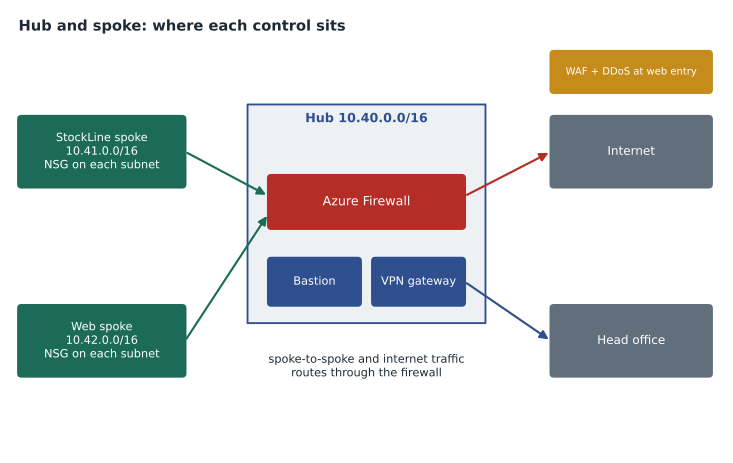
Marcus asked the obvious follow-up: if the firewall checks everything centrally, why keep NSGs? Sunil's answer was layering. The firewall controls traffic between networks; NSGs control traffic within and into each subnet. If a route is misconfigured and traffic skips the firewall, the NSG still applies. If one VM in a subnet is compromised, the NSG can stop it reaching other VMs in the same network, which the hub firewall never sees.
Azure Web Application Firewall
A network firewall allows or denies connections. It does not understand whether a request to a web page contains an attempt to trick the database behind the page. Azure Web Application Firewall (WAF) works at the application layer and inspects HTTP and HTTPS requests. It uses managed rule sets, maintained by Microsoft and based on well-known lists of common web attack types, to detect and block attempts such as injecting database commands or malicious scripts into forms and URLs. Custom rules can add rate limits, geographic filters or exceptions for a particular application.
WAF is not a separate box. It is a policy attached to Azure Application Gateway, a regional web traffic load balancer, or to Azure Front Door, a global entry point for web applications, or to Azure Content Delivery Network. It can run in detection mode, which logs what it would have blocked, or prevention mode, which blocks. Marcus's team planned to start in detection mode for two weeks when the new website goes live, review the logs for false alarms, and then switch to prevention.
Azure DDoS Protection
A distributed denial of service (DDoS) attack tries to make a service unavailable by overwhelming it with traffic from many sources at once. Attacks can flood the network with packets, exhaust connections or send so many requests that servers cannot keep up. For a retailer, the risk is real: an online store that is unreachable during a holiday sale loses money every minute.
All Azure services are covered by infrastructure-level DDoS protection that Microsoft runs for the platform as a whole at no extra charge. The paid Azure DDoS Protection service adds protection tuned to the customer's own public IP addresses. It learns the normal traffic pattern of each protected address, detects unusual floods and mitigates them automatically, and provides metrics, alerts, reports after an attack and, on the higher tier, access to Microsoft's DDoS rapid response team. Protection is applied either to a whole virtual network, covering the public IP addresses in it, or to individual public IP addresses.
DDoS Protection works at the network and transport layers. Floods of web requests that look like real visitors are better handled at the application layer by WAF rate-limiting rules and by Azure Front Door, which spreads traffic across Microsoft's global edge. Sunil summed up the combination: DDoS Protection absorbs the flood, WAF filters the bad requests, Azure Firewall controls what goes between networks, and NSGs guard each subnet.
| Service | Looks at | Where it sits | Example at Harrow & Finch |
|---|---|---|---|
| Network security group | Address, port, protocol | Subnet or network interface | Only app servers may reach the SQL port |
| Azure Firewall | Address, port, protocol, domain names, threat intelligence | Hub virtual network | Spokes may reach only approved update sites |
| Web Application Firewall | Content of web requests | Application Gateway or Front Door | Blocks script injection in the store search box |
| DDoS Protection | Traffic volume and patterns | Public IP addresses or virtual networks | Absorbs a flood against the store address |
Designing rules that stay readable
Theo had seen network rule sets on premises grow over the years into hundreds of entries that nobody dared to remove. He set three habits for Skylight so the Azure rules would not go the same way. First, every rule has a name that says what it allows and why, such as Allow-App-To-SQL, and a description that names the ticket or change request that created it. Second, rules use application security groups and service tags instead of lists of individual addresses wherever possible, so adding a new application server means adding it to a group, not editing every rule that mentions servers. Third, priorities are spaced out in tens, starting at 100, so a new rule can be slotted between two existing ones without renumbering the whole list.
He also turned on NSG flow logs, now provided through virtual network flow logs in Azure Network Watcher, which record which connections were allowed or denied. The logs feed Microsoft Sentinel in lesson 4 and let the team answer questions such as whether anything still uses a port before closing it. Every quarter, the plan is to review rules that matched no traffic in the previous ninety days and remove those that are no longer needed.
Marcus asked whether all of this would slow the website down. Sunil explained that NSG rules are processed in the Azure network fabric and add no noticeable delay, Azure Firewall adds a small amount for the traffic routed through it, and WAF inspection is designed for web-scale traffic. The bigger risk to the website, he said, was not latency but a rule mistake that blocked real customers, which is another reason to keep rules named, documented and reviewed.
Worked problem
Choosing the right control
Harrow & Finch wants four things: (1) block test VMs from reaching the internet except the vendor update site updates.example-vendor.com; (2) stop the website VMs from talking to the StockLine database; (3) block attempts to inject database commands through the store search box; (4) keep the store reachable during a traffic flood.
Show solution
- Allowing one domain name for outbound traffic needs an application rule on Azure Firewall.
- Blocking traffic between two subnets can be done with NSG rules on the database subnet, and also with a firewall network rule between spokes.
- Inspecting the content of web requests needs Web Application Firewall.
- Absorbing a traffic flood against a public address needs Azure DDoS Protection, with WAF rate limits for request floods.
Answer: Azure Firewall application rule; network security group (and firewall); Web Application Firewall; DDoS Protection. No single service covers all four.
Common mistakes
MistakeThinking a rule with priority 4000 is checked before priority 100.
InsteadLower numbers are processed first, and the first matching rule wins.
MistakeExpecting an NSG to block a website by name.
InsteadNSGs filter by address, port and protocol; domain name filtering needs Azure Firewall application rules.
MistakeAssuming Azure Firewall inspects attacks inside web form fields.
InsteadThat is the job of Web Application Firewall.
MistakeBelieving Azure gives no DDoS protection unless you pay.
InsteadBasic platform protection is always on; the paid service adds tuning, monitoring and support for your addresses.
Summary and key terms
- Network security groups filter traffic to subnets and network interfaces with prioritized allow and deny rules on address, port and protocol, and include default rules that deny inbound internet traffic.
- Azure Firewall is a managed, stateful firewall, usually in a hub, with network, application and NAT rules and threat intelligence.
- Web Application Firewall inspects web requests on Application Gateway or Front Door to block common web attacks.
- Azure DDoS Protection detects and mitigates traffic floods against public IP addresses beyond the free platform protection.
- Together they give layered network protection.
- Network security group
- A set of prioritized allow and deny rules for traffic to and from Azure resources.
- Service tag
- A Microsoft-maintained name for a group of IP address ranges, used in rules.
- Application security group
- A group of VMs used as a source or destination in NSG rules.
- Stateful
- Tracking connections so that return traffic is allowed automatically.
- Application rule
- An Azure Firewall rule that filters outbound traffic by domain name.
- Web Application Firewall
- A service that inspects web requests to block common application attacks.
- DDoS attack
- An attempt to make a service unavailable by flooding it with traffic from many sources.
Practice problems
Work each problem on paper first, then reveal the answer to check.
In what order are NSG rules processed?
Show answer
From the lowest priority number to the highest; the first match applies.
Which service can allow outbound traffic to one domain name only?
Show answer
Azure Firewall, with an application rule.
On which services can Web Application Firewall run?
Show answer
Azure Application Gateway, Azure Front Door and Azure Content Delivery Network.
Lesson quiz · 5 questions
Score 60% or more to complete this lesson.
Create a free account to save your progress, take quizzes and earn a certificate.