
MSAZ-131 · Lesson 10 of 12 · 18 min
Data loss prevention
▶ Video coming soon A video version of this lesson is on the way.
A week after the labelling session, Dana Whitcombe's accounts payable team had a near miss. A clerk preparing a payment run attached a spreadsheet of supplier bank details to an email meant for the bank and, through autocomplete, addressed it to a supplier with a similar name instead. She caught it before sending. When Sunil Rao heard, he said that catching it had been luck, and that luck is not a control. The security hour that followed was about data loss prevention (DLP): policies that detect sensitive information as people use it and step in before it leaves where it should be.
What data loss prevention does
Sensitivity labels protect a document by encrypting and marking it. DLP works differently. A DLP policy watches activities, such as sending an email, sharing a file, copying to a USB drive or pasting into a website, checks whether the content involved is sensitive, and then takes an action: let it go and record it, warn the user, require a business justification, or block it. Labels and DLP work together. A DLP rule can use a label as a condition, for example blocking any Highly Confidential document from being shared outside the organization, and it can use the sensitive information types, exact data match and trainable classifiers from lesson 9.
Microsoft Purview Data Loss Prevention is one solution with one set of policies that can be applied in many places. Ama Boateng found this the most useful idea in the lesson for the exam: the same policy model covers email, files, chat, devices and more, so a question about "stopping card numbers from leaving the company" is answered with DLP whichever channel it mentions.
| Location | Examples of what DLP can watch |
|---|---|
| Exchange email | Messages and attachments sent outside the organization |
| SharePoint sites and OneDrive | Files shared with external people or by anonymous links |
| Teams chat and channel messages | Sensitive information posted in chats, including with guests |
| Devices (endpoint DLP) | Copying to USB drives, printing, uploading to websites, copying to the clipboard or to network shares |
| On-premises file shares and SharePoint Server | Sensitive files found by a scanner in existing repositories |
| Cloud apps through Defender for Cloud Apps | Files in other software-as-a-service applications |
| Power BI and other locations | Sensitive data in reports and datasets, where supported |
Inside a DLP policy
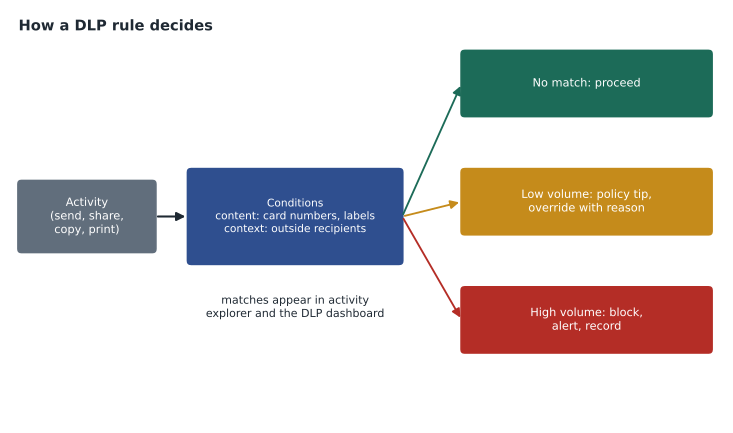
A DLP policy is built from rules. Each rule has conditions, which decide when it applies, and actions, which decide what happens. Conditions describe the content, such as containing at least five credit card numbers with high confidence or carrying the Highly Confidential label, and the context, such as being shared with people outside the organization. Actions range from recording the event in audit logs, to showing the user a policy tip, to blocking the activity with or without allowing the user to override with a justification. Rules can also send alerts to administrators and incident reports by email, and their matches appear in activity explorer and the DLP alerts dashboard.
Rules in a policy are processed in order, and a policy can have rules of increasing severity. Harrow & Finch's card data policy, for example, has one rule for low volumes, which warns the user, and another for high volumes, which blocks and alerts. Many organizations start from policy templates that Microsoft provides for common regulations and data types, such as financial data or personal information for a particular country, and adjust them.
# A simplified DLP policy: two rules of increasing severity for card numbers sent outside.
rules = [  # checked in order; the most severe matching rule applies
    {"name": "High volume card data", "min_cards": 5, "action": "block and alert"},
    {"name": "Low volume card data", "min_cards": 1, "action": "show policy tip, allow override with justification"},
]
messages = [
    ("to bank (internal routing)", 0, False),
    ("to supplier", 1, True),
    ("to unknown address", 12, True),
    ("to colleague", 12, False),
]
for label, cards, external in messages:
    action = "allow"
    if external:
        for r in rules:
            if cards >= r["min_cards"]:
                action = r["action"] + " (" + r["name"] + ")"
                break
print(f"{label:28s} cards={cards:2d} external={external!s:5s} -> {action}")to bank (internal routing) cards= 0 external=False -> allow to supplier cards= 1 external=True -> show policy tip, allow override with justification (Low volume card data) to unknown address cards=12 external=True -> block and alert (High volume card data) to colleague cards=12 external=False -> allow
What this code does
Applies a simplified data loss prevention policy to outgoing messages: it counts card numbers in each message and checks whether it is going outside the organisation. A message with many card numbers sent outside is blocked with an alert, while one with a single number shows a policy tip and can be overridden with a reason. Internal messages are not affected.
Policy tips and user education
DLP is not only a barrier. Policy tips appear in Outlook, the Office apps, SharePoint, OneDrive and Teams when content matches a rule, explaining why the content looks sensitive and what the company's rule is. A tip can simply inform, or ask the user to confirm or justify before continuing. Sunil liked tips because most leaks are mistakes, like the payment run email, and a well-written tip at the right moment teaches people the rule without a training course. He asked Carmen Ortiz to write the tip wording in plain language and link it to the company's data handling page.
Overrides need care. Allowing a user to override with a justification keeps the business moving when there is a real need, such as sending bank details to the company's own bank, and the justification is recorded for review. Allowing overrides on everything turns DLP into a click-through warning. The team decided that card data could never be overridden, while supplier bank details could be sent to the approved bank domain with a justification.
Endpoint DLP
Endpoint DLP extends DLP to Windows and macOS devices that are onboarded to Purview, often through the same onboarding as Microsoft Defender for Endpoint from lesson 5. It can watch and control activities that happen on the device itself, outside any cloud service: copying a sensitive file to a USB drive, printing it, uploading it to a website or an unapproved cloud service, copying it to the clipboard, or opening it with an unapproved app. Like other DLP rules, endpoint rules can audit, warn, allow override or block, and can be scoped to particular groups of devices or users.
For Harrow & Finch, endpoint DLP answered a question Grace Oduya had raised about store back-office computers, which have USB ports for loading price label files. The plan, decided for early 2027, is to allow copying to USB in general but block copying files that contain card numbers or carry the Highly Confidential label, with a policy tip explaining why.
Testing before enforcing
DLP policies can run in simulation mode, which evaluates the rules against real activity and reports what would have matched without taking any action, and they can be turned on with actions set to audit only. Both let the team see false matches, such as order reference numbers that look like card numbers, before anyone is blocked. Microsoft's guidance, which the team followed, is to start in simulation, review matches in the DLP alerts dashboard and activity explorer, tune the conditions, turn on tips, and only then enforce blocking.
| Stage | What happens | Planned dates at Harrow & Finch |
|---|---|---|
| Simulation | Rules are evaluated; matches are reported; nothing is shown to users | From December 2026 for four weeks |
| Tips only | Users see policy tips; activities are allowed and recorded | January 2027 |
| Enforce | High-severity rules block; low-severity rules warn with override | From February 2027 |
| Review | Alerts and overrides are reviewed every week at the security hour | Ongoing |
DLP alerts need an owner. Sunil assigned DLP alert review to Ama, with a rule that any alert involving card data is reviewed the same day. Alerts can also flow to Microsoft Defender XDR and Microsoft Sentinel, so a DLP match on a device can be seen alongside other signals in an incident.
DLP for collaboration and AI
Teams raised a question of its own. Staff chat with suppliers and contractors who are guests in Harrow & Finch's Teams, and a card number pasted into a chat with a guest leaves the company just as surely as one sent by email. DLP policies for Teams can detect sensitive information in chat and channel messages and, depending on the rule, block the message for external participants while showing the sender a policy tip. Files shared in Teams are stored in SharePoint and OneDrive, so the same file rules apply to them.
Generative AI added another channel. People sometimes paste content into AI chat websites to summarize or rewrite it, and a pasted customer list leaves the company as surely as an emailed one. Purview can extend DLP to activities in supported browsers and to AI applications, for example warning or blocking when sensitive content is pasted into an unapproved AI site, and it can show which AI apps people are using with sensitive data. The details depend on the browser, the device onboarding and licensing, so the team listed it for a 2027 review after the main rollout.
Measuring whether DLP works
Sunil wanted to know whether the policies would reduce risk or merely generate alerts. He chose three measures to track monthly from the DLP alerts dashboard and activity explorer: how many high-severity matches occurred, how many low-severity matches ended with the user changing their action after a policy tip, and how many overrides were justified with a reason that the review found weak. A falling number of high-severity matches and a rising share of people who correct themselves after a tip would show the policies were teaching as well as blocking.
False positives get their own review. Order reference numbers at Harrow & Finch are sixteen digits long, and in the simulation run a handful of them passed the card checksum by chance. The fix was to raise the confidence required for blocking, which needs card-related keywords nearby, and to add an exception for messages to the company's own order system. Tuning like this is normal; a DLP policy that never needs tuning is probably not looking at enough.
Carmen added that DLP is one control among several for the payment card requirements, not the whole answer. The card data environment still depends on network segmentation from lesson 2, access controls from MSAZ-130 and the logging in lesson 4. DLP reduces the chance that card data escapes into email, chat and files, which is the risk the accounts payable near miss had shown.
Ama's study card for DLP ended with the three questions every rule answers: what content counts as sensitive, in which activities and places the rule applies, and what should happen when it matches. If she could answer those for a scenario, she could design the rule, and she could recognize DLP in an exam question whatever channel it described.
Grace asked whether DLP would read every email. Sunil explained that DLP evaluates content against the rules automatically as it is sent or shared; people see only the matches that rules report, and access to those reports is limited by role.
Worked problem
Designing a rule
The accounts payable team needs to send supplier bank details to the company's bank, bank.example.com, but nowhere else outside the company. Card numbers must never be emailed outside. Describe two rules for an Exchange DLP policy.
Show solution
- Rule 1, card data: condition, contains one or more card numbers with high confidence and is sent to recipients outside the organization; action, block without override and alert.
- Rule 2, bank details: condition, contains bank account information and is sent outside the organization to any domain other than bank.example.com; action, block with override and justification, plus a policy tip.
- Both rules start in simulation mode so the team can check for false matches.
Answer: Card data is always blocked; bank details are blocked to anyone but the bank unless the user justifies an override, and every override is recorded.
Common mistakes
MistakeThinking DLP only covers email.
InsteadOne DLP policy model covers email, SharePoint, OneDrive, Teams, devices and more.
MistakeEnforcing blocking rules on day one.
InsteadStart in simulation, tune false matches, add tips, then enforce.
MistakeConfusing DLP with sensitivity labels.
InsteadLabels classify and protect content; DLP watches activities and acts on them, often using labels as conditions.
MistakeAllowing overrides on every rule.
InsteadReserve overrides for real business needs and review the justifications.
Summary and key terms
- Data loss prevention policies in Microsoft Purview detect sensitive information in activities and act to prevent inappropriate sharing.
- Policies apply to locations including Exchange, SharePoint, OneDrive, Teams, Windows and macOS devices through endpoint DLP, on-premises repositories and cloud apps.
- Rules combine conditions on content, such as sensitive information types and labels, and context, such as external recipients, with actions from auditing and policy tips to blocking with or without override, plus alerts.
- Policies should be tested in simulation mode and tuned before enforcement.
- Data loss prevention
- Policies that detect and prevent inappropriate sharing or transfer of sensitive information.
- DLP rule
- Conditions and actions within a DLP policy.
- Policy tip
- A message shown to a user when content matches a DLP rule.
- Override
- Allowing a user to continue past a DLP block, usually with a recorded justification.
- Endpoint DLP
- DLP for activities on onboarded Windows and macOS devices, such as copying to USB.
- Simulation mode
- Running a policy to report matches without taking action.
Practice problems
Work each problem on paper first, then reveal the answer to check.
Name three locations a DLP policy can cover.
Show answer
Any three of Exchange, SharePoint, OneDrive, Teams, devices, on-premises repositories, cloud apps and Power BI.
What is a policy tip?
Show answer
A message in the app that tells a user their content matches a DLP rule and explains the rule.
Which DLP capability controls copying sensitive files to USB drives?
Show answer
Endpoint DLP.
Lesson quiz · 5 questions
Score 60% or more to complete this lesson.
Create a free account to save your progress, take quizzes and earn a certificate.