
LVT-310 · Lesson 7 of 12 · 21 min
Digital audio networking: Dante, AVB and AES67
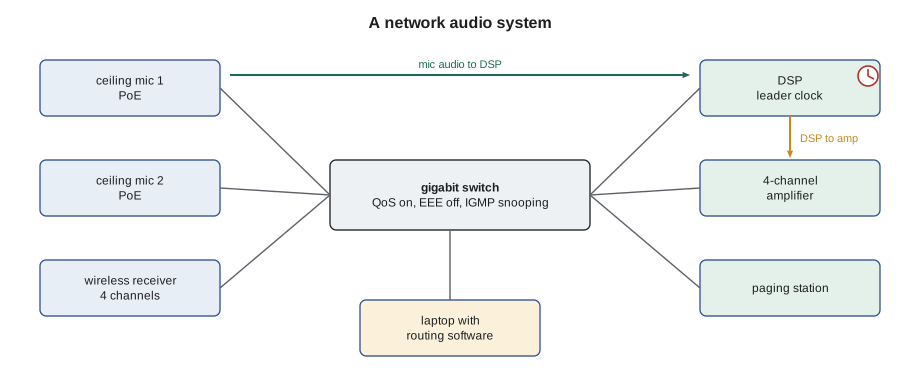
When Sanjay's team designed Riverside's sound systems, they made a choice that changes Maya's work: most of the audio does not travel on audio cable at all. The gym's microphone receivers, the office paging station, the DSPs in each communications room and the amplifiers all connect to the network, and audio moves between them as packets, the same way the cameras' video did in the security course. Brightwater's meeting rooms use network ceiling microphones powered by PoE. A single Category 6A cable now carries dozens of audio channels that once needed a multicore snake. This lesson covers why audio moves to the network, how digital audio is sampled and packaged, the main audio networking technologies, Dante, AVB and Milan, and AES67, clocking, the network settings they need, bandwidth and channel counts, and how an installer brings network audio devices online.
Why audio moved to the network
Analogue audio needs one cable for every signal, and every cable is a chance for hum, noise and wiring mistakes. A gym with 16 wireless microphone channels, a mixer and four amplifier zones on the far side of the building would need a large multicore cable, a stage box and careful grounding. Networked audio replaces that with ordinary Ethernet. Each device converts audio to digital at its own location and sends it as packets; any device on the network can receive any channel. Routing becomes a software setting rather than a patch cable, adding a channel or a device means plugging into a switch, and the audio arrives without the hum and noise that long analogue runs pick up.
There are costs. The network has to be built and configured for audio, with the right switches and settings; a network that is fine for email can make audio drop out. Clocking has to be right, or channels click and glitch. The installer and the network team, Omar Haddad at Brightwater and the school board's IT department at Riverside, have to agree on who owns which settings. Most of this lesson is about getting those things right.
Digital audio basics
To carry sound digitally, a converter measures the analogue signal at regular instants, the sampling rate, and records each measurement as a number with a fixed number of bits, the bit depth. Installed systems usually run at a sampling rate of 48 kHz, 48,000 samples per second, which reproduces frequencies up to about 20 kHz, and at a bit depth of 24 bits, which gives a theoretical dynamic range of about 144 dB, far more than any room needs. Some systems use 96 kHz. Every device in one audio network must use the same sampling rate, or be told to convert.
A single channel at 48 kHz and 24 bits is 1.152 megabits of audio per second before packet overhead. The device collects a short block of samples, places them in a packet with headers and sends it. Short blocks give low latency but more packets and more overhead; long blocks the reverse. Latency, the delay from one device's input to another's output, is set in most network audio systems as a fixed value, commonly 0.25 to 5 milliseconds; every receiver waits that long so all channels play out in step, even if packets took different paths.
Dante
Dante, made by Audinate, is by far the most common audio networking technology in installed AV in Canada and the United States. Hundreds of manufacturers build it into microphones, DSPs, amplifiers, mixers, wireless receivers and interfaces, so a Riverside microphone receiver from one maker can feed a DSP from another without converters. Dante runs on standard IP networks: it uses ordinary switches, IP addresses from DHCP or link-local addresses, and the same cabling as the rest of the network. It uses the Precision Time Protocol to keep every device's clock aligned to a leader clock, which the devices elect automatically.
Devices are discovered and routed with Dante Controller, free software that shows every Dante device on the network as a grid of transmit channels across the top and receive channels down the side; a click at a crossing makes a subscription, a route from one channel to another. Routes are stored in the receiving device, so they survive power cycles. Channels travel in flows: by default unicast flows of up to four channels each from a transmitter to one receiver, or multicast flows that many receivers can join. Larger systems add Dante Domain Manager, which adds user accounts, permissions and the ability to route across subnets, the kind of control an IT department expects.
AVB and Milan
Audio Video Bridging, AVB, is a set of IEEE standards, gathered in IEEE 802.1BA, that build timing and bandwidth guarantees into Ethernet switches themselves. AVB switches use a generalised precision time protocol, IEEE 802.1AS, for clocking; reserve bandwidth for each stream with the Stream Reservation Protocol, so a stream either has guaranteed capacity or is refused; and shape traffic so audio packets are never delayed behind other data. AVB therefore needs switches that support it. Milan, a specification from the Avnu Alliance first published in 2018, defines how AVB audio devices must behave so that products from different makers work together, including stream formats, redundancy and device discovery. AVB and Milan are common in live sound and some large venues; Cobalt Line meets them less often than Dante, but the gym's loudspeaker processors at one competing school use Milan.
AES67 and interoperability
AES67, a standard from the Audio Engineering Society first published in 2013, is not a product but a common language: a set of rules for sampling rates, packet timing, clocking with IEEE 1588 PTP version 2, and stream description, that allows different audio-over-IP systems to exchange audio. Dante devices can usually be switched into an AES67 mode for selected channels, as can products using other technologies such as Ravenna and Livewire. The broadcast standard SMPTE ST 2110-30, used in television facilities, is based on AES67 too. In practice, AES67 lets a Dante DSP at Riverside exchange audio with a paging gateway or a broadcast studio product that speaks only AES67, with some setup: matching clock domains, sending multicast streams and describing them for the receiver.
| Technology | Origin | Network | Clock | Where seen |
|---|---|---|---|---|
| Dante | Audinate, proprietary, very widely licensed | Standard IP switches | PTP version 1, or version 2 for AES67 | Most installed AV |
| AVB / Milan | IEEE 802.1 standards; Milan from Avnu Alliance | AVB-capable switches | IEEE 802.1AS | Live sound, venues |
| AES67 | Audio Engineering Society interoperability standard | Standard IP, multicast | IEEE 1588 PTP version 2 | Bridging between systems, broadcast |
Clocking
Every digital audio device has a clock that sets when it takes samples. If two devices' clocks differ even slightly, one will eventually have too many or too few samples, and the audio clicks or drops. Network audio systems solve this by making every device follow one leader clock through PTP. Dante devices elect the leader automatically, preferring devices set as preferred leader; a well-designed system chooses a stable, always-on device such as the main DSP or a dedicated clock, rather than a laptop or a wireless receiver that might be switched off. When something goes wrong with clocking, Dante Controller's clock status view shows which device is leading and which are following, and any that are unlocked.
What the network needs
Audio networks are sensitive to delay variation and to lost packets, so the switches need certain settings. Audinate and other makers publish requirements; the common ones are these. Use managed gigabit switches for anything beyond a small room. Turn on quality of service, QoS, with strict priority queues, so that the clock packets and then the audio packets are sent ahead of other traffic; Dante marks its packets with DSCP values for this, clock packets highest and audio next. Turn off Energy Efficient Ethernet, EEE, on ports carrying audio, because its power saving adds delay that upsets clocking. Enable IGMP snooping where multicast is used, so multicast audio goes only to ports that asked for it rather than flooding every port. Keep audio on its own VLAN, as lesson 3 of LVT-220 described, and ask the IT team which VLAN and address range to use.
On Riverside's network, the board's IT department owns the switches. Maya's job is to give them a clear list of what the AV devices need: VLAN, address range, PoE class for each microphone, QoS settings, EEE off on those ports, and IGMP snooping with a querier on the AV VLAN. She then verifies those settings with them before connecting devices, rather than discovering at commissioning that the audio glitches every time the network is busy.
Bandwidth and channel counts
Network audio uses little bandwidth by modern standards. A Dante flow of four channels at 48 kHz and 24 bits, at the default latency, needs a few megabits per second including packet overhead, roughly 1.5 Mb/s per channel. A gigabit link can therefore carry hundreds of channels in each direction; in practice, a device's own channel limit, the number of flows it supports, and multicast flooding on badly configured networks are what run out first. The calculation is still worth doing for large systems and for links between switches.
# Network audio bandwidth: channels, flows and link load
import math
FS, BITS = 48000, 24
OVERHEAD = 1.30                 # packet headers at about 1 ms packet time, rough allowance
per_ch = FS * BITS * OVERHEAD / 1e6
print(f"Per channel with overhead: about {per_ch:.2f} Mb/s")
systems = {  # system: (channels sent across the busiest link, channels per unicast flow)
    "Brightwater meeting room (2 ceiling mics x 8 lobes)": (16, 4),
    "Riverside gym (16 wireless + 4 wired mics)":         (20, 4),
    "Riverside DSP to 3 amplifier frames":                (24, 4),
    "Riverside all floors to main DSP":                   (96, 4),
}
for name, (ch, per_flow) in systems.items():
    flows = math.ceil(ch / per_flow)
    mb = ch * per_ch
print(f"{name:52s} {ch:3d} ch, {flows:2d} flows, {mb:6.1f} Mb/s = {mb / 1000:5.1%} of 1 Gb/s")Per channel with overhead: about 1.50 Mb/s Brightwater meeting room (2 ceiling mics x 8 lobes) 16 ch, 4 flows, 24.0 Mb/s = 2.4% of 1 Gb/s Riverside gym (16 wireless + 4 wired mics) 20 ch, 5 flows, 30.0 Mb/s = 3.0% of 1 Gb/s Riverside DSP to 3 amplifier frames 24 ch, 6 flows, 35.9 Mb/s = 3.6% of 1 Gb/s Riverside all floors to main DSP 96 ch, 24 flows, 143.8 Mb/s = 14.4% of 1 Gb/s
Even the whole school's paging and program audio uses only a small fraction of a gigabit link. The figure that matters more is the device's flow limit: a small wireless receiver might support only a few transmit flows, so if ten DSPs each subscribe to its channels by unicast, it runs out of flows. The design avoids this by using multicast for channels many devices need, such as the paging bus.
Bringing devices online
Commissioning network audio follows a pattern. First, the network is ready: VLAN, addressing, QoS, EEE and IGMP settings confirmed with the IT team, and each port's PoE budget checked against the device's class. Second, each device is connected, given a name from the design's device list, such as RIV-GYM-RX1 or BW-614-MIC1, and set to the design's sampling rate and latency, with its firmware updated to the version the design specifies. Third, the routes are made from the design's routing table, and the configuration is saved to a file. Fourth, each route is tested with a signal, and the clock status is checked: one leader, all others following, none unlocked. Finally, the device list, routing file and settings go into the handover record, and default passwords and open settings are locked down, as LVT-220 lesson 11 required for every network device.
# Check a device list against the design before routing: names, sample rates, latency and PoE
DESIGN_FS, DESIGN_LAT_MS = 48000, 1.0
devices = [  # name, sample rate, latency ms, PoE class needed, port PoE budget W, clock state
    ("BW-614-MIC1", 48000, 1.0, 3, 15.4, "follower"),
    ("BW-614-MIC2", 48000, 2.0, 3, 15.4, "follower"),
    ("BW-614-DSP",  48000, 1.0, 0,  0.0, "leader"),
    ("BW-614-AMP",  44100, 1.0, 0,  0.0, "unlocked"),
]
CLASS_W = {0: 0, 1: 4.0, 2: 7.0, 3: 15.4, 4: 30.0}
for name, fs, lat, cls, port_w, clk in devices:
    issues = []
    if fs != DESIGN_FS: issues.append(f"sample rate {fs}")
    if lat != DESIGN_LAT_MS: issues.append(f"latency {lat} ms")
    if CLASS_W[cls] > port_w: issues.append("PoE budget short")
    if clk == "unlocked": issues.append("clock unlocked")
print(f"{name:12s} {', '.join(issues) if issues else 'ok'}")BW-614-MIC1 ok BW-614-MIC2 latency 2.0 ms BW-614-DSP ok BW-614-AMP sample rate 44100, clock unlocked
The second microphone has been left at a 2 ms latency, which works but puts its audio out of step with the first; the amplifier was shipped at 44.1 kHz and cannot lock to the 48 kHz clock until its rate is changed. Both are quick fixes, but only if someone checks every device against the design before blaming the network.
Worked problem
Audio that drops every few minutes
At Brightwater, meeting room 6-14's ceiling microphones drop out for a second or two every few minutes, usually when someone starts a large file transfer. Dante Controller shows the DSP as leader and the microphones following, with occasional clock warnings on the microphones. The room switch is a managed switch supplied by Brightwater. What should Maya check with Omar?
Show solution
- Dropouts tied to heavy traffic point to audio and clock packets being delayed behind data.
- She asks Omar to confirm QoS is enabled with strict priority queues and that the switch trusts the DSCP values the audio devices mark, so clock and audio packets go first.
- She checks whether Energy Efficient Ethernet is on for the microphone and DSP ports, which can add delay when ports wake from power saving.
- Omar finds QoS enabled but set to weighted queues and not trusting DSCP, and EEE on for all ports; he sets strict priority with DSCP trust and turns EEE off on the AV ports.
Answer: After the changes, a large file transfer during a test call causes no dropouts and no clock warnings, and Maya records the switch settings in the handover so they are not lost at the next switch upgrade.
Common mistakes
MistakePlugging network audio into an untuned network.
InsteadAgree VLAN, QoS, EEE and IGMP settings with the IT team first.
MistakeLeaving a laptop or wireless receiver as clock leader.
InsteadSet a stable, always-on device as preferred leader.
MistakeMixing sampling rates on one network.
InsteadSet every device to the design's rate, usually 48 kHz.
MistakeUsing unicast to many receivers from a small device.
InsteadUse multicast for channels many devices need, with IGMP snooping.
MistakeLeaving default names and passwords.
InsteadName devices from the design list and lock down defaults.
Summary and key terms
- Network audio replaces many analogue cables with Ethernet, and routing becomes a software setting.
- Installed systems usually use 48 kHz sampling and 24-bit samples, about 1.15 Mb/s per channel before overhead.
- Dante is the most common technology, using standard switches, PTP clocking and software routing.
- AVB, under IEEE 802.1BA, builds timing and reservations into switches; Milan defines interoperable devices.
- AES67 lets different audio-over-IP systems exchange audio using PTP version 2 and multicast.
- Every device follows one stable leader clock; unlocked devices click or drop.
- Audio networks need QoS with strict priority, EEE off on audio ports and IGMP snooping for multicast.
- Commissioning checks every device's name, rate, latency, firmware, PoE and clock, then saves routes.
- Sampling rate
- The number of times per second an audio signal is measured, such as 48 kHz.
- Latency
- The delay from one device’s input to another’s output.
- Dante
- A widely used proprietary audio networking technology from Audinate.
- AVB
- Audio Video Bridging, IEEE standards for timed, reserved audio on Ethernet.
- AES67
- An interoperability standard for audio over IP from the Audio Engineering Society.
- PTP
- Precision Time Protocol, used to align device clocks over a network.
- Leader clock
- The device whose clock all others follow in an audio network.
Practice problems
Work each problem on paper first, then reveal the answer to check.
What is the raw bit rate of one channel at 48 kHz and 24 bits?
Show answer
1.152 Mb/s.
Name two switch settings audio networks usually need.
Show answer
QoS with strict priority, and Energy Efficient Ethernet turned off; also IGMP snooping.
What does AES67 allow?
Show answer
Different audio-over-IP systems to exchange audio.
What happens to a device whose sampling rate differs from the network's?
Show answer
It cannot lock to the clock until its rate is changed or converted.
Lesson quiz · 5 questions
Score 60% or more to complete this lesson.
Create a free account to save your progress, take quizzes and earn a certificate.