
LVT-310 · Lesson 5 of 12 · 21 min
Paging, background music and zoning
On a school day at Riverside, the paging system is busy. The main office pages a student to the front desk; the bell system marks every period; the principal makes morning announcements; a custodian needs to reach the gym; and once a term the school practises a lockdown, with an announcement that must reach every room at once and override everything else. At Hartwell, pages go to one aisle or all of them; at Juniper Point, quiet background music plays in the lobby and amenity rooms. All of these are paging and background music systems, and their success depends less on the loudspeakers than on how speakers are grouped, how sources are prioritised and how evenly the sound is spread. This lesson covers paging sources and interfaces, zones and priorities, scheduling and bells, background music and its licensing, ceiling speaker layout for even coverage, automatic level control, and how the system is set up and tested.
Paging sources and interfaces
A page can start in many places. A desk paging microphone with a push-to-talk button, like Riverside's main office station, connects to a microphone input with priority. A telephone system can page through a paging interface: a user dials an access code or a zone number from any phone, and the phone system connects the call to the paging amplifier or to an interface that converts the phone line to audio. Modern systems often page over the network using SIP, the protocol phone systems use to set up calls, so an IP paging gateway or SIP-enabled speakers appear to the phone system as extensions. Pre-recorded messages, such as closing announcements or emergency instructions, play from a message player triggered by a button, a schedule or a contact closure from another system.
Each page usually starts with a pre-announce tone, a short chime that tells listeners a message is coming and gives them a moment to listen. Many systems also delay live pages slightly, recording the first seconds while the tone plays and then playing them, so the first word is not lost under the chime. At the end, a background music source that was muted ramps back up rather than jumping, so the system does not startle anyone.
Zones
A zone is a group of loudspeakers that receives the same audio at the same time. In a 70 V system, a zone is usually one amplifier channel or one output of a zone selector; in a network system, a zone is a group set up in software. Zones let the office page one area without disturbing others: the gym without the library, the north wing without the south, aisles 1 to 6 at Hartwell without the office. An all-call zone sends a page to every speaker at once. The design states which speakers belong to which zone, and the installer must wire and label them accordingly, because a speaker on the wrong zone will either miss pages meant for its area or receive pages meant for another.
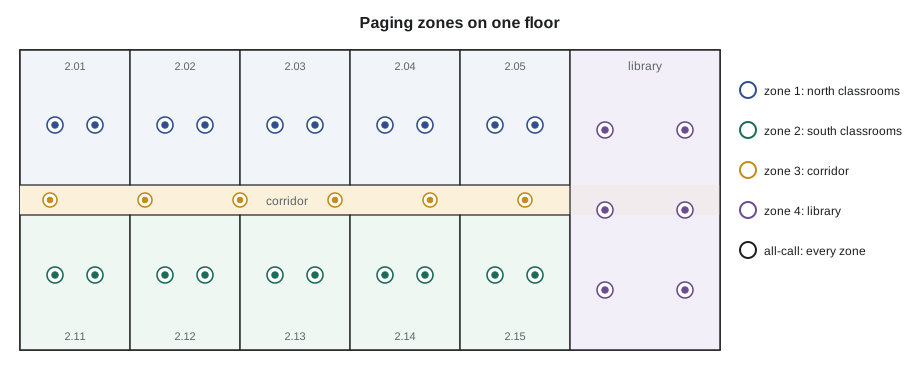
Zone design follows how the building is used. Schools usually zone by wing and floor, with classrooms on separate zones from corridors so a class can have its speaker turned down without muting corridor pages, and with a separate gym, library, office and exterior zone. Warehouses zone by area and by noise level. Hospitals zone carefully and often limit overhead paging to staff areas and public corridors, sending most messages to staff phones and badges instead. Each classroom at Riverside also has a call-in switch, which lets a teacher press a button to call the office, and a local volume control that the paging system overrides for emergency messages.
Priorities
When two sources want the same zone at once, priority decides which one plays. A typical order, from highest to lowest, is: emergency messages, then live pages from the main office, then telephone pages, then scheduled bells and recorded messages, then background music. A higher priority source mutes, or ducks, everything below it in the zones it uses. Emergency messages, such as Riverside's lockdown message, also override local volume controls and classroom muting, so they reach every room at full level. The priority scheme is programmed in the DSP or the paging controller and tested at commissioning by triggering sources together and listening in each zone.
| Priority | Source | Behaviour |
|---|---|---|
| 1 | Emergency or lockdown message | All zones, overrides local volume and mute |
| 2 | Main office live page | Selected zones, ducks lower sources |
| 3 | Telephone page | Selected zones by dialled code |
| 4 | Bells and scheduled messages | Zones by schedule |
| 5 | Background music | Plays when nothing else is active |
One priority sits above all of these in buildings with a fire alarm voice or emergency communication system: when that system speaks, the AV paging must be silent, so that its own messages are not drowned out by a music system in the same space. Lesson 6 covers that interface.
Scheduling and bells
Many paging systems include a scheduler that plays tones and messages at set times: period bells, lunch, end of day, closing announcements in a store. The scheduler uses the network time server or its own clock, which must be set correctly and kept on the right time zone and daylight saving rule; a bell schedule an hour off after the spring change is a common complaint. Schools keep several schedules, regular days, early dismissal and exam days, and the office selects which runs. The installer sets up the schedules from the owner's list, confirms the time source, and shows the office how to change them.
Background music
Background music, sometimes called foreground music when it is chosen to be noticed, plays in lobbies, retail, restaurants, fitness rooms and offices. It should be even and unobtrusive: loud enough to cover small noises and give the space a feel, quiet enough to talk over, typically around 55 to 70 dBA depending on the space. Sources are streaming players, media servers or licensed music services. A DSP sets the level for each area and often a time schedule, quieter in the evening at Juniper Point, off overnight.
Playing music in a business is a public performance under copyright law, and needs a licence. In Canada, performing rights are licensed through collective societies, SOCAN for musical works and Re:Sound for recordings; in the United States, through performing rights organisations such as ASCAP, BMI and SESAC, among others. Commercial background music services usually include the licences in their subscription. A personal streaming account, plugged into a lobby system, usually does not cover business use. The installer does not decide this, but should tell the owner, so the system Cobalt Line installs is not used in a way the owner did not intend.
Laying out ceiling speakers
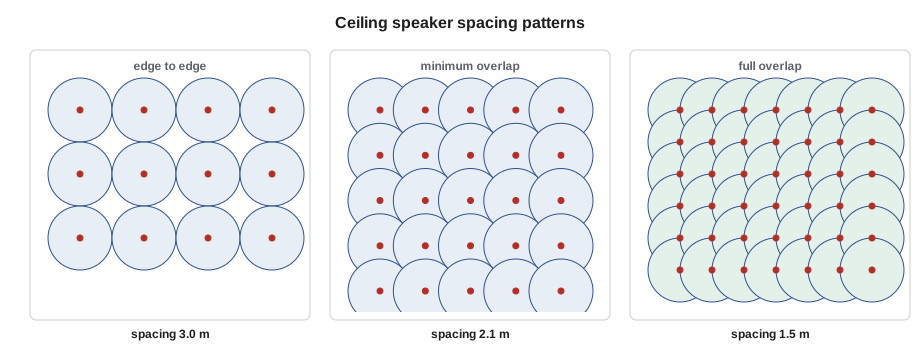
In paging and background music, the aim is even coverage: every listener should hear about the same level, without loud spots under speakers and quiet gaps between them. Ceiling speakers are laid out on a grid, and the spacing depends on the ceiling height, the listener's ear height, about 1.2 m (4 ft) seated or 1.5 m (5 ft) standing, and the speaker's coverage angle. The coverage circle at ear height has a radius of the height above the ear times the tangent of half the coverage angle.
Three spacing patterns are common. Edge-to-edge spacing puts speakers one coverage diameter apart, so the circles just touch; it uses the fewest speakers but leaves gaps between four circles on a square grid, with variations of 6 dB or more, and suits background music in less critical areas. Minimum overlap spacing, about 1.4 times the radius on a square grid, closes those gaps so the circles meet at the centre of each square, with variations of about 3 dB. Centre-to-centre spacing, one radius apart, makes each circle reach the next speaker; it uses the most speakers and gives the most even coverage, suited to speech where intelligibility matters, such as classrooms and meeting rooms.
# Ceiling speaker spacing and count for a room, for three patterns
import math
def radius(ceiling, ear, angle):
    return (ceiling - ear) * math.tan(math.radians(angle / 2))
def count(length, width, spacing):
    return math.ceil(length / spacing) * math.ceil(width / spacing)
rooms = [  # name, length, width, ceiling height, ear height (m), coverage angle deg
    ("Riverside classroom", 9.0, 7.5, 2.7, 1.2, 120),
    ("Riverside library",   24.0, 15.0, 3.0, 1.2, 90),
    ("Juniper Point lobby", 14.0, 9.0, 4.2, 1.5, 110),
]
for name, L, W, H, ear, ang in rooms:
    r = radius(H, ear, ang)
    pats = {"edge-to-edge": 2 * r, "minimum overlap": r * math.sqrt(2), "centre-to-centre": r}
    print(f"{name}: coverage radius {r:.2f} m at ear height")
    for p, s in pats.items():
print(f" {p:17s} spacing {s:5.2f} m -> {count(L, W, s):3d} speakers")Riverside classroom: coverage radius 2.60 m at ear height edge-to-edge spacing 5.20 m -> 4 speakers minimum overlap spacing 3.67 m -> 9 speakers centre-to-centre spacing 2.60 m -> 12 speakers Riverside library: coverage radius 1.80 m at ear height edge-to-edge spacing 3.60 m -> 35 speakers minimum overlap spacing 2.55 m -> 60 speakers centre-to-centre spacing 1.80 m -> 126 speakers Juniper Point lobby: coverage radius 3.86 m at ear height edge-to-edge spacing 7.71 m -> 4 speakers minimum overlap spacing 5.45 m -> 6 speakers centre-to-centre spacing 3.86 m -> 12 speakers
Even with wide-dispersion 120 degree speakers, the low classroom ceiling would need nine speakers for minimum overlap. School standards accept two to four speakers per classroom for paging and voice reinforcement, because a classroom is small enough that the level difference between seats under and between speakers stays within a few decibels; voice reinforcement, which lesson 12 covers, sets its own pattern. Minimum overlap matters more in large open areas such as the library. The lobby's high ceiling spreads each speaker's coverage, so far fewer are needed. Ceilings higher than about 6 m (20 ft) usually call for pendant speakers lowered on cables, or horns and wall speakers, because a ceiling speaker that high puts too much sound into the reflections.
On site, the speaker positions on the reflected ceiling plan rarely land exactly where the grid says, because lights, sprinklers, diffusers and structure get in the way. The installer moves a speaker to the nearest clear tile, keeping the pattern as even as possible, and records the change. A speaker moved half a metre is fine; one moved into the next room, or doubled up next to another, is a coverage problem the designer should hear about.
Automatic level control
A page set loud enough for a busy corridor between classes is too loud for the same corridor during a test. Ambient noise compensation solves this: a sensing microphone in the zone measures the background noise when nobody is paging, and the DSP raises or lowers the paging level to keep it a set amount above the noise, within limits. The sensing microphone is placed where it hears the room's noise but not directly under a speaker; the DSP is set with a minimum level, so pages are never too quiet, and a maximum, so they are never painful. Hartwell's aisles and Riverside's gym and cafeteria use it.
# Ambient noise compensation: page level follows the noise within limits
TARGET_ABOVE, MIN, MAX = 12, 62, 88
def page_level(ambient):
    return max(MIN, min(MAX, ambient + TARGET_ABOVE))
for t, amb in [("08:05 arrivals", 72), ("09:30 class time", 48), ("11:50 lunch change", 76), ("15:20 dismissal", 79), ("19:00 evening event", 64)]:
print(f"{t:20s} ambient {amb} dBA -> page at {page_level(amb)} dBA")08:05 arrivals ambient 72 dBA -> page at 84 dBA 09:30 class time ambient 48 dBA -> page at 62 dBA 11:50 lunch change ambient 76 dBA -> page at 88 dBA 15:20 dismissal ambient 79 dBA -> page at 88 dBA 19:00 evening event ambient 64 dBA -> page at 76 dBA
Setting up and testing a paging system
With the speakers installed and lines checked, as lesson 4 described, the installer connects the amplifiers, and the programmer loads the DSP or paging controller configuration. Each zone is tested in turn: a page from each source is sent to the zone, and someone walks the zone confirming every speaker works, the level is right and the sound is clear. Pink noise, a test signal with equal energy in each octave, is played through the zone, and a sound level meter checks the level at several listener positions; lesson 11 describes the tuning that follows. Priority is tested by triggering a lower source and then a higher one, and the emergency override by triggering it with classroom volume controls turned down. Every result is recorded on the zone test sheet.
Worked problem
A zone that pages the wrong rooms
During Riverside's zone tests, a page to zone 2 north classrooms is heard in rooms 2.11 to 2.14 on the south side, and rooms 2.07 and 2.08 on the north side are silent. The impedance readings of both lines were normal. What has happened and how should Maya find it?
Show solution
- Both lines measured normal, so the wiring is intact; the speakers are on the wrong lines.
- At the rack, the two zone cables may be swapped at the amplifier outputs, but that would move the whole zone, not part of it.
- Because only some rooms are wrong, the swap is in the field: in a ceiling junction where the north and south home runs meet, the north line continues to the south rooms and the south line to the north rooms.
- She checks the cable labels at the corridor junction box above room 2.09, finds the two continuations crossed, swaps them, and re-measures both lines.
Answer: After the swap, each zone line reads its expected impedance with the right speaker count, and the retest pages reach exactly the rooms on the zone schedule.
Common mistakes
MistakePutting classroom and corridor speakers on one zone.
InsteadZone by use, so local volume can be set without muting corridor pages.
MistakeLetting background music play over a fire alarm voice message.
InsteadMute the AV system when the life-safety system speaks.
MistakePlugging a personal streaming account into a business system.
InsteadTell the owner that business music needs licensing, usually through a commercial service.
MistakeLaying out speakers edge to edge for speech.
InsteadUse minimum overlap or centre-to-centre spacing where intelligibility matters.
MistakeTesting only one source per zone.
InsteadTest every source, priority and override in every zone, and record it.
Summary and key terms
- Pages come from microphones, telephone interfaces, SIP gateways and message players, usually with a pre-announce tone.
- Zones group speakers so pages reach only the areas they are meant for; all-call reaches every zone.
- Priorities decide which source plays; emergency messages override local volume and mute.
- Schedulers play bells and messages and need a correct time source.
- Business background music needs performing rights licences, often included in commercial services.
- Ceiling speaker spacing depends on height above ears and coverage angle; minimum overlap or closer suits speech.
- Ambient noise compensation keeps pages a set amount above changing noise, within limits.
- Every zone, source and priority is tested and recorded.
- Zone
- A group of loudspeakers that receives the same audio at the same time.
- All-call
- A page sent to every zone at once.
- Pre-announce tone
- A chime played before a page to alert listeners.
- Ducking
- Lowering one source automatically when a higher-priority source plays.
- SIP
- Session Initiation Protocol, used by phone systems to set up calls, including network pages.
- Minimum overlap
- A speaker spacing where coverage circles meet at the centre of each grid square.
- Ambient noise compensation
- Automatic adjustment of page level to follow background noise.
Practice problems
Work each problem on paper first, then reveal the answer to check.
A ceiling is 3.0 m high, ear height 1.2 m, speaker coverage 90 degrees. What is the coverage radius?
Show answer
About 1.8 m.
With that radius, what is the minimum overlap spacing?
Show answer
About 2.5 m.
Which source normally has the highest priority on a school paging system?
Show answer
The emergency or lockdown message.
Why does background music in a business need licensing?
Show answer
Playing music for the public is a public performance under copyright law.
Lesson quiz · 5 questions
Score 60% or more to complete this lesson.
Create a free account to save your progress, take quizzes and earn a certificate.