
LES-213 · Lesson 7 of 12 · 20 min
Digital evidence: sources, volatility and first response
▶ Video coming soon A video version of this lesson is on the way.
When Jordan Pike was arrested on Harold Mercer's front step at 4:05 p.m. on March 19, the phone in his hand was unlocked and showing a messaging app. Constable Sam Rourke, one of the two plainclothes officers, took the phone from Pike's hand as Pike was handcuffed. He did not scroll, tap or read further. He looked at what was already on the screen, which showed the top of a conversation with a contact named 'Mav', the last message reading 'blue door, dont knock twice', and he photographed the screen with his own work phone. Then he switched Pike's phone to airplane mode, wrote down that he had done so and at what time, and placed it in a signal-blocking pouch with a small battery pack attached by cable. Within about four minutes the screen locked.
Desjardins plays the class Rourke's body-worn camera video of those four minutes and asks them to list every decision he made. They count seven. This lesson explains why each decision mattered: what digital evidence is, where it lives, how quickly it changes, and what the first officer should do and avoid. The next lesson covers seizure and documentation in more detail, and lesson 10 covers the legal authority needed to search what is seized.
What digital evidence is
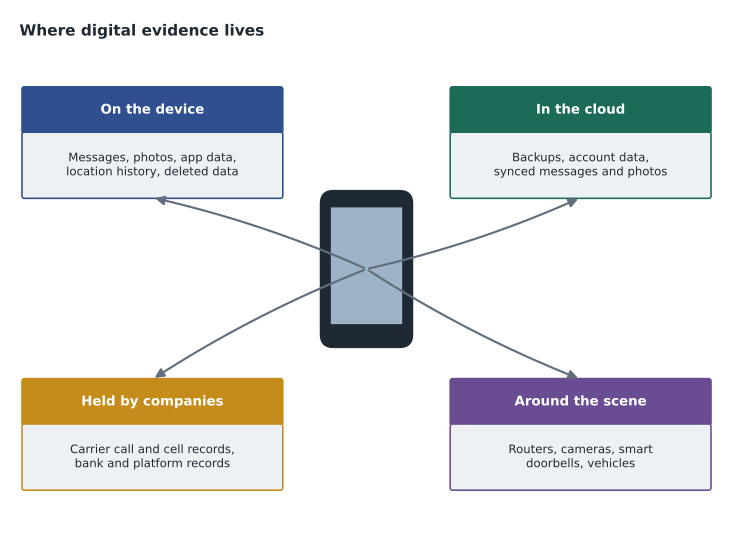
Digital evidence is information of value to an investigation that is stored or transmitted in digital form. It includes the obvious, such as messages, photos, videos, emails and documents, and much that users never see: logs of when a device connected to a network, records of which apps were used and when, location records, deleted data that has not yet been overwritten, and metadata, the data about data, such as when a file was created, by what device, and where a photo was taken. On a phone, this information comes from the device itself, from apps, and from accounts in the cloud that the device is signed in to. Much of the most useful evidence is held by companies rather than on the device: phone company call and location records, bank records, email and social media account records, and cloud backups.
Digital evidence has properties that make it powerful and fragile. It is detailed and often time-stamped to the second. It is created automatically, so it does not depend on anyone's memory. It is often duplicated, existing on a device, in a backup and on a company's servers at once. But it is also easily changed, sometimes by simply turning a device on or off, opening a file or letting the device connect to a network. It can be deleted or altered remotely. And it is invisible: an officer looking at a phone cannot tell what is stored on it, what has been deleted, or what is about to be overwritten.
Where digital evidence is found
At almost any scene there are several potential sources. Phones, tablets, laptops and desktop computers are the most common. External drives, memory cards and USB sticks are easily overlooked, especially when hidden. Smart watches and fitness trackers record activity and location. Home routers keep records of connected devices. Smart doorbells, home security cameras and voice assistants record sound and video, usually to the cloud. Vehicles store navigation history, connected phone data and sometimes driving data. Business premises have point-of-sale systems, access card logs and security video. Game consoles, smart televisions and other connected devices can hold messages and accounts. And outside the scene, service providers hold records of almost everything the devices did.
In Pike's case, the sources included the phone in his hand, a second phone found in the grey car's glove compartment during the later search, the car's own navigation system, Mercer's bank's records of the withdrawal request, the bank branch's video, Mercer's landline records, and the records held by the messaging app's company. Park says the second phone turned out to be more important than the first, because it was the one Pike used for everything other than the courier jobs, and it contained his bank app showing payments received after each job.
Volatility
Not all digital evidence lasts equally long. Investigators speak of volatility: how quickly information is lost if nothing is done. The most volatile information exists only while a device is running, in its memory, such as open network connections, running programs, encryption keys in use and unsaved data. It disappears when the device is turned off. Next comes information that changes quickly while the device runs, such as temporary files and recent activity records, which can be overwritten in minutes or hours. Stored files on the device's storage are more durable but can be deleted, overwritten or remotely wiped. Records held by service providers last for the provider's retention period, which may be days, months or years depending on the company and the type of record. Backups and archives are the most durable.
The practical rule that follows is to collect or protect the most volatile evidence first, and never to destroy volatile evidence carelessly. For a first officer, this mostly means not switching off a device that is on, not switching on a device that is off, and preventing the device from connecting to networks. Capturing evidence from a running computer's memory is a specialist task, and first officers should call for advice rather than attempt it.
# Ordering collection tasks by volatility (1 = lost soonest)
tasks = [
    ("provider records: messaging app account", 4),
    ("what is visible on the unlocked screen", 1),
    ("data on the phone's storage", 3),
    ("bank branch video (overwritten in 30 days)", 3),
    ("phone state while powered: keep it on and isolated", 2),
    ("carrier call records for Mercer's landline", 4),
]
for task, level in sorted(tasks, key=lambda t: t[1]):
    print(level, task)
first = min(tasks, key=lambda t: t[1])
print("do first:", first[0])1 what is visible on the unlocked screen 2 phone state while powered: keep it on and isolated 3 data on the phone's storage 3 bank branch video (overwritten in 30 days) 4 provider records: messaging app account 4 carrier call records for Mercer's landline do first: what is visible on the unlocked screen
Rourke's photograph of the screen dealt with the most volatile item: what was displayed at that moment, which would disappear when the phone locked. Keeping the phone powered and isolated protected the next level. Everything else could wait for legal authority and the right specialist, provided the companies were asked to preserve their records in time.
Network isolation
A phone or computer connected to a network can change in many ways after seizure. New messages arrive and older ones may be deleted by the app. Location and activity records update. And anyone with access to the account, including the suspect's associates, can wipe the device remotely through the manufacturer's find-my-device service or an app's settings. For these reasons, seized devices should be isolated from networks as soon as possible.
There are two common methods. The first is to place the device in a signal-blocking container, often called a Faraday bag or pouch, which stops cellular, Wi-Fi and Bluetooth signals. Phones in such containers search for a signal and drain their batteries quickly, which is why Rourke attached a battery pack, and the container must be fully sealed or it will leak. The second is to switch the device to airplane mode, which turns off its radios. This changes the device's settings slightly and requires touching the screen, so it must be recorded, and on some devices it may not be possible without unlocking. Many services train officers to use both: airplane mode if it can be done safely from the locked or already-open screen, and a signal-blocking container in any case. Desjardins says the exact method matters less than consistency with the service's policy and a complete record of what was done.
The first responder's principles
Several sets of guidelines for handling digital evidence have been published by police organizations, governments and standards bodies. They differ in detail but share core principles. No action should change data on a device that may later be relied on in court, unless it is unavoidable, and then it must be done by a competent person who can explain what was done and its effect. A complete record of every action taken with the device should be kept, so that another examiner could follow it and reach the same result. And the person in charge of the investigation is responsible for ensuring these principles are followed.
For the first officer, the principles translate into a few rules. Secure the scene and the devices, and keep people away from them, including the suspect, who may try to wipe a phone or ask to make a call from it. If a device is off, leave it off. If it is on, leave it on and isolate it from networks. Record the device's state, what is on the screen, and anything displayed, by photograph where possible. Do not browse through the device to look for evidence: that is a search requiring legal authority, and it changes the data. Seize chargers and cables. Note passwords, patterns or codes if the owner volunteers them, but do not demand or coerce them without legal advice. And get specialist advice quickly for anything unusual, such as a running computer with encryption, a large server, or a device that appears to be wiping itself.
| Device state | Do | Do not |
|---|---|---|
| Phone on and unlocked | Photograph the screen; isolate; keep powered; record time | Scroll, open apps or read messages |
| Phone on and locked | Isolate; keep powered; record state | Try to guess the code |
| Phone off | Leave it off; seize with charger | Turn it on to check |
| Computer running | Photograph the screen; call for advice before shutting down | Pull the plug or open files without advice |
| Computer off | Leave it off; seize; note connected devices | Turn it on |
Body-worn cameras and the officer's own devices
Rourke's body-worn camera recorded the seizure, which is now the best evidence of exactly what he did and did not do with the phone. Officers should narrate key actions on camera, such as 'I am switching the phone to airplane mode at 16:06'. The photograph Rourke took on his work phone is itself digital evidence and must be handled the same way: exported to the evidence system, with its original file preserved, and not left on the device or sent by personal messaging. Officers should never use personal phones to photograph evidence, because those phones and their cloud accounts may then be subject to disclosure.
Park adds a final caution about scenes involving the officer's own technology. Officers should not connect a suspect's device to a police computer, plug in a charger that also transfers data, or log into the suspect's accounts from a police device. Each of those actions can change the evidence or create new records that must be explained in court.
Worked problem
A laptop open on a table
During a search of an apartment under a warrant for evidence of fraud, officers find a laptop open on the kitchen table, screen lit, with a web browser showing what appears to be a bank's online banking page logged in to an account in another person's name. A phone beside it is locked. What should the first officer do?
Show solution
- Keep everyone away from the laptop and phone, and do not touch the keyboard or mouse.
- Photograph the laptop's screen and the phone, recording the time, and note any other devices or cables attached.
- Call the digital forensics unit for advice before doing anything else with the laptop, because a logged-in session and memory may hold evidence that is lost if it is shut down or the screen locks.
- Isolate the phone in a signal-blocking container with power, recording its state.
- Check that the warrant authorizes seizure and search of computers and their data, and if not, get advice before going further.
- Record every action, with times, in notes and on body-worn camera.
Answer: Protect the volatile evidence on the running laptop by getting specialist advice, isolate the phone, photograph and record everything, and confirm the authority.
Common mistakes
MistakeTurning off a phone is the safest way to preserve it.
InsteadTurning it off can lose volatile data and may trigger encryption that makes later access harder; keep it on and isolated.
MistakeA quick look through a phone at the scene does no harm.
InsteadBrowsing is a search needing authority and changes the data; record only what is already displayed.
MistakeA signal-blocking pouch protects a phone indefinitely.
InsteadPhones in pouches drain their batteries quickly and pouches can leak; attach power and check the seal.
MistakeOfficers can use their personal phones to photograph a screen.
InsteadUse work devices only, and export the photo to the evidence system.
Summary and key terms
- Digital evidence includes content, logs, location records and metadata on devices, in the cloud and at service providers.
- It is detailed and automatic, but easily changed, remotely wiped and invisible to the eye.
- Volatility runs from running memory, through stored files, to provider records and backups; protect the most volatile first.
- Isolate devices from networks with airplane mode and a powered signal-blocking container, and record what was done.
- Do not change data unless unavoidable, keep a complete record, and leave searches to lawful authority and specialists.
- The officer's own photographs and body-worn camera recordings are evidence and must be handled properly.
- Metadata
- Data about data, such as when a file was created, by what device and where.
- Volatility
- How quickly digital evidence is lost if nothing is done.
- Faraday bag
- A signal-blocking container that prevents a device from connecting to networks.
- Remote wipe
- Erasing a device from a distance through an account or management service.
Practice problems
Work each problem on paper first, then reveal the answer to check.
What was the last message visible on Pike's screen?
Show answer
'blue door, dont knock twice', from a contact named 'Mav'.
Why did Rourke attach a battery pack to the pouch?
Show answer
Phones in signal-blocking containers search for a signal and drain their batteries quickly.
In the code example, which task was to be done first?
Show answer
Recording what was visible on the unlocked screen.
Why was the second phone more important than the first?
Show answer
It held Pike's bank app showing payments received after each courier job.
Lesson quiz · 5 questions
Score 60% or more to complete this lesson.
Create a free account to save your progress, take quizzes and earn a certificate.