
JAVA-201 · Lesson 7 of 12 · 21 min
Comparable and Comparator
▶ Video coming soon A video version of this lesson is on the way.
Kofi wants three different printouts of the same parts list. For the weekly order, parts sorted by how few are left, lowest first. For the shelf walk, parts sorted by shelf and then by bin. For the price list Odile pins up at the counter, parts sorted by name, ignoring capitals. Sorting itself is solved; Collections.sort and List.sort are fast and tested. What a program must supply is the order. The plan for Friday, March 5, 2027 is the two ways Java lets you say how things compare: Comparable, for a type's one natural order, and Comparator, for any other order you like.
Comparing two values
Every comparison in Java follows the same convention. A method compares a with b and returns an int: negative if a comes before b, zero if they are equal in this order, and positive if a comes after b. Only the sign matters, not the size. Integer.compare(3, 7) returns a negative number; "chain".compareTo("bell") returns a positive one, because c comes after b.
public class Main {
    public static void main(String[] args) {
        System.out.println(Integer.compare(3, 7));
        System.out.println(Integer.compare(7, 7));
        System.out.println(Integer.compare(9, 7));
        System.out.println("chain".compareTo("bell") > 0);
        System.out.println("Bell".compareTo("bell") < 0);
        System.out.println("Bell".compareToIgnoreCase("bell"));
    }
}-1 0 1 true true 0
What this code does
Integer.compare returns a negative number, zero and a positive number for less than, equal and greater than. chain sorts after bell, and capital B sorts before lower-case b because Strings compare character codes. compareToIgnoreCase treats Bell and bell as equal and returns zero.
Comparable: a natural order
A class that has one obvious order implements Comparable<T> and its single method, compareTo(T other). That order is the class's natural ordering. String, Integer, LocalDate and the other standard value types all implement it, which is why the TreeMaps of lesson 6 sorted them without being told how. Once your class implements Comparable, Collections.sort, TreeSet, TreeMap, Collections.max and many other methods work with it automatically.
import java.util.*;

public class Main {
    public static void main(String[] args) {
        List<Part> parts = new ArrayList<>(List.of(
                new Part("TUBE-700x25", "B-07", 14),
                new Part("BELL", "A-02", 9),
                new Part("PAD-ROAD", "B-14", 6),
                new Part("CABLE-BRAKE", "C-03", 22)));
        Collections.sort(parts);
        for (Part p : parts) System.out.println(p);
        System.out.println("last by code: " + Collections.max(parts).code());
    }
}

record Part(String code, String shelf, int count) implements Comparable<Part> {
    @Override
    public int compareTo(Part other) {
        return code.compareTo(other.code);
    }

    @Override
    public String toString() {
        return code + " (" + shelf + ", " + count + ")";
    }
}BELL (A-02, 9) CABLE-BRAKE (C-03, 22) PAD-ROAD (B-14, 6) TUBE-700x25 (B-07, 14) last by code: TUBE-700x25
What this code does
Part's natural order is by code, so Collections.sort puts the four parts in alphabetical order of code. compareTo delegates to String's own compareTo, which already follows the sign convention. Collections.max uses the same order and returns the part whose code sorts last.
compareTo has a contract, like equals. It must be antisymmetric: if a comes before b, then b comes after a. It must be transitive: if a comes before b and b before c, then a comes before c. And it should be consistent with equals, returning zero exactly when equals returns true, or sorted sets and maps will treat different objects as duplicates, as lesson 6 showed. Choose as a natural order only an order that is truly natural, usually the identity of the object, such as a part's code.
Comparator: any other order
Most orders are not natural. Sorting parts by count, by shelf or by name ignoring case are all useful, and a Part cannot have all of them as its compareTo. A Comparator<T> is a separate object whose compare(a, b) method decides the order. You pass it to the method that sorts: list.sort(comparator), new TreeSet<>(comparator), Collections.max(list, comparator). Since Java 8 you rarely write a Comparator class; you build one with a lambda or with the factory methods on the Comparator interface.
import java.util.*;

public class Main {
    public static void main(String[] args) {
        List<Part> parts = new ArrayList<>(List.of(
                new Part("TUBE-700x25", "B-07", 14), new Part("BELL", "A-02", 9),
                new Part("PAD-ROAD", "B-14", 6), new Part("CABLE-BRAKE", "C-03", 22)));

        Comparator<Part> byCountLambda = (a, b) -> Integer.compare(a.count(), b.count());
        parts.sort(byCountLambda);
        System.out.println("lowest count first: " + parts);

        parts.sort(Comparator.comparing(Part::shelf));
        System.out.println("by shelf: " + parts);

        System.out.println("most stocked: " + Collections.max(parts, Comparator.comparingInt(Part::count)));
    }
}

record Part(String code, String shelf, int count) {
    @Override
    public String toString() { return code + ":" + count; }
}lowest count first: [PAD-ROAD:6, BELL:9, TUBE-700x25:14, CABLE-BRAKE:22] by shelf: [BELL:9, TUBE-700x25:14, PAD-ROAD:6, CABLE-BRAKE:22] most stocked: CABLE-BRAKE:22
What this code does
The first comparator is a lambda that compares counts with Integer.compare, so the list is sorted lowest count first for Kofi's order. Comparator.comparing(Part::shelf) builds a comparator from a method reference that extracts the key to sort by. Passing a comparator to Collections.max finds the part with the highest count.
The factory method Comparator.comparing(keyExtractor) takes a function that pulls a sort key out of each object, such as Part::shelf, and compares by that key's natural order. For int, long and double keys, use comparingInt, comparingLong and comparingDouble, which avoid boxing every value into an Integer, Long or Double.
Chaining: thenComparing, reversed and nulls
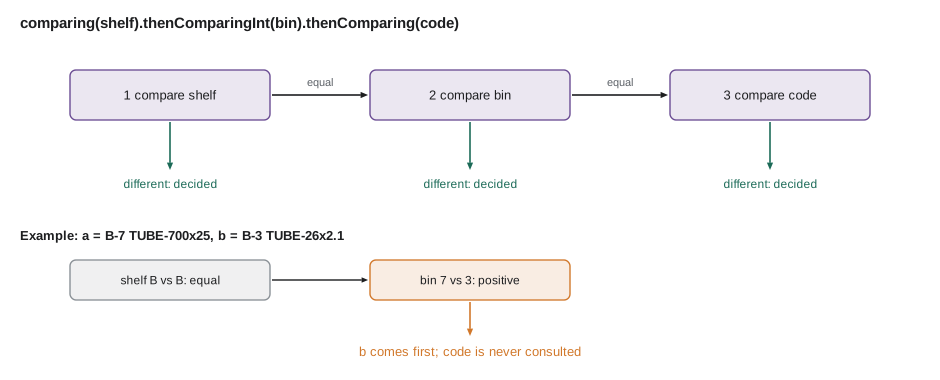
Real orders usually have more than one level. For the shelf walk, parts must be sorted by shelf and, within a shelf, by bin. thenComparing adds a tie-breaker that is used only when the earlier comparator says two elements are equal. reversed turns a comparator around, and Comparator.nullsFirst or nullsLast wraps one so that it copes with null values instead of throwing.
import java.util.*;

public class Main {
    public static void main(String[] args) {
        List<Part> parts = new ArrayList<>(List.of(
                new Part("TUBE-700x25", "B", 7, 14), new Part("TUBE-26x2.1", "B", 3, 5),
                new Part("BELL", "A", 2, 9), new Part("PAD-ROAD", "B", 14, 6),
                new Part("GRIPS", "A", 2, 9)));

        parts.sort(Comparator.comparing(Part::shelf).thenComparingInt(Part::bin));
        System.out.println("shelf walk:");
        parts.forEach(p -> System.out.println("  " + p));

        parts.sort(Comparator.comparingInt(Part::count).reversed().thenComparing(Part::code));
        System.out.println("most stocked first, then by code:");
        parts.forEach(p -> System.out.println("  " + p));
    }
}

record Part(String code, String shelf, int bin, int count) {
    @Override
    public String toString() { return shelf + "-" + bin + " " + code + " x" + count; }
}shelf walk: A-2 BELL x9 A-2 GRIPS x9 B-3 TUBE-26x2.1 x5 B-7 TUBE-700x25 x14 B-14 PAD-ROAD x6 most stocked first, then by code: B-7 TUBE-700x25 x14 A-2 BELL x9 A-2 GRIPS x9 B-14 PAD-ROAD x6 B-3 TUBE-26x2.1 x5
What this code does
The shelf walk sorts by shelf letter and, within shelf B, by bin number, so bins 3, 7 and 14 come out in order. The second order reverses the count comparison so the most stocked parts come first, and thenComparing breaks the tie between BELL and GRIPS, both 9, alphabetically. Each thenComparing applies only when everything before it was equal.
Be careful with reversed in the middle of a chain: it reverses everything built so far, not just the last step. Comparator.comparing(Part::shelf).thenComparing(Part::code).reversed() sorts both shelf and code backwards. To reverse only one key, pass a reversed comparator into that step: thenComparing(Part::code, Comparator.reverseOrder()).
import java.util.*;

public class Main {
    public static void main(String[] args) {
        List<String> names = new ArrayList<>(Arrays.asList("chain", null, "Bell", "axle nut", null, "brake pads"));
        names.sort(Comparator.nullsLast(String.CASE_INSENSITIVE_ORDER));
        System.out.println(names);
        names.sort(Comparator.nullsFirst(Comparator.<String>naturalOrder().reversed()));
        System.out.println(names);
    }
}[axle nut, Bell, brake pads, chain, null, null] [null, null, chain, brake pads, axle nut, Bell]
What this code does
Some rows in Kofi's export have no name, which shows up as null. nullsLast wraps the case-insensitive comparator so the missing names go to the end instead of causing a NullPointerException. The second sort puts nulls first and the names in reverse natural order, where lower-case letters come before capitals.
A bug to avoid: subtracting
Older code often writes a comparator as return a.count - b.count. It looks neat and follows the sign convention for small numbers, but it is wrong when the subtraction overflows the int range, which happens when the values are large or have opposite signs. The result then has the wrong sign, and the sort quietly produces the wrong order. Always use Integer.compare, or Comparator.comparingInt.
import java.util.*;

public class Main {
    public static void main(String[] args) {
        int big = 2_000_000_000, small = -2_000_000_000;
        System.out.println("subtraction: " + (big - small) + "  (should be positive)");
        System.out.println("Integer.compare: " + Integer.compare(big, small));

        List<Integer> values = new ArrayList<>(List.of(big, small, 0));
        values.sort((a, b) -> a - b);
        System.out.println("sorted with subtraction: " + values);
        values.sort(Integer::compare);
        System.out.println("sorted with Integer.compare: " + values);
    }
}subtraction: -294967296 (should be positive) Integer.compare: 1 sorted with subtraction: [2000000000, -2000000000, 0] sorted with Integer.compare: [-2000000000, 0, 2000000000]
What this code does
Two billion minus minus two billion is too large for an int, so the subtraction wraps round to a negative number and claims the larger value comes first. Sorting with the subtracting comparator therefore gives a wrong order. Integer.compare never overflows and sorts the values correctly.
How sorting works and why stability matters
List.sort and Collections.sort for objects use TimSort, a merge sort that takes advantage of runs that are already in order. It is O(n log n) in the worst case and close to O(n) on nearly sorted lists. It is also stable: elements that compare as equal keep their original relative order. Stability lets you sort in passes. If you sort by code and then by shelf, parts within each shelf stay sorted by code, which is another way to get a two-level order.
import java.util.*;

public class Main {
    public static void main(String[] args) {
        record Part(String code, String shelf) {}
        List<Part> parts = new ArrayList<>(List.of(new Part("TUBE", "B"), new Part("BELL", "A"),
                new Part("PAD", "B"), new Part("CHAIN", "B"), new Part("GRIPS", "A")));
        parts.sort(Comparator.comparing(Part::code));
        parts.sort(Comparator.comparing(Part::shelf));
        for (Part p : parts) System.out.println(p.shelf() + " " + p.code());
    }
}A BELL A GRIPS B CHAIN B PAD B TUBE
What this code does
The first sort puts the parts in code order, and the second sorts by shelf. Because the sort is stable, parts on the same shelf keep the code order from the first pass, so shelf B lists CHAIN, PAD and TUBE alphabetically. An unstable sort could have mixed them up.
| Want | Write |
|---|---|
| Natural order of the elements | Comparator.naturalOrder() or pass null to List.sort |
| By one field | Comparator.comparing(Part::code) |
| By an int field | Comparator.comparingInt(Part::count) |
| Reverse an order | comparator.reversed() or Comparator.reverseOrder() |
| Break ties | .thenComparing(Part::code) or .thenComparingInt(Part::bin) |
| Reverse only the tie-breaker | .thenComparing(Part::code, Comparator.reverseOrder()) |
| Strings ignoring case | String.CASE_INSENSITIVE_ORDER |
| Cope with nulls | Comparator.nullsFirst(c) or Comparator.nullsLast(c) |
Comparable or Comparator?
Implement Comparable when a type has one order that everyone would expect and that agrees with equals, such as a part code or a date. Use a Comparator for every other order, for orders that depend on the situation, and for types you cannot change. It is common to have both: Part is naturally ordered by code, and Kofi's printouts use comparators by count and by shelf. Keep comparators as constants or static methods with clear names, such as Part.BY_COUNT, so the rest of the program reads well.
Try it yourself
A natural order for bikes
Make the record Bike implement Comparable<Bike> so bikes sort by their tag, alphabetically.
The program should print [SG-0003-CI, SG-0007-AR, SG-0012-TA].
import java.util.*;

public class Main {
    public static void main(String[] args) {
        List<Bike> fleet = new ArrayList<>(List.of(new Bike("SG-0012-TA"), new Bike("SG-0003-CI"), new Bike("SG-0007-AR")));
        fleet.sort(null);
        List<String> tags = new ArrayList<>();
        for (Bike b : fleet) tags.add(b.tag());
        System.out.println(tags);
    }
}

record Bike(String tag) implements Comparable<Bike> {
    @Override
    public int compareTo(Bike other) {
        return 0;
    }
}
Try it yourself
The weekly order sheet
Sort the parts for Kofi's order: lowest count first and, for equal counts, by code alphabetically. Build the comparator with Comparator.comparingInt and thenComparing.
The program should print PAD-ROAD:6, BELL:9, GRIPS:9 and TUBE-700x25:14, one per line.
import java.util.*;

public class Main {
    public static void main(String[] args) {
        List<Part> parts = new ArrayList<>(List.of(new Part("TUBE-700x25", 14), new Part("GRIPS", 9),
                new Part("PAD-ROAD", 6), new Part("BELL", 9)));
        parts.sort(Comparator.comparing(Part::code));
        for (Part p : parts) System.out.println(p.code() + ":" + p.count());
    }
}

record Part(String code, int count) {}
Common mistakes
MistakeWriting a comparator as return a - b.
InsteadUse Integer.compare(a, b) or Comparator.comparingInt, which cannot overflow.
MistakeGiving a class a natural order that disagrees with equals.
InsteadMake compareTo return zero exactly when equals is true, or use a Comparator instead.
MistakeCalling reversed at the end of a chain to reverse only the last key.
Insteadreversed reverses the whole chain; pass Comparator.reverseOrder() to that thenComparing step instead.
MistakeSorting a list that contains nulls with a plain comparator.
InsteadWrap it with Comparator.nullsFirst or nullsLast.
MistakeWriting a whole Comparator class for a simple order.
InsteadUse Comparator.comparing with a method reference, and chain with thenComparing.
Summary and key terms
- Every comparison returns a negative number, zero or a positive number for before, equal and after, and only the sign matters.
- A class with one obvious order implements Comparable<T> and compareTo, which defines its natural ordering; String, Integer and LocalDate do this, and sorted collections and sorting methods then work automatically. compareTo must be antisymmetric and transitive and should be consistent with equals.
- A Comparator supplies any other order and is passed to List.sort, TreeSet, TreeMap or Collections.max.
- Comparator.comparing and comparingInt build comparators from key extractors, thenComparing adds tie-breakers, reversed reverses the whole chain, and nullsFirst and nullsLast handle nulls.
- Never compare by subtracting, which can overflow; use Integer.compare.
- Java sorts objects with TimSort, which is O(n log n) and stable, so equal elements keep their order and sorting in passes works.
- Comparable
- An interface a class implements to define its natural ordering through compareTo.
- compareTo
- The method that compares this object with another, returning negative, zero or positive.
- Natural ordering
- The single default order a type defines by implementing Comparable.
- Comparator
- An object whose compare method defines an order for two values.
- Key extractor
- A function, such as Part::shelf, that pulls out the value to sort by.
- thenComparing
- A method that adds a tie-breaking comparison to a comparator.
- reversed
- A method that returns a comparator for the opposite order.
- nullsFirst and nullsLast
- Wrappers that let a comparator handle null values.
- Overflow
- An arithmetic result too large for its type, which wraps round to a wrong value.
- Stable sort
- A sort that keeps equal elements in their original relative order.
- TimSort
- The stable merge-based algorithm Java uses to sort objects.
Practice problems
Work each problem on paper first, then reveal the answer to check.
What does compareTo return when this object should come after the other?
Show answer
A positive number.
When should a class implement Comparable?
Show answer
When it has one natural order that agrees with equals, such as a code or a date.
How do you sort parts by shelf and then by bin?
Show answer
Comparator.comparing(Part::shelf).thenComparingInt(Part::bin).
Why is return a - b a risky comparator?
Show answer
The subtraction can overflow and give the wrong sign.
What does it mean that Java's object sort is stable?
Show answer
Equal elements keep the order they had before the sort.
Lesson quiz · 5 questions
Score 60% or more to complete this lesson.
Create a free account to save your progress, take quizzes and earn a certificate.