
JAVA-201 · Lesson 3 of 12 · 21 min
ArrayList and LinkedList
▶ Video coming soon A video version of this lesson is on the way.
Kofi's export has 612 rows, one per kind of part, and Hamza's first step on Friday, January 29, 2027 is to load them into a List. Java offers two general-purpose lists, ArrayList and LinkedList, and they behave identically from the outside: same methods, same results. They differ completely on the inside, and that changes how fast each operation is. This lesson opens both up, measures them by counting the work they do rather than by timing them, and ends with a clear rule for choosing.
Measuring work with Big-O
To compare data structures you need a way to say how the cost of an operation grows as the collection grows. Big-O notation does this by keeping only the dominant term. O(1), or constant time, means the cost does not depend on the size: reading element 300 of an array takes the same work as reading element 3. O(n), or linear time, means the cost grows in step with the number of elements n: searching an unsorted list may have to look at every one. O(log n) grows very slowly and appears in trees and binary search. O(n²) grows fast and is what you get from a loop inside a loop.
| Big-O | Name | n = 600 | n = 60,000 | Example |
|---|---|---|---|---|
| O(1) | constant | 1 | 1 | get(i) on an ArrayList |
| O(log n) | logarithmic | about 10 | about 16 | finding a key in a TreeMap |
| O(n) | linear | 600 | 60,000 | contains on an unsorted list |
| O(n log n) | linearithmic | about 5,500 | about 950,000 | sorting a list |
| O(n²) | quadratic | 360,000 | 3,600,000,000 | comparing every pair of parts |
Timing a program with a clock gives different answers on different machines and even on different runs of the same machine. Counting the basic steps an algorithm takes gives the same answer every time, and it shows the growth that Big-O describes. The examples in this course count steps.
Inside an ArrayList
An ArrayList keeps its elements in an ordinary Java array, called its backing array, which is usually a little larger than needed. The list's size is how many elements are in use; the array's length is its capacity. Because the elements sit side by side, get(i) and set(i, x) go straight to position i in O(1). Adding at the end is also cheap while there is spare capacity: the new element goes in the next free slot.
When the array is full, the list allocates a bigger array, copies every element across and then adds the new one. In the JDK the new capacity is about one and a half times the old. Copying is O(n), but because the array grows by a proportion each time, copies happen less and less often, and the average cost of add at the end works out to O(1). This is called amortized constant time. The following model of a growable array counts the copies.
public class Main {
    public static void main(String[] args) {
        GrowArray a = new GrowArray();
        for (int i = 1; i <= 612; i++) {
            a.add("part " + i);
        }
        System.out.println("size " + a.size() + ", capacity " + a.capacity());
        System.out.println("times the array grew: " + a.grows);
        System.out.println("element copies made: " + a.copies);
        System.out.printf("copies per add: %.2f%n", (double) a.copies / a.size());
    }
}

class GrowArray {
    private Object[] data = new Object[10];
    private int size;
    int grows, copies;

    void add(Object x) {
        if (size == data.length) {
            Object[] bigger = new Object[data.length + data.length / 2];
            for (int i = 0; i < size; i++) {
                bigger[i] = data[i];
                copies++;
            }
            data = bigger;
            grows++;
        }
        data[size++] = x;
    }

    int size() { return size; }
    int capacity() { return data.length; }
}size 612, capacity 823 times the array grew: 11 element copies made: 1633 copies per add: 2.67
What this code does
The model starts with room for 10 and grows by half again whenever it is full, as ArrayList does. Adding 612 parts makes the array grow 11 times and copies 1,633 elements, fewer than three copies per add on average. That small, fixed average is what amortized constant time means.
If you know roughly how many elements are coming, you can avoid most of the growing by giving the list an initial capacity: new ArrayList<>(650). This changes only the capacity, not the size; the new list is still empty. The method ensureCapacity does the same for a list that already exists.
Inserting and removing in the middle
Adding or removing anywhere except the end is where an ArrayList pays. To insert at position i, every element from i onwards must shift one place right to open a gap; to remove at i, they shift left to close it. That is O(n) work, and at the front of the list it is the whole list. One insertion is fine. Inserting at the front of a 600-element list 600 times does about 180,000 shifts.
import java.util.ArrayList;
import java.util.List;

public class Main {
    public static void main(String[] args) {
        List<String> parts = new ArrayList<>(List.of("chain", "pads", "tube"));
        parts.add(1, "cable");
        System.out.println(parts);
        parts.remove(0);
        System.out.println(parts);
        parts.set(2, "tube, 700x25c");
        System.out.println(parts);
        System.out.println("index of pads: " + parts.indexOf("pads"));
        System.out.println("shifts to insert at the front of 600: " + shiftsAtFront(600));
    }

    static long shiftsAtFront(int n) {
        long shifts = 0;
        for (int size = 0; size < n; size++) shifts += size;
        return shifts;
    }
}[chain, cable, pads, tube] [cable, pads, tube] [cable, pads, tube, 700x25c] index of pads: 1 shifts to insert at the front of 600: 179700
What this code does
add(1, cable) slides pads and tube one place to the right to make room, and remove(0) slides everything left. set replaces an element in place without shifting anything. The count shows that inserting 600 parts one at a time at the front would shift elements 179,700 times.
A classic trap hides in remove. A List has both remove(int index) and remove(Object o). With a List<Integer>, the call remove(3) uses the int version and removes the element at position 3, not the value 3. To remove a value, pass an Integer object: remove(Integer.valueOf(3)).
import java.util.ArrayList;
import java.util.List;

public class Main {
    public static void main(String[] args) {
        List<Integer> counts = new ArrayList<>(List.of(14, 3, 22, 9, 3));
        counts.remove(3);
        System.out.println("after remove(3): " + counts);
        counts.remove(Integer.valueOf(3));
        System.out.println("after remove(Integer.valueOf(3)): " + counts);
    }
}after remove(3): [14, 3, 22, 3] after remove(Integer.valueOf(3)): [14, 22, 3]
What this code does
remove(3) chose the index version, so it removed the 9 at position 3 rather than a 3. remove(Integer.valueOf(3)) passes an object, so it removes the first element equal to 3. The second 3 is still in the list because remove takes away only one match.
Inside a LinkedList
A LinkedList stores each element in a separate small object called a node. Each node holds the element and two references: one to the next node and one to the previous node, which makes it a doubly linked list. The list keeps references to the first and last nodes. Adding or removing at either end only changes a few references, so it is O(1). Once you are holding a node, inserting next to it is also O(1).
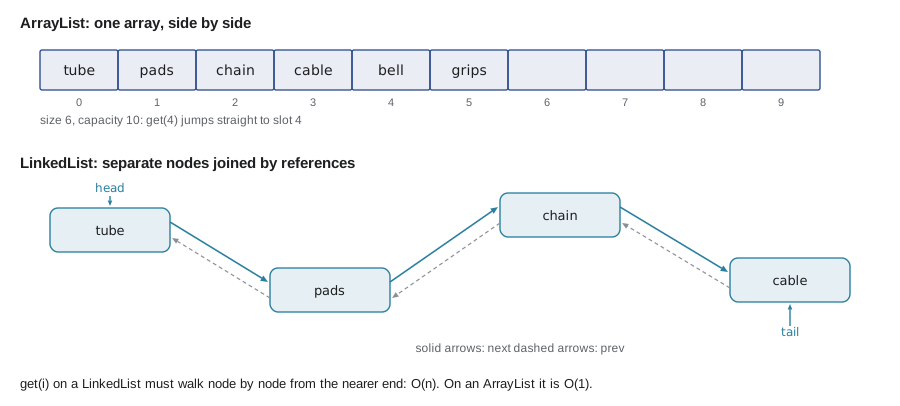
The catch is that a linked list has no way to jump to position i. get(i) must start at one end and follow references node by node until it has counted to i. LinkedList is clever enough to start from whichever end is closer, but it is still O(n). A loop that calls get(i) for every i is therefore O(n²) on a LinkedList, which is a common and serious performance bug.
public class Main {
    public static void main(String[] args) {
        int n = 600;
        long arraySteps = 0, linkedSteps = 0;
        for (int i = 0; i < n; i++) {
            arraySteps += 1;
            linkedSteps += Math.min(i, n - 1 - i) + 1;
        }
        System.out.println("get(i) for every i in a list of " + n);
        System.out.println("  ArrayList steps:  " + arraySteps);
        System.out.println("  LinkedList steps: " + linkedSteps);
    }
}get(i) for every i in a list of 600 ArrayList steps: 600 LinkedList steps: 90300
What this code does
The loop models the work of calling get(i) for every position. An ArrayList takes one step per call, 600 in all, while a LinkedList walks from the nearer end each time and takes 90,300 steps. Looping with get(i) over a LinkedList turns a linear job into a quadratic one.
Comparing the costs
| Operation | ArrayList | LinkedList |
|---|---|---|
| get(i), set(i, x) | O(1) | O(n) |
| add(x) at the end | O(1) amortized | O(1) |
| add(0, x), remove(0) | O(n) | O(1) |
| add or remove in the middle by index | O(n) to shift | O(n) to walk there |
| add or remove next to an iterator's position | O(n) to shift | O(1) |
| contains(x), indexOf(x) | O(n) | O(n) |
| Memory per element | one array slot | a node with three references |
On paper, LinkedList wins at the front and when editing through an iterator. In practice, ArrayList wins almost everywhere. Its elements are next to each other in memory, which modern processors read very quickly, while a linked list's nodes are scattered and each one costs extra memory. Even inserting in the middle is often faster with an ArrayList, because shifting a block of array slots is one fast copy, and the linked list must still walk to the right node first. Joshua Bloch, who wrote LinkedList, has said he never uses it.
The practical rule is: use ArrayList as your default list. If you need to add and remove at both ends, as with a queue or a stack, use ArrayDeque, which lesson 4 introduces. Reach for LinkedList only when you have measured a real need, such as many insertions through a ListIterator in a very long list.
Editing a list while walking through it
A ListIterator walks a list in either direction and can add, remove or set elements at its position. With a LinkedList, those edits are O(1) because the iterator is already standing on the right node. Lesson 8 covers iterators fully; here is the idea in action, inserting a note after every out-of-stock part.
import java.util.LinkedList;
import java.util.List;
import java.util.ListIterator;

public class Main {
    public static void main(String[] args) {
        List<String> sheet = new LinkedList<>(List.of("tube:0", "pads:6", "chain:0", "cable:4"));
        ListIterator<String> it = sheet.listIterator();
        while (it.hasNext()) {
            String line = it.next();
            if (line.endsWith(":0")) {
                it.add("  -> reorder");
            }
        }
        for (String line : sheet) System.out.println(line);
    }
}tube:0 -> reorder pads:6 chain:0 -> reorder cable:4
What this code does
The ListIterator adds a reorder line right after each part with a count of zero, at the iterator's current position. Because it is a LinkedList, each add only links in a new node. The same code works on an ArrayList, which would shift the later elements each time.
Building and converting lists
Lists are often built from other data. The constructor new ArrayList<>(collection) copies any collection. Arrays.asList(array) wraps an array in a fixed-size list that writes through to the array, and List.of makes an immutable list. To go the other way, toArray turns a list into an array; passing a zero-length typed array, as in list.toArray(new String[0]), gives an array of the right type.
import java.util.*;

public class Main {
    public static void main(String[] args) {
        String[] fromSpreadsheet = {"tube", "pads", "chain"};
        List<String> fixed = Arrays.asList(fromSpreadsheet);
        fixed.set(0, "tube 700x25c");
        System.out.println("array changed too: " + fromSpreadsheet[0]);

        List<String> growable = new ArrayList<>(fixed);
        growable.add("cable");
        String[] back = growable.toArray(new String[0]);
        System.out.println(back.length + " parts: " + String.join(", ", back));
        List<String> firstTwo = growable.subList(0, 2);
        System.out.println("first two: " + firstTwo);
    }
}array changed too: tube 700x25c 4 parts: tube 700x25c, pads, chain, cable first two: [tube 700x25c, pads]
What this code does
Arrays.asList gives a list view of the array, so setting element 0 also changed the array. Copying it into a new ArrayList produced a list that can grow, and toArray turned it back into a String array of four parts. subList returns a view of a range of positions, here the first two.
import java.util.Arrays;
import java.util.List;

public class Main {
    public static void main(String[] args) {
        List<String> fixed = Arrays.asList("tube", "pads");
        fixed.set(1, "pads, disc");
        System.out.println(fixed);
        fixed.add("chain");
    }
}
What this code does
A list from Arrays.asList has a fixed size because it is backed by an array, so set works but add throws UnsupportedOperationException. The first line prints the changed list, and then the program stops. Copy it into an ArrayList when you need to add or remove.
$ javac Main.java
$ java Main
[tube, pads, disc]
Exception in thread "main" java.lang.UnsupportedOperationException
	at java.base/java.util.AbstractList.add(AbstractList.java:155)
	at java.base/java.util.AbstractList.add(AbstractList.java:113)
	at Main.main(Main.java:9)
Try it yourself
Pre-sizing a list
Kofi's next export will have about 650 parts. Complete loadParts so it creates its ArrayList with an initial capacity equal to expected, then adds the names part 1 to part n.
The program should print loaded 650 parts and first: part 1, last: part 650.
import java.util.ArrayList;
import java.util.List;

public class Main {
    public static void main(String[] args) {
        List<String> parts = loadParts(650, 650);
        System.out.println("loaded " + parts.size() + " parts");
        System.out.println("first: " + parts.getFirst() + ", last: " + parts.getLast());
    }

    static List<String> loadParts(int n, int expected) {
        List<String> parts = new ArrayList<>();
        for (int i = 1; i < n; i++) {
            parts.add("part " + i);
        }
        return parts;
    }
}
Try it yourself
Removing values, not positions
The list holds stock counts. Complete removeAllZeros so it removes every 0 from the list. Use removeIf, or remove(Integer.valueOf(0)) in a loop, but not remove(0), which removes by position.
The program should print [14, 6, 4, 9].
import java.util.ArrayList;
import java.util.List;

public class Main {
    public static void main(String[] args) {
        List<Integer> counts = new ArrayList<>(List.of(0, 14, 6, 0, 4, 0, 9));
        removeAllZeros(counts);
        System.out.println(counts);
    }

    static void removeAllZeros(List<Integer> counts) {
        counts.remove(0);
    }
}
Common mistakes
MistakeUsing LinkedList because inserting is O(1).
InsteadInsertion is O(1) only once you are at the node; getting there is O(n). Use ArrayList by default and ArrayDeque for both ends.
MistakeLooping with get(i) over a LinkedList.
InsteadUse an enhanced for loop or an iterator, which walks the nodes once.
MistakeCalling remove(3) on a List<Integer> to remove the value 3.
Insteadremove(int) removes by position; use remove(Integer.valueOf(3)) or removeIf.
MistakeExpecting new ArrayList<>(650) to contain 650 elements.
InsteadThe number sets the capacity only; the list starts empty.
MistakeAdding to a list from Arrays.asList.
InsteadIt has a fixed size; copy it into a new ArrayList first.
Summary and key terms
- Big-O notation describes how the work of an operation grows with the number of elements, from O(1) and O(log n) to O(n), O(n log n) and O(n²).
- Counting steps shows that growth more reliably than timing.
- An ArrayList stores elements in a backing array, so get and set are O(1), and adding at the end is amortized O(1) because the array grows by a proportion when full.
- Inserting or removing anywhere else shifts elements and is O(n).
- An initial capacity avoids repeated growing.
- A LinkedList chains nodes with next and previous references, so it is O(1) at the ends but O(n) for get(i).
- In practice ArrayList is faster for almost everything and is the default choice; ArrayDeque handles both ends. remove(int) removes by position and remove(Object) by value.
- Arrays.asList gives a fixed-size view, List.of an immutable list and new ArrayList<>(...) a growable copy.
- Big-O notation
- A way to describe how the cost of an operation grows with the size of the input.
- Constant time, O(1)
- Work that does not depend on the number of elements.
- Linear time, O(n)
- Work that grows in proportion to the number of elements.
- Backing array
- The array inside an ArrayList that holds its elements.
- Capacity
- The length of the backing array, as opposed to the number of elements in use.
- Amortized constant time
- An average cost per operation that stays constant even though some operations are expensive.
- Node
- A small object in a linked structure that holds an element and references to its neighbours.
- Doubly linked list
- A linked list whose nodes refer to both the next and the previous node.
- ListIterator
- An iterator for lists that can move both ways and add, remove or set elements.
- Sublist
- A view of a range of positions in a list.
Practice problems
Work each problem on paper first, then reveal the answer to check.
What is the cost of get(300) on an ArrayList, and on a LinkedList?
Show answer
O(1) on an ArrayList; O(n) on a LinkedList, which must walk to it.
Why is add at the end of an ArrayList called amortized O(1)?
Show answer
The occasional growth copies are rare enough that the average cost per add stays constant.
What does new ArrayList<>(650) do?
Show answer
Creates an empty list with room for 650 elements before it must grow.
On a List<Integer>, what does remove(3) remove?
Show answer
The element at index 3.
Which list should be your default choice?
Show answer
ArrayList.
Lesson quiz · 5 questions
Score 60% or more to complete this lesson.
Create a free account to save your progress, take quizzes and earn a certificate.