
JAVA-201 · Lesson 5 of 12 · 21 min
HashMap, HashSet and hashing
▶ Video coming soon A video version of this lesson is on the way.
Every part at Second Gear has a code that Kofi writes on the bin label, such as TUBE-700x25 or PAD-ROAD. When a volunteer asks how many of something are left, Kofi needs the answer from the code, instantly, out of 612 rows. Searching a list for the code is O(n); keeping the list sorted and using binary search is O(log n). The plan for Friday, February 12, 2027 is the structure that does better than both on average: the hash table, which Java offers as HashMap and HashSet.
Maps: looking up by key
A map stores entries, each a key paired with a value. Keys are unique: putting a new value under an existing key replaces the old one. The essential methods are put(key, value), get(key), containsKey(key), remove(key) and size(). get returns null when the key is missing, and getOrDefault lets you choose a different answer.
import java.util.HashMap;
import java.util.Map;

public class Main {
    public static void main(String[] args) {
        Map<String, Integer> stock = new HashMap<>();
        stock.put("TUBE-700x25", 12);
        stock.put("PAD-ROAD", 6);
        stock.put("CHAIN-11", 4);
        stock.put("TUBE-700x25", 14);

        System.out.println("tubes: " + stock.get("TUBE-700x25"));
        System.out.println("known codes: " + stock.size());
        System.out.println("bells: " + stock.get("BELL"));
        System.out.println("bells, with a default: " + stock.getOrDefault("BELL", 0));
        System.out.println("has CHAIN-11? " + stock.containsKey("CHAIN-11"));
        stock.remove("CHAIN-11");
        System.out.println("has CHAIN-11 now? " + stock.containsKey("CHAIN-11"));
    }
}tubes: 14 known codes: 3 bells: null bells, with a default: 0 has CHAIN-11? true has CHAIN-11 now? false
What this code does
The second put under TUBE-700x25 replaces the 12 with 14, so the map still has three keys. get returns null for the unknown code BELL, while getOrDefault returns the 0 we asked for. remove deletes the chain entry, so containsKey then reports false.
A map makes counting easy. Kofi's usage log lists one part code per item taken, and a map from code to count turns it into totals in one pass. The method merge adds a value to whatever is already there, and computeIfAbsent creates a value the first time a key is seen, which is handy when each value is itself a list.
import java.util.*;

public class Main {
    public static void main(String[] args) {
        String[] takenThisWeek = {"TUBE-700x25", "PAD-ROAD", "TUBE-700x25", "CABLE-BRAKE",
                                  "TUBE-700x25", "PAD-ROAD", "TUBE-700x25"};
        Map<String, Integer> used = new TreeMap<>();
        for (String code : takenThisWeek) {
            used.merge(code, 1, Integer::sum);
        }
        System.out.println(used);

        Map<String, List<String>> byShelf = new TreeMap<>();
        String[][] parts = {{"B-07", "TUBE-700x25"}, {"B-14", "PAD-ROAD"}, {"B-07", "TUBE-26x2.1"}};
        for (String[] p : parts) {
            byShelf.computeIfAbsent(p[0], k -> new ArrayList<>()).add(p[1]);
        }
        System.out.println(byShelf);
    }
}{CABLE-BRAKE=1, PAD-ROAD=2, TUBE-700x25=4}
{B-07=[TUBE-700x25, TUBE-26x2.1], B-14=[PAD-ROAD]}What this code does
merge(code, 1, Integer::sum) puts 1 for a new code and adds 1 to an existing count, so the tubes reach 4. computeIfAbsent creates an empty list for a shelf the first time it appears and returns the existing list after that. A TreeMap is used here so the printed keys come out sorted.
How a hash table works
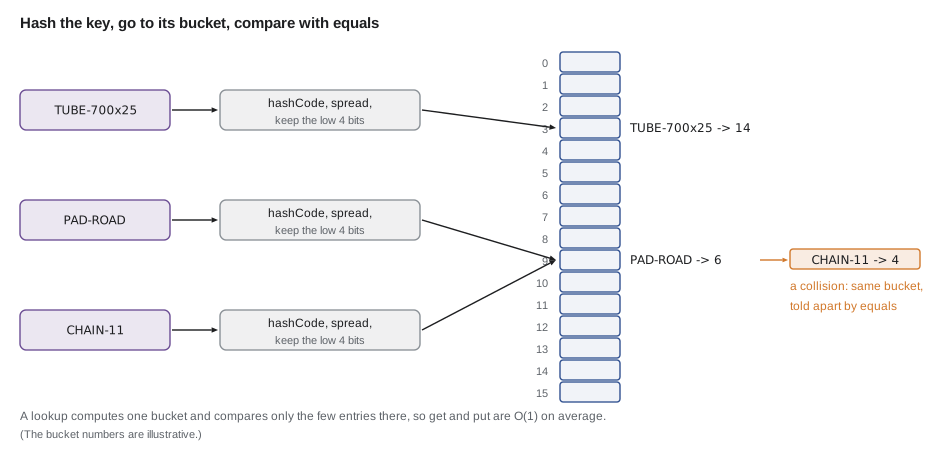
A HashMap keeps an array of buckets. To store a key it calls the key's hashCode method, which returns an int, and turns that int into a bucket index. To find the key again it computes the same index and looks only in that bucket. If keys are spread evenly, each bucket holds about one entry, so put, get and remove are O(1) on average no matter how many entries the map holds.
The table size is always a power of two, 16 by default. Java mixes the high bits of the hash into the low bits, h ^ (h >>> 16), and then keeps the low bits with a bitwise and: index = spread & (size − 1). For a table of 16 that keeps the last four bits, a number from 0 to 15. The program below repeats Java's calculation for a few part codes.
public class Main {
    public static void main(String[] args) {
        String[] codes = {"TUBE-700x25", "PAD-ROAD", "CHAIN-11", "CABLE-BRAKE", "BELL"};
        int buckets = 16;
        for (String code : codes) {
            int h = code.hashCode();
            int spread = h ^ (h >>> 16);
            int index = spread & (buckets - 1);
            System.out.printf("%-12s hashCode %12d  bucket %2d%n", code, h, index);
        }
    }
}TUBE-700x25 hashCode -573447091 bucket 12 PAD-ROAD hashCode 1534932026 bucket 7 CHAIN-11 hashCode -2084355892 bucket 15 CABLE-BRAKE hashCode -1583427237 bucket 5 BELL hashCode 2034947 bucket 12
What this code does
String.hashCode is defined by the Java specification, so every JDK gives the same numbers for these codes. The program mixes the high bits into the low ones and keeps the last four bits, which is the bucket a HashMap with 16 buckets would use. Different codes usually land in different buckets.
Collisions, load factor and resizing
Two different keys can land in the same bucket; this is a collision. It is unavoidable, because there are far more possible keys than buckets. HashMap keeps the colliding entries in that bucket and uses equals to tell them apart, so a lookup computes the bucket and then compares the key with each entry there. With few entries per bucket this is quick.
To keep buckets short, the map watches its load factor, the number of entries divided by the number of buckets. The default limit is 0.75. A table of 16 buckets therefore holds 12 entries, and adding the thirteenth rehashes everything into a table of 32. Like ArrayList growth, this is occasional, so the average cost of put stays O(1). If you know you will store about 600 entries, HashMap.newHashMap(600), added in Java 19, creates a map large enough to hold them without resizing.
public class Main {
    public static void main(String[] args) {
        int buckets = 16;
        double loadFactor = 0.75;
        int resizes = 0;
        for (int entries = 1; entries <= 612; entries++) {
            if (entries > buckets * loadFactor) {
                buckets *= 2;
                resizes++;
                System.out.println("entry " + entries + " -> " + buckets + " buckets");
            }
        }
        System.out.println(resizes + " resizes; final load " + String.format("%.2f", 612.0 / buckets));
    }
}entry 13 -> 32 buckets entry 25 -> 64 buckets entry 49 -> 128 buckets entry 97 -> 256 buckets entry 193 -> 512 buckets entry 385 -> 1024 buckets 6 resizes; final load 0.60
What this code does
The model follows HashMap's rule: whenever the entries would exceed three quarters of the buckets, the table doubles. Loading 612 parts doubles it six times, from 16 buckets to 1,024. The final load of about 0.6 means most buckets hold zero or one entry.
If many keys collide in one bucket, the cost of searching it grows. Since Java 8, a HashMap turns a bucket into a small balanced tree once it holds more than eight entries and the table has at least 64 buckets, so even a bad hash function cannot make a lookup worse than O(log n) in that bucket. This is called treeification. You rarely see it, but it is why a poor hashCode slows a map rather than ruining it.
The hashCode and equals contract
A hash table relies on two rules that JAVA-102 introduced. Equal objects must have equal hash codes: if a.equals(b), then a.hashCode() == b.hashCode(). And equals and hashCode must not change while the object is a key. If the first rule is broken, two equal keys go to different buckets, and the map will not find one by searching for the other. Unequal objects may share a hash code; that is merely a collision.
import java.util.*;

public class Main {
    public static void main(String[] args) {
        Map<PartKey, Integer> withRecord = new HashMap<>();
        withRecord.put(new PartKey("TUBE", "700x25"), 14);
        System.out.println("record key found: " + withRecord.get(new PartKey("TUBE", "700x25")));

        Map<BadKey, Integer> withBad = new HashMap<>();
        withBad.put(new BadKey("TUBE", "700x25"), 14);
        System.out.println("bad key found: " + withBad.get(new BadKey("TUBE", "700x25")));
    }
}

record PartKey(String kind, String size) {}

class BadKey {
    private final String kind, size;
    BadKey(String kind, String size) { this.kind = kind; this.size = size; }

    @Override
    public boolean equals(Object o) {
        return o instanceof BadKey b && kind.equals(b.kind) && size.equals(b.size);
    }
}record key found: 14 bad key found: null
What this code does
The record PartKey gets equals and hashCode generated from its components, so a new but equal key finds the stored value 14. BadKey overrides equals but not hashCode, so two equal keys usually have different identity hash codes and go to different buckets. The lookup therefore returns null even though an equal key is in the map.
Mutable keys break the second rule. If you change a field that hashCode uses after putting the object into a map, the entry stays in its old bucket while lookups go to the new one, and the entry is effectively lost. Use immutable keys: Strings, Integers, records with immutable components or enums.
import java.util.*;

public class Main {
    public static void main(String[] args) {
        Set<List<String>> seen = new HashSet<>();
        List<String> key = new ArrayList<>(List.of("TUBE", "700x25"));
        seen.add(key);
        System.out.println("contains before change: " + seen.contains(key));
        key.set(1, "700x28");
        System.out.println("contains after change:  " + seen.contains(key));
        System.out.println("set still has " + seen.size() + " element, but cannot find it");
    }
}contains before change: true contains after change: false set still has 1 element, but cannot find it
What this code does
A List's hash code depends on its elements, so changing the size from 700x25 to 700x28 changes the key's hash code. The set still holds the list in the bucket for the old hash, while contains looks in the bucket for the new one. The element is present but unreachable, which is why keys should be immutable.
HashSet
A HashSet is a set built on a HashMap: each element is stored as a key with a dummy value. It has the same average O(1) add, remove and contains, and the same need for good equals and hashCode methods. Use it whenever you only need to know whether something is present, such as which part codes have already been counted in a stocktake.
import java.util.*;

public class Main {
    public static void main(String[] args) {
        String[] scanned = {"PAD-ROAD", "TUBE-700x25", "PAD-ROAD", "BELL", "TUBE-700x25", "CHAIN-11"};
        Set<String> counted = new HashSet<>();
        List<String> repeats = new ArrayList<>();
        for (String code : scanned) {
            if (!counted.add(code)) repeats.add(code);
        }
        System.out.println(counted.size() + " different codes scanned");
        System.out.println("scanned twice: " + repeats);
        System.out.println("BELL counted? " + counted.contains("BELL"));
    }
}4 different codes scanned scanned twice: [PAD-ROAD, TUBE-700x25] BELL counted? true
What this code does
add returns false when the code is already in the set, which is a neat way to spot repeats as they happen. Six scans contain four different codes, and PAD-ROAD and TUBE-700x25 were each scanned a second time. contains answers in O(1) on average.
Iteration order
A HashMap or HashSet makes no promise about the order in which you get its keys back. The order depends on the hash codes, the table size and the history of insertions, and it can change when the map resizes or between Java versions. Never write code, or tests, that depend on it. When order matters, use LinkedHashMap or LinkedHashSet, which remember insertion order at a small cost in memory, or TreeMap and TreeSet, which keep keys sorted, as lesson 6 explains.
import java.util.*;

public class Main {
    public static void main(String[] args) {
        SequencedMap<String, Integer> inOrder = new LinkedHashMap<>();
        inOrder.put("TUBE-700x25", 14);
        inOrder.put("PAD-ROAD", 6);
        inOrder.put("CHAIN-11", 4);
        inOrder.put("BELL", 9);
        for (Map.Entry<String, Integer> e : inOrder.entrySet()) {
            System.out.println(e.getKey() + " = " + e.getValue());
        }
        System.out.println("first entry: " + inOrder.firstEntry().getKey());
    }
}TUBE-700x25 = 14 PAD-ROAD = 6 CHAIN-11 = 4 BELL = 9 first entry: TUBE-700x25
What this code does
A LinkedHashMap returns its entries in the order they were put, so the loop prints the four parts exactly as they were added. entrySet gives key and value together, which is better than looping over keys and calling get for each. Declaring the variable as a SequencedMap, new in Java 21, makes firstEntry available, and it gives the oldest entry.
| Class | Order of iteration | get, put, remove | Use when |
|---|---|---|---|
| HashMap | none promised | O(1) average | you only look up by key |
| LinkedHashMap | insertion order (or access order) | O(1) average | you also want a predictable order |
| TreeMap | sorted by key | O(log n) | you need sorted keys or ranges |
| HashSet / LinkedHashSet / TreeSet | as for the map above | as for the map above | you only need membership |
Try it yourself
Counting with merge
Complete countByCode so it counts how many times each code appears, using merge. The map is a TreeMap, so it prints sorted.
The program should print {BELL=1, PAD-ROAD=2, TUBE-700x25=3}.
import java.util.*;

public class Main {
    public static void main(String[] args) {
        List<String> taken = List.of("TUBE-700x25", "PAD-ROAD", "BELL", "TUBE-700x25", "PAD-ROAD", "TUBE-700x25");
        System.out.println(countByCode(taken));
    }

    static Map<String, Integer> countByCode(List<String> codes) {
        Map<String, Integer> counts = new TreeMap<>();
        for (String code : codes) {
            counts.put(code, 1);
        }
        return counts;
    }
}
Try it yourself
A key that works
BinSpot is used as a map key but breaks the hash contract. Make it work by adding a hashCode method that agrees with equals, using Objects.hash(shelf, bin). Turning it into a record would also work.
The program should print found: 14.
import java.util.*;

public class Main {
    public static void main(String[] args) {
        Map<BinSpot, Integer> counts = new HashMap<>();
        counts.put(new BinSpot("B", 7), 14);
        System.out.println("found: " + counts.get(new BinSpot("B", 7)));
    }
}

class BinSpot {
    private final String shelf;
    private final int bin;

    BinSpot(String shelf, int bin) {
        this.shelf = shelf;
        this.bin = bin;
    }

    @Override
    public boolean equals(Object o) {
        return o instanceof BinSpot b && shelf.equals(b.shelf) && bin == b.bin;
    }
}
Common mistakes
MistakeOverriding equals without hashCode in a class used as a key.
InsteadAlways override both together, using the same fields, or use a record.
MistakeChanging a key's fields after putting it in a map or set.
InsteadUse immutable keys such as Strings, Integers, enums or records of immutable values.
MistakeRelying on the order in which a HashMap returns its keys.
InsteadUse LinkedHashMap for insertion order or TreeMap for sorted order.
MistakeCalling get and then put to update a count.
InsteadUse merge or getOrDefault, which say what you mean in one step.
MistakeLooping over keySet and calling get for each key.
InsteadLoop over entrySet to get each key and value together.
Summary and key terms
- A map stores entries of unique keys and their values, with put, get, getOrDefault, containsKey and remove; merge and computeIfAbsent make counting and grouping simple.
- A HashMap is a hash table: it uses a key's hashCode to choose a bucket in a power-of-two table and equals to find the key within the bucket, giving O(1) average operations.
- Collisions are normal.
- When entries exceed the load factor of 0.75 times the buckets, the table doubles and rehashes, so puts stay O(1) on average; crowded buckets become small trees since Java 8.
- Equal keys must have equal hash codes, and keys must not change while in a map, so use immutable keys and override equals and hashCode together, or use records.
- HashSet is built on HashMap and gives O(1) average membership tests.
- Hash-based collections promise no iteration order; LinkedHashMap keeps insertion order and TreeMap keeps keys sorted.
- Map
- A collection of unique keys, each paired with a value.
- Entry
- One key and value pair in a map.
- Hash table
- A structure that uses hash codes to choose where each key is stored.
- Hash code
- An int computed from an object by hashCode, used to choose a bucket.
- Bucket
- One slot of a hash table, holding the entries whose keys hash to it.
- Collision
- Two different keys landing in the same bucket.
- Load factor
- The number of entries divided by the number of buckets; 0.75 by default.
- Rehashing
- Moving every entry into a larger table when the load factor is exceeded.
- Treeification
- Turning a crowded HashMap bucket into a small balanced tree.
- merge
- A Map method that combines a new value with any existing value for a key.
- LinkedHashMap
- A HashMap that also remembers the order in which keys were added.
- HashSet
- A set built on a HashMap, with O(1) average membership tests.
Practice problems
Work each problem on paper first, then reveal the answer to check.
What does get return for a key that is not in a HashMap?
Show answer
null; getOrDefault lets you choose another value.
Why are HashMap operations O(1) on average?
Show answer
The hash code takes a lookup straight to one bucket, which usually holds about one entry.
When does a default HashMap with 16 buckets first resize?
Show answer
When the thirteenth entry is added, because 12 is three quarters of 16.
What must be true of two keys for which equals returns true?
Show answer
They must have the same hash code.
Which map should you use if you need the keys in the order they were added?
Show answer
LinkedHashMap.
Lesson quiz · 5 questions
Score 60% or more to complete this lesson.
Create a free account to save your progress, take quizzes and earn a certificate.