
GCP-222 · Lesson 8 of 12 · 20 min
Access control for datasets and tables
▶ Video coming soon A video version of this lesson is on the way.
Wednesday's session, on November 4, is about who can see and change what. Teresa Okonjo has sent the data team the results of an access review: 61 people can read the curated dataset in bl-data-prod, 23 of them through roles granted to them by name, and 4 service accounts have the BigQuery Admin role on the whole project although they only ever load one table each. Aisha and Mateo spend the session working out what least privilege should look like for Birchline's data, and then fixing the four service accounts before lunch.
IAM in one paragraph
Identity and Access Management (IAM) controls access in Google Cloud with allow policies attached to resources. Each policy binds principals, such as a Google account, a group, a service account or a whole domain, to roles, and each role is a collection of permissions, such as bigquery.tables.getData, which allows reading a table's rows. A principal can do something if any policy on the resource, or on a resource above it, grants a role that includes the needed permission. Google Cloud also supports deny policies, which block specific permissions regardless of what is allowed, and IAM conditions, which limit a binding, for example to a time window or to resources with a certain name.
Basic, predefined and custom roles
Roles come in three kinds. Basic roles, Owner, Editor and Viewer, are broad roles from Google Cloud's early days that apply across almost every service in a project. They are convenient and almost always too much: a project Viewer can read the data in every BigQuery table in the project. Predefined roles are maintained by Google for each service and match common jobs, such as BigQuery Data Viewer or Storage Object Creator. Custom roles are collections of permissions you define yourself, for the rare case where no predefined role fits; they must then be maintained as services add permissions.
Birchline's rule follows Google's own advice: no basic roles on any project that holds data, predefined roles wherever one fits, custom roles only with the security team's agreement, and all grants made to groups rather than individuals. A person's access then changes when they join or leave a group, which People and culture's joiner and leaver process already manages, rather than through dozens of separate grants nobody remembers.
Where a role is granted
IAM policies attach to resources arranged in a hierarchy: the organization, then folders, then projects, then the resources inside a project. A role granted on a resource applies to everything below it. That makes the level of a grant as important as the role itself.
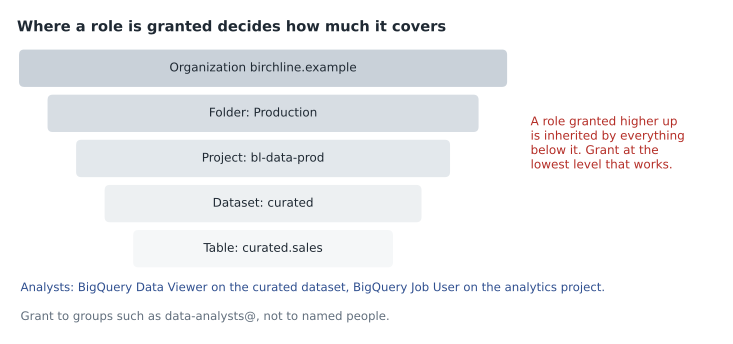
BigQuery roles that concern data, such as Data Viewer, Data Editor and Data Owner, can be granted on a project, a dataset, or an individual table, view or routine. Roles that concern running work, such as Job User, can only be granted at the project level or above, because a job belongs to a project. This split is important: to query a table, a person needs permission to read the table's data and permission to run a query job in some project, and the two can be in different projects. Birchline's analysts run their queries in bl-analytics, where they have Job User and where the query costs are billed, and read data in bl-data-prod, where they have Data Viewer on the curated dataset only.
| BigQuery role | What it allows | Typical grant at Birchline |
|---|---|---|
| Data Viewer | Read table data and metadata | Analyst groups, on the curated dataset |
| Metadata Viewer | See datasets, tables and schemas but not the rows | All staff, on curated, so they can discover data |
| Data Editor | Create, change and delete tables and their data | A pipeline's service account, on the datasets it writes |
| Data Owner | Full control of a dataset, including its access | The data platform team, on each dataset |
| Job User | Run jobs such as queries in a project | Analysts and pipelines, on the project that pays |
| User | Run jobs and create datasets in a project | Analysts in their sandbox projects |
| Admin | Everything in BigQuery for the project | Two platform administrators, through a break-glass group |
Authorized views and authorized datasets, covered in GCP-221, add one more tool: they let a view read tables that its users cannot read directly, so a group can be given a filtered or aggregated view of restricted data without any access to the underlying tables. Row access policies and column-level controls, covered in lesson 10, narrow access inside a single table.
Least privilege for pipelines
The four service accounts in Teresa's review each run one pipeline, and each had been given BigQuery Admin on the project because it 'made the errors go away' when the pipeline was first built. Admin lets them delete any dataset, change any access policy and read every table, including the restricted ones. If one of them were misused, through a leaked key or a bug, the damage would not be limited to the one table it loads.
The fix is to work out what each pipeline actually does and grant exactly that. The till-file loader reads objects from one bucket, writes to the raw dataset and runs load jobs. It needs Storage Object Viewer on the landing bucket, Data Editor on the raw dataset and Job User on the project, and nothing else. Mateo writes a small check that compares the permissions a pipeline needs with what its roles grant, using a simplified list of permissions for a handful of roles.
# Compare what a pipeline needs with what its roles grant (simplified permission lists)
roles = {
    "bigquery.admin": {"bigquery.tables.getData", "bigquery.tables.updateData", "bigquery.tables.create",
                       "bigquery.tables.delete", "bigquery.datasets.delete", "bigquery.datasets.setIamPolicy",
                       "bigquery.jobs.create"},
    "bigquery.dataEditor": {"bigquery.tables.getData", "bigquery.tables.updateData", "bigquery.tables.create",
                            "bigquery.tables.delete"},
    "bigquery.jobUser": {"bigquery.jobs.create"},
    "storage.objectViewer": {"storage.objects.get", "storage.objects.list"},
}
needs = {"storage.objects.get", "storage.objects.list", "bigquery.tables.getData", "bigquery.tables.updateData",
         "bigquery.tables.create", "bigquery.jobs.create"}

for granted in (["bigquery.admin", "storage.objectViewer"],
                ["bigquery.dataEditor", "bigquery.jobUser", "storage.objectViewer"]):
    perms = set().union(*(roles[r] for r in granted))
    missing = needs - perms
    extra = perms - needs
    print(" + ".join(granted))
    print("   missing:", sorted(missing) or "none")
print(" extra: ", len(extra), "permissions not needed:", sorted(extra))bigquery.admin + storage.objectViewer missing: none extra: 3 permissions not needed: ['bigquery.datasets.delete', 'bigquery.datasets.setIamPolicy', 'bigquery.tables.delete'] bigquery.dataEditor + bigquery.jobUser + storage.objectViewer missing: none extra: 1 permissions not needed: ['bigquery.tables.delete']
What this code does
This lists a few roles with the permissions each one includes, and the permissions the till-file loader really needs. For two possible sets of roles it combines the permissions they grant, then reports anything the pipeline needs but would not have, and anything it would have but does not need. The output shows that both sets cover the pipeline's needs, but the admin set carries extra powers such as deleting datasets and changing access policies, while the narrower set carries only one unneeded permission, deleting tables in the raw dataset, which the team can accept or remove with a custom role.
The narrower set still includes one permission the loader does not need, deleting tables, because Data Editor includes it. Aisha's view is that granting Data Editor on the raw dataset only, rather than on the project, already limits the damage to tables that can be reloaded from the landing bucket, so a custom role is not worth the maintenance here. For the restricted customer dataset, the answer would be different.
Cloud Storage access
Cloud Storage has its own access options, and the exam expects you to compare them. With uniform bucket-level access, the recommended setting, access is controlled only by IAM on the bucket (and higher levels), so every object in the bucket has the same rules. With fine-grained access, each object can also carry its own access control list (ACL), which makes it possible to share single objects but very hard to know who can read what. Birchline has enabled uniform access on every bucket and set the organization policy that enforces it for new ones.
Public access is controlled separately. Granting a role to allUsers or allAuthenticatedUsers makes data public, which is almost never wanted for business data. Public access prevention, set on a bucket or enforced by organization policy, blocks such grants entirely. When someone outside the company needs one file, such as a supplier collecting a monthly order export, a signed URL gives time-limited access to a single object without changing any IAM policy. Storage roles mirror BigQuery's: Storage Object Viewer reads objects, Storage Object Creator can add objects but not read or delete them, which suits a sender such as a store till, and Storage Object Admin manages objects fully.
Sharing data beyond the team
When data must be shared widely, with other departments, partner companies or the public, granting IAM roles table by table becomes hard to manage. BigQuery sharing, the feature previously called Analytics Hub, organizes sharing through data exchanges and listings. A publisher creates a listing for a dataset in an exchange, and subscribers who are allowed to see the listing subscribe to it, which creates a linked dataset in their own project: a read-only reference to the shared data, not a copy. The publisher keeps control, can see who has subscribed, can remove access, and pays only for storage, while subscribers pay for their own queries. Data clean rooms, a special kind of exchange, let two organizations combine data under rules that only allow aggregate results.
Birchline is planning its first listing: a weekly sell-through dataset for its largest suppliers, with product, store region, week and units, but no customer data. Before sharing, the dataset goes through the same review as any restricted access: an owner, a description, a classification of internal, and a quality scan.
Reviewing who has access
Granting access well is half the job; the other half is noticing when access is no longer needed. Google Cloud helps in three ways. The IAM recommender looks at which permissions each principal has actually used over the past 90 days and suggests removing or narrowing roles that were never used; it flagged the four Admin service accounts before Teresa's review did, but nobody was reading its suggestions. Policy Analyzer answers questions such as 'who can read curated.sales?' by working through every policy, group and inherited grant, which is much faster than reading policies by hand. And Cloud Audit Logs record administrative changes, such as a new grant, always, and can also record data access, such as each query that read a restricted table, when Data Access logs are turned on for that service.
Birchline now runs a short monthly routine: export the recommender's suggestions for the data projects, review them with each dataset's steward, apply the agreed ones, and check the data access logs for any reads of restricted tables by principals who are not on the approved list. It takes about an hour a month, and it is the reason the next review should find far fewer surprises.
Worked problem
Fixing a grant
The store-operations analysts group needs to query curated.sales and the view v_store_daily, and nothing else in bl-data-prod. Today it has the Viewer basic role on bl-data-prod and nothing on bl-analytics, where they run queries. What should the grants be?
Show solution
- Remove Viewer on bl-data-prod: it lets the group read every table in the project, including restricted ones.
- Grant BigQuery Data Viewer on the table curated.sales and on the view v_store_daily, or on the curated dataset if the group should see all curated tables.
- Grant BigQuery Job User on bl-analytics, so their queries run there and are billed there.
- Optionally grant BigQuery Metadata Viewer on the curated dataset so they can discover other tables and request access.
Answer: Data Viewer on the two objects (or the curated dataset), Job User on bl-analytics, Metadata Viewer for discovery, and no basic role anywhere, all granted to the group rather than its members.
Common mistakes
MistakeGranting basic roles such as Editor or Viewer on data projects.
InsteadUse predefined roles at the lowest level that works.
MistakeGranting roles to named people.
InsteadGrant to groups, so joiners and leavers are handled by group membership.
MistakeGiving a pipeline Admin to make permission errors stop.
InsteadFind the specific permissions it needs and grant the narrowest roles that include them.
MistakeForgetting that querying needs two kinds of permission.
InsteadGrant Data Viewer where the data is and Job User where the query runs.
MistakeSharing a single file by making a bucket public.
InsteadUse a signed URL with a short expiry, and keep public access prevention on.
Summary and key terms
- IAM allow policies bind principals to roles, and roles bundle permissions; deny policies and conditions refine them.
- Basic roles are too broad for data, predefined roles fit most needs, and custom roles are for exceptions.
- Roles are inherited down the hierarchy from organization to folder, project, dataset and table, so grant at the lowest workable level, to groups.
- BigQuery data roles can be granted on datasets and tables, while Job User is granted on the project where queries run.
- Pipelines need narrow roles of their own.
- Cloud Storage should use uniform bucket-level access with public access prevention, and signed URLs for one-off sharing.
- BigQuery sharing, formerly Analytics Hub, shares datasets through exchanges, listings and linked datasets.
- Principal
- An identity that can be granted access: a user, group, service account or domain.
- Predefined role
- A role maintained by Google for a common job in one service.
- Basic role
- One of the broad Owner, Editor and Viewer roles that apply across a project.
- Least privilege
- Granting only the permissions needed for a task, at the narrowest scope.
- Job User
- The BigQuery role that allows running jobs, such as queries, in a project.
- Uniform bucket-level access
- A Cloud Storage setting that controls access with IAM only, without object ACLs.
- Signed URL
- A link that grants time-limited access to one Cloud Storage object.
- Linked dataset
- A read-only reference to a shared dataset, created when a subscriber subscribes to a listing.
Practice problems
Work each problem on paper first, then reveal the answer to check.
Why is the Viewer basic role a problem on bl-data-prod?
Show answer
It lets holders read the data in every BigQuery table in the project.
At what level can BigQuery Job User be granted?
Show answer
Project, folder or organization, not on datasets or tables.
Which Cloud Storage role suits a till that uploads files but should not read others?
Show answer
Storage Object Creator.
What does a subscriber to a BigQuery sharing listing receive?
Show answer
A linked dataset in their own project that reads the shared data without copying it.
Lesson quiz · 5 questions
Score 60% or more to complete this lesson.
Create a free account to save your progress, take quizzes and earn a certificate.