
GCP-222 · Lesson 7 of 12 · 19 min
Metadata, lineage and the data catalog
▶ Video coming soon A video version of this lesson is on the way.
Tuesday's session, on November 3, begins with a question from Lena Okafor, the director of retail operations. Her weekly report shows that refunds at the Mississauga warehouse outlet rose sharply in October, and she wants to know whether the number is real before she raises it with the outlet manager. Mateo knows how to read the report's query. What he cannot see is where every number in it comes from: which raw files, which transformations, which filters along the way. Aisha's answer is to look at the table's metadata and lineage, the two things this session is about.
What metadata is
Metadata is data about data. It falls into three broad kinds. Technical metadata describes structure: a table's columns and their types, its partitioning, its size, when it was created and last changed. Business metadata describes meaning: what the table is for, what each column means in business terms, who owns it, how sensitive it is and which quality rules it must meet. Operational metadata describes activity: which jobs read and wrote it, how often, and with what results. Lineage, covered later in this lesson, is operational metadata about how data moves.
BigQuery collects technical and operational metadata automatically. Business metadata has to be written by people, and it is the part most often missing. A column called rfnd_amt_adj tells an analyst nothing, while a description that says 'refund amount after restocking fee, in dollars, negative for exchanges' tells them everything. Birchline's rule since GCP-221 is that every curated table and column has a description before it is shared, and the catalog makes those descriptions searchable.
The Knowledge Catalog
The Knowledge Catalog, called Dataplex Universal Catalog until April 2026, is Google Cloud's searchable inventory of data assets. It automatically holds an entry for every BigQuery dataset, table, view and model, and for many other resources such as Pub/Sub topics, Bigtable instances and Cloud SQL databases, and it can hold entries for assets outside Google Cloud through custom entries and metadata import. Entries are grouped into entry groups and typed by entry types.
Business metadata is attached to entries as aspects. An aspect type is a template that defines a set of fields, such as data owner, data steward, classification and refresh frequency, and an aspect is a filled-in copy of that template on a particular entry. Aspects replaced the tags and tag templates of the old Data Catalog, and the automatic migration when Data Catalog shut down on June 1, 2026 turned existing tags into aspects. Birchline has one aspect type called governance, with the fields Teresa defined last session, and every curated table carries one.
Searching the catalog works across all the projects a person can see, and results respect permissions: a user who cannot read a table may still find its entry if they can view its metadata, which lets them discover that the data exists and ask its steward for access. Searches can use plain words, such as 'refunds', or filters on fields, such as the system, the type of resource, a column name, or an aspect field like classification equals restricted.
| Kind of metadata | Examples | Where it comes from |
|---|---|---|
| Technical | Columns, types, partitioning, size, last modified | Collected automatically from BigQuery and other services |
| Business | Descriptions, owner, steward, classification, glossary terms | Written by people, stored as descriptions and aspects |
| Operational | Jobs that read and wrote a table, quality scan results, lineage | Recorded automatically by services and scans |
A business glossary
Different teams often use the same word for different things. At Birchline, 'net sales' means sales after discounts in the finance team's reports, but sales after discounts and refunds in the store operations dashboard, a difference GCP-221 spent a whole lesson untangling. A business glossary records agreed definitions of business terms, with an owner for each, and links each term to the columns that hold it. In the Knowledge Catalog, glossary terms can be attached to columns, so someone searching for 'net sales' finds both the definition and every column that implements it.
The glossary is only as good as the agreement behind it. Aisha's advice is to start with the twenty terms that cause the most arguments, not to try to define everything, and to make the owner of each term the person who would settle an argument about it.
Data lineage
Data lineage records how data moves: which sources a table was built from, which processes built it, and which tables, views and reports depend on it. It answers two everyday questions. Looking upstream answers 'where did this number come from?', which is Lena's question today. Looking downstream answers 'what will break if I change this?', which is the question every engineer should ask before altering a table.
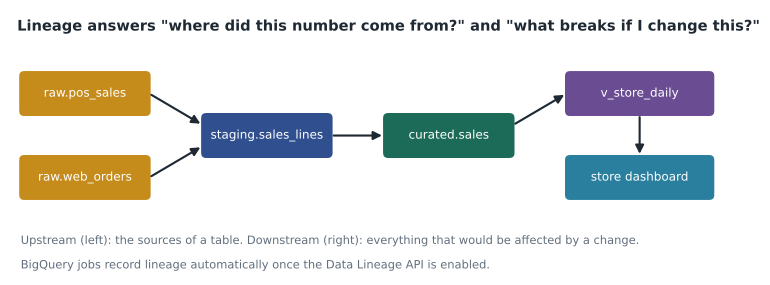
In Google Cloud, lineage is recorded by the Data Lineage API, part of Dataplex. Once it is enabled in a project, BigQuery records lineage automatically for jobs that copy, load or query data into tables, without any changes to the SQL. Other services, including Dataflow, Dataproc and managed Airflow, can report lineage too, and custom processes can send lineage events through the API, which accepts the open-source OpenLineage format. The catalog shows lineage as a graph on each table's entry, at table level and, for BigQuery, increasingly at column level, so you can see which source columns feed a given column. Lineage information is kept for a limited period, so for audit purposes Birchline also keeps its own run records in the control table.
Lineage has limits worth knowing. It shows what jobs did, not what they meant: a view that reads ten columns but uses only two still shows all ten as inputs. It only covers processes that report it, so a spreadsheet uploaded by hand appears as a load with no visible origin. And it records what happened, so a table built once a month shows its lineage only after it has run.
Following Lena's question upstream
Mateo opens the lineage graph for the report's source view and walks it upstream. The view reads curated.returns_daily, which is built from staging.returns, which is built from raw.returns, which is loaded by the returns portal pipeline. One more input appears that he did not expect: on October 5, a new process started writing to staging.returns from a file called outlet_returns_manual.csv. The warehouse outlet had begun uploading a weekly spreadsheet of returns that its old till could not record, and the same returns were also coming through the portal. October's refund jump was partly real and partly double counting.
Before fixing anything, Aisha asks the downstream question: what else reads staging.returns? Mateo writes a small impact search over the lineage edges, the same traversal the catalog performs when it draws the graph.
from collections import deque

# lineage edges: source -> targets that read from it
edges = {
    "raw.returns": ["staging.returns"],
    "outlet_returns_manual.csv": ["staging.returns"],
    "staging.returns": ["curated.returns_daily", "curated.return_reasons"],
    "curated.returns_daily": ["v_store_daily", "finance.refund_accrual"],
    "curated.return_reasons": ["return_risk_model"],
    "v_store_daily": ["store dashboard", "weekly ops report"],
    "finance.refund_accrual": ["month-end close"],
}

def downstream(start):
    seen, queue, order = {start}, deque([start]), []
    while queue:
        node = queue.popleft()
        for nxt in edges.get(node, []):
            if nxt not in seen:
                seen.add(nxt); order.append(nxt); queue.append(nxt)
    return order

affected = downstream("staging.returns")
print(len(affected), "assets depend on staging.returns:")
for a in affected:
print(" -", a)8 assets depend on staging.returns: - curated.returns_daily - curated.return_reasons - v_store_daily - finance.refund_accrual - return_risk_model - store dashboard - weekly ops report - month-end close
What this code does
This stores the lineage as a list of which assets read from which, then starts at the staging returns table and follows every link outward, one level at a time, keeping track of what it has already visited so nothing is counted twice. The output lists everything that depends on that table, directly or indirectly. It shows that a fix to the staging table will change two curated tables, a view, a model, a finance table, two reports and the month-end close, so all of their owners need to be told.
Eight assets, including the finance team's refund accrual for month-end. A quiet fix to staging.returns would have changed October's month-end numbers after finance had already used them. Aisha's process for a correction like this is to tell the owners of every downstream asset first, agree when the fix will land, fix the data, and note the change on each affected entry in the catalog. The double counting is removed the next day, with finance's agreement, and October's outlet returns turn out to have risen by a little over a quarter rather than doubling.
Keeping metadata current
Metadata decays. Owners change jobs, descriptions describe columns that have since changed, and aspects record a classification that no longer matches the data. Birchline keeps it current in three ways. First, descriptions and aspects for curated tables are kept in the same Git repository as the Dataform code that builds them, so a change to a table and a change to its description go through the same review. Second, a monthly report lists curated tables with no owner, no description or no quality scan, sent to the stewards. Third, the quarterly access review from lesson 6 includes a check that each restricted table's classification is still right.
Using the catalog in daily work
Mateo asks how often people really open the catalog. Aisha's answer is that it is most useful at three moments. The first is before building something new: a search for 'store targets' would have shown Mateo that reference.store_targets already existed before he started his own copy in GCP-221. The second is when a number looks wrong, which is today's case: the entry shows the owner to ask, the last quality result and the lineage, all on one page. The third is before changing or deleting something, when the downstream lineage and the list of recent readers show who will notice.
The catalog also helps the people who are not analysts. Teresa uses searches on the classification aspect to list every restricted table and check that each has masking in place. The finance team searches the glossary for a term before quoting a figure in a board paper. And when a new team member joins, their first task is to search the catalog for the tables their team owns and read the descriptions, which is often how out-of-date descriptions get noticed and fixed.
Aisha's last tip is about naming. Search works best when names are predictable, so Birchline's tables follow the layer.subject pattern that Mateo has seen throughout these courses, raw, staging, curated and reference, and column names use whole words. A catalog cannot make a confusing name clear, but a consistent naming rule means people can often guess the right table before they search for it.
Worked problem
Estimating the effect of the double counting
In October, the outlet recorded 1,840 returns in the portal. The manual spreadsheet added 1,520 rows, of which 1,410 duplicated portal returns and 110 were returns the portal had not recorded. September had 1,520 outlet returns, all through the portal. How large was the real increase, and how large did the report show?
Show solution
- The report counted 1,840 + 1,520 = 3,360 October returns.
- The real October count is the portal's 1,840 plus the 110 genuinely new rows: 1,950.
- Reported change: (3,360 - 1,520) / 1,520 = 1,840 / 1,520 ≈ 1.21, so the report showed about 2.2 times September's level.
- Real change: (1,950 - 1,520) / 1,520 = 430 / 1,520 ≈ 0.28, an increase of about 28 in every 100.
Answer: Returns really rose by about 28 in every 100, from 1,520 to 1,950, while the report showed them more than doubling. The fix keeps the 110 new rows and drops the 1,410 duplicates.
Common mistakes
MistakeLeaving business metadata to be written later.
InsteadRequire descriptions, an owner and a classification before a table is shared.
MistakeChanging a shared table without checking downstream lineage.
InsteadLook downstream first and tell the owners of every dependent asset.
MistakeAssuming lineage shows everything.
InsteadLineage covers only processes that report it; manual uploads and outside tools may show no origin.
MistakeBuilding a glossary of every term at once.
InsteadStart with the terms that cause the most disagreement, each with an owner.
MistakeUsing Data Catalog tag templates in new work.
InsteadUse aspect types and aspects in the Knowledge Catalog; Data Catalog shut down in June 2026.
Summary and key terms
- Metadata is technical, business or operational.
- BigQuery collects technical and operational metadata automatically, while business metadata such as descriptions, owners and classifications must be written by people.
- The Knowledge Catalog holds entries for data assets, groups them into entry groups and attaches business metadata as aspects defined by aspect types, which replaced Data Catalog's tags.
- A business glossary records agreed definitions linked to columns.
- The Data Lineage API records how data moves, automatically for BigQuery jobs, and lets you look upstream to trace a number's origin and downstream to see what a change would affect.
- Metadata needs owners and regular review to stay accurate.
- Metadata
- Data that describes other data: its structure, meaning and activity.
- Business metadata
- Descriptions, owners, classifications and other meaning written by people.
- Entry
- The Knowledge Catalog record for one data asset.
- Aspect type
- A template of metadata fields that can be attached to catalog entries.
- Aspect
- A filled-in instance of an aspect type on a particular entry.
- Business glossary
- A set of agreed business term definitions linked to the data that implements them.
- Data lineage
- A record of how data moves from sources through processes to targets.
- Downstream
- The tables, views, models and reports that depend on a given asset.
Practice problems
Work each problem on paper first, then reveal the answer to check.
What kind of metadata is a column description written by a steward?
Show answer
Business metadata.
What replaced Data Catalog's tag templates?
Show answer
Aspect types in the Knowledge Catalog.
Which direction of lineage do you look at before changing a table?
Show answer
Downstream, to see what the change would affect.
Why did the manual spreadsheet appear in lineage at all?
Show answer
Because the process that loaded it into staging.returns ran as a BigQuery job, which records lineage automatically.
Lesson quiz · 5 questions
Score 60% or more to complete this lesson.
Create a free account to save your progress, take quizzes and earn a certificate.