
GCP-222 · Lesson 3 of 12 · 19 min
Cloud Composer and Apache Airflow
▶ Video coming soon A video version of this lesson is on the way.
On Wednesday, October 28, Aisha opens the Airflow web interface for Birchline's one managed Airflow environment. The data engineering team created it in early 2025 to run the warehouse system's nightly exports, which involve a file server, an FTP drop from a supplier and three BigQuery steps. Mateo has seen the word Composer in the exam guide and wants to know what it is, when Birchline would use it, and why Aisha calls it 'the tool for when the simple tools run out'.
Airflow and its managed service
Apache Airflow is an open-source platform for writing, scheduling and monitoring workflows as code. A workflow, which Airflow calls a DAG, is a Python file that defines tasks and the dependencies between them. Airflow is widely used, has hundreds of ready-made connectors called operators, and can coordinate almost any system that has an API.
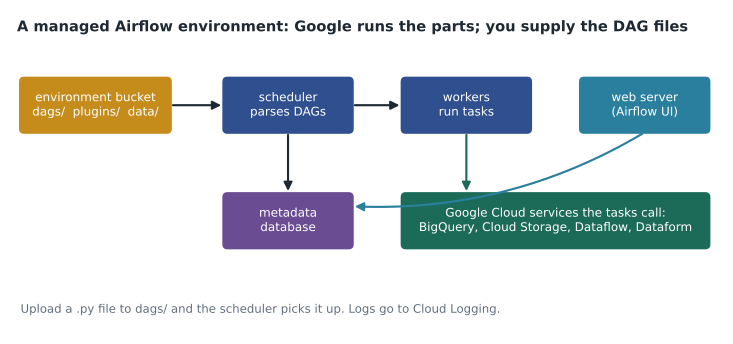
Running Airflow yourself means running a scheduler, workers, a web server, a database and storage for the DAG files, and keeping all of them patched and scaled. Google's managed version does that for you. For years it was called Cloud Composer, and the exam guide still uses that name. In April 2026 Google announced that Cloud Composer is becoming Managed Service for Apache Airflow; the product, the console pages and the gcloud composer commands carry on, so expect both names in documentation for a while. This course uses Composer and managed Airflow interchangeably.
Environments and versions
An Airflow installation in Google Cloud is called an environment. Each environment has a Cloud Storage bucket with a dags folder, a set of Airflow components, and an Airflow version. The service has gone through three generations. The first used a Google Kubernetes Engine cluster in your own project and is now past its end of life. The second runs on an Autopilot GKE cluster in your project and supports Airflow 2. The third, which Birchline uses, does not put a cluster in your project at all, scales workers automatically, simplifies networking, and supports both Airflow 2 and Airflow 3. Each Airflow build is supported for about a year after release, so environments need upgrading from time to time.
An environment is billed while it exists, whether or not any DAG is running, because its scheduler, web server and database run all the time. Birchline's small environment costs a few hundred dollars a month before any task runs. That fixed cost is the main reason Aisha does not use Airflow for pipelines that a scheduled query or a short workflow could handle, a point lesson 11 returns to.
A DAG file
Aisha opens the DAG that loads the supplier's nightly stock file. It is a Python file, but it does not process data itself; it describes tasks and leaves the work to the services they call.
# dags/supplier_stock.py  (runs in Airflow, not in the browser)
import pendulum
from airflow import DAG
from airflow.providers.google.cloud.sensors.gcs import GCSObjectExistenceSensor
from airflow.providers.google.cloud.transfers.gcs_to_bigquery import GCSToBigQueryOperator
from airflow.providers.google.cloud.operators.bigquery import BigQueryInsertJobOperator

with DAG(
    dag_id="supplier_stock",
    schedule="0 4 * * *",                          # 04:00 every day
    start_date=pendulum.datetime(2026, 1, 1, tz="America/Toronto"),
    catchup=False,
    default_args={"retries": 3, "retry_delay": pendulum.duration(minutes=10)},
) as dag:
    wait = GCSObjectExistenceSensor(
        task_id="wait_for_file",
        bucket="bl-data-landing",
        object="suppliers/stock_{{ ds_nodash }}.csv",
        mode="reschedule", timeout=3 * 60 * 60)
    load = GCSToBigQueryOperator(
        task_id="load_raw",
        bucket="bl-data-landing",
        source_objects=["suppliers/stock_{{ ds_nodash }}.csv"],
        destination_project_dataset_table="bl-data-prod.raw.supplier_stock_{{ ds_nodash }}",
        write_disposition="WRITE_TRUNCATE", skip_leading_rows=1)
    merge = BigQueryInsertJobOperator(
        task_id="merge_curated",
        configuration={"query": {"query": "CALL curated.merge_supplier_stock(DATE '{{ ds }}')",
                                 "useLegacySql": False}})
    wait >> load >> merge
Each part of the file has a job. The DAG's schedule says when runs start, written in cron syntax. The start date and catchup setting decide whether Airflow creates runs for past dates it has missed; with catchup off, it only schedules from now on. The default arguments give every task three retries, ten minutes apart. The sensor waits for the supplier's file, checking periodically and giving up after three hours. The two operators run a BigQuery load and a stored procedure. And the last line, wait >> load >> merge, sets the dependencies.
The double curly brackets are templates. When a run starts, Airflow replaces {{ ds }} with the run's logical date, such as 2026-10-27, and {{ ds_nodash }} with the same date without dashes. This is Airflow's version of the run-date parameter from lesson 2, and it is what makes reruns and backfills process the right day. Airflow 3 renames some of these ideas, for example using 'logical date' consistently, but the principle is the same.
Operators, sensors and retries
An operator is a template for one kind of task: run a BigQuery job, start a Dataflow template, copy files, call an HTTP endpoint, run a Dataform workflow. Google maintains a large provider package of operators for its services. A sensor is a special operator that waits for something to be true, such as a file existing or a partition appearing. Sensors that occupy a worker slot while they wait can be wasteful, so modern DAGs use reschedule mode, which frees the slot between checks, or deferrable sensors, which hand the waiting to a lightweight process called the triggerer.
Retries handle temporary failures such as a network timeout or a service briefly refusing requests. Aisha sets them deliberately: three retries with growing delays for tasks that call external systems, and none for tasks that fail only when the data is wrong, because retrying a bad file just fails three more times. Mateo works out how long the retry schedule can delay a run.
# Total extra wait when a task fails and is retried with exponential backoff
first_delay = 10      # minutes before the first retry
factor = 2            # each delay doubles
max_delay = 60        # but never more than an hour
retries = 4

delay, total = first_delay, 0
for attempt in range(1, retries + 1):
    total += delay
    print(f"retry {attempt}: waits {delay} min, {total} min after the first failure")
delay = min(delay * factor, max_delay)retry 1: waits 10 min, 10 min after the first failure retry 2: waits 20 min, 30 min after the first failure retry 3: waits 40 min, 70 min after the first failure retry 4: waits 60 min, 130 min after the first failure
What this code does
This adds up the waiting time for a task that fails and is retried four times, where each wait is twice as long as the one before but is never allowed to exceed an hour. The printout lists when each retry happens. It shows that four retries can push a task almost two hours past its first failure, which is time the pipeline must have in hand before its deadline.
The answer, 130 minutes, is why retries and deadlines must be planned together. If the nightly pipeline must finish by 06:00 and the task normally runs at 04:00, four retries with this schedule could leave just a few minutes, or none at all, for the tasks after it. Aisha's rule is that retries cover short glitches; anything longer should alert a person.
When Airflow is the right choice
Managed Airflow earns its cost when a pipeline coordinates many systems, branches on conditions, needs sensors that wait for things outside Google Cloud, must be backfilled over long periods, or is one of dozens of pipelines that benefit from a single scheduler, interface and history. Birchline's warehouse exports qualify: they touch an on-premises file server, a supplier's FTP drop and BigQuery, and the operations team likes seeing every run in one place.
It is the wrong choice for a single nightly SQL statement, for a handful of BigQuery transformations that Dataform can order by itself, or for an event-driven step that should run seconds after a file arrives. It is also wrong when nobody on the team can write and review Python, because every DAG is code. Aisha keeps a short list on the team wiki: if a new pipeline does not need at least two of sensors, branching, many external systems and long backfills, it does not go into Airflow.
| Concept | What it is | Birchline example |
|---|---|---|
| DAG | A Python file defining tasks and dependencies | supplier_stock.py |
| Operator | A reusable kind of task | BigQueryInsertJobOperator runs the merge |
| Sensor | A task that waits for a condition | Waits up to three hours for the supplier file |
| Logical date | The date a run processes, available as {{ ds }} | The run starting at 04:00 on October 28 processes October 27 |
| Catchup | Whether missed past runs are created automatically | Off, so a paused DAG does not flood the system |
| Retries | Automatic repeats after a failure | Three, ten minutes apart |
Testing and deploying DAGs
Because DAGs are code, Birchline treats them like code. They live in a Git repository, changes go through a pull request that another engineer reviews, and an automated check imports every DAG file before it is merged. That import check catches the most common failure: a DAG that does not parse, perhaps because of a typing mistake or a missing library, never appears in the Airflow UI at all, and its runs simply stop. Aisha has seen that happen twice, both times on a Friday afternoon.
Deployment is a copy. When a change is merged, the build pipeline copies the DAG file into the dags folder of the environment bucket, and the scheduler picks it up within a few minutes. Python packages that DAGs need are installed on the environment itself, and a change to them restarts the components, so package updates are scheduled for quiet periods. Birchline keeps a second, smaller environment for testing upgrades to new Airflow versions before the production environment moves.
Two settings keep a busy environment fair. Pools limit how many tasks of a certain kind run at once, for example no more than four tasks that call the supplier's slow API. Priority weights decide which waiting tasks start first when workers are scarce, so the nightly sales tasks win over a weekend backfill. Together with the cap on concurrent runs from lesson 1, they stop one large job from starving everything else.
Mateo asks how the team knows a DAG change worked. Aisha shows him the habit she insists on: after every deployment, open the DAG in the Airflow UI, confirm the new version appears in its code view, and trigger one run against a test date before the next scheduled run. A deployment that nobody has watched run once is not finished.
Worked problem
Reading a DAG run
The supplier_stock DAG ran on the morning of October 28. The Airflow UI shows: wait_for_file succeeded at 05:12; load_raw failed at 05:13 with "schema mismatch: column 4 expected INTEGER, got STRING", then failed three more times; merge_curated is marked upstream_failed. What happened, and what should Aisha do?
Show solution
- The sensor waited from 04:00 until the file appeared at 05:12, well inside its three-hour timeout.
- The load failed because the file's fourth column held text where a number was expected, which is a data problem, not a temporary one.
- The three retries could never succeed, because the same file was loaded each time; they added about 30 minutes of delay.
- merge_curated never ran, because its upstream task failed; upstream_failed means it was skipped for that reason.
- The fix is to contact the supplier or correct the file, then clear load_raw for that run so it and merge_curated run again.
Answer: The supplier sent a bad file. Aisha should fix or replace the file and clear the failed task so the run continues, and she should set retries to zero for load_raw, because schema errors are never temporary.
Common mistakes
MistakeUsing managed Airflow for a single scheduled SQL statement.
InsteadUse a scheduled query; Airflow's environment costs money around the clock.
MistakeDoing heavy data processing inside Airflow tasks in Python.
InsteadLet Airflow call BigQuery, Dataflow or Dataform to do the work, and keep tasks light.
MistakeTurning catchup on for a DAG with an old start date.
InsteadLeave catchup off unless you want Airflow to create every missed run, and backfill deliberately.
MistakeRetrying tasks that fail on bad data.
InsteadRetry temporary errors only; data errors need a person or a quarantine step.
MistakeUsing a sensor that holds a worker while it waits for hours.
InsteadUse reschedule mode or a deferrable sensor.
Summary and key terms
- Apache Airflow defines workflows as Python DAGs of tasks and dependencies.
- Google's managed Airflow, long called Cloud Composer and now becoming Managed Service for Apache Airflow, runs the scheduler, workers, web server, database and DAG bucket for you.
- Current environments support Airflow 2 and 3 and are billed while they exist.
- Operators run kinds of tasks, sensors wait for conditions, templates such as {{ ds }} pass the logical date, and retries handle temporary failures.
- Airflow suits pipelines with many systems, branching, sensors and long backfills; simpler needs are better met by scheduled queries, Dataform or Workflows.
- Apache Airflow
- An open-source platform for defining, scheduling and monitoring workflows as Python code.
- Environment
- One managed Airflow installation with its bucket, components and Airflow version.
- Operator
- A template for one kind of Airflow task.
- Sensor
- An operator that waits for a condition, such as a file existing.
- Deferrable sensor
- A sensor that hands its waiting to the triggerer and frees its worker.
- Logical date
- The date a run processes, independent of when it actually starts.
- Catchup
- An Airflow setting that creates runs for missed past schedule intervals.
- Exponential backoff
- Retrying with delays that grow, often doubling, after each failure.
Practice problems
Work each problem on paper first, then reveal the answer to check.
Why does an Airflow environment cost money even when no DAG runs?
Show answer
Its scheduler, web server and database run continuously.
What does {{ ds }} become in a run for the logical date October 27, 2026?
Show answer
2026-10-27.
A task fails because a file has a wrong column type. Should it be retried automatically?
Show answer
No; the same file fails every time, so a person must fix the data.
Name two signs that a pipeline justifies managed Airflow.
Show answer
Any two of: many external systems, sensors, branching, long backfills, many pipelines needing one scheduler.
Lesson quiz · 5 questions
Score 60% or more to complete this lesson.
Create a free account to save your progress, take quizzes and earn a certificate.