
FILM-220 · Lesson 10 of 12 · 30 min
Editing systems and media management
Creative editing rests on technical foundations. If media goes missing, if clips are badly named, if storage fills up the night before a screening or if a drive fails without a backup, no amount of artistry will save the schedule. Professional editors and assistant editors spend a large share of their time on media management: getting footage into the system safely, organizing it so anything can be found in seconds, choosing codecs and proxy workflows that keep systems responsive, and protecting everything with backups. This lesson surveys editing systems and the practical discipline of media management, with the calculations that let you plan storage, transfer times and workflows before a project begins.
Editing systems
Non-linear editing systems, often called NLEs, let editors arrange media in any order without altering the original files. At the time of writing, the most widely used professional systems include Avid Media Composer, long standard in feature film and scripted television; Adobe Premiere Pro, common in documentary, commercials and online content; DaVinci Resolve, which combines editing with colour grading, visual effects and audio; and Apple Final Cut Pro, popular with independent editors. The core concepts carry across systems: projects contain bins, bins contain clips, and sequences or timelines arrange clips in time.
| Concept | What it is | Notes |
|---|---|---|
| Project | The container for all work on a production | Settings for frame rate and resolution |
| Bin | A folder of clips and sequences | Organized by day, scene or type |
| Clip | A reference to media with in and out points | Media stays on disk; the clip points to it |
| Sequence or timeline | An arrangement of clips in time | Versions saved separately |
| Media | The actual video and audio files | Stored on local or shared drives |
| Metadata | Information about clips | Scene, take, camera, timecode, notes |
Because clips point to media rather than containing it, a project can lose contact with its media if files move or drives are renamed. Relinking restores the connection. Good naming and stable folder structures prevent most relinking problems.
Ingest and verification
Ingest is the process of bringing camera and sound media into the post-production system. On many productions, a digital imaging technician, or DIT, or a data wrangler copies camera cards on set, verifies the copies and creates first backups. Verification uses checksums, short codes calculated from each file's contents. If the checksum of the copy matches the original, the copy is identical. Common checksum methods include MD5 and xxHash, the latter being much faster on large files.
- Copy every card to at least two separate drives before reformatting it.
- Verify copies with checksums, not just file sizes.
- Keep the original folder structure from the camera, which carries metadata.
- Record a transfer log with card names, dates and checksum results.
- Never reformat a card until verified copies exist in two places.
Codecs and data rates
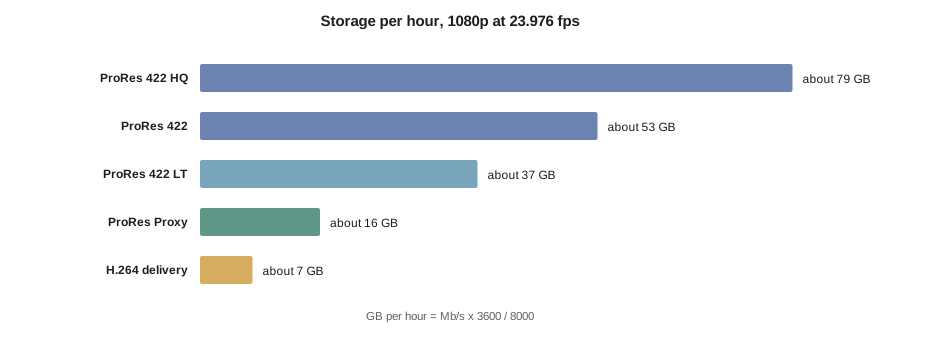
A codec compresses and decompresses video. Camera codecs aim for image quality; editing codecs aim for smooth playback; delivery codecs aim for small files at acceptable quality. Intraframe codecs compress each frame independently and are easy to edit. Long-GOP codecs compress across groups of frames, giving smaller files but demanding more processing during playback. Many productions shoot in a high-quality camera format and edit with lighter proxy files.
| Codec | Type | Approximate data rate | Storage per hour |
|---|---|---|---|
| ProRes 422 HQ | Intraframe | 176 Mb/s | About 79 GB |
| ProRes 422 | Intraframe | 117 Mb/s | About 53 GB |
| ProRes 422 LT | Intraframe | 82 Mb/s | About 37 GB |
| ProRes Proxy | Intraframe | 36 Mb/s | About 16 GB |
| H.264 delivery file | Long-GOP | 10 to 20 Mb/s | About 4.5 to 9 GB |
Worked problem
Storage for a feature in originals and proxies
A feature shoots 35 days, averaging 3 hours of footage per day, in a camera format recording about 280 Mb/s at 4K. Editorial works with ProRes Proxy at about 36 Mb/s. Calculate storage for originals and proxies.
Show solution
- Total footage: \( 35 \times 3 = 105 \) hours.
- Originals per hour: \( 280 \times 3600 / 8000 = 126 \) GB, so \( 105 \times 126 = 13\,230 \) GB, about 13.2 TB.
- Proxies per hour: \( 36 \times 3600 / 8000 = 16.2 \) GB, so \( 105 \times 16.2 \approx 1\,701 \) GB, about 1.7 TB.
Answer: About 13.2 TB of originals and 1.7 TB of proxies. The editing workstation or shared storage needs to hold the proxies plus audio, graphics and renders, while the originals live on protected storage for the online.
Proxy workflows
In a proxy workflow, editors cut with lightweight copies of the camera media. When the edit is finished, the timeline is relinked to the original high-resolution files for finishing. Proxies make it possible to edit high-resolution projects on modest hardware and over shared storage, but they must keep the same file names, timecode and frame rate as the originals so relinking works.
- Match proxy names, timecode and frame rate exactly to the originals.
- Include burned-in source name and timecode only if the workflow expects it.
- Test the relink to originals early, before months of editing depend on it.
- Record the look applied to proxies, such as a viewing LUT, so the online can match it.
Worked problem
Time to create proxies
A workstation transcodes 4K originals to proxies at about 3 times real time. How long will it take to create proxies for 105 hours of footage? If two machines share the work, how long then?
Show solution
- One machine: \( 105 / 3 = 35 \) hours.
- Two machines: \( 35 / 2 = 17.5 \) hours.
Answer: About 35 hours on one machine, or 17.5 hours on two. Assistants usually create proxies overnight as each day's footage arrives, so the editor never waits.
Transfers and shared storage
Teams of editors and assistants commonly work on shared storage over a network, so everyone sees the same media. Network speed limits how quickly files move and how many streams can play at once. Speeds are quoted in bits per second, while file sizes are in bytes, so divide by 8 and allow for overhead.
Worked problem
Transfer time over a network
You need to copy 2 TB of originals over a 10 gigabit per second network. Assume real throughput is about 70 per cent of the nominal speed. How long will it take?
Show solution
- Effective speed: \( 10 \times 0.7 = 7 \) Gb/s, which is \( 7 / 8 = 0.875 \) GB/s.
- Data: 2 TB is 2,000 GB.
- Time: \( 2\,000 / 0.875 \approx 2\,286 \) seconds, about 38 minutes.
Answer: About 38 minutes. On a 1 gigabit network the same copy would take roughly 10 times as long, over six hours, which is why post facilities invest in fast networks.
Organization and naming
A well-organized project lets anyone find a clip in seconds. Assistant editors set up bin structures, naming conventions and metadata before editing starts and maintain them throughout. Common approaches organize dailies by shoot day and by scene, with separate areas for sound, music, graphics, visual effects and sequences.
- Name sequences with project, reel or scene, version and date, such as FILM_R2_v07_2026-03-14.
- Never overwrite a cut; duplicate it and increment the version number.
- Fill in scene and take metadata so script-based tools and searches work.
- Keep exports and screening files in a separate, clearly labelled location.
Backups and safety
Drives fail. The question is not whether but when. Professional practice follows the 3-2-1 rule: keep at least three copies of important data, on at least two different types of media or devices, with at least one copy off site. Editing projects themselves, which are small, should be backed up automatically several times a day. Camera originals should be protected from the moment they leave set.
Worked problem
Backup storage for a documentary
A documentary holds 14.3 TB of originals and 2.9 TB of proxies. The team keeps originals in three copies and proxies in two. How much total storage is needed, before audio and graphics?
Show solution
- Originals: \( 14.3 \times 3 = 42.9 \) TB.
- Proxies: \( 2.9 \times 2 = 5.8 \) TB.
- Total: \( 42.9 + 5.8 = 48.7 \) TB.
Answer: About 49 TB. Adding 10 to 20 per cent headroom for renders, exports and growth is wise, so plan for 55 to 60 TB.
Automation and AI tools
At the time of writing, editing systems include a growing range of automated tools: speech-to-text transcription, text-based editing where cutting a transcript cuts the media, automatic scene detection, audio cleanup, smart reframing for different aspect ratios and tools that suggest rough assemblies. These tools can save hours on organization and routine tasks. They do not replace the editor's judgment about story and performance, and their output needs checking. Productions should also check whether their contracts or union agreements address the use of such tools, and whether uploading media to online services is allowed under their security rules.
Security and confidentiality
Unreleased films are valuable, and leaks can cost productions money and damage their release plans. Many productions require editorial systems to be isolated from the public internet, restrict who can copy media, watermark screening copies with the viewer's name and keep logs of who accesses files. Editors and assistants sign confidentiality agreements and are expected to keep plot details private. Remote editing, which became widespread in the early 2020s, added new security questions: home networks, personal computers and cloud services all need to meet the production's standards. Before using any online service, including transcription or AI tools, check that the production allows it.
Remote and cloud workflows
At the time of writing, many productions combine local and remote work. Editors may cut on a workstation in a facility while directors review from elsewhere through secure streaming tools, or entire teams may work from cloud-based storage with proxies synced to home machines. Cloud workflows reduce the need to ship drives but add costs for storage and data transfer, and they depend on reliable, fast internet connections. Planning which media lives where, who can access it and how changes are synchronized is now part of the assistant editor's job.
Project hygiene
Over months of editing, projects accumulate clutter: abandoned sequences, duplicate clips, renders for effects that no longer exist and media for scenes that were cut. Regular cleanup keeps projects fast and reduces confusion. Assistants archive old sequences in clearly labelled bins, consolidate media when needed and delete unused render files. A simple routine, such as tidying the project at the end of each week, prevents a crisis just before the turnover.
Planning before the first day
The best time to design a media workflow is before shooting begins. A short workflow meeting between the editor, assistant editor, DIT, sound mixer, post supervisor and finishing facility can settle the project frame rate, timecode practices, camera and audio formats, proxy specifications, naming conventions, storage capacity and backup responsibilities. A test day, in which a few minutes of footage go through the whole chain from camera to conform, catches problems while they are still cheap to fix.
Common mistakes
MistakeRelying on file size to verify copies
InsteadUse checksums such as MD5 or xxHash to confirm copies are identical
MistakeCreating proxies with different names or timecode
InsteadMatch proxies to originals exactly and test the relink early
MistakeConfusing bits and bytes in transfer planning
InsteadDivide bits per second by 8 and allow for overhead
MistakeOverwriting sequences when making changes
InsteadDuplicate and increment version numbers for every significant change
MistakeKeeping only one copy of originals
InsteadFollow the 3-2-1 backup rule from the first day
Summary and key terms
- Editing systems share core concepts of projects, bins, clips, sequences and media.
- Ingest copies and verifies media with checksums before cards are reused.
- Codecs trade quality, file size and playback ease; proxies make editing efficient.
- Storage per hour equals data rate in Mb/s times 3,600, divided by 8,000.
- Transfers depend on network speed, overhead and the bits-to-bytes conversion.
- Consistent naming, bin structure and versioning make projects easy to manage.
- The 3-2-1 rule protects against drive failure and disaster.
- NLE
- Non-linear editing system
- Bin
- A folder of clips and sequences in an editing project
- Ingest
- Bringing media into the post-production system
- Checksum
- A code calculated from file contents to verify copies
- DIT
- Digital imaging technician who manages camera data on set
- Codec
- Software that compresses and decompresses media
- Proxy
- A lightweight copy of media used for editing
- Relink
- Reconnecting clips to media files, such as originals after a proxy edit
- Intraframe
- Compression that treats each frame independently
- 3-2-1 rule
- Three copies, two media types, one copy off site
Practice problems
Work each problem on paper first, then reveal the answer to check.
How many GB per hour does 117 Mb/s produce?
Show answer
\( 117 \times 3600 / 8000 \approx 52.7 \) GB.
How long does 500 GB take over an effective 0.5 GB/s link?
Show answer
1,000 seconds, about 17 minutes.
Sixty hours of proxy at 16.2 GB per hour need how much space?
Show answer
About 972 GB.
What does a checksum confirm?
Show answer
That a copy is identical to the original.
Why keep the camera's folder structure?
Show answer
It carries metadata the software needs.
How long to transcode 40 hours at 4 times real time?
Show answer
10 hours.
What is the 3-2-1 rule?
Show answer
Three copies, two kinds of media, one off site.
Name one risk of AI editing tools.
Show answer
Errors that need checking, or security and contract issues with uploading media.
How many GB per hour does 280 Mb/s produce?
Show answer
126 GB.
What should match between proxies and originals?
Show answer
File names, timecode and frame rate.
Lesson quiz · 5 questions
Score 60% or more to complete this lesson.
Create a free account to save your progress, take quizzes and earn a certificate.