
ENCM-100 · Lesson 2 of 5 · 32 min
Variables, types and expressions
Most engineering programs start the same way: take some numbers, combine them with formulas, and report the result. This chapter covers the building blocks for doing that well: variables to hold values, the basic types of data Python works with, arithmetic and the order of operations, the math module, converting between types, reading input and formatting output.
It also explains one of the most surprising facts about computing for newcomers: computers cannot store most decimal numbers exactly. Understanding why prevents a whole class of subtle bugs. Throughout, the examples are calculations you have met in first-year courses: stresses, flows, unit conversions and pendulums.
Variables and assignment
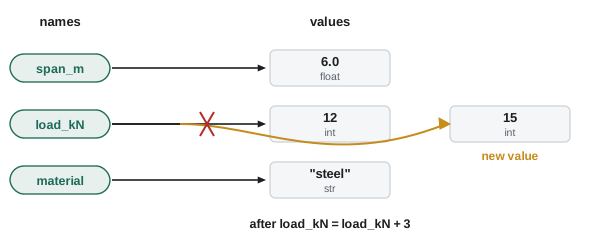
A variable is a name that refers to a value. You create one by assignment, with a single equals sign:
span_m = 6.0
load_kN = 12
material = "steel"
print(span_m, load_kN, material)
The right-hand side is evaluated first, then the name on the left is made to refer to the result. That is why count = count + 1 makes sense in code even though it is nonsense in algebra: take the current value, add one, and store the new value under the same name.
Python variable names may contain letters, digits and underscores, must not start with a digit, and are case-sensitive (Load and load are different). They cannot be one of Python's reserved words such as if, for, or class. Good names describe the quantity and its units: wall_thickness_mm, not t or x1. Constants, values that should not change, are by convention written in capitals: G = 9.81.
The basic types
Every value in Python has a type, which decides what you can do with it. Four types cover most engineering calculations:
- int: whole numbers, of any size: 12, −3, 1000000.
- float: numbers with a decimal point or exponent: 6.0, 0.001, 2.1e11 (which means 2.1 × 10¹¹, a typical Young's modulus for steel in pascals).
- str: text (strings), in single or double quotes: "steel", 'W310x39'.
- bool: the truth values True and False, the result of comparisons such as stress < allowable.
print(type(3), type(3.0), type("3"), type(True))<class 'int'> <class 'float'> <class 'str'> <class 'bool'>Notice that 3, 3.0 and "3" are three different things. The first two are numbers that happen to be equal; the third is a piece of text containing the character 3, and arithmetic on it behaves very differently.
Arithmetic and the order of operations
Python's arithmetic operators are:
- + addition, − subtraction, * multiplication, / division (always gives a float).
- ** exponent: 2 ** 10 is 1024; 10 ** 0.5 is the square root of 10.
- // floor division: divides and rounds down to a whole number.
- % remainder (modulo): what is left after floor division.
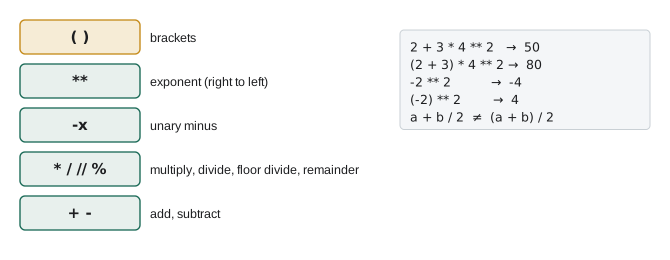
The order of operations is the usual one from mathematics: brackets first, then exponents, then multiplication and division (including // and %), then addition and subtraction. Operators of equal precedence work left to right, except ** which works right to left.
print(7 / 2, 7 // 2, 7 % 2, 2 ** 10)
print(2 + 3 * 4 ** 2, (2 + 3) * 4 ** 2, -2 ** 2)
3.5 3 1 1024
50 80 -4The last result surprises many people: -2 ** 2 is −4, because the exponent is applied before the minus sign. Write (-2) ** 2 if you mean 4.
Worked problem
Packing with // and %
A supplier ships bolts in boxes of 200. An order needs 1250 bolts. How many full boxes are there, and how many bolts are left over for a part box? Write the Python.
Show solution
bolts = 1250 per_box = 200 full_boxes = bolts // per_box left_over = bolts % per_box print(full_boxes, "full boxes and", left_over, "bolts left over")- Output: 6 full boxes and 50 bolts left over.
Answer: 6 full boxes and 50 left over, so 7 boxes in total. Floor division and remainder are the natural tools for counting things that come in fixed batches
The math module
Functions such as square roots, trigonometry and logarithms live in the math module, which you load with import math at the top of a program. You then write math.sqrt(x), math.sin(x), math.log(x) (natural log), math.log10(x), math.exp(x), and use the constants math.pi and math.e.
Worked problem
Pendulum period
A pendulum used to demonstrate a tuned mass damper is 1.5 m long. Compute its small-swing period \(T = 2\pi\sqrt{L/g}\).
Show solution
import math G = 9.81 # m/s^2 length_m = 1.5 period_s = 2 * math.pi * math.sqrt(length_m / G) print(period_s)- Output: 2.456919878869914.
- Check by hand: \(\sqrt{1.5/9.81} = 0.391\); \(2\pi \times 0.391 = 2.46\) s. ✓
Answer: T ≈ 2.46 s. We will tidy the long output with formatting shortly
Angles are in radians
Python's trigonometric functions work in radians, like almost all programming languages. Passing degrees gives a wrong answer with no error message: a classic logic error.
import math
print(math.sin(30))
print(math.sin(math.radians(30)))
-0.9880316240928618
0.49999999999999994The first line computes the sine of 30 radians, which is meaningless here. The second converts 30° to radians first and gets 0.5 (to within rounding, a point we will come back to). Use math.radians() and math.degrees() to convert. When an engineering calculation with angles gives a strange answer, check this first.
Engineering formulas in code
Worked problem
Bending stress in a timber beam
A rectangular timber beam, 100 mm wide and 300 mm deep, carries a bending moment of 45 kN·m. Compute the maximum bending stress \(\sigma = Mc/I\), with \(I = bh^3/12\) and \(c = h/2\). Work in N and mm so the stress comes out in MPa.
Show solution
b_mm = 100 h_mm = 300 M_Nmm = 45e6 # 45 kN.m = 45 x 10^6 N.mm I_mm4 = b_mm * h_mm ** 3 / 12 # second moment of area c_mm = h_mm / 2 stress_MPa = M_Nmm * c_mm / I_mm4 print(I_mm4, stress_MPa)- Output: 225000000.0 30.0.
Answer: I = 2.25 × 10⁸ mm⁴ and σ = 30.0 MPa. Choosing a consistent unit system (N and mm gives MPa directly) and writing units in the names avoids the most common errors in engineering code
Worked problem
Reynolds number
Water (\(\rho = 998\) kg/m³, \(\mu = 1.0 \times 10^{-3}\) Pa·s) flows at 1.8 m/s in a 100 mm pipe. Compute \(Re = \rho V D/\mu\).
Show solution
rho = 998 # kg/m^3 V = 1.8 # m/s D = 0.100 # m mu = 1.0e-3 # Pa.s Re = rho * V * D / mu print(Re)- Output: 179640.0.
Answer: Re ≈ 180 000, well into the turbulent range. In Lesson 3 we will make the program classify the flow automatically
Floating-point numbers are approximate
Here is something every engineer who programs must understand:
import math
print(0.1 + 0.2)
print(0.1 + 0.2 == 0.3)
print(math.isclose(0.1 + 0.2, 0.3))
0.30000000000000004
False
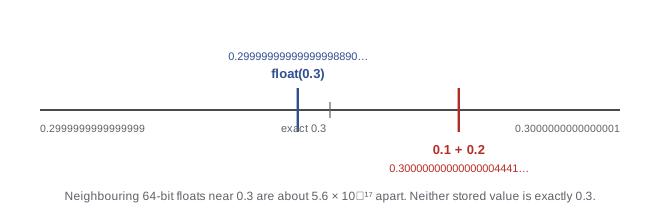
TrueComputers store floats in binary, in a fixed number of bits (64 for a Python float, following the IEEE 754 standard). Just as 1/3 cannot be written exactly as a finite decimal (0.3333…), most decimal fractions, including 0.1, cannot be written exactly in binary. The stored value is the nearest binary fraction, accurate to about 15 or 16 significant digits. The tiny representation errors usually do not matter, but they show up in two ways:
- Printed results with long tails, such as 1723.6892500000001 in Lesson 1 or 0.49999999999999994 above.
- Equality tests that fail. Never test floats for exact equality with ==. Use math.isclose(a, b), or check that abs(a − b) is smaller than a tolerance you choose.
Sixteen significant digits is far more precision than any engineering input has, so for nearly all engineering work floats are entirely adequate. Problems arise in special cases: subtracting two nearly equal large numbers (which wipes out the significant digits), summing millions of tiny values, or money, where exact cents matter (Python's decimal module handles that).
Strings
Strings hold text: labels, file names, messages, identifiers such as section designations. A few operations are enough to start:
- + joins strings: "W310" + "x39" gives "W310x39".
- len(s) gives the number of characters.
- Methods such as s.upper(), s.lower(), s.strip() (remove spaces at the ends) and s.replace("x", "X") return modified copies.
Mixing strings and numbers in arithmetic is an error: "Load: " + 12 raises a TypeError. Convert first, or better, use an f-string.
Formatting output with f-strings
An f-string is a string with an f before the opening quote. Expressions inside braces are evaluated and inserted, and a format specification after a colon controls how numbers look.
import math
period_s = 2 * math.pi * math.sqrt(1.5 / 9.81)
Re = 179640.0
print(f"Period: {period_s:.3f} s")
print(f"Reynolds number: {Re:,.0f}")
print(f"Reynolds number: {Re:.3e}")
print(f"{'Load':<8}{'Stress':>10}")
print(f"{12:<8}{30.0:>10.1f}")
Period: 2.457 s
Reynolds number: 179,640
Reynolds number: 1.796e+05
Load Stress
12 30.0The common specifications: .3f for three decimal places, .3e for scientific notation with three decimals, a comma for thousands separators, and < or > with a width to align columns left or right. Round only when displaying; keep full precision in the variables.
Input and type conversion
The input() function shows a prompt and waits for the user to type something. It always returns a string, even if the user types digits. To do arithmetic, convert with int() or float():
span_text = input("Span in metres: ")     # user types 6.5
span_m = float(span_text)
print(f"Half the span is {span_m / 2} m")
Worked problem
The string trap
A student writes a = input("First: ") and b = input("Second: "), types 2 and 3, and prints a + b. What appears, and how is it fixed?
Show solution
- Both values are strings "2" and "3", and + joins strings, so the program prints 23.
- Fix: a = int(input("First: ")) and b = int(input("Second: ")). Now a + b is 5.
Answer: 23, not 5. Convert input to a number before doing arithmetic. If the user types something that is not a number, int() or float() raises a ValueError; Lesson 3 shows how to check input
Converting the other way, str(30.0) gives the text "30.0", and int(7.9) gives 7 (it truncates; use round(7.9) to get 8).
Common mistakes
MistakePassing degrees to math.sin, math.cos or math.tan.
InsteadConvert with math.radians() first; Python's trig functions use radians.
MistakeTesting floats with ==.
InsteadUse math.isclose(a, b) or compare abs(a − b) with a tolerance.
MistakeDoing arithmetic on the result of input() directly.
Insteadinput() returns a string; convert with float() or int() first.
MistakeWriting a + b / 2 or -2 ** 2 and expecting algebra-book results.
InsteadLearn the precedence rules and add brackets when in doubt: (a + b) / 2, (-2) ** 2.
MistakeMixing unit systems in one formula (kN with mm and MPa with m).
InsteadChoose a consistent system (N, mm, MPa or N, m, Pa) and put units in variable names.
MistakeRounding values in the middle of a calculation.
InsteadKeep full precision in variables; round only in the printed output with f-strings.
Summary and key terms
- A variable is a name that refers to a value; = evaluates the right side and stores the result under the name.
- The main types are int, float, str and bool; 3, 3.0 and "3" are different.
- Operators: + − * /, ** (exponent), // (floor division) and % (remainder); precedence follows mathematics, with brackets to override.
- The math module provides sqrt, trig, logs and pi; trig functions use radians.
- Floats are binary approximations good to about 15–16 digits; never compare them with ==.
- Strings join with +; f-strings format numbers with specifications such as .3f, .3e and widths for alignment.
- input() returns a string; convert with int() or float() before arithmetic.
- Variable
- A name that refers to a value.
- Assignment
- Storing a value under a name with =.
- Type
- The kind of a value, which determines what operations it supports.
- int
- Python's whole-number type.
- float
- Python's type for numbers with fractional parts, stored in binary floating point.
- str
- Python's text type.
- bool
- The type with values True and False.
- Operator precedence
- The rules deciding which operations in an expression happen first.
- Floor division
- Division rounded down to a whole number (//).
- Module
- A file of related functions and values, loaded with import.
- f-string
- A string with embedded expressions and format specifications.
- Floating-point error
- The small difference between a decimal value and its nearest binary representation.
Practice problems
Work each problem on paper first, then reveal the answer to check.
What do these print? (a) 17 // 5; (b) 17 % 5; (c) 17 / 5; (d) 2 ** 3 ** 2.
Show answer
(a) 3; (b) 2; (c) 3.4; (d) 512, because ** works right to left: 3 ** 2 = 9, then 2 ** 9.
Write Python that converts 75 °F to Celsius and prints it to one decimal place.
Show answer
c = (75 - 32) * 5 / 9; print(f"{c:.1f}") prints 23.9.
A 2.4 m beam spacing must be filled with joists at 400 mm centres. Use // to find how many full spaces fit, and % for the remainder in mm.
Show answer
2400 // 400 = 6 spaces; 2400 % 400 = 0 mm left.
Write Python for the area of a 150 mm diameter pipe in m², printed in scientific notation with 3 decimals.
Show answer
import math; A = math.pi * 0.150 ** 2 / 4; print(f"{A:.3e}") prints 1.767e-02.
Why does math.cos(60) not give 0.5? Fix it.
Show answer
60 is interpreted as radians. Use math.cos(math.radians(60)), which gives 0.5000000000000001.
Compute the axial stress in a 20 mm diameter steel rod carrying 50 kN, in MPa.
Show answer
A = π × 20²/4 = 314.16 mm²; σ = 50 000/314.16 = 159.2 MPa.
Predict: x = "4"; y = x * 3; print(y).
Show answer
444. Multiplying a string by an int repeats it.
What does int(9.99) give? What does round(9.99) give?
Show answer
9 (truncates); 10.
Write a test that checks a computed value v is within 1e-9 of 0.3.
Show answer
math.isclose(v, 0.3, abs_tol=1e-9), or abs(v - 0.3) < 1e-9.
Format the number 1234567.891 as (a) 1,234,568; (b) 1.235e+06; (c) 1234567.89.
Show answer
(a) f"{x:,.0f}"; (b) f"{x:.3e}"; (c) f"{x:.2f}".
Lesson quiz · 5 questions
Score 60% or more to complete this lesson.
Create a free account to save your progress, take quizzes and earn a certificate.