
ENCM-100 · Lesson 1 of 5 · 37 min
Thinking like a programmer
Every engineer now writes code. A civil engineer processes thousands of survey points, a chemical engineer fits rate constants to lab data, a mechanical engineer runs a hundred variations of a design calculation overnight, an electrical engineer programs a microcontroller. You do not need to become a professional software developer, but you do need to tell a computer precisely what to do, and to judge whether its answers are right.
This course teaches programming with Python, the language most widely used in engineering and science for calculation, data analysis and automation. It is free, readable, and comes with enormous libraries for numerical work. This first chapter is about the thinking that comes before and around the code: breaking problems into exact steps, planning with pseudocode and flowcharts, running your first programs, reading error messages, and testing results against hand calculations.
What a program is
A computer does exactly what it is told, very fast, and nothing else. It has no common sense and cannot guess what you meant. A program is a precise set of instructions written in a language the computer can carry out.
Behind every program is an algorithm: a finite, unambiguous sequence of steps that solves a problem. The long-division method you learned in school is an algorithm. So is the method of joints from ENGG-130: find the reactions, start at a joint with two unknowns, solve two equations, move to the next joint. Programming is mostly the work of turning a vague task into an algorithm; typing the code is the easier part.
Why do engineers program rather than use spreadsheets or calculators?
- Repetition: the same calculation on thousands of inputs (every beam in a building, every hour of a year of sensor data).
- Reliability: once tested, a program gives the same answer every time; a manual calculation can go wrong in a new way each time.
- Exploration: running a design calculation for hundreds of combinations of parameters to find the best one.
- Automation and control: reading instruments, operating equipment, producing reports.
- Transparency: a well-written program is a record of exactly how a result was obtained, which a reviewer can check.
Breaking a problem down
Large problems become manageable when split into smaller ones, each simple enough to solve directly. This decomposition is the core skill of programming. Ask: what are the inputs? What output is needed? What steps turn one into the other? Can any step be split further?
Pseudocode
Pseudocode is a plain-language description of an algorithm, precise enough to translate line by line into code but free of any language's syntax. Writing it first separates thinking about the logic from fighting with the language.
Worked problem
Planning a data check
A strain gauge records 24 hourly readings in microstrain. Plan a program that reports the average reading, the largest reading, and how many readings exceed the alarm limit of 800 microstrain.
Show solution
- Inputs: the 24 readings and the limit (800). Outputs: average, maximum, count above the limit.
- Pseudocode:
set total to 0, largest to the first reading, count to 0
for each reading:
    add the reading to total
    if the reading is larger than largest, set largest to the reading
    if the reading is greater than 800, add 1 to count
average = total / number of readings
display average, largest, count
Answer: Seven lines of pseudocode, each of which becomes one or two lines of Python in Lesson 3. Notice that the plan already decides details such as "greater than 800", not "at least 800"
Flowcharts
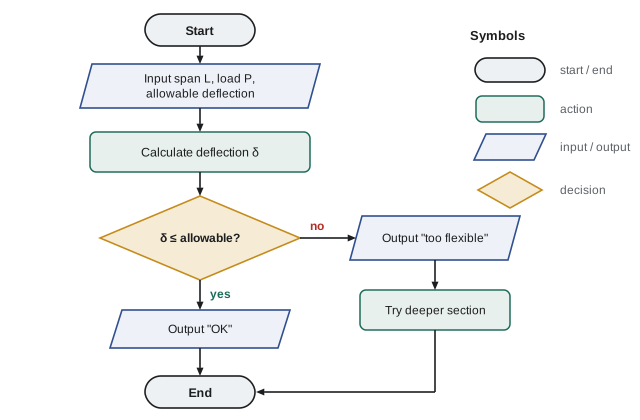
A flowchart shows an algorithm as a diagram: ovals for start and end, rectangles for actions, parallelograms for input and output, and diamonds for decisions with yes/no branches. Flowcharts are especially good at showing decisions and loops, and they are still used to document control logic in industry.
Getting started with Python
You can run Python in several ways. Install it free from python.org and use the IDLE editor that comes with it; install a code editor such as VS Code; use Jupyter notebooks, which mix code, results and notes and are popular for engineering analysis; or use an online environment in a web browser. Any of these works for this course.
There are two modes. In the interactive shell (the >>> prompt), you type one line and Python answers immediately, which is handy for trying things. In a script, you write a file of instructions (ending in .py) and run it all at once, which is how real programs are built and saved.
print("Hello, HSM University")
print(2 + 3 * 4)
print("250 psi is", 250 * 6.894757, "kPa")
Running this displays three lines:
Hello, HSM University
14
250 psi is 1723.6892500000001 kPa
Three things to notice. Python runs the lines in order, top to bottom. It follows the usual order of operations, so \(2 + 3 \times 4 = 14\). And the conversion prints a long string of digits ending in ...0001: computers store most decimal numbers in binary, with tiny rounding errors. You will learn to format output neatly, and why this happens, in Lesson 2.
Comments and style
Code is read far more often than it is written, by your teammates, your reviewers, and you in six months. A # starts a comment, which Python ignores. Use comments to explain why, not to repeat what the code obviously does. Give variables meaningful names that include units where it helps: span_m, load_kN. Python's community style guide, PEP 8, recommends lower-case names with underscores and four spaces of indentation.
# Convert the design pressure from the client's spec (psi) to kPa for the code check
PSI_TO_KPA = 6.894757      # exact conversion factor to 7 significant figures
design_pressure_psi = 250
design_pressure_kPa = design_pressure_psi * PSI_TO_KPA
print(design_pressure_kPa)
When things go wrong: three kinds of error
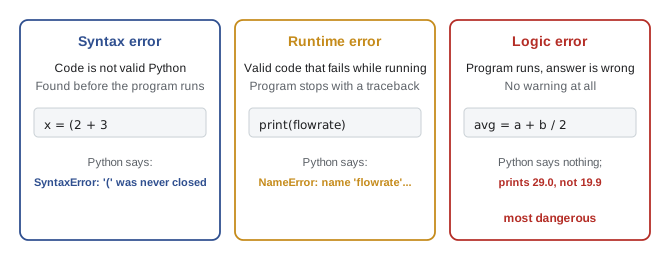
Every programmer, at every level, writes code with errors in it. The skill is finding and fixing them quickly. Errors come in three kinds.
Syntax errors
A syntax error means the code is not valid Python, like a sentence with broken grammar. Python reports it before running anything, with the file, the line and a caret (^) pointing near the problem.
Worked problem
Reading a syntax error
Running a script containing the line x = (2 + 3 produces the message below. What is wrong?
Show solution
File "check.py", line 1 x = (2 + 3 ^ SyntaxError: '(' was never closed- The message names the line and points at the opening bracket, which has no matching closing bracket.
Answer: Add the missing ): x = (2 + 3). Sometimes the true error is on the line before the one reported, because Python only notices the problem when the next line does not make sense
Runtime errors
A runtime error (called an exception in Python) happens when valid code tries to do something impossible: divide by zero, use a variable that does not exist, open a file that is not there. Python stops and prints a traceback, which shows where the error happened. Read tracebacks from the bottom up: the last line says what went wrong.
Worked problem
Reading a traceback
What is wrong here, and how do you fix it?
Show solution
flow_rate = 12.5 print(flowrate * 2)- Output:
Traceback (most recent call last):
  File "flow.py", line 2, in <module>
    print(flowrate * 2)
          ^^^^^^^^
NameError: name 'flowrate' is not defined. Did you mean: 'flow_rate'?
Answer: A typing mistake: the variable is flow_rate, with an underscore. Recent versions of Python even suggest the fix. Names in Python are case-sensitive and must match exactly
Logic errors
A logic error is the worst kind: the program runs without complaint and produces a wrong answer. Only checking the result catches it.
Worked problem
A quiet logic error
This program should average two temperature readings, 18.2 °C and 21.6 °C. What does it print, and why is it wrong?
Show solution
a = 18.2 b = 21.6 average = a + b / 2 print(average)- It prints 29.0. Division happens before addition, so Python computes \(18.2 + 21.6/2 = 18.2 + 10.8\).
- The average of two temperatures must lie between them, and 29.0 does not. A quick sanity check exposes the bug.
Answer: Use brackets: average = (a + b) / 2, which gives 19.9. The fix is trivial; noticing the error is the real skill
Testing: never trust an untested program
A program that runs is not a program that works. Before relying on any result, test it.
- Check a case you can work out by hand. If your beam program says a 1 m simply supported beam with a 2 kN central load has 0.5 kN reactions, something is wrong (they should be 1 kN each).
- Check special cases: zero load should give zero deflection; a symmetric problem should give symmetric answers.
- Check units and orders of magnitude: is a floor deflection of 3 m plausible?
- Check edge cases: what happens with an empty data file, a negative input, a reading exactly at the limit?
This is the same discipline as checking a hand calculation, and it matters even more for code, because a program will repeat the same mistake perfectly, thousands of times, and its neat output looks trustworthy.
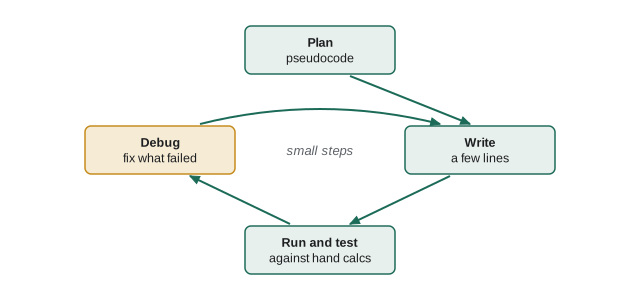
Work in small steps. Write a few lines, run them, check the output, then add more. When something breaks, you know it was in the last few lines. Beginners who write a hundred lines before running anything spend hours hunting for errors that would have taken seconds to find one at a time.
Debugging strategies
- Read the error message carefully, starting from the last line.
- Print intermediate values to see where the numbers stop making sense.
- Trace the program by hand on a small example, writing down each variable's value line by line.
- Simplify: comment out parts until the problem disappears, then add them back one at a time.
- Explain the code line by line to someone else (or to an inanimate object; programmers call this "rubber duck debugging"). Saying it aloud often reveals the mistake.
Worked problem
Tracing by hand
Without running it, work out what this program prints.
Show solution
tank_L = 500 tank_L = tank_L - 120 tank_L = tank_L * 2 print(tank_L)- Line 1: tank_L is 500. Line 2: 500 − 120 = 380. Line 3: 380 × 2 = 760. Line 4 prints it.
Answer: 760. A variable holds one value at a time; each assignment replaces the previous value. The = sign means "store", not "equals"
When software fails
Software errors in engineering systems have caused some famous failures, and their lessons apply to every program you write.
Worked problem
Mars Climate Orbiter
In 1999, NASA's Mars Climate Orbiter was lost as it arrived at Mars. What went wrong, and what is the lesson for engineering code?
Show solution
- Ground software supplied by one team reported thruster impulse in pound-force seconds; the navigation software that used it expected newton-seconds.
- The values were too small by a factor of about 4.45, so the trajectory was wrongly estimated over months of small corrections, and the spacecraft passed far too low through the Martian atmosphere.
- The investigation found that the mismatch was not caught by interface checks or reviews, even after navigators noticed anomalies.
Answer: Units must be explicit at every interface between programs and teams. Put units in variable names and documentation, convert at clear boundaries, and treat unexplained discrepancies as warnings, not noise
Two other cases are worth knowing. On its first flight in 1996, the Ariane 5 rocket veered off course and self-destructed about 40 seconds after launch when software reused from Ariane 4 tried to convert a 64-bit floating-point number, larger on the faster new rocket, into a 16-bit integer; the conversion overflowed and shut down the guidance system. And in the 1980s, the Therac-25 radiation therapy machine gave several patients massive overdoses, some fatal, partly because of software errors that appeared only when operators typed quickly; earlier models had hardware interlocks that the designers relied on software to replace. The common lessons are to test reused code in its new conditions, never to remove safety layers just because software is present, and to treat software as part of the engineered system, with the same rigour as steel and concrete.
Common mistakes
MistakeStarting to type code before understanding the problem.
InsteadIdentify inputs and outputs, then write pseudocode or a flowchart first.
MistakeWriting a long program before running any of it.
InsteadWrite a few lines, run, check, repeat; errors stay small and easy to find.
MistakeAssuming a program that runs without errors is correct.
InsteadTest against hand calculations, special cases and sanity checks; logic errors give no warning.
MistakeReading a traceback from the top and giving up.
InsteadStart at the last line, which names the error, then use the line number to find it.
MistakeVariable names like x, a2 or temp with no units.
InsteadDescriptive names with units where useful: flow_rate_Ls, span_m.
MistakeForgetting that = means "store".
InsteadEach assignment replaces the variable's previous value; trace the values line by line.
Summary and key terms
- A program is a precise set of instructions; an algorithm is the finite, unambiguous sequence of steps behind it.
- Engineers program for repetition, reliability, exploration, automation and transparency.
- Decompose problems into inputs, outputs and steps; plan with pseudocode or flowcharts before coding.
- Python runs line by line in order; use the interactive shell to experiment and scripts to build programs.
- Use comments to explain why, and meaningful variable names with units.
- Errors are syntax (invalid code), runtime (fails while running) or logic (wrong answer, no warning). Read tracebacks from the bottom.
- Work in small steps and test every program against hand calculations, special cases and sanity checks; famous failures show what happens when software is not treated as engineering.
- Algorithm
- A finite, unambiguous sequence of steps that solves a problem.
- Program
- An algorithm written in a language a computer can run.
- Pseudocode
- A plain-language outline of an algorithm, independent of any programming language.
- Flowchart
- A diagram of an algorithm using standard symbols for actions and decisions.
- Script
- A file of program instructions run as a whole.
- Comment
- Text in code, starting with #, that Python ignores.
- Syntax error
- Code that is not valid in the language, detected before running.
- Exception
- A runtime error that stops a program unless handled.
- Traceback
- Python's report of where an exception occurred.
- Logic error
- A mistake that makes a program produce wrong results without any error message.
- Debugging
- Finding and fixing errors in a program.
Practice problems
Work each problem on paper first, then reveal the answer to check.
Write pseudocode for a program that reads a pipe's inside diameter (mm) and flow rate (L/s) and prints the flow velocity in m/s.
Show answer
Read diameter_mm and flow_Ls. Convert: d = diameter_mm / 1000, Q = flow_Ls / 1000. Area = π d²/4. Velocity = Q / area. Display velocity.
What does print(10 - 4 / 2) display?
Show answer
8.0. Division first (4/2 = 2.0), then subtraction; division always gives a float in Python.
Classify each error: (a) prnt("hi"); (b) print("hi"; (c) an area formula that uses the diameter instead of the radius.
Show answer
(a) Runtime error (NameError: prnt is not defined); (b) syntax error (bracket never closed); (c) logic error.
Trace: n = 3; n = n * n; n = n + 1; print(n).
Show answer
3 → 9 → 10. Prints 10.
A program computes the reaction at each end of a simply supported beam with a central point load P. Give two hand-checkable tests.
Show answer
P = 10 kN should give 5 kN at each end; P = 0 should give zero; reactions should always sum to P.
Draw (in words) a flowchart that reads a temperature and prints "freezing" if it is at or below 0 °C, otherwise "above freezing".
Show answer
Start → input temperature → decision "temperature ≤ 0?" → yes: output "freezing"; no: output "above freezing" → end.
The last line of a traceback reads ZeroDivisionError: division by zero. What should you check?
Show answer
The denominator of the division on the reported line: why is it zero? Perhaps an empty list (count of zero), a variable not yet set, or an input of zero that needs a check.
Rewrite with better names and a useful comment: x = 9.81 * y.
Show answer
Example: weight_N = G * mass_kg, with G = 9.81 defined once as "standard gravity, m/s²".
Why did the Mars Climate Orbiter failure go undetected for months?
Show answer
The unit mismatch was at an interface between teams' software, interface checks did not catch it, and anomalies seen by navigators were not resolved before arrival.
Fix the logic error: celsius = fahrenheit - 32 * 5 / 9.
Show answer
celsius = (fahrenheit - 32) * 5 / 9. Test: 212 °F should give 100 °C.
Lesson quiz · 5 questions
Score 60% or more to complete this lesson.
Create a free account to save your progress, take quizzes and earn a certificate.