
DCT-310 · Lesson 8 of 12 · 20 min
Firmware, BIOS/UEFI and lifecycle updates
The cloud provider in Halls B and C sends a firmware notice every few months: a list of server models, the new firmware versions for their BIOS, BMC, network cards and drives, and a schedule of maintenance windows. In the weeks that follow, its software updates thousands of servers in waves, and a small number fail to come back cleanly. "Firmware updates are routine," Anjali Desai, the site manager, tells Jamal, "until a server sits on a black screen at four in the morning with a half-written chip. Then it's a hardware ticket." This lesson explains what firmware is, the layers of it in a server, why it is updated, how updates are planned and done safely, and how firmware protects itself against tampering.
What firmware is
Firmware is software stored in flash memory chips on a device's own boards, rather than on its drives. It runs the device at the lowest level, before and underneath any operating system. A modern server holds many separate pieces of firmware, each on its own chip, each with its own version number:
- The system firmware, BIOS or UEFI, which starts the server, tests its hardware and loads the operating system.
- The BMC firmware, which runs the management controller.
- Network card firmware, which runs the card's own processor.
- Storage controller firmware, and the firmware inside every drive.
- Power supply firmware, and firmware in the GPU, its switch chips and many other components.
- Smaller pieces such as the complex programmable logic devices that sequence power on the board.
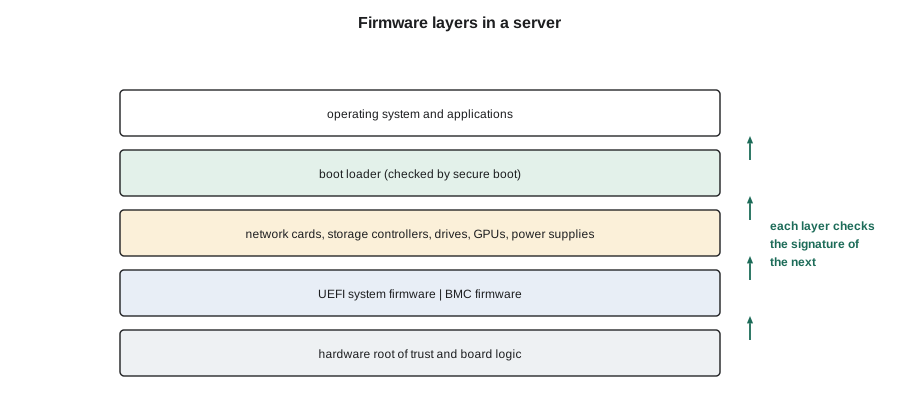
Each of these can have bugs, and each can be updated. The customer's firmware baseline lists the approved version of each component for each server model.
BIOS and UEFI
The basic input/output system, BIOS, was the original system firmware of the personal computer. Servers now use its replacement, the Unified Extensible Firmware Interface, UEFI, though many people, including vendors, still call it the BIOS. UEFI firmware:
- Runs the power-on self test, initializes the processors and trains the memory.
- Finds and initializes PCIe devices, including network cards, storage controllers and GPUs.
- Holds the server's settings, such as the boot order, processor power settings and which devices are enabled, in its setup menu.
- Can check that the operating system's boot loader is signed by a trusted key before running it, a feature called secure boot.
- Hands control to the operating system's boot loader on a drive or over the network.
UEFI settings can change how a server behaves in large ways, for example whether processors run in power-saving or maximum-performance modes, or whether a network card can boot the server. Customers set these through their own tools or the BMC. A technician never changes BIOS settings except under a written procedure, and a server whose settings have been reset by a battery failure or a firmware update must have them restored by the customer.
Why firmware is updated
Vendors release firmware updates for several reasons:
- To fix security weaknesses. Firmware runs with complete control over the hardware, so security fixes in firmware are among the most important updates a data centre applies.
- To fix bugs: memory training failures, devices that drop off the bus, fans that run at the wrong speed, drives that report wrong health values.
- To support new hardware, such as new processor steppings, larger memory modules or new drive models.
- To improve performance or power use.
Not updating firmware has risks; so does updating it carelessly. Most outages caused by firmware come from updates that were rushed, applied to the wrong model, or interrupted part way through. The answer used throughout the industry is a lifecycle process: test new firmware on a few servers first, approve a baseline, and roll it out in planned waves.
The firmware baseline and compliance
A firmware baseline is the approved set of versions for a server model. Customers in Halls B and C and many in Hall A keep their own; Stonebridge keeps one for the servers it owns, such as its monitoring and building-management servers. Comparing what is installed with the baseline shows which servers are behind:
# Firmware compliance: which servers are behind the approved baseline?
def ver(s): return tuple(int(x) for x in s.split("."))
baseline = {"BIOS": "2.18.1", "BMC": "7.10.30", "NIC": "22.41.1000", "PSU": "1.4.0"}
servers = {
    "B-07-14": {"BIOS": "2.18.1", "BMC": "7.10.30", "NIC": "22.41.1000", "PSU": "1.4.0"},
    "B-07-15": {"BIOS": "2.16.0", "BMC": "7.10.30", "NIC": "22.39.1002", "PSU": "1.4.0"},
    "B-07-16": {"BIOS": "2.18.1", "BMC": "7.00.60", "NIC": "22.41.1000", "PSU": "1.3.2"},
}
for host, fw in servers.items():
    behind = [f"{c} {fw[c]} < {baseline[c]}" for c in baseline if ver(fw[c]) < ver(baseline[c])]
print(f"{host}: {'compliant' if not behind else 'behind: ' + ', '.join(behind)}")B-07-14: compliant B-07-15: behind: BIOS 2.16.0 < 2.18.1, NIC 22.39.1002 < 22.41.1000 B-07-16: behind: BMC 7.00.60 < 7.10.30, PSU 1.3.2 < 1.4.0
The comparison is done by software that reads every server's inventory through Redfish. Version strings are compared part by part as numbers, not as text, because as text 2.9 would sort after 2.18. Servers behind the baseline are scheduled for update in the next wave. A server running a newer version than the baseline, perhaps because a vendor engineer installed a fix during a repair, is recorded too, because it is also out of step with the tested set.
Planning an update wave
Updating firmware usually needs a reboot, and many updates need the server to be out of service while they run. Customers plan waves so that only a small share of their servers is down at a time:
# Planning a firmware update wave: how many servers fit in a maintenance window?
window_min = 240
per_server_min = {"drain workload": 10, "BIOS + BMC update": 25, "reboot and checks": 15, "return to service": 5}
per = sum(per_server_min.values())
parallel = 6                     # servers updated at the same time, set by the customer's capacity rules
servers = 84
batches = window_min // per
print(f"Each server takes about {per} min; {parallel} at a time -> {batches * parallel} servers per {window_min} min window")
print(f"{servers} servers need {-(-servers // (batches * parallel))} windows")Each server takes about 55 min; 6 at a time -> 24 servers per 240 min window 84 servers need 4 windows
The plan shows the limits: each server takes nearly an hour from draining to returning to service, the customer allows six at a time, and a four-hour window covers 24 servers. 84 servers need four windows. On a fleet of thousands, firmware waves run for weeks. The technician's part is usually to stand by during the windows for servers that fail to come back, and to be ready to reseat parts, connect a crash cart or replace a board.
Updates also have an order. Many vendors require the BMC to be updated before the BIOS, or the BIOS before the network card, because a newer component may depend on a newer partner. Vendors publish this order in their release notes, and the customer's update tooling follows it.
Updating safely
Most firmware updates are applied remotely through the BMC or the customer's tools; technicians rarely run them by hand. When they do, on Stonebridge's own servers or under a customer's written procedure, the rules are:
- Use only firmware from the vendor's official source, for exactly the model and part number, and check its published checksum or signature.
- Make sure the server has stable power on both supplies. A power failure during a firmware write can leave the chip half written.
- Do not interrupt an update. Some take many minutes with nothing on the screen. Wait for the BMC or the tool to report completion.
- Follow the vendor's order and reboot requirements.
- After the update, confirm the new version in the inventory and that the server is healthy.
If an update fails, many servers can recover by themselves. Modern BMCs and UEFI firmware keep two copies of their firmware, a primary and a backup, and fall back to the good copy if the new one does not start. Some boards have a jumper or button to force a recovery from the backup. When none of that works, the board goes back to the vendor; this is one of the few situations where a server that worked yesterday needs a motherboard replacement today.
Firmware security: protect, detect, recover
Because firmware runs before any security software and controls the hardware completely, malicious firmware is one of the most serious threats to a server. The standard defensive approach is set out in NIST Special Publication 800-193, Platform Firmware Resiliency Guidelines, which describes three goals:
- Protect: firmware can only be changed through an authorized, authenticated update process, and updates must be signed by the vendor. The server checks the signature before accepting an update.
- Detect: at every boot, the server checks that its firmware has not been changed, by verifying signatures or measurements against values it trusts.
- Recover: if firmware is found to be corrupted or tampered with, the server restores a known-good copy automatically or through a recovery process.
These checks start from a hardware root of trust, a small piece of hardware or immutable code on the board that cannot be changed, which checks the first firmware to run, which in turn checks the next, and so on up to the operating system. Many current servers include such a root of trust, either in a dedicated chip or in the BMC. Some customers also use secure boot and measured boot records to prove to their own systems that a server started with untampered firmware.
For technicians, these protections show up in practical ways. A replacement motherboard may need to be enrolled by the customer before it will boot their operating system. A server may refuse to boot after an unsigned firmware image is loaded. Parts from unknown sources may be rejected. All of these are the protections working as intended, and the right response is to report them to the customer, not to look for a way around them.
The CMOS battery and lost settings
Most servers still have a small coin-cell battery on the motherboard that keeps the system clock running and, on some, preserves certain settings when the server has no power. These batteries last many years but do run out. A server that loses its time or settings every time it is unplugged may need a new battery. Replacing it is a cold-swap job: the server is shut down and unplugged, and the battery is replaced with exactly the type the service label specifies. After the repair, the customer checks the clock and settings.
Worked problem
A server stuck after a BIOS update
During the provider's overnight wave, server B-07-16 in Hall B does not return after its BIOS update. The provider asks Jamal to check it at the rack.
Show solution
- Confirm the asset tag. The front panel shows a status LED blinking amber, and the small diagnostic display shows a code that the vendor's guide lists as firmware recovery in progress.
- Do not power cycle it. Recovery from the backup copy can take up to 20 minutes on this model, according to the guide.
- Check both power supplies are green and on separate feeds, so the recovery is not interrupted.
- After 14 minutes the server reboots on its own and starts the normal boot. The provider sees it come back with the old BIOS version.
- The provider marks the server for a retry in the next wave, and asks for a support bundle from the BMC, which Jamal exports through the provider's procedure and attaches to the ticket.
Answer: Patience was the repair. Cutting power during a firmware recovery could have left the board unbootable. Reading the diagnostic code and the vendor's guide told Jamal what the server was doing.
Firmware after a part replacement
A replacement part arrives with whatever firmware the factory installed, which may be older or newer than the customer's baseline. A new drive, network card or power supply that is out of step can cause problems that look like hardware faults: a drive that reports wrong health values, a card that will not link at full speed, or power supplies that refuse to share load because their firmware versions differ. Many customers therefore update the firmware of a replacement part as part of the repair, through the BMC or their own tools, before returning the server to service.
For motherboard replacements the same applies on a larger scale. A new board comes with its own BIOS and BMC firmware and none of the server's settings. The customer restores the settings, updates the firmware to the baseline and, where they use it, enrolls the board's root of trust in their attestation system. The technician's part is to record the new board's serial and firmware versions in the ticket so the customer knows what to bring into line.
Common mistakes
MistakePower cycling a server that seems stuck during a firmware update.
InsteadCheck the diagnostic codes and the vendor's guide; most updates and recoveries must not be interrupted.
MistakeUsing firmware downloaded from an unofficial site.
InsteadUse only vendor firmware for the exact model, with a verified checksum or signature.
MistakeComparing version numbers as text.
InsteadCompare each part of the version as a number.
MistakeChanging BIOS settings to make a server boot.
InsteadReport it; the customer restores or changes settings.
MistakeTrying to bypass a server that refuses unsigned firmware.
InsteadThat is a security protection working; report it to the customer.
Summary and key terms
- Servers contain many separate pieces of firmware: UEFI, BMC, cards, drives, power supplies and more.
- UEFI starts the server, holds its settings and can verify the boot loader with secure boot.
- Updates fix security weaknesses and bugs; a baseline lists the approved versions.
- Updates are rolled out in waves, in the vendor's order, with stable power and no interruptions.
- NIST SP 800-193 describes firmware resiliency as protect, detect and recover, starting from a hardware root of trust.
- Technicians report firmware security refusals rather than working around them.
- Firmware
- Low-level software stored on a device's own chips.
- UEFI
- Unified Extensible Firmware Interface: the modern replacement for the BIOS.
- Firmware baseline
- The approved set of firmware versions for a server model.
- Secure boot
- A UEFI feature that runs only boot loaders signed by trusted keys.
- Root of trust
- Hardware or immutable code that checks the first firmware to run.
- Firmware recovery
- Restoring a known-good firmware copy after a failed or corrupted update.
Practice problems
Work each problem on paper first, then reveal the answer to check.
Why must a firmware update not be interrupted?
Show answer
A partly written firmware chip can leave the device unable to start.
As text, why might 2.9 appear newer than 2.18?
Show answer
Text comparison looks at characters, and 9 is greater than 1; versions must be compared part by part as numbers.
What are the three goals in NIST SP 800-193?
Show answer
Protect, detect and recover.
A replacement motherboard will not boot the customer's operating system. What might be the reason?
Show answer
It may need to be enrolled or trusted by the customer's secure boot or attestation system.
Lesson quiz · 5 questions
Score 60% or more to complete this lesson.
Create a free account to save your progress, take quizzes and earn a certificate.