
DCT-310 · Lesson 12 of 12 · 21 min
Capstone: a GPU node failure from alert to RMA
This capstone follows one incident in Hall D from the first alert to the vendor's final report. It draws on every lesson in the course: the hardware in a GPU tray, its cooling and power, the BMC and its event log, the diagnosis method, the replacement procedure, and the RMA and spares process. It takes place on Jamal's last night shift of the term, with Dmitri as shift lead, Roz on call, and Carmen Ortiz's team at Corvid AI on the other end of the phone.
02:14: the alert
At 02:16 the monitoring console in the operations room shows a critical alert for rack D-3-07, the rack Jamal helped install last term: tray T11 reports GPU2 not detected, after a temperature alert two minutes earlier. A minute later Corvid AI's on-call engineer opens a ticket: GPU2 in D-3-07-T11 has fallen off the bus during a training job, the job has stopped on that tray, and they are draining the tray so the rest of the cluster can continue. They ask Stonebridge to inspect the tray and reseat it under their standard runbook.
Dmitri assigns the ticket to Jamal and reads it with him. It names the rack, tray and GPU, it is authorized by the on-call engineer, and it refers to Corvid AI's runbook entry for a GPU that has fallen off the bus, which allows one inspection and reseat before the tray is sent for replacement. The tray will be powered off by the customer once it is drained.
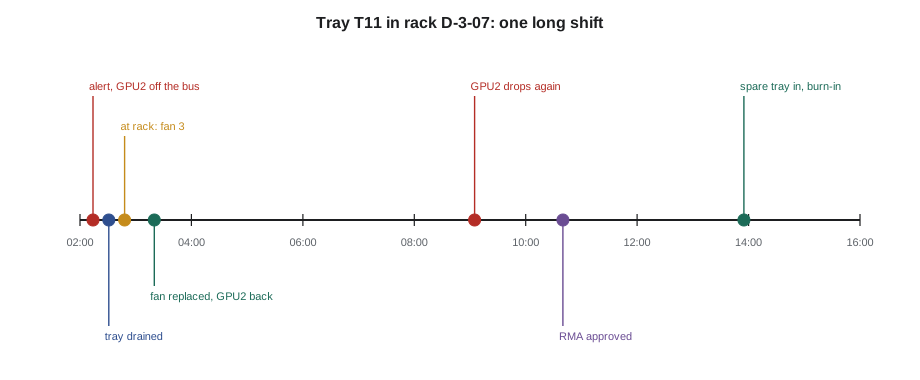
# Incident timeline for the capstone: time from alert to each milestone
from datetime import datetime as dt
events = [("02:14", "GPU2 high temperature, then fatal PCIe error"), ("02:16", "Monitoring alert to shift; ticket opened"),
          ("02:31", "Customer drains tray T11"), ("02:48", "Jamal at rack D-3-07; fan 3 dead, front LED amber"),
          ("03:20", "Fan module replaced, tray reseated, GPU2 back"), ("09:05", "GPU2 drops again under load"),
          ("10:40", "Vendor approves RMA for the tray"), ("13:55", "Spare tray installed, burn-in started")]
t0 = dt.strptime(events[0][0], "%H:%M")
for t, what in events:
    m = (dt.strptime(t, "%H:%M") - t0).seconds // 60
print(f"+{m // 60:2d} h {m % 60:02d} min {t} {what}")+ 0 h 00 min 02:14 GPU2 high temperature, then fatal PCIe error + 0 h 02 min 02:16 Monitoring alert to shift; ticket opened + 0 h 17 min 02:31 Customer drains tray T11 + 0 h 34 min 02:48 Jamal at rack D-3-07; fan 3 dead, front LED amber + 1 h 06 min 03:20 Fan module replaced, tray reseated, GPU2 back + 6 h 51 min 09:05 GPU2 drops again under load + 8 h 26 min 10:40 Vendor approves RMA for the tray +11 h 41 min 13:55 Spare tray installed, burn-in started
02:20: reading the evidence
Before walking to Hall D, Jamal exports the tray's BMC event log through Corvid AI's procedure and reads it with Dmitri. The sequence is the one shown in lesson 10: GPU2's temperature crossed its non-critical threshold at 02:14:07 and its critical threshold at 02:14:39; a fatal PCIe error on GPU2's link followed two seconds later; then the system reported GPU2 not detected. At 02:20 fan 3 was reported below its critical speed.
The GPUs themselves are liquid cooled, so a fan should not overheat a GPU. But the tray's fans cool the voltage regulators, network cards and memory around the GPUs, and fan 3 sits in front of GPU2's power stages. Jamal also checks the cooling side in the monitoring system: rack D-3-07's coolant supply temperature and flow are normal, the same as its neighbours, and the other GPUs in T11 were running at normal temperatures. The coolant is not the problem; something local to GPU2's area is.
His working theory, which he writes in the ticket: fan 3 was failing, GPU2's power stages overheated, GPU2 tripped and dropped off its PCIe link. The fan was only flagged after it fell below its critical threshold. The plan follows the runbook: confirm the tray is drained and off, inspect, replace fan 3 from site stock, reseat the tray, and hand back for testing.
02:48: at the rack
At the rack, Jamal follows the Hall D MOP for a tray inspection:
- He confirms the tray label and serial against the ticket, and that the tray's status LED shows it powered off. Corvid AI's ticket note confirms it was drained at 02:31.
- He tests his wrist strap, sets out the grounded mat on the tray cart, and sets the cart to the height of slot T11.
- He places an absorbent pad under the tray's quick-disconnect fittings and releases them in the order the MOP gives. A few drops appear on the pad, as expected.
- He slides the tray onto the cart and wheels it to the service bench at the end of the row, where the light is better.
With the tray's air cover off, the cause of the fan alarm is obvious: fan 3's rotor turns freely by hand but is discoloured on one side, and its connector is loose in its socket, pushed partly out. It looks as if the connector was disturbed during an earlier service and has been making intermittent contact. The heat sink on GPU2's voltage regulators, just behind fan 3, shows no visible damage.
Jamal photographs the fan, its connector and the regulator area, and calls Carmen's engineer to describe what he sees. They agree: replace fan 3 from site stock, check every other fan connector, reseat the tray, and run Corvid AI's quick health test.
03:20: fan replaced, tray back
The fan module is a CRU listed in Corvid AI's runbook. Jamal takes one from the customer's spares cage, checks its part number against the tray's service label, and fits it, seating the connector until its latch clicks. He then checks all the other fan connectors in the tray; two are slightly proud of their sockets, and he reseats them. He refits the air cover, wheels the tray back, slides it in, reconnects the coolant fittings in order and watches for leaks for two minutes, then tells the customer it is ready.
Corvid AI powers the tray on at 03:15. All four GPUs appear, GPU2 included, and the quick health test passes. At 03:20 the tray goes back into the cluster. Jamal records the fan's removed and installed serials, the photos and the times, and leaves the ticket open, as the runbook says, until the tray has run under full load for a day.
09:05: GPU2 drops again
At 09:05, six hours into a new training job, GPU2 in T11 falls off the bus again. This time the event log shows no fan alarm and no slow temperature rise: the temperature of GPU2's power stage jumps within a second, and the PCIe link fails immediately afterwards. Corvid AI drains the tray again.
The runbook is clear: one reseat is allowed; a repeat failure means the tray goes back to the vendor. Jamal does not reseat it a second time. Instead he gathers the evidence for the RMA: both event log exports, the photos from the night, the serial numbers of the tray and the replaced fan, the coolant data for the rack, and Corvid AI's GPU error codes and job logs, which the customer adds to the case.
The evidence suggests what had happened. The loose fan connector had let GPU2's power stage overheat for some time before the first failure, and the regulator had been damaged by the heat. The new fan stopped the overheating, but the damaged regulator failed again as soon as it was loaded hard. That is a theory for the vendor to confirm, and Jamal writes it as such in the case notes.
10:40: the RMA
With good evidence attached, the vendor approves the RMA at 10:40 without asking for further tests and agrees to the exchange of the whole tray, the unit of replacement for this system. Corvid AI keeps spare compute trays in its cage at YUL-2 (IAD-3), because their resupply time is about three weeks; the stock model from lesson 11 gave four for 95 percent cover, and four are on the shelf.
# Building an RMA record: every field the vendor and the customer's asset team need
rma = {"rma": "RMA-2611-0447", "ticket": "INC-30958", "customer": "Corvid AI", "site": "YUL-2 Beauharnois",
       "part": "GPU compute tray", "fru": "699-2G548-0200", "failed_serial": "1652224018331",
       "replacement_serial": "1652224019020", "fault": "GPU 2 fell off the bus twice after reseat; fatal PCIe error in SEL",
       "data_bearing": False, "shipped": "2026-11-04", "carrier_ref": "1Z88F0A90311740522"}
for k in ("rma", "ticket", "part", "fru", "failed_serial", "replacement_serial", "fault"):
    print(f"{k:19s}: {rma[k]}")
print("Data-bearing part:", "yes - sanitize or destroy before shipping" if rma["data_bearing"] else "no - ship with RMA label")rma : RMA-2611-0447 ticket : INC-30958 part : GPU compute tray fru : 699-2G548-0200 failed_serial : 1652224018331 replacement_serial : 1652224019020 fault : GPU 2 fell off the bus twice after reseat; fatal PCIe error in SEL Data-bearing part: no - ship with RMA label
The compute tray has no customer data on it, under Corvid AI's classification; its local boot drive is a separate part that Corvid AI's runbook requires to be removed before return. Jamal removes the boot drive from the failed tray under the MOP, seals it in a numbered bag, and logs it in the destruction register. Corvid AI's own software moves the replacement tray's boot drive configuration when it is enrolled.
13:55: spare tray installed and tested
The replacement tray goes in under the same MOP as any tray: checked against the order on arrival, its serial recorded, its fittings and connectors inspected, and its coolant fittings connected in order and checked for leaks. Corvid AI enrolls the new tray with its secure boot and attestation system, a step that lesson 8 explained, and then starts a burn-in test, running all four GPUs at full load for several hours.
# Burn-in results for the replacement tray: all GPUs must pass before the customer takes it back
def show(t): return f"{t} C"
results = {0: (76, 0, 0), 1: (78, 0, 0), 2: (77, 1, 0), 3: (75, 0, 0)}   # GPU: (peak temp C, corrected errors, uncorrected)
limit_t = 85
passed = True
for g, (t, ce, ue) in results.items():
    ok = t <= limit_t and ue == 0
    passed &= ok
    print(f"GPU {g}: peak {show(t)}, corrected {ce}, uncorrected {ue} -> {'pass' if ok else 'FAIL'}")
print("Tray passes burn-in: hand back to customer" if passed else "Tray fails: keep out of service")GPU 0: peak 76 C, corrected 0, uncorrected 0 -> pass GPU 1: peak 78 C, corrected 0, uncorrected 0 -> pass GPU 2: peak 77 C, corrected 1, uncorrected 0 -> pass GPU 3: peak 75 C, corrected 0, uncorrected 0 -> pass Tray passes burn-in: hand back to customer
All four GPUs pass, with peak temperatures well under the limit and no uncorrected errors. The tray returns to the cluster in the afternoon. Tomás packs the failed tray in the vendor's crate with its fittings capped, the RMA number on the label, and the carrier reference recorded before it leaves the dock that evening. The spares stock for compute trays is now three, and the customer's reorder is placed the same day.
The incident record
Stonebridge closes the ticket with an incident record that Dmitri reviews before it is sent to Corvid AI. It follows the structure the shift uses for every significant hardware incident:
| Section | Content |
|---|---|
| Summary | GPU2 in D-3-07-T11 fell off the bus twice; tray replaced under RMA; service restored in about 12 hours |
| Timeline | From 02:14 alert to burn-in pass, with times from the monitoring system, the BMC log and the ticket |
| Evidence | Event log exports, photos, serials, coolant data, customer error codes |
| Likely cause | Loose fan 3 connector let GPU2's power stage overheat; regulator damaged; vendor analysis pending |
| Actions taken | Fan replaced, connectors reseated, tray reseated once, tray exchanged under RMA, boot drive destroyed |
| Follow-ups | Check fan connectors on all trays serviced last quarter; alert on fan speed falling below its normal band, not only below critical; correct BMC configuration gaps |
The follow-ups matter as much as the repair. Carmen's team adds a check of fan connector seating to their tray service procedure, and Jamal and Roz inspect 40 trays that had been opened in the previous quarter, finding two more connectors not fully seated. Corvid AI's monitoring adds an earlier alert for a fan running below its normal speed band. And the BMC configuration gaps on this rack that Jamal reported in lesson 7, IPMI over LAN enabled and BMC firmware behind its baseline, are corrected by the customer in the same maintenance window.
Three weeks later the vendor's failure analysis comes back: a failed voltage regulator on GPU2's power stage, consistent with prolonged overheating. The incident record is updated and closed.
Worked problem
What made the difference
Looking back with Roz at the end of the term, Jamal lists what went right and what he would do differently.
Show solution
- Reading the full event log before going to the rack gave a working theory and kept the cooling system off the suspect list early.
- Following the runbook meant one reseat, then an RMA, instead of repeated reseats on a damaged tray.
- Collecting complete evidence, serials, logs, photos and times, got the RMA approved on the first request.
- Spares planning meant a replacement tray was on the shelf rather than three weeks away.
- Next time: when a fan connector is found loose, raise the question of other trays serviced at the same time immediately, not the next day.
Answer: Good hardware work is mostly method: read the evidence, follow the procedure, change one thing at a time, record everything, and look for what else the same cause might have touched.
Common mistakes
MistakeReseating a tray again and again when a GPU keeps dropping out.
InsteadFollow the runbook: one reseat, then an RMA for a repeat failure.
MistakeSending a failed tray back with its boot drive inside.
InsteadFollow the customer's rule for data-bearing parts; remove and log the drive first.
MistakeClosing the ticket as soon as the GPU comes back.
InsteadKeep it open until the hardware has run under load as the runbook requires.
MistakePresenting a theory as a confirmed cause.
InsteadWrite it as a likely cause until the vendor's analysis confirms it.
MistakeFixing only the tray that failed.
InsteadCheck the other equipment the same cause might have affected.
Summary and key terms
- The incident began with a temperature alert and a GPU falling off its PCIe bus.
- Reading the event log first suggested a local cooling fault rather than a coolant problem.
- A loose fan connector was found and the fan replaced; the GPU returned but failed again under load.
- The runbook required an RMA after the repeat failure; complete evidence got it approved at once.
- A spare tray from site stock was installed, enrolled and burned in; the boot drive was destroyed on site.
- The incident record captured the timeline, evidence, likely cause and follow-ups across the fleet.
- Burn-in
- Running new or repaired hardware at full load for a period to confirm it is healthy.
- Incident record
- A written account of an incident: timeline, evidence, cause, actions and follow-ups.
- Failure analysis
- The vendor's examination of a returned part to find why it failed.
- Enrollment
- Registering a new part with the customer's security and management systems.
- Follow-up action
- A task raised by an incident to prevent the same problem elsewhere.
- Working theory
- The most likely explanation of a fault, to be tested or confirmed.
Practice problems
Work each problem on paper first, then reveal the answer to check.
Why did Jamal not reseat the tray a second time after the 09:05 failure?
Show answer
The runbook allows one reseat; a repeat failure means the tray goes back to the vendor.
Why was the cooling system ruled out early?
Show answer
The rack's coolant supply and flow were normal and the other GPUs in the tray were at normal temperatures.
What happened to the failed tray's boot drive?
Show answer
It was removed, sealed in a numbered bag, logged and destroyed on site under the customer's runbook.
Name one follow-up action from the incident.
Show answer
Any one: check fan connectors on recently serviced trays, add an earlier fan speed alert, correct the BMC configuration gaps.
Lesson quiz · 5 questions
Score 60% or more to complete this lesson.
Create a free account to save your progress, take quizzes and earn a certificate.