
DCT-310 · Lesson 4 of 12 · 20 min
Power supplies, fans and server cooling
On Wednesday the shift board shows six tickets for power supplies and fans, more than for any other part. "They're the parts that wear out," Roz says. "Fans have bearings, power supplies have capacitors and their own fans. Both run every second of every day." This lesson covers how servers are powered and cooled from the inside: redundant power supplies and how they share load, what happens when a supply or a feed is lost, how server fans respond to temperature, and how technicians replace these parts without stopping the server.
Server power supplies
A server's power supply units, PSUs, convert the AC power from the rack PDU into the low DC voltages the server's boards use, mainly 12 V, with further conversion on the board itself to the much lower voltages the CPUs and memory need. Most rack servers have two power supplies; larger servers and GPU systems have four or more. Each supply has a power rating, such as 1,100 W or 2,700 W, printed on its label, and an efficiency rating that says how much of the input power reaches the server rather than becoming heat in the supply.
Server power supplies are hot-swappable in almost all current servers: a failed supply can be pulled from the back and a new one pushed in while the server keeps running on the others. Each has a status LED, usually green for normal, amber or blinking for a fault, and off when it has no input power. The BMC reports each supply's input voltage, output power and status.
Redundancy and the A and B feeds
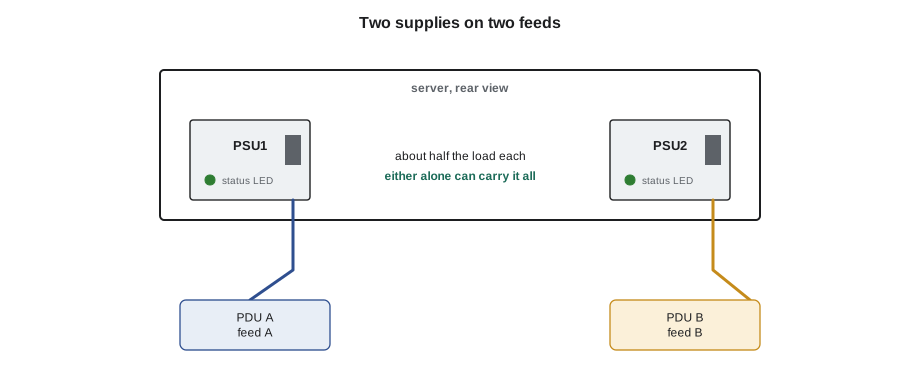
DCT-130 explained that most racks receive power from two independent sources, the A feed and the B feed, through separate PDUs. A server with two supplies plugs one into each. If one feed is lost, for example during maintenance on a UPS or a breaker trip, the server keeps running on the other. This only works if three things are true:
- Each supply is connected to a different feed. Two supplies plugged into the same PDU give no protection against a feed failure. Lesson 8 of DCT-130 showed how to check this.
- Each supply can carry the server's full load alone. Vendors size the supplies for this, but customers sometimes add GPUs or drives that push the load above one supply's rating.
- Both supplies are healthy. A server running on one supply because the other has failed has no redundancy left until it is replaced.
In servers with four or more supplies, the redundancy rule is written as a count. A GPU system with four supplies might be set for 2+2: two supplies on each feed, and any two can carry the load. Some are set for 3+1, which survives the loss of any one supply but not the loss of a whole feed if the feed carries two supplies. The setting is in the BMC, and the customer's runbook says which is expected.
# Power supply redundancy: does the server keep running if one supply or one feed fails?
psu_rating_w = 2700
psus = [("PSU1", "A"), ("PSU2", "B"), ("PSU3", "A"), ("PSU4", "B")]
load_w = 4100
n = len(psus)
share = load_w / n
print(f"Normal load share: {share:.0f} W per supply ({share / psu_rating_w * 100:.0f} % of rating)")
for lost in ("one supply", "feed A"):
    left = n - 1 if lost == "one supply" else sum(1 for _, f in psus if f != "A")
    per = load_w / left
    ok = per <= psu_rating_w
print(f"Lose {lost}: {left} supplies at {per:.0f} W each -> {'OK' if ok else 'OVERLOAD, server may throttle or shut down'}")Normal load share: 1025 W per supply (38 % of rating) Lose one supply: 3 supplies at 1367 W each -> OK Lose feed A: 2 supplies at 2050 W each -> OK
The check shows a healthy arrangement: four supplies of 2,700 W carrying a 4,100 W server, two on each feed. Losing one supply puts three at about half their rating; losing a whole feed puts two at about three quarters. If the customer later adds load that brings the server to 6,000 W, losing a feed would put each remaining supply above its rating, and the server would throttle its processors or shut down. Jamal records the server's power from the BMC when he works on it, so that the customer can see how close it is to that limit.
Replacing a power supply
A power supply swap is one of the most common tickets in every hall. The steps, at Stonebridge, are:
- Confirm the ticket, the server's asset tag and serial, and which supply has failed, from the BMC or the supply's LED.
- Confirm the other supply or supplies are healthy and the server is running on them. If not, stop: pulling the wrong supply, or the only good one, will power the server off.
- Check the replacement is the same part number and wattage. Mixing supply models in one server is usually not supported.
- Unplug the power cord from the failed supply, then press the release latch and pull the supply out by its handle.
- Slide the new supply in until it latches, plug the cord in, and fasten the cord's retention clip.
- Watch the LED turn green, and confirm in the BMC that the server sees both supplies and redundancy is restored.
The failed supply goes back to the vendor or the customer's spares process (lesson 11). Power supplies do not hold customer data, so they need no sanitization, but they are still logged against the ticket.
Fans and airflow inside a server
Air-cooled servers pull cool air in at the front and push warm air out at the back. A row of fans across the server, usually between the drives and the processors, does the work. Air must flow past every hot part: drives, CPU heat sinks, memory, cards and power supplies. Plastic air shrouds and baffles inside the lid guide it, and blanking covers fill empty drive bays and slots so that air does not take a shortcut through the gap instead of passing over the hot parts.
Fans in rack servers come as modules, often with two rotors in series so that one can fail without the module stopping, and most are hot-swappable. The server's firmware controls their speed, raising it when any temperature sensor inside the server reads high. The highest reading usually wins: a hot CPU, a hot memory module, or a hot card in a riser can each drive all the fans up.
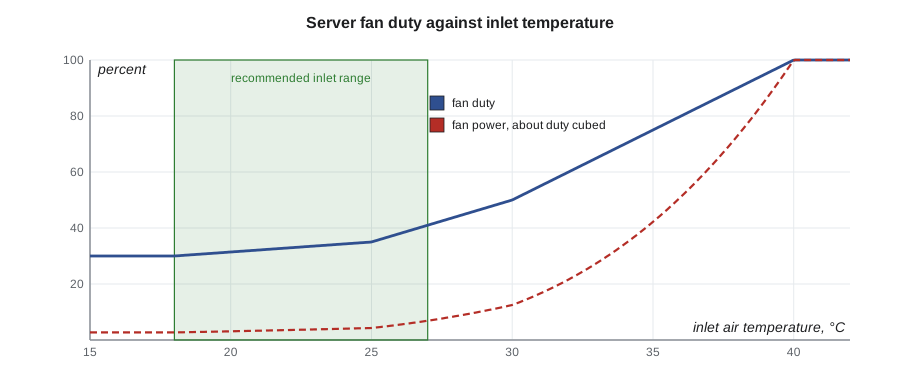
# Fan speed against inlet temperature: a typical server fan curve (illustrative)
curve = [  # (inlet temperature C, fan duty %)
    (18, 30), (25, 35), (30, 50), (35, 75), (40, 100),
]
def duty(t):
    for (t1, d1), (t2, d2) in zip(curve, curve[1:]):
        if t1 <= t <= t2:
            return d1 + (d2 - d1) * (t - t1) / (t2 - t1)
    return curve[0][1] if t < curve[0][0] else 100
for t in (20, 27, 32, 38):
    d = duty(t)
print(f"inlet {t} C: fans at about {d:.0f} %, fan power about {(d / 100) ** 3 * 100:.0f} % of maximum")inlet 20 C: fans at about 31 %, fan power about 3 % of maximum inlet 27 C: fans at about 41 %, fan power about 7 % of maximum inlet 32 C: fans at about 60 %, fan power about 22 % of maximum inlet 38 C: fans at about 90 %, fan power about 73 % of maximum
The curve is why inlet temperature matters to energy use as well as to reliability. Within the recommended range the fans idle at about a third of their speed. When the inlet climbs above it, fan speed rises quickly, and because fan power varies with about the cube of speed, a server whose fans run at 90 percent uses about a quarter of its power just for fans. A row of servers with their fans at full speed is one of the clearest signs of a cooling problem in the hall, and the BMC fan readings across a row are one of the first things Jamal checks when a hot spot is reported.
When a fan fails
A server with a failed fan raises the speed of the others to make up, logs the failure, and lights an amber LED on the fan module or the front panel. Most servers can run indefinitely with one fan failed. Some cannot: if the remaining fans cannot keep the temperatures down, the server throttles its processors, running slower to make less heat, and as a last resort shuts itself down to protect the hardware. A fan failure in a GPU tray, where the air-cooled parts are packed tightly, can let one part overheat quickly even though the GPUs themselves are liquid cooled.
Replacing a hot-swap fan module takes less than a minute, but the lid must be open, and in many servers air stops flowing properly while it is. Vendors give a time limit for running a server with its lid off, often two minutes or less. Jamal reads the limit on the lid label, has the new fan in his hand before opening the lid, and closes the lid as soon as the fan is in.
Fans that are not hot-swappable, such as some fans inside power supplies or on GPU baseboards, mean the server must be shut down for the repair. The ticket and the vendor's guide say which kind it is.
Temperatures and throttling
Every server has dozens of temperature sensors: the inlet air, each CPU, each memory module, the power supplies, the cards, the drives. The BMC shows all of them and records when any crosses its thresholds. Server firmware uses three kinds of threshold:
| Threshold | What the server does | What the technician does |
|---|---|---|
| Upper non-critical | Raises fan speed; logs an event | Check the inlet temperature, the fans and the airflow at the rack |
| Upper critical | Throttles processors; logs a critical event | Treat as urgent: check cooling, blanking and fans; tell the customer |
| Upper non-recoverable | Shuts down to protect the hardware | Find the cause before the customer powers it back on |
Throttling is easy to miss, because the server keeps running. The customer sees it as work that has become slow. Their administrators may raise a ticket that says only that a server is performing badly. Checking the BMC's temperature history and its throttling events is often the quickest way to find the reason.
The inlet temperature reported by the server's own sensor is useful, but it is not a calibrated instrument and it often reads a little high because of heat from the server's own front panel. DCT-230 explained that the facility's rack sensors are the reference for the contract. When the two disagree by a few degrees, that is normal; when a server's inlet reads far above its neighbours, look for hot air recirculating into that unit, a missing blanking panel nearby, or a blocked front bezel.
Blanking and shrouds inside the server
The same airflow rules that apply to the rack apply inside the server. Empty drive bays, empty PCIe slots and empty memory slots in some servers must have blanks or fillers fitted, and the air shroud over the CPUs and memory must be in place when the lid is closed. A server run without its shroud after a memory repair can overheat its memory within minutes under load. Jamal's closing check on any job that opened a server includes the shroud, the blanks and the lid latch.
Worked problem
A row of fans at full speed
In Hall B, the cloud provider raises a ticket: twelve servers in rack B-14-06 report fans at 100 percent and several have throttled. Their neighbours in rack B-14-05 run their fans at about 40 percent.
Show solution
- Check the facility sensors on B-14-06: the top inlet reads 31 °C (88 °F), the neighbouring racks 24 °C (75 °F).
- At the rack, the front door is closed and looks normal. Open it: a blanking panel strip of 4U has been left out above unit 30 after a server was removed last week.
- Hot air from the hot aisle is coming back through the gap and into the servers above it.
- Fit blanking panels to close the gap, and check the rest of the rack for missing blanks.
- Within ten minutes the inlet falls to 24 °C (75 °F), the fans drop to about 40 percent and the throttling events stop.
Answer: Twelve servers had the same problem at once, which pointed at the rack, not at the servers. The fans and throttling were the servers doing their job; the fix was in the airflow.
Common mistakes
MistakePulling a power supply without checking the other is healthy.
InsteadConfirm the server is running on its remaining supplies first.
MistakePlugging both supplies of a server into the same PDU.
InsteadConnect each supply to a different feed, A and B.
MistakeLeaving a server's lid open while fetching a part.
InsteadHave the part ready; respect the vendor's lid-off time limit.
MistakeClosing a server without its air shroud.
InsteadRefit the shroud, blanks and fillers before closing the lid.
MistakeReplacing fans in a server whose fans are all at full speed.
InsteadFans at full speed usually mean high inlet or blocked airflow, not failed fans.
Summary and key terms
- Servers have redundant, hot-swappable power supplies, each able to carry the load alone.
- Supplies must be on different feeds, sized for the full load and all healthy for redundancy to work.
- Fan speed rises with temperature, and fan power with about the cube of speed.
- A failed fan raises the others' speed; some servers throttle or shut down if cooling is lost.
- BMC temperature thresholds: non-critical, critical and non-recoverable.
- Shrouds, blanks and fillers inside the server keep air flowing over the hot parts.
- PSU
- Power supply unit: converts AC from the PDU into DC for the server.
- Hot-swappable
- Able to be replaced while the server keeps running.
- Throttling
- Slowing the processors to reduce heat when temperatures rise.
- Air shroud
- A plastic cover inside a server that directs air over the CPUs and memory.
- Redundancy (PSU)
- Enough supplies that the server keeps running when one or more fail.
- Fan duty
- Fan speed as a percentage of maximum.
Practice problems
Work each problem on paper first, then reveal the answer to check.
A server has two 1,100 W supplies and draws 1,300 W. Is it redundant?
Show answer
No: one supply alone cannot carry 1,300 W, so losing either would overload the other.
Why check the BMC for throttling events when a customer reports a slow server?
Show answer
A hot server slows its processors without crashing, so throttling can explain the slowness.
Twelve servers in one rack run their fans at full speed. Where do you look first?
Show answer
At the rack's airflow and inlet temperatures, such as missing blanking panels or recirculation.
What must be refitted before closing a server after a memory repair?
Show answer
The air shroud, and any blanks or fillers that were removed.
Lesson quiz · 5 questions
Score 60% or more to complete this lesson.
Create a free account to save your progress, take quizzes and earn a certificate.