
CRE-350 · Lesson 7 of 12 · 26 min
Privacy, doxxing and operational security
For most people, privacy is about keeping personal information away from companies and strangers. For creators, it is also about safety. Once your face and voice are public, any detail that links you to a home, school, workplace, car or family member can be used by someone who wants to find or frighten you. This lesson explains how doxxing happens, how to audit your own exposure, and the practical habits, often called operational security, that reduce risk without making it impossible to share your life.
How doxxing happens
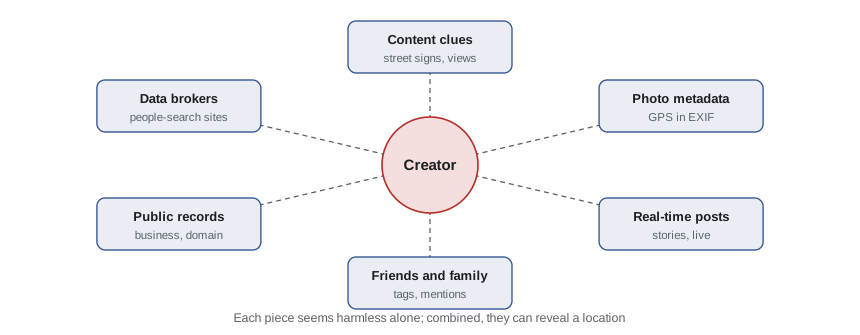
Doxxing is the publishing of private identifying information about someone without consent, usually to intimidate, shame or invite harassment. It rarely requires hacking. Most doxxing combines small pieces of information that are individually harmless: a street sign in the background of a video, the view from a window, a reflection in sunglasses, a school logo on a sweatshirt, a tagged friend, a public business registration, a property record or a listing on a data broker site. Put together, these pieces can lead to a home address within hours.
Common sources of exposure include:
- Visual clues in content: house numbers, street signs, landmarks, the view outside, licence plates, mail and packages, school or workplace logos.
- Metadata: photos taken with a phone can contain embedded location data, called EXIF data, showing exactly where they were taken.
- Real-time posting: stories and live streams that reveal where you are right now.
- Friends and family: tagged photos, family members' public accounts and comments that mention names or places.
- Public records: business registrations, domain name records, court records and, in some places, property records.
- Data brokers and people-search sites: companies that collect and sell personal information such as addresses, phone numbers and relatives.
- Account recovery and reused passwords: weak account security can let someone take over an email or social account and find more.
Auditing your exposure
A privacy audit means searching for yourself the way a hostile stranger would, then closing the gaps. Search your real name, usernames, phone number and email address in search engines and on major platforms. Look at images of you, your home and your neighbourhood. Check what your old accounts, forum posts and tagged photos reveal. Ask a trusted friend to try to find your city, neighbourhood or address from your public content, then fix whatever they find.
Worked problem
Scoring doxxing exposure
A creator rates each of six exposure areas from 0 (no exposure) to 3 (high exposure): visual clues 2, metadata 1, real-time posting 3, friends and family 1, public records 2 and data brokers 3. They plan to act first on any area rated 3 and then on the highest-weighted remaining areas. What is their total score, and where should they start?
Show solution
- Total: 2 + 1 + 3 + 1 + 2 + 3 = 12 out of a possible 18.
- Areas rated 3: real-time posting and data brokers.
- Next priority: visual clues and public records, each rated 2.
Answer: A score of 12 out of 18. Start by delaying location posts and removing data broker listings, then review visual clues and public records.
Content habits that protect location
Several simple habits reduce location risk without changing what you make very much.
- Post with a delay. Share travel, events and daily outings after you have left, not while you are there.
- Check the frame. Before filming, look for house numbers, street signs, distinctive views, mail, packages and licence plates. Blur or crop anything that slips through.
- Vary your backgrounds. Use a set or a neutral wall rather than windows that show the street.
- Watch reflections. Mirrors, windows, glasses and shiny surfaces can show more than you expect.
- Keep routines private. Avoid revealing regular schedules, such as the gym you visit every morning.
- Separate home and business addresses. Use a mailbox service or a post office box for fan mail, product samples and business registrations instead of your home address.
Metadata hygiene
Many phones add location data to photos by default. Some platforms remove this data when you upload, but not all do, and files sent by email, cloud links or messaging apps may keep it. Turn off location tagging in your camera settings, or remove metadata before sharing original files. Most phones let you see and remove location information from a photo's details, and many editing tools strip metadata on export. Treat original files you send to brands, editors or collaborators with the same care as public posts.
Data brokers and people-search sites
Data brokers collect personal information from public records, purchases, apps and other sources and sell it or display it on people-search sites. Most allow individuals to request removal, although the process is often slow and listings can reappear. Some people pay a removal service to send requests on their behalf and monitor for new listings. Rules differ between countries.
Canada has no dedicated data broker registry. Under the federal Personal Information Protection and Electronic Documents Act and provincial laws in Quebec, Alberta and British Columbia, organizations generally need consent to collect, use and disclose personal information, and you can ask an organization what it holds about you and request corrections. Quebec's privacy law, updated by Law 25, gives individuals additional rights, including the right to have certain information de-indexed. Many people-search sites are based in the US, so you may need to use their own opt-out processes.
Worked problem
Comparing removal options
A creator finds their address on 24 people-search sites. Doing removals themselves takes about 20 minutes per site the first time and about 2 hours a quarter to recheck. A removal service costs $130 a year. If the creator values their time at $40 an hour, which is cheaper in the first year?
Show solution
- First removals: 24 × 20 minutes = 480 minutes = 8 hours.
- Rechecks: 2 hours × 4 quarters = 8 hours a year; in the first year, assume 3 rechecks after the initial pass: 6 hours.
- Total time: 8 + 6 = 14 hours, worth 14 × $40 = $560.
- Removal service: $130 plus perhaps 2 hours of checking (worth $80) = $210.
Answer: The service is cheaper in the first year (about $210 versus $560 of time), though doing it yourself costs nothing in cash.
Account security
Strong account security prevents harassers from taking over your accounts or finding more information. Use a password manager and a unique, long password for every account. Turn on two-factor authentication, preferably with an authenticator app or a hardware security key rather than text messages, which can be intercepted through SIM-swap attacks. Use a separate email address for business and account recovery, not one you share publicly. Review which apps and people have access to your accounts, and remove access for former editors or managers promptly.
| Risk | Protection |
|---|---|
| Reused or weak passwords | Password manager with unique long passwords |
| SIM-swap takeover | Authenticator app or security key; carrier account PIN |
| Phishing emails posing as brands or platforms | Check sender domains; log in directly rather than through links |
| Former team members with access | Use role-based access and remove it promptly |
| Public recovery email | Private email address used only for recovery |
Family, friends and home
Creators control their own posts, but their privacy also depends on the people around them. Talk to family and close friends about what they post and tag. Ask them not to share your address, your children's school or real-time locations, and to keep their own accounts private if they are often shown with you. If you share a home with others, agree on rules about filming and what can appear on camera. Children deserve particular care: their faces, names, schools and routines are all valuable to someone with bad intentions, and they cannot give informed consent to a public life.
Balancing privacy and authenticity
Audiences value authenticity, and creators often worry that privacy habits will make their content feel cold. In practice, most of the details that matter for safety, such as exact locations, routines and addresses, are not what makes content feel personal. You can share your thoughts, feelings, interests and stories while keeping your map coordinates private. Deciding your privacy rules in advance, and writing them down, makes it easier to stay consistent when you are tired or excited.
If you are doxxed, follow the response framework from Lesson 6: assess immediate danger, protect yourself, document what was posted, report it to the platform and, if your address or family information has been shared with threats, to police. Consider whether you need to stay elsewhere temporarily. Lesson 9 covers legal options and Lesson 10 covers physical safety.
Privacy for collaborators and guests
Creators often feature other people: friends, partners, guests, collaborators and members of the public. Each person has their own privacy interests and their own risks. Before filming someone, explain where the content will appear and ask whether there is anything they do not want shown, such as their full name, workplace or home. Give guests a chance to review sensitive content before it goes live. For members of the public filmed in the background, blur faces when the content could embarrass or endanger them. CRE-320 and PHOT-230 cover the legal side of filming people; the point here is that protecting others' privacy is part of protecting your community.
Separating identities
Some creators use a stage name or a first name only, keep their surname private and register business accounts under a company name. Others keep a completely separate personal social media presence with private settings for friends and family. A separate phone number for business, using a virtual number service, keeps your personal number off contracts, websites and brand databases. These steps take some effort at the start, but they create a buffer between your public work and your private life that is hard to build later, once information has spread.
Remember that information shared once is hard to remove. Old posts, archived pages and screenshots can persist for years. When in doubt, leave it out: you can always share more later, but you can rarely take something back.
Reviewing privacy over time
Privacy needs change as a channel grows. A setting that was fine at 1,000 followers may be risky at 100,000. Moving house, starting a relationship, having children or becoming known for a contested topic are all moments to repeat your privacy audit. Set a reminder to review your exposure at least once a year, and after any significant change in your life or audience. Each review is a chance to remove old information, tighten settings and update the rules you share with family and team members.
Common mistakes
MistakePosting stories in real time from places you visit regularly.
InsteadPost with a delay after you have left.
MistakeAssuming platforms always strip photo metadata.
InsteadTurn off location tagging and remove metadata from original files.
MistakeUsing a home address for business registrations and fan mail.
InsteadUse a mailbox service or post office box.
MistakeRelying on text-message two-factor authentication alone.
InsteadUse an authenticator app or security key and a carrier PIN.
MistakeIgnoring what friends and family post about you.
InsteadAgree on tagging and location rules with the people close to you.
Summary and key terms
- Doxxing usually combines small, public pieces of information rather than hacking.
- Sources include content clues, photo metadata, real-time posts, family, public records and data brokers.
- A privacy audit searches for yourself as a stranger would and closes the gaps.
- Delayed posting, frame checks and separate business addresses protect location.
- Canadian privacy laws give rights to access and correction; many people-search sites use their own opt-outs.
- Password managers, app-based two-factor authentication and private recovery emails secure accounts.
- Privacy and authenticity are compatible: share stories and feelings, not coordinates.
- Operational security
- Habits that prevent sensitive information from leaking.
- EXIF data
- Metadata embedded in image files, which can include location.
- Data broker
- A company that collects and sells personal information.
- People-search site
- A website that displays personal information about individuals.
- Privacy audit
- A systematic search for one's own public information to reduce exposure.
- Delayed posting
- Sharing location-related content after leaving the place.
- Two-factor authentication
- A login method requiring a second proof of identity.
- SIM swap
- An attack in which a phone number is moved to an attacker's SIM card.
- Mailbox service
- A commercial address used to receive mail instead of a home address.
- Phishing
- Fraudulent messages designed to trick people into revealing information.
Practice problems
Work each problem on paper first, then reveal the answer to check.
Name four sources of doxxing exposure.
Show answer
Content clues, metadata, real-time posts, family and friends, public records, data brokers.
What is EXIF data?
Show answer
Metadata in image files that can include location.
Exposure scores of 3, 2, 0, 1, 3 and 1. Total out of 18?
Show answer
10.
Why post travel content with a delay?
Show answer
So no one can find you at that place in real time.
What should you check in the frame before filming?
Show answer
House numbers, street signs, views, mail, packages, licence plates and reflections.
Which is safer: text-message codes or an authenticator app?
Show answer
An authenticator app or security key.
Removing 30 listings at 15 minutes each takes how long?
Show answer
7.5 hours.
Why use a separate recovery email?
Show answer
A private address is harder to target for account takeovers.
Name one rule to agree with family members.
Show answer
No tagging locations, no sharing the address, no real-time posts, keep children's details private.
What should you do if you are doxxed with threats?
Show answer
Assess danger, protect, document, report to the platform and police, consider staying elsewhere.
Lesson quiz · 5 questions
Score 60% or more to complete this lesson.
Create a free account to save your progress, take quizzes and earn a certificate.