
CRE-130 · Lesson 1 of 12 · 26 min
Your phone as a camera system
Most of the photographs and videos published online are now made with phones. A modern smartphone carries several cameras, a powerful image processor, stabilization, microphones, editing software and a direct connection to every platform, all in a device that is always in your pocket. For creators, this means that professional-looking content no longer requires expensive equipment; it requires understanding what the phone can do, where its limits are, and how light, framing, sound and editing turn a quick snapshot into content that people stop for. This course builds on the photographic foundations of PHOT-101 and applies them to the phone. This first lesson looks at the phone as a camera system: its sensors and lenses, the computational processing that shapes every image, its strengths and weaknesses compared with dedicated cameras, and how to choose and look after a phone for content creation.
A short history of the camera phone
The first phones with built-in cameras appeared around 2000, producing tiny images of about 0.1 megapixels that were barely usable beyond the phone's own screen. The arrival of the iPhone in 2007 and Android phones soon afterward combined better cameras with large touch screens, app stores and mobile internet, and photo-sharing apps such as Instagram, launched in 2010, turned the phone into a publishing device. Through the 2010s, manufacturers competed on camera quality: larger sensors, optical stabilization, multiple lenses, portrait modes and night modes. Short-form vertical video, popularized by apps such as Vine, Snapchat and later TikTok, made the phone the default video camera for a generation of creators. By the mid-2020s, flagship phones could record 4K video at 60 frames per second or more, capture raw photographs and log video, and produce images that, in good conditions and at social media sizes, are hard to distinguish from those of dedicated cameras.
Multiple cameras in one device
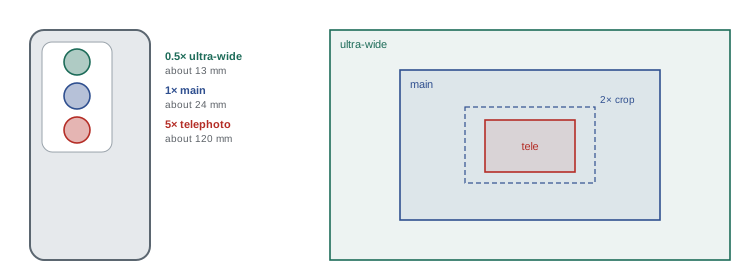
Most current phones have two to four rear cameras, each with its own sensor and fixed lens, plus a front camera for selfies and video calls. A typical arrangement includes:
- A main or wide camera, with the largest sensor and best image quality, usually with an equivalent focal length of about 23 to 26 mm in full-frame terms. This camera handles most shots and performs best in low light.
- An ultra-wide camera, about 13 to 16 mm equivalent, for landscapes, interiors, tight spaces and dramatic perspectives; it often doubles as a macro camera for close-ups.
- One or more telephoto cameras, from about 48 mm to 120 mm or more equivalent, for portraits, distant subjects and compressed perspectives. Long telephotos often use a folded or periscope design, in which a prism turns the light sideways so that the lens can be longer than the phone is thick.
- A front camera, usually lower in quality than the main rear camera, with a wide view suited to selfies held at arm's length.
When you tap a zoom button such as 0.5×, 1×, 2×, 3× or 5×, the phone switches between these cameras, and at intermediate values it crops and enlarges the image from the nearest camera. Zoom values that match a physical camera give the best quality; values in between, and digital zoom beyond the longest camera, rely on cropping and processing and lose detail. Many phones with high-resolution main sensors offer a 2× option that crops the centre of the main sensor, giving good quality without a separate camera.
Small sensors and their consequences
Phone sensors are small. Main camera sensors in flagship phones range from about 1/1.3 inch to 1 inch type, with diagonals of roughly 12 to 16 mm, while ultra-wide, telephoto and front cameras use much smaller sensors. A full-frame camera sensor has a diagonal of about 43 mm, so its area is roughly seven to twelve times larger than even the biggest phone main sensors, and many times larger than the secondary cameras. As PHOT-201 explains, the total light a sensor collects depends on its area, and more light means less noise and more dynamic range. Phones compensate with bright lenses, efficient sensors and heavy processing, but physics still shows in three main ways:
- Low light: images from the secondary cameras, and from the main camera in very dim scenes, become noisy, soft or smeared.
- Depth of field: because the lenses are very short, phones naturally keep almost everything in focus. Background blur happens only with very close subjects or with simulated portrait modes.
- Highlights and contrast: very bright scenes with deep shadows can exceed what a single exposure can capture, which is why phones rely on multi-frame HDR.
Many main sensors now have 48 or 50 megapixels or more, but by default the phone combines groups of four photosites into one larger pixel, a technique called pixel binning, producing 12 or 24 megapixel images with lower noise. Full-resolution modes are useful in bright light when you need detail for cropping or large prints.
| Camera | Typical equivalent focal length | Relative sensor size | Best uses |
|---|---|---|---|
| Ultra-wide | 13–16 mm | Small | Interiors, landscapes, macro, dramatic angles |
| Main (wide) | 23–26 mm | Largest | Most photos and video, low light |
| Telephoto | 48–120 mm or more | Small to medium | Portraits, products, distant subjects |
| Front (selfie) | About 22–28 mm | Small | Talking to camera, selfies, calls |
Computational photography
The biggest difference between a phone and a traditional camera is processing. When you open the camera app, the phone continuously captures frames into a buffer. When you press the shutter, it selects and aligns several frames, some exposed darker to protect highlights and some brighter to capture shadows, and merges them into one image with less noise and wider dynamic range than any single frame. Machine-learning models recognize faces, skin, skies, plants, food and text and process each differently, brightening faces, deepening skies and sharpening text. Night modes extend this over several seconds, and portrait modes estimate depth to blur backgrounds artificially. PHOT-201 covers these techniques in detail.
This processing is why a phone can produce an attractive image in difficult light with no effort from the photographer. It also has drawbacks that creators should recognize: an overprocessed look with crunchy textures and flat, bright shadows; skin that looks smoothed; HDR images that lack contrast and depth; inconsistent colour between the different cameras; and artefacts such as halos around subjects in portrait mode. Learning how to control or work around the processing, through settings, exposure adjustments, raw capture and editing, is a key skill for producing content with a distinctive, natural look.
What phones do well and where they struggle
Phones excel when the light is good, the subject is not moving fast and the output is a screen. They are light, discreet and always available, so creators can capture moments that would be missed while setting up a larger camera, and people being filmed often feel more relaxed in front of a phone than a professional camera. They are connected, so content can be edited and published within minutes. Their wide-angle lenses and deep depth of field suit vlogs, travel, interiors and talking-head videos, and their stabilization makes handheld walking shots smooth.
Phones struggle in dim light, especially with moving subjects; with fast action, where autofocus and shutter lag may miss the moment; with long telephoto shots in anything but bright light; with shallow depth of field, which they can only simulate; and with heat during long 4K recordings or in hot weather, when the phone may dim the screen, lower the frame rate or stop recording. Audio from built-in microphones is adequate for casual clips but rarely matches an external microphone. Battery life and storage fill quickly when recording high-quality video. Knowing these limits helps you plan: shoot important scenes in good light, add light and microphones when needed, and use a dedicated camera when the job truly demands it.
Worked problem
Choosing the right camera on the phone
A food creator wants to film a plate on a restaurant table in dim evening light. The phone has an ultra-wide, main and 3× telephoto camera. The telephoto gives a pleasing, flattering view from a seated position, but the image looks noisy. What should the creator do?
Show solution
- Recognize that the telephoto camera has a smaller sensor and a darker lens, so it struggles in dim light.
- Switch to the main camera, which has the largest sensor and best low-light performance.
- Move physically closer to the plate, or use the 2× crop from the main sensor if it is offered, to approximate the telephoto framing.
- If possible, move the plate near a window or use a small light, and keep the phone steady.
Answer: Use the main camera and move closer or use its 2× crop, rather than the telephoto, and add light if possible.
Choosing a phone for content creation
Many creators start with the phone they already have, which is the right decision until they find a specific limitation. When choosing a phone for content work, the most relevant features are:
- Main camera quality and low-light performance, judged from independent reviews and sample images rather than megapixel counts.
- Video features: 4K recording at 30 and 60 fps, good stabilization, consistent colour and exposure when switching between cameras, and professional formats such as log or high-bitrate codecs if you plan to colour grade.
- Front camera quality, if you film yourself often, including 4K recording and good autofocus.
- A useful telephoto camera for portraits and products.
- Storage capacity: 4K video uses several hundred megabytes per minute, and professional formats far more, so 256 GB or more is sensible for regular video work.
- Connectivity: a USB-C port that supports fast transfers, external storage and wired microphones.
- Battery life and heat management for long recording sessions.
- The quality of the editing apps and accessories available for the platform.
Mid-range phones often have excellent main cameras but weaker secondary cameras and fewer video features, which may be perfectly adequate for many creators. Buying a recent flagship model secondhand can offer high-end features at a lower price.
Caring for your phone camera
Small habits make a big difference to image quality. Phone lenses sit exposed on the back of the device, where they collect fingerprints, dust and pocket lint, causing hazy, low-contrast images and glowing halos around lights. Wipe the lenses with a clean microfibre cloth before shooting; this one habit improves more phone photos than any setting. Check the lens covers for scratches, and choose a case that does not intrude into the ultra-wide field of view or cause reflections. Avoid magnetic mounts that may interfere with optical stabilization in some phones, and avoid mounting phones on motorcycles, where strong vibrations have been known to damage stabilization systems; some manufacturers specifically warn against this. Keep the software up to date, as manufacturers frequently improve camera processing through updates. Protect the phone from extreme heat and cold, and let it cool down if it shows temperature warnings during recording.
Phones and dedicated cameras together
Professional creators often use phones alongside dedicated cameras rather than choosing one or the other. A mirrorless camera might record the main talking-head shot with shallow depth of field and clean audio, while a phone records a second angle, behind-the-scenes clips, vertical versions for short-form platforms, or quick stories during the day. Phones are also useful as monitors, remotes and teleprompters for other cameras. Understanding the phone deeply makes it a reliable tool in any setup, and many of the skills in this course, such as finding good light, framing for different aspect ratios and recording clean audio, apply equally to larger cameras. Throughout the course, the focus is on technique first and equipment second: a well-lit, well-framed, steady shot with clear sound made with an older phone will outperform a poorly lit, shaky shot made with the newest model.
Course overview
The remaining lessons follow the process of creating content with a phone. Lesson 2 covers camera app settings and formats; Lesson 3, framing and composition for vertical and horizontal formats; Lessons 4 and 5, light at home and outdoors; Lesson 6, stabilization and camera movement; Lesson 7, shooting video sequences; Lesson 8, microphones and clean audio; Lesson 9, setups for talking heads, products and food; Lessons 10 and 11, editing photos and video on a phone; and Lesson 12, workflow, ethics and a capstone project in which you plan, shoot and edit a complete piece of content.
Common mistakes
MistakeUsing digital zoom beyond the longest camera.
InsteadMove closer or use a zoom value that matches a physical camera.
MistakeUsing the telephoto camera in dim light.
InsteadSwitch to the main camera, which has the largest sensor.
MistakeShooting with a smudged lens.
InsteadWipe the lenses with a microfibre cloth before every session.
MistakeJudging phones by megapixel count.
InsteadCompare real samples, low-light performance and video features.
MistakeIgnoring heat warnings during long recordings.
InsteadShade the phone, remove the case and let it cool.
Summary and key terms
- Phones combine several cameras, processing, editing and publishing in one device.
- Zoom buttons switch between cameras with different focal lengths and sensor sizes.
- Small sensors limit low-light quality and natural background blur.
- Computational photography merges frames for less noise and wider dynamic range.
- Processing can look overdone, so learning to control it matters.
- Choose phones by real image quality, video features, storage and connectivity.
- Clean lenses, sensible accessories and updates keep image quality high.
- Main camera
- The phone camera with the largest sensor and best quality.
- Ultra-wide camera
- A camera with a very wide field of view.
- Periscope lens
- A folded telephoto design using a prism.
- Equivalent focal length
- Focal length giving the same view on full frame.
- Digital zoom
- Enlarging by cropping, which loses detail.
- Pixel binning
- Combining neighbouring photosites into one larger pixel.
- Computational photography
- Algorithms combining frames and data into one image.
- Multi-frame HDR
- Merging exposures for wider dynamic range.
- Portrait mode
- Simulated background blur using depth estimation.
- Thermal throttling
- Reducing performance when the phone overheats.
Practice problems
Work each problem on paper first, then reveal the answer to check.
Which phone camera usually performs best in low light?
Show answer
The main camera.
What happens at zoom values between the physical cameras?
Show answer
The phone crops and enlarges, losing some detail.
Why do phones keep most things in focus?
Show answer
Their very short lenses and small sensors give deep depth of field.
What is pixel binning?
Show answer
Combining groups of photosites into larger pixels to reduce noise.
Name two signs of overprocessing.
Show answer
Crunchy textures, flat bright shadows, smoothed skin, halos.
Name two situations where phones struggle.
Show answer
Dim light, fast action, long telephoto, heat, shallow depth of field.
What is a periscope telephoto?
Show answer
A folded lens using a prism to fit a long focal length.
Why is storage capacity important for video?
Show answer
4K and professional formats use a lot of space per minute.
What single habit improves many phone photos?
Show answer
Wiping the lens clean.
Name one way phones complement dedicated cameras.
Show answer
Second angles, vertical versions, behind-the-scenes, monitoring.
Lesson quiz · 5 questions
Score 60% or more to complete this lesson.
Create a free account to save your progress, take quizzes and earn a certificate.