
CMP-325 · Lesson 3 of 12 · 31 min
SQL I: defining and modifying data
SQL is the language every relational DBMS speaks. This lesson covers the data definition part, which creates tables with columns, types, keys and constraints, and the data modification part, which inserts, updates and deletes rows. It also introduces the college database used in the examples for the rest of the course: departments, instructors, students, courses, prerequisites, course sections and enrollments. Every SQL example in these lessons was run in SQLite 3.45, and its real output is shown. Where SQLite differs from the SQL standard or from servers such as PostgreSQL, MySQL and MariaDB, the text points out the difference.
SQL basics
An SQL program is a sequence of statements, each ending with a semicolon. Keywords such as SELECT and CREATE are not case-sensitive; by convention they are written in capitals so that they stand out from table and column names. Identifiers such as table names are also case-insensitive in most systems unless written in double quotes. String literals use single quotes: 'Computing Science'. Two hyphens start a comment that runs to the end of the line. Whitespace and line breaks are free, so long statements are laid out over several lines for readability.
Each column has a data type. The standard defines many, and every system adds its own. The common core is INTEGER and SMALLINT or BIGINT for whole numbers; DECIMAL(p, s) or NUMERIC for exact decimals such as money; REAL or DOUBLE PRECISION for approximate floating-point numbers; CHAR(n) and VARCHAR(n) for strings, or TEXT; DATE, TIME and TIMESTAMP for dates and times; and BOOLEAN. Money should never be stored as floating point, because binary fractions cannot represent amounts like 0.10 exactly, as CMPUT-229 showed; use DECIMAL or store whole cents as integers.
| Concept | Standard SQL | SQLite | MySQL / MariaDB | PostgreSQL |
|---|---|---|---|---|
| Auto-numbered key | GENERATED ... AS IDENTITY | INTEGER PRIMARY KEY | AUTO_INCREMENT | GENERATED AS IDENTITY or SERIAL |
| Variable string | VARCHAR(n) | TEXT (length not enforced) | VARCHAR(n) | VARCHAR(n) or TEXT |
| Exact decimal | DECIMAL(p, s) | NUMERIC affinity (stored as integer or real) | DECIMAL(p, s) | NUMERIC(p, s) |
| Boolean | BOOLEAN | INTEGER 0 or 1 | TINYINT(1) / BOOLEAN alias | BOOLEAN |
| Type checking | Strict | Flexible type affinity unless the table is declared STRICT | Strict in strict SQL mode | Strict |
SQLite is unusual in using type affinity: a column's declared type is a preference rather than a rule, so by default a TEXT value can be stored in an INTEGER column. Since version 3.37 a table declared with the STRICT keyword enforces types as other systems do. MySQL and MariaDB have historically been permissive too, silently truncating or converting bad values unless strict SQL mode is on; modern versions turn strict mode on by default. PostgreSQL is strict. Relying on lax behaviour is a mistake: declare constraints, and use strict modes where available.
Creating tables
CREATE TABLE names a table and lists its columns with types and constraints. Column constraints attach to one column; table constraints, written after the columns, can involve several. The constraints that matter most are NOT NULL, which forbids missing values; UNIQUE, which forbids duplicates; PRIMARY KEY, which combines UNIQUE and NOT NULL and names the main identifier; FOREIGN KEY ... REFERENCES, which enforces referential integrity; CHECK, which requires a condition to be true or unknown; and DEFAULT, which supplies a value when none is given. Here is the complete schema of the college database.
CREATE TABLE department (
    dept_id   TEXT PRIMARY KEY,
    name      TEXT NOT NULL UNIQUE,
    building  TEXT,
    budget    INTEGER CHECK (budget >= 0)
);
CREATE TABLE instructor (
    instr_id  INTEGER PRIMARY KEY,
    name      TEXT NOT NULL,
    dept_id   TEXT REFERENCES department(dept_id),
    salary    INTEGER CHECK (salary > 0),
    mentor_id INTEGER REFERENCES instructor(instr_id)
);
CREATE TABLE student (
    student_id INTEGER PRIMARY KEY,
    name       TEXT NOT NULL,
    dept_id    TEXT REFERENCES department(dept_id),
    credits    INTEGER NOT NULL DEFAULT 0 CHECK (credits >= 0)
);
CREATE TABLE course (
    course_id TEXT PRIMARY KEY,
    title     TEXT NOT NULL,
    dept_id   TEXT NOT NULL REFERENCES department(dept_id),
    credits   INTEGER NOT NULL CHECK (credits BETWEEN 1 AND 6)
);
CREATE TABLE prereq (
    course_id TEXT REFERENCES course(course_id) ON DELETE CASCADE,
    prereq_id TEXT REFERENCES course(course_id),
    PRIMARY KEY (course_id, prereq_id)
);
CREATE TABLE section (
    sec_id    INTEGER PRIMARY KEY,
    course_id TEXT NOT NULL REFERENCES course(course_id),
    term      TEXT NOT NULL CHECK (term IN ('Fall', 'Winter', 'Summer')),
    year      INTEGER NOT NULL,
    instr_id  INTEGER REFERENCES instructor(instr_id),
    room      TEXT,
    capacity  INTEGER CHECK (capacity > 0)
);
CREATE TABLE enrollment (
    student_id INTEGER REFERENCES student(student_id) ON DELETE CASCADE,
    sec_id     INTEGER REFERENCES section(sec_id) ON DELETE CASCADE,
    grade      INTEGER CHECK (grade BETWEEN 0 AND 100),
    PRIMARY KEY (student_id, sec_id)
);

SELECT name FROM sqlite_schema WHERE type = 'table' ORDER BY name;name ---------- course department enrollment instructor prereq section student
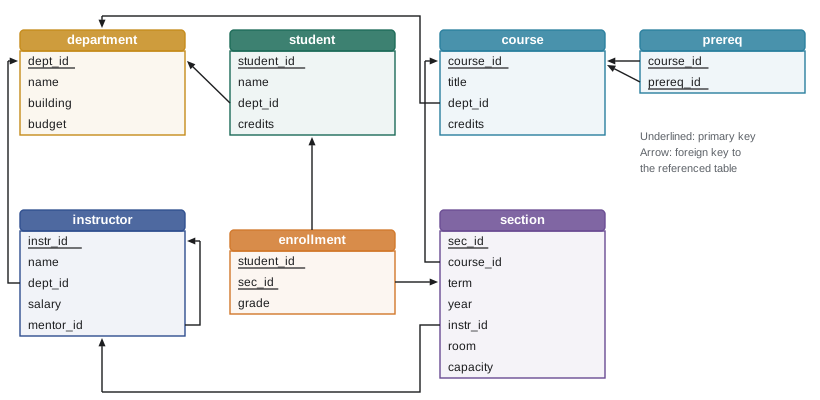
Several design choices are visible. Departments use short codes as natural primary keys. Instructors, students and sections use integer surrogate keys. The prereq table has a composite primary key of two columns, because a course can have several prerequisites and a prerequisite can serve several courses; the pair is what must be unique. Enrollment, likewise, is keyed by the pair of student and section, and its grade may be NULL while a course is in progress. Instructor has a foreign key to itself, mentor_id, so that one instructor can mentor others, which lesson 5 uses for a recursive query.
One SQLite detail matters for every example: SQLite does not enforce foreign keys unless each connection runs PRAGMA foreign_keys = ON, a setting kept off by default for backward compatibility. The examples in this course turn it on. PostgreSQL, MariaDB with the InnoDB storage engine, and other servers always enforce declared foreign keys. Forgetting the pragma is a classic way to end up with orphaned rows in an SQLite application.
Inserting data
INSERT adds rows. The safest form names the columns, so that the statement keeps working if columns are later added or reordered, and lists one or more rows of values. Columns that are not named get their DEFAULT value or NULL. INSERT ... SELECT copies the result of a query into a table. Each inserted row is checked against every constraint; if any check fails, the statement is rejected and, by default, none of its rows are inserted.
INSERT INTO student (student_id, name, dept_id)
VALUES (111, 'Kiri', 'PHYS');                   -- credits takes its DEFAULT of 0

SELECT * FROM student WHERE student_id = 111;

INSERT INTO student (student_id, name, dept_id, credits)
VALUES (112, 'Leo', 'ENG', 10);                  -- no ENG department exists

INSERT INTO student (student_id, name, credits)
VALUES (113, 'Mina', -5);                        -- violates CHECK (credits >= 0)

INSERT INTO student (student_id, name)
VALUES (101, 'Duplicate'); -- 101 already exists(1 row affected) student_id name dept_id credits ---------- ---- ------- ------- 111 Kiri PHYS 0 Error: FOREIGN KEY constraint failed Error: CHECK constraint failed: credits >= 0 Error: UNIQUE constraint failed: student.student_id
Each failed insert names the constraint that stopped it. These messages are the DBMS doing exactly its job: an application with a bug, or a user typing into a form, cannot put the database into a state that breaks the declared rules. Without the constraints, the second insert would create a student in a department that does not exist, and every later report joining students to departments would silently lose Leo.
Worked problem
Choosing constraints for a table
Write CREATE TABLE for a room table in which each room has a code such as CAB 239, a building that must be given, a seat count that must be positive, and an optional flag for whether it has a projector, defaulting to yes.
Show solution
- The room code identifies a room, so it is the primary key: room_code TEXT PRIMARY KEY.
- The building is required: building TEXT NOT NULL.
- The seat count must be positive: seats INTEGER NOT NULL CHECK (seats > 0).
- The projector flag is a boolean with a default; in SQLite store 0 or 1 and constrain it: projector INTEGER NOT NULL DEFAULT 1 CHECK (projector IN (0, 1)).
CREATE TABLE room (
    room_code TEXT PRIMARY KEY,
    building  TEXT NOT NULL,
    seats     INTEGER NOT NULL CHECK (seats > 0),
    projector INTEGER NOT NULL DEFAULT 1 CHECK (projector IN (0, 1))
);
Answer: The table above. In PostgreSQL the last column would be projector BOOLEAN NOT NULL DEFAULT TRUE.
Updating and deleting
UPDATE changes values in existing rows. Its WHERE clause chooses which rows; without one, every row in the table changes, which is one of the most common and costly mistakes in SQL. SET can use expressions involving the current values. DELETE removes the rows chosen by its WHERE clause, and again, without one, it removes every row. A good habit before running an UPDATE or DELETE on important data is to run a SELECT with the same WHERE clause first and check which rows it chooses, and to do the change inside a transaction that can be rolled back.
-- Give every Mathematics instructor a 3% raise, rounded to the dollar
SELECT name, salary FROM instructor WHERE dept_id = 'MATH';

UPDATE instructor
SET salary = CAST(ROUND(salary * 1.03) AS INTEGER)
WHERE dept_id = 'MATH';

SELECT name, salary FROM instructor WHERE dept_id = 'MATH';

-- Record a final grade for an enrollment that was in progress
UPDATE enrollment SET grade = 87 WHERE student_id = 101 AND sec_id = 5;
SELECT * FROM enrollment WHERE student_id = 101 AND sec_id = 5;name salary -------- ------ Nakamura 105000 Ferreira 91000 (2 rows affected) name salary -------- ------ Nakamura 108150 Ferreira 93730 (1 row affected) student_id sec_id grade ---------- ------ ----- 101 5 87
What happens to references on delete
Deleting or changing a row that other rows refer to raises a question: what should happen to the referring rows? A foreign key declaration can specify an action. NO ACTION or RESTRICT, the default, rejects the delete while references exist. CASCADE deletes the referring rows too, or updates them to the new key value for ON UPDATE CASCADE. SET NULL sets the foreign key to NULL; SET DEFAULT sets it to its default. Which to choose depends on meaning. Enrollments make no sense without their student, so the college schema cascades deletes from student to enrollment. A department should not be deleted while students belong to it, so that reference uses the default and the delete is refused.
PRAGMA foreign_keys = ON;
SELECT COUNT(*) AS enrollments_for_101 FROM enrollment WHERE student_id = 101;

DELETE FROM student WHERE student_id = 101;      -- ON DELETE CASCADE removes the enrollments

SELECT COUNT(*) AS enrollments_for_101 FROM enrollment WHERE student_id = 101;

DELETE FROM department WHERE dept_id = 'CS'; -- refused: students and instructors refer to CSenrollments_for_101 ------------------- 4 (1 row affected) enrollments_for_101 ------------------- 0 Error: FOREIGN KEY constraint failed
| Action | Effect on referring rows when the referenced row is deleted | Typical use |
|---|---|---|
| NO ACTION / RESTRICT (default) | The delete is rejected while references exist | Lookup tables such as departments |
| CASCADE | Referring rows are deleted too | Dependent rows with no meaning alone, such as enrollments or order lines |
| SET NULL | The foreign key in referring rows becomes NULL | Optional relationships, such as an instructor's mentor leaving |
| SET DEFAULT | The foreign key becomes its default value | Reassigning to a default category |
CASCADE is powerful and dangerous. A chain of cascades can delete far more than intended: deleting one course might cascade to its sections, then to all their enrollments. Use it only where the dependent rows truly have no meaning without the parent, and prefer restricting deletes of important reference data. Many applications avoid deleting such rows at all, marking them inactive instead, which also preserves history.
Changing a schema
ALTER TABLE changes an existing table: adding a column, renaming a column or table, dropping a column, or adding a constraint. DROP TABLE removes a table and its data. Systems differ in what ALTER supports; SQLite historically supported only a few forms and still cannot add most constraints to an existing table, so the usual SQLite approach is to create a new table, copy the data, drop the old one and rename. In production, schema changes are applied through versioned migration scripts kept in source control, so every copy of the database, from a developer's laptop to production, goes through the same steps in the same order.
ALTER TABLE student ADD COLUMN email TEXT;
UPDATE student SET email = lower(name) || '@college.example' WHERE dept_id = 'CS';
SELECT student_id, name, email FROM student WHERE dept_id IN ('CS', 'MATH') ORDER BY student_id;

CREATE UNIQUE INDEX student_email_uk ON student(email);   -- enforce uniqueness of non-NULL emails
INSERT INTO student (student_id, name, email) VALUES (120, 'Ava Two', 'ava@college.example');(4 rows affected) student_id name email ---------- ----- --------------------- 101 Ava ava@college.example 102 Ben ben@college.example 103 Chloe NULL 104 Dev dev@college.example 107 Grace grace@college.example 109 Isla NULL Error: UNIQUE constraint failed: student.email
The unique index allows many NULL emails but no two equal non-NULL ones, matching UNIQUE semantics in the standard, where NULLs are not considered equal to each other. SQL Server is an exception that by default allows only one NULL in a unique column. These portability details matter when an application moves between systems.
Worked problem
Predicting the effect of a delete
In the college database, section.course_id references course without a referential action, and prereq.course_id references course ON DELETE CASCADE. What happens if you try to delete course CMPUT-304? What about CMPUT-174?
Show solution
- CMPUT-304 appears in prereq as a course with a prerequisite (it requires CMPUT-204) but has no section. Deleting it cascades to its prereq row and succeeds.
- CMPUT-174 has sections 1 and 10. The section reference has no action, so the default rejects the delete.
- It is also a prerequisite of CMPUT-201 and CMPUT-272 through prereq.prereq_id, which has no action either, so that reference would block the delete too.
Answer: Deleting CMPUT-304 succeeds and removes one prereq row; deleting CMPUT-174 is refused because sections and prerequisite rows refer to it.
Common mistakes
MistakeRunning UPDATE or DELETE without a WHERE clause by accident.
InsteadWithout WHERE, every row changes. Preview with a SELECT using the same condition, and work inside a transaction you can roll back.
MistakeAssuming SQLite enforces foreign keys by default.
InsteadRun PRAGMA foreign_keys = ON on every connection. Server systems such as PostgreSQL and MariaDB with InnoDB enforce them always.
MistakeStoring money in a REAL or FLOAT column.
InsteadBinary floating point cannot represent most decimal fractions exactly. Use DECIMAL or store integer cents.
MistakeWriting INSERT without a column list.
InsteadName the columns. Positional inserts break silently when columns are added or reordered.
MistakeUsing ON DELETE CASCADE everywhere for convenience.
InsteadCascade only where dependent rows are meaningless without the parent; otherwise restrict deletes or mark rows inactive.
Summary and key terms
- SQL statements end with semicolons; keywords are case-insensitive; strings use single quotes; two hyphens start a comment.
- Columns have types; systems spell types differently, and SQLite uses flexible type affinity unless a table is declared STRICT.
- CREATE TABLE declares columns with NOT NULL, UNIQUE, PRIMARY KEY, FOREIGN KEY, CHECK and DEFAULT constraints, enforced on every change.
- INSERT, UPDATE and DELETE modify data; UPDATE and DELETE affect every row their WHERE clause chooses, or all rows without one.
- Referential actions (NO ACTION, CASCADE, SET NULL, SET DEFAULT) decide what happens to referring rows when a referenced row is deleted or updated.
- SQLite requires PRAGMA foreign_keys = ON on each connection to enforce foreign keys.
- ALTER TABLE and DROP TABLE change schemas; production systems apply changes through versioned migrations.
- CREATE TABLE
- The SQL statement that defines a new table with its columns and constraints.
- NOT NULL
- A constraint that forbids missing values in a column.
- UNIQUE
- A constraint that forbids two rows having equal non-NULL values in the given columns.
- CHECK
- A constraint requiring a condition to be true (or unknown) for every row.
- DEFAULT
- A value supplied for a column when an insert does not give one.
- Composite key
- A key made of more than one column.
- Surrogate key
- An artificial identifier, such as a generated integer, used as a primary key.
- Referential action
- The rule for what happens to referring rows when a referenced row is deleted or updated.
- Type affinity
- SQLite's system in which a column's declared type is a preference rather than a strict rule.
- Migration
- A versioned script that changes a database schema in a controlled, repeatable way.
Practice problems
Work each problem on paper first, then reveal the answer to check.
Write a CREATE TABLE statement for book(isbn, title, year) where isbn is the key, title is required and year must be after 1450.
Show answer
CREATE TABLE book (isbn TEXT PRIMARY KEY, title TEXT NOT NULL, year INTEGER CHECK (year > 1450));
Why is it better to write INSERT INTO t (a, b) VALUES (...) than INSERT INTO t VALUES (...)?
Show answer
The column list makes the statement independent of column order and keeps it working when columns are added.
What does UPDATE student SET credits = credits + 3; do?
Show answer
It adds 3 to the credits of every student, because there is no WHERE clause.
In the college database, what happens to a student's enrollments when the student row is deleted, and why?
Show answer
They are deleted too, because enrollment.student_id is declared ON DELETE CASCADE.
Which referential action would you choose for instructor.mentor_id when a mentor leaves the college?
Show answer
SET NULL, so mentees remain but no longer have a mentor recorded.
What must an SQLite application do on each connection for foreign keys to be enforced?
Show answer
Run PRAGMA foreign_keys = ON.
A UNIQUE column contains three NULLs. Is that allowed in standard SQL?
Show answer
Yes. NULLs are not equal to each other for uniqueness, so multiple NULLs are allowed (SQL Server is an exception by default).
Why should money not be stored in a REAL column?
Show answer
Binary floating point cannot represent most decimal fractions exactly, causing rounding errors in sums.
Give the general SQLite approach to adding a CHECK constraint to an existing table.
Show answer
Create a new table with the constraint, copy the data across, drop the old table and rename the new one, ideally in a transaction.
Why are schema changes applied through migrations in production?
Show answer
So every copy of the database undergoes the same changes in the same order, reproducibly and under version control.
Lesson quiz · 5 questions
Score 60% or more to complete this lesson.
Create a free account to save your progress, take quizzes and earn a certificate.