
CMP-325 · Lesson 1 of 12 · 32 min
What databases are for
Almost every program you use keeps data that must outlive a single run: a bank's accounts, a hospital's patient charts, a university's course registrations, the lessons and quiz results on this site. Storing that data in ordinary files works for a while, then breaks down as the data grows, as more programs and people use it at once, and as mistakes become expensive. A database management system, or DBMS, is software built to solve those problems once, well, for everyone. This course teaches the relational model that underlies most databases, the SQL language used to define and query them, how to design a database so that it stays correct as it changes, and how a DBMS keeps data safe when many users work at the same time and machines fail. This first lesson explains what a database is for, what goes wrong without one, and how a DBMS is organized.
Data, databases and database management systems
A database is an organized collection of related data that models some part of the world, such as the students, courses and grades of a college. A DBMS is the software that defines, stores, retrieves and protects that data on behalf of many applications. The pair together, plus the applications that use them, is often called a database system. When people say 'the database' they may mean any of the three, so it is worth being precise: PostgreSQL, MySQL, MariaDB, SQLite, Oracle Database and Microsoft SQL Server are DBMSs; the collection of tables that a particular college keeps in one of them is a database.
A DBMS does more than store bytes. It enforces the structure and rules that the designers declared, answers questions written in a high-level query language, lets many users read and change data at once without corrupting it, recovers the data after crashes, and controls who may see or change what. Each of these is a large engineering problem. Writing them yourself for every application would be slow and error-prone, which is why almost every serious application hands its persistent data to a DBMS. Even this course site follows that pattern: its accounts, progress records and quiz attempts live in a MariaDB database, while the course text you are reading lives in files.
What goes wrong with plain files
Before DBMSs, and still today in many small offices, data lived in application-specific files: one program writes a file of student records, another writes a file of course registrations, a spreadsheet tracks fees. This file-processing approach has well-known weaknesses, and each one corresponds to a feature a DBMS provides.
| Problem with files | What happens | What a DBMS provides |
|---|---|---|
| Redundancy and inconsistency | A student's address is stored in the registrar's file and the fees file; one is updated, the other is not | One shared copy with declared relationships between tables |
| Hard to answer new questions | Every new question needs a new program that knows the file layout | A declarative query language (SQL) |
| Integrity rules buried in code | "Grades are between 0 and 100" is checked in some programs but not others | Constraints declared once and enforced for every program |
| Concurrent access | Two clerks register the last seat in a section at the same moment | Transactions and concurrency control |
| Crashes | A power failure halfway through moving money leaves one account debited and the other not credited | Atomic transactions and recovery from a log |
| Security | Anyone who can read the file can read every field | Users, roles and fine-grained privileges |
| Data dependence | Changing the file layout breaks every program that reads it | Physical and logical data independence |
The fifth row deserves emphasis because it is the hardest to get right by hand. Suppose a program transfers $500 between two accounts by subtracting from one record and adding to another. If the machine fails between the two writes, the money has vanished. A DBMS groups the two changes into a transaction that either happens completely or not at all, even across a crash, using techniques covered in lesson 10.
# A tiny file-based "database" and the inconsistency it invites
registrar = {"101": {"name": "Ava", "email": "ava@old.example"}}
fees      = {"101": {"name": "Ava", "email": "ava@old.example", "owing": 1250}}

# The registrar's program updates the email...
registrar["101"]["email"] = "ava@new.example"
# ...but the fees program keeps its own copy and is never told.

for system, data in (("registrar", registrar), ("fees", fees)):
    print(f"{system:9s} thinks Ava's email is {data['101']['email']}")
same = registrar["101"]["email"] == fees["101"]["email"]
print("consistent:", same)registrar thinks Ava's email is ava@new.example fees thinks Ava's email is ava@old.example consistent: False
Data models and schemas
A data model is a collection of concepts for describing data, the relationships between data, and the rules the data must obey. The relational model, which this course uses, describes data as tables of rows and columns; lesson 2 makes it precise. Older hierarchical and network models described data as trees and graphs of linked records. Newer document, key-value, column-family and graph models, often grouped as NoSQL, are covered briefly in lesson 12. Each model comes with a way to describe a particular database's structure, called its schema, and a way to query it.
It helps to separate the schema, which describes the structure and changes rarely, from the instance or state, which is the actual data at a given moment and changes constantly. The schema of a college database might say that every student has an identifier, a name, a home department and a count of credits earned. The instance on a given day contains the 22,000 actual students. A useful analogy is a programming language's type declaration versus the values of variables of that type: the declaration says what values can look like; the values change as the program runs.
Levels of abstraction and data independence
A key idea in database architecture is to describe data at three levels of abstraction, an arrangement known as the ANSI/SPARC three-schema architecture, proposed in the 1970s and still the standard way of thinking about database design.
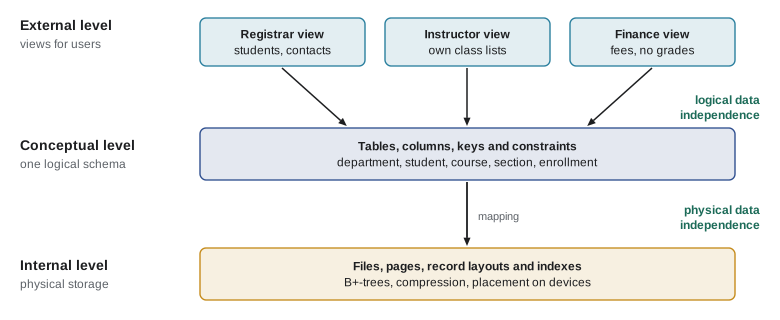
The internal or physical level describes how the data is stored: files, pages, record layouts, indexes and compression. The conceptual or logical level describes what data is stored and how it is related, for the whole database, as tables, columns, keys and constraints, without saying how they are laid out on disk. The external or view level describes the part of the database that a particular user or application sees, possibly reshaped or restricted. A financial aid office might see a view of students with their fees but no grades; a professor might see a view of their own class list.
The point of the layers is data independence: the ability to change one level without changing the levels above. Physical data independence means the storage design can change, for instance by adding an index or moving a table to a faster disk, without changing the conceptual schema or any application. Logical data independence means the conceptual schema can change, for instance by adding a column or splitting a table, while existing views and the programs that use them keep working. Physical independence is achieved very well in practice; logical independence is harder, but views help a great deal. Both are big improvements over file processing, where any change to a file layout broke every program.
Worked problem
Which kind of independence?
For each change, say whether it relies on physical or logical data independence: (a) the database administrator adds an index on student names to speed up searches; (b) the designers split the student table into two tables, one for contact details and one for academic records, and define a view named student that joins them back together; (c) the college moves the database files to a new storage array.
Show solution
- (a) An index is part of the internal level. Queries are unchanged; only their speed changes. This is physical data independence.
- (b) Splitting a table changes the conceptual schema. Old programs keep working because the view presents the old structure. This is logical data independence.
- (c) Moving files changes only where and how data is stored. This is physical data independence.
Answer: (a) physical, (b) logical, (c) physical. Logical independence usually depends on views, which lesson 5 covers.
Database languages
A DBMS offers languages for different jobs. A data definition language (DDL) declares schemas: tables, columns, types, keys and constraints. A data manipulation language (DML) inserts, updates, deletes and queries data. A data control language grants and revokes privileges. In relational systems all three are parts of one language, SQL, the Structured Query Language, first developed at IBM in the 1970s and standardized by ANSI and ISO since 1986, with the latest revision published in 2023.
SQL is declarative: you describe what result you want, and the DBMS decides how to compute it. A query optimizer considers many possible strategies, such as which index to use and in which order to join tables, and picks one it estimates to be cheap. This is a major contrast with the file approach, where the programmer writes the loops. It also means the same query keeps working when the physical design changes, which is physical data independence again.
import sqlite3

con = sqlite3.connect(":memory:")            # a throwaway database in memory
con.execute("CREATE TABLE student (student_id INTEGER PRIMARY KEY, name TEXT NOT NULL, credits INTEGER)")
con.executemany("INSERT INTO student VALUES (?, ?, ?)",
                [(101, "Ava", 54), (102, "Ben", 30), (103, "Chloe", 87)])

# Declarative: say WHAT you want, not how to loop over the data
for row in con.execute("SELECT name, credits FROM student WHERE credits >= 50 ORDER BY credits DESC"):
    print(row)
print(con.execute("SELECT COUNT(*), AVG(credits) FROM student").fetchone())('Chloe', 87)
('Ava', 54)
(3, 57.0)This course runs its SQL examples in SQLite, a small embedded DBMS that is built into Python's standard library and into every smartphone, web browser and many other devices; by some estimates it is the most widely deployed database engine in the world. SQLite stores a whole database in a single file and runs inside the application rather than as a separate server. Client-server systems such as PostgreSQL, MySQL and MariaDB run as separate server processes that many applications connect to over a network. The SQL you learn transfers almost unchanged; where SQLite differs from the standard or from other systems, the lessons say so.
Inside a DBMS
A DBMS has several major components. The query processor parses SQL, checks it against the schema, and turns it into an efficient execution plan. The storage manager reads and writes pages of data on disk, keeps frequently used pages in a memory buffer pool, and maintains indexes. The transaction manager ensures that concurrent transactions do not interfere and that committed changes survive failures. The catalogue, also called the data dictionary, stores the schema itself as data, so the DBMS can describe its own tables.
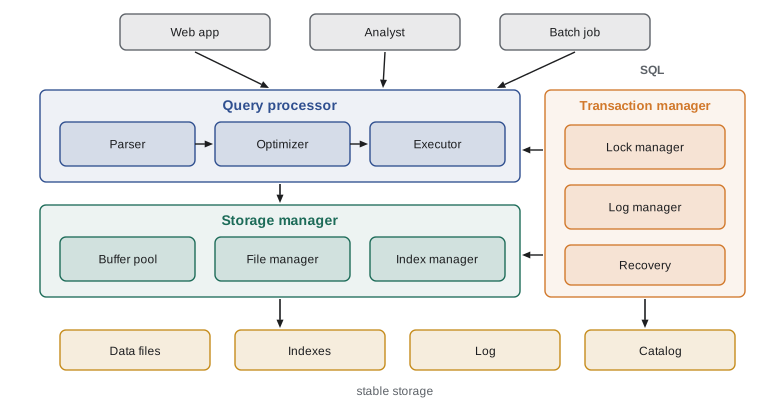
Different people interact with these components. Database administrators install and tune the system, manage storage, backups and security. Database designers decide what tables, columns and constraints the database should have; that is the subject of lessons 6 to 8. Application programmers write programs that issue SQL, covered in lesson 11. End users run applications or, for analysts, write queries directly.
A short history
Commercial database systems appeared in the 1960s with IBM's IMS, a hierarchical system built partly for the Apollo program, and the network model standardized by CODASYL. In 1970 Edgar F. Codd, working at IBM, published the relational model, which proposed describing all data as relations and querying it with a high-level language independent of storage. Prototypes such as IBM's System R and Berkeley's Ingres followed, and commercial relational systems, including Oracle and IBM DB2, appeared around 1980. Codd received the Turing Award in 1981. The relational model has dominated ever since, absorbing object, XML and JSON features along the way. The 2000s brought web-scale systems that relaxed some relational guarantees to spread data across thousands of machines, and the 2010s brought distributed SQL systems that try to offer both scale and strong guarantees. Distributed databases are the subject of CMPUT-450.
| Era | Model or trend | Examples |
|---|---|---|
| 1960s | Hierarchical and network | IBM IMS, CODASYL systems |
| 1970s | Relational model and prototypes | Codd 1970, System R, Ingres |
| 1980s | Commercial relational systems and SQL standard | Oracle, DB2, SQL-86 |
| 1990s | Object-relational features, open source | PostgreSQL, MySQL |
| 2000s | Embedded and web-scale stores | SQLite, Bigtable, Dynamo |
| 2010s and later | NoSQL, NewSQL and cloud databases | MongoDB, Cassandra, Spanner, managed cloud services |
Worked problem
Spotting the need for a transaction
A course registration program does three things when a student adds a section: it checks that the section has an empty seat, inserts an enrollment record, and decreases the count of available seats. Two students try to add the last seat at the same moment. Using only file operations, what can go wrong, and which DBMS features prevent it?
Show solution
- Both programs read the seat count, both see 1 seat available, and both decide to proceed.
- Both insert an enrollment record and both write the seat count as 0. The section now has one more student than seats.
- If one program crashes after inserting the enrollment but before updating the count, the count is wrong even without a second student.
- A DBMS transaction makes the check, insert and update a single atomic unit, and concurrency control makes the two transactions behave as if they ran one after the other.
Answer: The section is overbooked (a lost update) and a crash can leave the data inconsistent. Transactions, concurrency control and recovery, the subjects of lesson 10, prevent both.
Where this course goes
Lessons 2 to 5 cover the relational model and SQL in depth: relational algebra as the foundation, then SQL for defining data, querying it with joins and aggregation, and writing advanced queries with subqueries, views, window functions and recursion. Lessons 6 to 8 cover design: entity-relationship modelling, translating diagrams into tables, and normalization with functional dependencies. Lesson 9 looks under the hood at storage, indexes and how queries are executed. Lesson 10 covers transactions, concurrency and recovery. Lesson 11 covers using a database from a program safely, including SQL injection and privacy law. Lesson 12 is a capstone that designs and builds a database from requirements and surveys NoSQL systems. The discrete mathematics of CMPUT-272, especially sets, relations and logic, is assumed and will pay off immediately in lesson 2.
Common mistakes
MistakeUsing "database" and "DBMS" interchangeably in technical writing.
InsteadA DBMS is the software (for example PostgreSQL or SQLite); a database is the collection of data it manages. Being precise avoids confusion about what is being configured or backed up.
MistakeThinking a DBMS is just a faster file system.
InsteadA DBMS adds a data model, a declarative query language, integrity constraints, concurrency control, recovery and security on top of storage.
MistakeConfusing schema and instance.
InsteadThe schema describes structure and changes rarely; the instance is the data at a moment and changes constantly.
MistakeAssuming SQL tells the DBMS how to compute a result.
InsteadSQL is declarative. It states what result is wanted, and the query optimizer chooses the execution strategy.
MistakeTreating spreadsheets shared by email as a database.
InsteadCopies of a spreadsheet are exactly the redundant, inconsistent files that a DBMS was invented to replace; a shared DBMS keeps one authoritative copy with enforced rules.
Summary and key terms
- A database is an organized collection of related data; a DBMS is the software that defines, stores, queries and protects it for many applications.
- File-based data management suffers from redundancy, inconsistency, buried integrity rules, unsafe concurrent access, crash damage, weak security and data dependence.
- A data model provides concepts for describing data; the schema describes a database's structure, while the instance is its current data.
- The three-schema architecture separates external views, the conceptual schema and the physical storage design, giving physical and logical data independence.
- SQL combines data definition, manipulation and control, and is declarative: the optimizer chooses how to evaluate each query.
- A DBMS contains a query processor, storage manager, transaction manager and catalogue.
- The relational model, proposed by Codd in 1970, has dominated since the 1980s, joined by NoSQL and distributed systems for special needs.
- Database
- An organized collection of related data that models part of the world.
- DBMS
- Database management system: software that defines, stores, retrieves and protects databases.
- Schema
- A description of the structure of a database, such as its tables, columns and constraints.
- Instance
- The data stored in a database at a particular moment.
- Data model
- A set of concepts for describing data, relationships and constraints, such as the relational model.
- Data independence
- The ability to change the schema at one level without changing the levels above it.
- View
- A virtual table defined by a query, used to present part of the database to a user or application.
- DDL
- Data definition language: the part of SQL that declares schemas.
- DML
- Data manipulation language: the part of SQL that inserts, updates, deletes and queries data.
- Transaction
- A unit of work that the DBMS executes atomically and in isolation from other concurrent units.
Practice problems
Work each problem on paper first, then reveal the answer to check.
Name three problems of file-based data management and the DBMS feature that addresses each.
Show answer
For example: redundancy and inconsistency (one shared copy), crashes leaving partial updates (transactions and recovery), integrity rules duplicated in programs (declared constraints).
A university stores each student's mailing address in four separate systems. What is the risk, and how would a database design avoid it?
Show answer
The copies can disagree after an update. A design that stores the address once and refers to it from other tables keeps one authoritative value.
Explain the difference between a schema and an instance using a library catalogue as an example.
Show answer
The schema says each book has an ISBN, title, authors and year; the instance is the set of actual books recorded today.
Which level of the three-schema architecture describes indexes?
Show answer
The internal (physical) level.
A developer adds a column to a table, and an old report that selects specific columns still works. Which kind of data independence does this illustrate?
Show answer
Logical data independence, because the conceptual schema changed without breaking the external view used by the report.
Why is SQL called declarative?
Show answer
Because a query states what result is wanted and the DBMS decides how to compute it.
Name the four main components of a DBMS described in this lesson.
Show answer
The query processor, storage manager, transaction manager and catalogue.
What is the difference between an embedded DBMS such as SQLite and a client-server DBMS such as MariaDB?
Show answer
An embedded DBMS runs inside the application and stores the database in local files; a client-server DBMS runs as a separate server that many applications connect to over a network.
Who proposed the relational model, and in what year?
Show answer
Edgar F. Codd, in 1970.
Give an example of a situation in a store's inventory system that requires a transaction.
Show answer
Selling an item must decrease stock and record the sale together; if only one happens, stock or sales records become wrong.
Lesson quiz · 5 questions
Score 60% or more to complete this lesson.
Create a free account to save your progress, take quizzes and earn a certificate.