
CINE-430 · Lesson 5 of 12 · 31 min
Mastering: HDR masters, SDR derivations and Dolby Vision metadata
Mastering is the stage at which the graded picture becomes a set of definitive files: the HDR master, the SDR version and the metadata that tells displays how to show them. CINE-310 covered the craft of grading in HDR and making SDR trims. This lesson looks at the technical side of the same work: how the HDR master is defined, how SDR versions are derived, how Dolby Vision analysis and trim metadata work, how MaxCLL and MaxFALL are measured and what the cinematographer should check before approving the master. The values below are common examples from public guidelines; the current specification for your production always takes precedence.
What makes a master
A master is the highest-quality finished version of the picture from which all other versions are made. For a premium HDR streaming title, the master is typically:
- Graded on a reference display, often a 1,000-nit P3-D65 PQ display, in a controlled grading suite.
- Rendered at the delivery resolution, usually 3,840 × 2,160, at the project frame rate, from the conformed timeline with final VFX.
- Stored as high-bit-depth image files, such as 16-bit TIFF or OpenEXR sequences, or as lossless or high-quality compressed files, depending on the service.
- Accompanied by metadata describing the mastering display, MaxCLL, MaxFALL and, often, Dolby Vision dynamic metadata.
- Paired with an SDR version, either derived through metadata or rendered separately.
Netflix's public Dolby Vision mastering guidelines, for example, have described a workflow in which the HDR master is graded on a P3-D65 PQ display of at least 1,000 nits and Dolby Vision metadata is generated for the SDR and other target displays. Other services use similar approaches.
HDR-first and SDR-first workflows
There are two broad ways to build an HDR and SDR pair.
- HDR first: the colourist grades the HDR master, then makes SDR trims, often using Dolby Vision tools to derive an SDR version automatically and then adjust it. This is the usual approach for premium streaming originals.
- SDR first: the colourist grades SDR, then creates an HDR version, sometimes by expanding the SDR grade. This is less common for new streaming originals but may appear on mixed or legacy projects.
HDR-first workflows keep the most information in the master. The risk is that SDR becomes an afterthought; the cinematographer should insist on a proper SDR review, because many viewers will see that version.
Dolby Vision analysis and trims
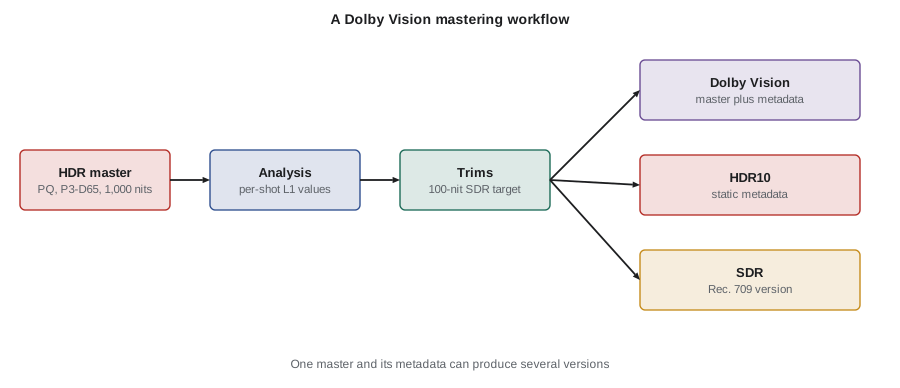
Dolby Vision adds dynamic metadata to a PQ master. The process usually runs like this:
- Analysis: software measures each shot and records its minimum, average and maximum brightness. In Dolby Vision terms, these measurements are called Level 1 (L1) metadata.
- Trims: the colourist reviews the automatically mapped version for a target display, typically a 100-nit SDR Rec. 709 display, and adjusts parameters such as lift, gamma, gain, saturation and chroma for each shot. These adjustments are stored as trim metadata. Older metadata versions call them Level 2 (L2); the current version 4.0 metadata uses Level 8 (L8) trims, which allow trims for more target displays and add more controls.
- Other levels: Level 5 (L5) records the active picture area, such as letterbox bars; Level 6 (L6) records static values such as MaxCLL and MaxFALL for HDR10 compatibility; other levels describe the mastering display and content type.
- Output: the master files plus a metadata file, often an XML file, that is delivered with the picture or embedded in an IMF package.
A Dolby Vision television reads the metadata and maps each shot to its own capability, using the trims as guidance. The SDR version can be rendered from the same master and metadata.
| Level | What it holds | Who sets it |
|---|---|---|
| L1 | Per-shot minimum, average and maximum luminance from analysis | Software analysis |
| L2 | Trims for target displays in older metadata versions | Colourist |
| L5 | Active image area (letterbox or pillarbox offsets) | Colourist or finishing editor |
| L6 | MaxCLL, MaxFALL and mastering display values for HDR10 | Software and finishing |
| L8 | Trims for target displays in version 4.0 metadata | Colourist |
| L9 | Mastering display primaries | Finishing setup |
| L11 | Content type hints for televisions, such as cinema or game | Finishing setup |
Worked problem
Why shot-based analysis matters
A scene cuts between a dark interior (shot average about 5 nits, maximum 150 nits) and a sunny exterior (average 180 nits, maximum 1,000 nits). A 400-nit television tone-maps using static metadata with MaxCLL of 1,000 nits for the whole programme. How might the interior look, and how does dynamic metadata help?
Show solution
- With static metadata, the television plans its tone mapping around a 1,000-nit peak for every shot.
- The interior's highlights at 150 nits are well within the television's 400 nits, but a static curve may still compress them.
- With dynamic metadata, the television knows the interior's maximum is 150 nits and can show it almost unchanged, while compressing only the exterior's highlights.
Answer: Static mapping may make the interior duller than intended. Shot-based metadata lets each shot be mapped for its own range, so the interior keeps its intended contrast.
Measuring MaxCLL and MaxFALL
MaxCLL and MaxFALL are calculated from the finished master, not guessed. For each frame, software converts every pixel to luminance in nits, using the maximum of the red, green and blue components as defined in CTA-861.3. It records the brightest pixel and the average of all pixels in the frame. MaxCLL is the highest brightest-pixel value across the programme; MaxFALL is the highest frame average.
Worked problem
MaxCLL and MaxFALL from a set of frames
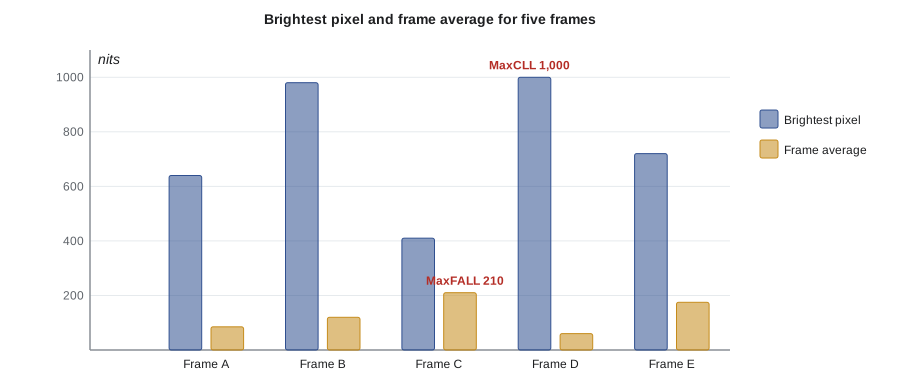
Measurements from five representative frames of a short programme give these values in nits: frame A brightest pixel 640 and average 85; frame B 980 and 120; frame C 410 and 210; frame D 1,000 and 60; frame E 720 and 175. What are MaxCLL and MaxFALL?
Show solution
- MaxCLL is the largest brightest-pixel value: max(640, 980, 410, 1,000, 720) = 1,000 nits.
- MaxFALL is the largest frame average: max(85, 120, 210, 60, 175) = 210 nits.
Answer: MaxCLL is 1,000 nits (frame D) and MaxFALL is 210 nits (frame C). Note that the two values usually come from different frames: a dark frame can contain the brightest specular highlight, while a bright daylight frame has the highest average.
Common mastering limits
Services often set limits or expectations for mastered values. Examples include:
- Peak luminance within the mastering display's range: no pixel above the reference display's peak, such as 1,000 nits, because nobody saw it.
- Colours within the mastering gamut: no colours outside P3-D65 when the master is graded on a P3 display.
- Reasonable MaxFALL: very high frame averages may be uncomfortable for viewers and may cause televisions to dim the picture to protect their panels.
- Accurate metadata: MaxCLL and MaxFALL values that match the content, not defaults copied from a template.
- Legal or full range as specified, with no unexpected clipping at the top or bottom of the signal.
These are checked in QC (Lesson 9). The cinematographer can help by keeping practical lights, windows and specular highlights within the mastering range in the grade, and by asking the colourist to use soft clips or roll-offs rather than hard clipping.
Worked problem
A comfort check on frame average
A bright snow scene has a frame average of about 450 nits on a 1,000-nit master. Typical consumer HDR televisions may limit full-screen brightness to a few hundred nits. What might happen at home, and what could the colourist do?
Show solution
- Many televisions reduce brightness when large areas are bright, to manage power and heat.
- The scene may look dimmer and flatter at home than in the grading suite.
- Options: bring the frame average down to a more typical level while keeping highlights, and check on a consumer-grade HDR display.
Answer: The snow may dim noticeably on many televisions. Lowering the frame average while keeping specular sparkle protects the look across a wider range of displays.
The SDR version
The SDR version is usually SDR Rec. 709 (BT.1886 display gamma, about 100 nits reference), delivered as a separate file or derived from Dolby Vision metadata. Even when derived automatically, it needs review.
- Check that skin tones, key colours and important dark details are preserved.
- Watch for highlights that look clipped or flat, and saturated lights that shift hue.
- Confirm that captions and graphics fit and that letterboxing is correct.
- Review on a calibrated SDR display at the reference brightness.
Some services ask for SDR versions in other forms, such as an SDR P3 version for theatrical use or an SDR Rec. 709 file for archive and broadcast partners. The deliverables list will say which.
Worked problem
Time for an SDR trim pass
A 10-episode series has 50-minute episodes with an average shot length of 4 seconds. The colourist estimates an average of 20 seconds per shot for SDR trims after analysis. How many hours of trim work is that, before reviews?
Show solution
- Shots per episode: \( 50 \times 60 \div 4 = 750 \).
- Season: \( 750 \times 10 = 7\,500 \) shots.
- Time: \( 7\,500 \times 20 \text{ s} = 150\,000 \text{ s} \approx 41.7 \text{ hours} \).
Answer: About 42 hours of trim work, roughly a week of suite time. Schedules that leave no time for SDR trims risk poor SDR versions.
Other derived versions
From one HDR master and metadata, finishing teams may produce:
- HDR10: PQ video with static metadata, derived from the Dolby Vision master.
- HDR10+: where requested, with its own dynamic metadata generated by analysis.
- HLG: for broadcast partners, by converting the PQ master to HLG with a standard transform.
- Theatrical versions: P3 DCI or P3-D65 versions for cinema screenings, often at 48 nits for SDR cinema.
- Lower-resolution versions: HD files for partners who need them, usually created from the 4K master.
Each derived version should be checked; conversions can change contrast, colour or highlights in unexpected ways.
What the cinematographer should check before approval
Before signing off, the cinematographer should review:
- The HDR master on the reference display, at least key scenes and any shots with practical lights, windows, sun or fire.
- The SDR version on a calibrated SDR display.
- A sample of shots on a consumer HDR television, in a calibrated or neutral mode, to see how tone mapping affects the look.
- MaxCLL, MaxFALL and gamut reports, to catch values outside the mastering range.
- The active picture area and letterboxing, especially for 2.39:1 or 2.00:1 frames in a 16:9 container.
Write down the review notes and any changes agreed. If the cinematographer cannot attend the final mastering, agree in advance on remote review links with calibrated displays, and identify a trusted colourist or post supervisor who can make final calls.
Common mistakes
MistakeThe SDR version derived from Dolby Vision needs no review.
InsteadAutomatic mapping is a starting point; the colourist and DP should review and trim SDR.
MistakeMaxCLL and MaxFALL can be copied from a template.
InsteadThey must be measured from the finished master because they describe its actual content.
MistakeHighlights above the mastering display's peak are harmless.
InsteadNobody saw them on the reference display, so QC usually flags them.
MistakeMaxCLL and MaxFALL always come from the same frame.
InsteadThe brightest pixel and the brightest frame average often come from different frames.
MistakeDolby Vision trims are only for SDR.
InsteadVersion 4.0 metadata supports trims for several target displays, including HDR displays of different peaks.
Summary and key terms
- A master is the highest-quality finished version, usually a 4K PQ HDR grade on a reference display, with metadata.
- HDR-first workflows grade HDR and then derive and trim SDR.
- Dolby Vision analysis creates per-shot L1 metadata; colourists add trims (L2 or L8) for target displays.
- MaxCLL is the brightest pixel in the programme; MaxFALL is the highest frame average.
- Services expect peaks, colours and frame averages to stay within the mastering range.
- The SDR version must be reviewed on a calibrated SDR display.
- Before approval, the DP should review HDR, SDR, consumer playback and metadata reports.
- Master
- The highest-quality finished version of the picture from which other versions are made.
- HDR-first workflow
- Grading the HDR master first and deriving SDR from it.
- Dolby Vision analysis
- Software measurement that creates per-shot brightness metadata.
- L1 metadata
- Dolby Vision per-shot minimum, average and maximum luminance.
- Trim
- A colourist's adjustment for a target display, stored as metadata.
- L8 metadata
- Dolby Vision version 4.0 trim metadata for target displays.
- Target display
- A display type for which the HDR master is mapped, such as 100-nit SDR.
- CTA-861.3
- The standard that defines HDR static metadata values such as MaxCLL and MaxFALL.
- Soft clip
- A gradual roll-off of highlights near a limit instead of a hard cut.
- Derived version
- A version such as HDR10, HLG or SDR created from the master.
Practice problems
Work each problem on paper first, then reveal the answer to check.
Frames have brightest pixels of 300, 820 and 760 nits and averages of 90, 40 and 150 nits. Give MaxCLL and MaxFALL.
Show answer
MaxCLL 820 nits; MaxFALL 150 nits.
What does Dolby Vision L5 metadata record?
Show answer
The active image area, such as letterbox offsets.
Why might a television dim a very bright snow scene?
Show answer
Panels limit full-screen brightness to manage power and heat.
What reference brightness is typical for SDR Rec. 709 mastering?
Show answer
About 100 nits.
An episode has 900 shots; trims take 15 seconds each. How long is the trim pass?
Show answer
900 × 15 = 13,500 s, or 3.75 hours.
Name two derived versions besides SDR.
Show answer
Any two of HDR10, HDR10+, HLG, theatrical P3 and HD versions.
Why use a soft clip for practical lights?
Show answer
It keeps highlights within the mastering range without harsh edges.
What should the DP check on a consumer HDR television?
Show answer
How tone mapping affects the look in a neutral picture mode.
What is the risk of an HDR-first workflow?
Show answer
The SDR version can be rushed and poorly reviewed.
Where is Dolby Vision metadata delivered?
Show answer
In a metadata file, often XML, with the master or inside an IMF package.
Lesson quiz · 5 questions
Score 60% or more to complete this lesson.
Create a free account to save your progress, take quizzes and earn a certificate.