
CINE-201 · Lesson 1 of 12 · 25 min
Anatomy of a digital cinema camera
A digital cinema camera is a chain of systems, each of which shapes the final image. Light passes through the lens, through filters in front of the sensor, and onto millions of photosites that convert it into electrical charge. That charge is measured, converted to numbers, processed, compressed and written to media, while a copy of the image is sent to viewfinders and monitors and the camera is powered, cooled and controlled. A cinematographer who understands this chain can choose the right camera for a project, set it up correctly, predict how it will behave in difficult conditions, and diagnose problems when they occur. This course examines each link in turn. This first lesson takes a tour of the whole camera, introduces the main categories of camera used in production today, and explains the vocabulary that the rest of the course builds on.
From photons to files: the signal chain
Every digital motion picture camera, from a smartphone to a large-format cinema camera, performs the same basic steps:
- The lens forms an optical image of the scene on the sensor plane (CINE-210 covers lenses in depth).
- Filters in front of the sensor shape the light: an infrared-cut filter blocks wavelengths the sensor would otherwise record as false colour, an optical low-pass filter slightly blurs the image to reduce aliasing, and many cameras add internal neutral density (ND) filters to reduce exposure.
- The sensor, a grid of light-sensitive photosites, converts photons into electrons during the exposure time set by the shutter.
- Readout circuits measure the charge in each photosite, amplify it, and analogue-to-digital converters (ADCs) turn it into numbers.
- The image processor corrects sensor defects, interpolates full colour from the colour filter array, applies white balance, colour transforms and tone curves (or leaves the data raw), and scales the image to the recording resolution.
- An encoder compresses the image data using a codec, and the camera writes it, with metadata and audio, to recording media.
- At the same time, monitoring outputs send a processed image, often with a look-up table (LUT), to the viewfinder, on-board monitor and video village.
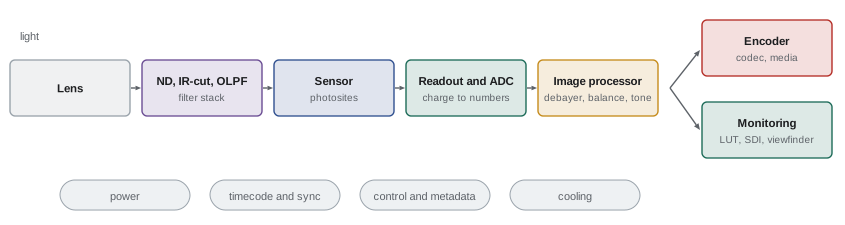
The camera body and its systems
Around the imaging chain sit the systems that make a camera usable on set. The lens mount holds the lens at a precise distance from the sensor, called the flange focal distance, and carries electrical contacts for lens data and control. Internal ND filters, now common on cinema cameras, let the camera team reduce exposure in calibrated steps without changing the aperture or adding filters in front of the lens. A cooling system with fans and heat sinks keeps the sensor at a stable temperature, because sensor noise rises with temperature. Inputs and outputs carry video, timecode, genlock, audio, control signals and power to accessories. Recording media slots accept cards or solid-state drives. User interfaces, menus, buttons and wireless control apps let the operator and camera assistants change settings quickly. Mounting points, top handles, shoulder pads and baseplates connect the body to support equipment.
Many of these systems are invisible in a still image but critical on a working set. A camera that overheats in a hot desert, whose fan noise is audible to the sound recordist, whose menus are slow to navigate, or whose power connector is fragile can cost far more production time than a small difference in image quality is worth.
Categories of camera
Productions choose from several broad categories of camera, each with typical strengths:
| Category | Examples | Typical strengths | Typical limitations |
|---|---|---|---|
| High-end digital cinema | ARRI ALEXA 35 and ALEXA Mini LF, Sony VENICE 2, RED V-RAPTOR | Image quality, dynamic range, raw recording, robust build, accessory ecosystem | Cost, size and weight, power consumption |
| Compact and mid-range cinema | Sony FX6 and BURANO, Canon C70 and C400, Blackmagic Design cinema cameras, RED KOMODO | Professional codecs and outputs at lower cost and size | Fewer features or less robustness than flagship models |
| Mirrorless hybrid | Sony Alpha, Canon EOS R, Panasonic Lumix S, Nikon Z, Fujifilm X and GFX | Small size, low cost, excellent sensors | Heat limits, small connectors, limited professional I/O |
| Broadcast and studio | Sony and Grass Valley system cameras, ENG camcorders | Live operation, 2/3-inch zoom lenses, camera control units | Small sensors, limited shallow depth of field |
| Specialty | Phantom high-speed, action cameras, drone cameras, smartphones | Very high frame rates, tiny size, unique viewpoints | Specialized workflows, image quality trade-offs |
The lines between categories are blurring. Mirrorless cameras now record internal raw and professional codecs, compact cinema cameras share sensors with flagships, and smartphones record log footage. What still distinguishes high-end cinema cameras is usually the combination of image quality, reliability over long shooting days, workflow integration and the ecosystem of accessories, support and rental availability.
Key specifications and what they mean
Camera specification sheets list many numbers. The most important, each covered in a later lesson, are:
- Sensor size and resolution: the physical dimensions of the active area and the number of photosites, which together determine field of view, depth of field and detail (Lessons 4 and 5).
- Frame rates: the frame rates available at each resolution and recording format (Lesson 6).
- Shutter type and readout speed: whether the sensor uses a rolling or global shutter, and how fast it reads out (Lesson 7).
- Native ISO and dynamic range: sensitivity and the range of brightness the sensor can record, usually claimed in stops (Lessons 8 and 9).
- Recording formats and codecs: raw and compressed options, bit depths, chroma subsampling and data rates (Lesson 10).
- Lens mount, outputs, power and weight: the practical specifications that determine how the camera fits into a package (Lessons 11 and 12).
Manufacturers measure some of these figures in different ways, especially dynamic range, so direct comparisons from spec sheets can mislead. Independent tests and the camera team's own tests (Lesson 12) are more reliable.
Sensor, processor and recording: where the image is made
It is common to credit a camera's look to its sensor, but the processor and recording format matter as much. Two cameras with the same sensor can produce different images because of differences in readout modes, noise reduction, colour processing and compression. Conversely, raw recording moves much of the processing out of the camera to post-production software, so that the image depends more on the colourist's choices than on in-camera settings. Understanding which decisions are fixed at the moment of capture, such as exposure, frame rate, shutter and the sensor's physical response, and which can be changed later, such as white balance and colour transforms in raw workflows, is one of the most important practical skills in modern cinematography.
Worked problem
Which decisions are fixed at capture?
A cinematographer records in a raw format at 24 fps with a 180° shutter, ISO 800 and a white balance of 5600 K. Which of these settings can be changed in post-production without loss, and which are fixed?
Show solution
- Frame rate and shutter angle determine how motion is sampled; they are fixed at capture.
- Exposure, the amount of light reaching the sensor through the aperture, shutter and ND, is fixed; underexposed noise or clipped highlights cannot be recovered.
- ISO in many raw formats is metadata describing how the image should be developed; it can be adjusted in post, though the underlying analogue gain and noise are fixed.
- White balance in raw is metadata and can be changed freely in post.
Answer: Frame rate, shutter and exposure are fixed at capture; white balance, and in most raw formats the ISO rating, can be changed later.
Professional workflow around the camera
On a professional set, the camera sits at the centre of a team and a workflow. The director of photography (DP) decides the look and exposure; the camera operator frames and moves the camera; the first assistant camera (1st AC) pulls focus and maintains the camera; the second assistant (2nd AC) slates, handles media and keeps camera reports; and the digital imaging technician (DIT) manages looks, monitoring and data. After each roll, media goes to a data wrangler or DIT who copies it with checksum verification to multiple drives before the card is cleared for reuse. Camera settings, lens data and metadata travel with the footage to editorial and colour grading. Each decision in this course connects to this workflow, and CINE-420 covers the camera crew's roles in detail.
Choosing a camera
Camera choice is rarely about the best image in absolute terms. It balances the creative needs of the project, such as the desired look, sensor size and lens choices, low-light performance and frame rates; practical needs, such as size, weight, power, heat, sound and reliability; workflow needs, such as recording formats, data volumes, post-production pipeline and delivery requirements; and budget and availability, including rental costs, crew familiarity and support. Streaming platforms and broadcasters may also have approved camera lists or minimum technical specifications for original productions. Lesson 12 returns to these questions in building and testing a complete camera package.
A short history of digital cinema cameras
Digital cameras entered feature filmmaking gradually. In the late 1990s and early 2000s, high-definition video cameras with three small 2/3-inch sensors, such as Sony's HDCAM-based CineAlta cameras, were used for a few high-profile features, including George Lucas's Star Wars: Episode II (2002), but their small sensors, limited dynamic range and video-style images kept most cinematographers on film. The arrival of single large-sensor cameras changed this. The RED ONE (2007) offered a Super 35-sized sensor and compressed raw recording at a fraction of the cost of earlier digital cinema cameras, and ARRI's ALEXA (2010) combined a Super 35 sensor with exceptional dynamic range, natural colour and a straightforward workflow. Within a few years, most features and television dramas had moved to digital capture, and by the 2020s, film was a deliberate creative choice rather than the default.
Reading a camera's specification sheet critically
Specification sheets are written to sell cameras, so read them carefully. Resolution figures may refer to the largest sensor mode, which may not be available at the frame rate you need. Dynamic range figures may use generous measurement thresholds. Frame rate tables may apply only to particular codecs or sensor crops. Power figures may exclude accessories. Weight figures may describe the body without battery, lens mount or top handle. Check the footnotes, look for independent tests by rental houses, cinematography magazines and testing laboratories, and ask colleagues who have used the camera in conditions like yours.
The camera as a system with the crew
A camera's usability depends on how it fits the way a crew works. Camera assistants value clearly labelled, accessible controls on the assistant's side, reliable lens data, sturdy power and video connectors, and media that are quick to swap. Operators value a good viewfinder, balanced weight and comfortable handholding. DITs value consistent metadata, reliable remote monitoring and predictable colour. Many experienced crews choose a camera partly because they know its menus and failure modes well, which saves time and reduces risk on set. When introducing an unfamiliar camera, allow time in prep for the crew to learn it.
Cameras and sustainability
Production equipment has an environmental footprint, from manufacturing to power use to transport and disposal. Choices that reduce it include renting rather than buying equipment that will be used rarely, choosing efficient cameras and LED lighting, using grid power or battery systems instead of diesel generators where possible, minimizing shipping, and planning data storage to avoid unnecessary copies. Many productions now track their carbon footprint, and equipment choices are part of that picture.
Camera support and ecosystems
Beyond the body itself, a camera's value depends on the ecosystem around it: compatible lenses, cages, power solutions, monitors, wireless systems and post-production software support. Popular cinema cameras have large ecosystems of third-party accessories and widespread rental availability in major production centres, which makes them easier to support on location and to replace quickly if something fails.
Common mistakes
MistakeJudging cameras by resolution alone.
InsteadConsider sensor size, dynamic range, colour, codecs and workflow.
MistakeComparing dynamic range figures across manufacturers directly.
InsteadRely on consistent independent tests or your own.
MistakeAssuming raw lets you fix exposure later.
InsteadExposure, shutter and frame rate are fixed at capture.
MistakeIgnoring heat, noise, power and weight.
InsteadCheck practical specifications for the shooting conditions.
MistakeForgetting delivery requirements.
InsteadCheck broadcaster or platform technical specifications early.
Summary and key terms
- A camera is a chain: lens, filters, sensor, readout, processing, encoding and recording.
- Monitoring outputs show a processed version of the image, often with a LUT.
- Body systems include the mount, internal ND, cooling, I/O, media and controls.
- Camera categories range from high-end cinema to mirrorless, broadcast and specialty.
- Key specifications include sensor size, resolution, frame rates, shutter, ISO, dynamic range and codecs.
- Exposure, frame rate and shutter are fixed at capture; raw allows later colour decisions.
- Camera choice balances creative, practical, workflow and budget needs.
- Signal chain
- Sequence of systems from lens to recording.
- Photosite
- Single light-sensitive element of a sensor.
- ADC
- Analogue-to-digital converter.
- OLPF
- Optical low-pass filter reducing aliasing.
- Internal ND
- Built-in neutral density filters.
- Codec
- Method of compressing and decompressing video.
- LUT
- Look-up table transforming image values.
- Flange focal distance
- Distance from mount to sensor plane.
- DIT
- Digital imaging technician.
- Checksum
- Value used to verify copied data.
Practice problems
Work each problem on paper first, then reveal the answer to check.
List the main stages of the camera signal chain.
Show answer
Lens, filters, sensor, readout and ADC, processing, encoding, recording.
What does an infrared-cut filter prevent?
Show answer
False colour from infrared light.
Why do cinema cameras have internal ND?
Show answer
To reduce exposure without changing aperture or adding filters.
Why does sensor temperature matter?
Show answer
Noise rises with temperature.
Name two strengths of mirrorless hybrids.
Show answer
Small size, low cost, good sensors.
Name a limitation of broadcast cameras for cinema use.
Show answer
Small sensors limit shallow depth of field.
Which settings are fixed at capture?
Show answer
Exposure, frame rate, shutter.
Which raw settings can be changed later?
Show answer
White balance and usually ISO rating.
What does the 2nd AC do?
Show answer
Slates, handles media and keeps camera reports.
Why verify copies with checksums?
Show answer
To confirm data was copied without errors.
Lesson quiz · 5 questions
Score 60% or more to complete this lesson.
Create a free account to save your progress, take quizzes and earn a certificate.