
BAS-220 · Lesson 5 of 12 · 30 min
Math, limits and scaling blocks
▶ Video coming soon A video version of this lesson is on the way.
The workshop on Saturday, September 26, was about numbers. Sophie wrote three lines on the whiteboard: a pressure transmitter's signal, a damper actuator's signal and a hot water reset schedule. "Every one of these is the same equation," she said, "and half the faults I find in programs are that equation done wrong." The equation was the straight line, y = mx + b. This lesson covers the math, limit and scaling blocks that turn signals into values, values into commands and one value into another, and the guards that stop a calculation from producing nonsense.
Math blocks
Every tool has blocks for the four arithmetic operations, and usually for absolute value, square root, minimum, maximum, average and a few more. In structured text, the same operations are written as ordinary expressions. Math in a control program looks simple, but it has three traps that ordinary arithmetic does not. Units must match: a program that adds a temperature in degrees Celsius to a temperature difference in kelvins is fine, but one that subtracts a Fahrenheit value from a Celsius value is meaningless. Division can fail: dividing by a value that may be zero, or close to zero, produces an error or an enormous number. And values from sensors can be missing or failed, so every calculation that uses a sensor should know what to do when the sensor is bad.
| Block | Does | Example use |
|---|---|---|
| ADD, SUB | Adds or subtracts | Setpoint plus an offset; supply minus return temperature |
| MUL, DIV | Multiplies or divides | Flow times temperature difference for energy; a ratio |
| ABS | Absolute value | Size of an error, regardless of sign |
| SQRT | Square root | Flow from a differential pressure, as BAS-120 showed |
| AVG | Average of several inputs | Average of zone temperatures on a floor |
| MIN, MAX | Smaller or larger of the inputs | Choosing the most demanding zone |
| LIMIT or clamp | Keeps a value between a low and a high limit | A setpoint that an operator cannot push too far |
Linear scaling: y = mx + b
BAS-120 and BAS-210 described scaling inputs: turning 4 to 20 milliamps or 0 to 10 volts into engineering units. The same straight line appears throughout programs. It is defined by two points: the signal or value at the low end and at the high end. From those two points, the slope m and the offset b follow, and any value in between can be calculated.
Worked problem
Scaling a 4 to 20 milliamp pressure input
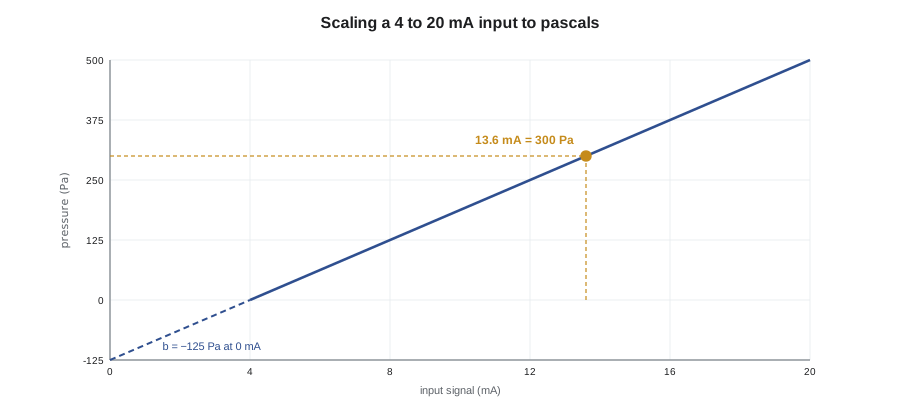
A duct static pressure transmitter has a range of 0 to 500 Pa on a 4 to 20 milliamp output. Find m and b, then the pressure for a reading of 13.6 milliamps.
Show solution
- Points: (4 mA, 0 Pa) and (20 mA, 500 Pa).
- Slope: m = (500 − 0) ÷ (20 − 4) = 31.25 Pa per mA.
- Offset: b = 0 − 31.25 × 4 = −125 Pa.
- At 13.6 mA: y = 31.25 × 13.6 − 125 = 300.0 Pa.
Answer: 300 Pa. The negative offset is normal: it reflects the live zero at 4 milliamps.
Outputs use the same line in reverse. A program usually calculates commands in engineering terms, such as a damper position of 0 to 100, and the output must turn that into the actuator's signal. For a 2 to 10 volt actuator, a command of 0 is 2 volts and 100 is 10 volts, so each unit of command is 0.08 volts.
Worked problem
Scaling a damper output
A rooftop unit's economizer actuator takes 2 to 10 volts for 0 to 100 open. What voltage should the output give for a command of 35? A meter at the actuator reads 6.4 volts; what command does that correspond to?
Show solution
- Slope: (10 − 2) ÷ (100 − 0) = 0.08 V per unit of command.
- Offset: 2 V.
- For 35: 0.08 × 35 + 2 = 4.8 V.
- For 6.4 V: (6.4 − 2) ÷ 0.08 = 55.
Answer: 4.8 volts for a command of 35; a reading of 6.4 volts means the program is commanding 55. A mismatch between the commanded value on the screen and the value worked back from the meter is a quick check of output scaling, as BAS-120's actuator fault showed.
Reset schedules
A reset schedule is a scaling block used for control. BAS-130 described Tilden Hall's hot water reset, which Nell Nakagawa approved in October: the hot water supply setpoint is high in cold weather and lower in mild weather. Two points define the line, and the block clamps the result at the ends, so that the setpoint never goes beyond the two set values however cold or warm it gets outside.
Worked problem
Calculating a reset setpoint
Tilden's reset runs from 80 °C hot water at −20 °C outdoors to 45 °C at 15 °C outdoors, clamped at both ends. What is the setpoint at 0 °C outdoors, at −25 °C and at 20 °C?
Show solution
- Slope: (45 − 80) ÷ (15 − (−20)) = −35 ÷ 35 = −1.0 K per K.
- At 0 °C: 80 + (−1.0) × (0 − (−20)) = 80 − 20 = 60 °C.
- At −25 °C: beyond the cold end, so clamped at 80 °C.
- At 20 °C: beyond the mild end, so clamped at 45 °C.
Answer: 60 °C, 80 °C and 45 °C. Without the clamps, the line would have asked for 85 °C on a very cold day, above what the converter was set up to deliver.
Limits and clamps
A limit block, also called a clamp, passes its input through unchanged when it is between a low and a high value, and replaces it with the nearest limit when it is outside. Clamps protect equipment and people from values that a calculation, an operator or a failed sensor might produce. A heating setpoint that an operator can type in should be clamped to a sensible range; a calculated damper command should be clamped to 0 to 100; a reset output should be clamped to what the plant can deliver.
Clamps should be visible. Sophie put every limit value in a named constant with a comment, and on the graphics she showed a small marker when a value was being clamped, so that an operator who typed a setpoint of 30 °C (86 °F) into an office could see that the program was using 26 °C (79 °F) instead. A clamp that silently changes a value causes as much confusion as a missing one.
Deadbands and hysteresis
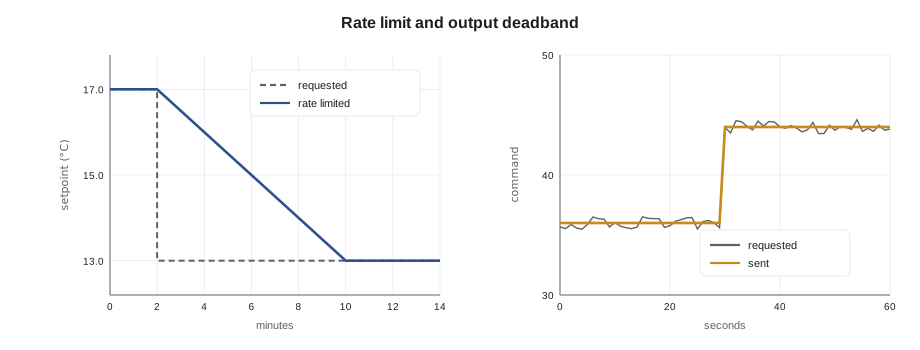
A deadband is a range around a value within which nothing changes. Lesson 3's fan coil used one to stop the mode switching between heating and cooling. Two-position control in BAS-130 used a differential for the same reason. In math and selection blocks, a deadband is often used on an output: a command that changes by less than a set amount is not sent, so that an actuator does not wear itself out chasing tiny changes. Hysteresis is the general name for a response that depends on whether the input is rising or falling, as a thermostat with a differential does.
Rate limiting
A rate limit block lets its output follow its input, but no faster than a set rate. It is used where a sudden change would upset a process or the people in a building. A setpoint that is reset by a large step, such as a supply air setpoint jumping when a mode changes, can be ramped instead, so that the loop has time to follow without overshoot. Chillers and boilers often have rate limits on their setpoints and on how fast stages can be added.
Worked problem
Ramping a setpoint
When AHU-1 changes from warm-up to occupied mode, its discharge air setpoint drops from 17 °C to 13 °C. A rate limit of 0.5 K per minute is applied. How long does the setpoint take to reach its new value?
Show solution
- Change: 17 − 13 = 4 K.
- Time: 4 ÷ 0.5 = 8 minutes.
Answer: Eight minutes. The loop follows a gentle ramp instead of a step, and the room does not feel a blast of cold air at the change of mode.
Guarding calculations
Some calculations can blow up. The mixed air or outdoor air fraction calculation is a classic. It works out what fraction of the supply air is outdoor air from three temperatures: return, outdoor and mixed. The formula divides by the difference between outdoor and return temperature. On a mild day, when outdoor air is close to return air temperature, that difference is small, any sensor error is magnified, and the result can be wildly wrong. When the two are equal, the program divides by zero.
Worked problem
Outdoor air fraction
RTU-1's return air is 22 °C, outdoor air 2 °C and mixed air 16 °C. What is the outdoor air fraction? On a mild day with return at 22 °C, outdoor at 21 °C and mixed at 21.5 °C, what does the formula give, and what if the mixed air sensor reads 0.3 K high?
Show solution
- Cold day: (16 − 22) ÷ (2 − 22) = −6 ÷ −20 = 0.30.
- Mild day: (21.5 − 22) ÷ (21 − 22) = −0.5 ÷ −1 = 0.50.
- With the mixed air sensor 0.3 K high: (21.8 − 22) ÷ (21 − 22) = 0.20.
Answer: An outdoor air fraction of 0.30 on the cold day is trustworthy. On the mild day, a small sensor error turns 0.50 into 0.20, so the program should not trust the calculation when outdoor and return temperatures are close.
(* outdoor air fraction from three temperatures, with a guard *)
IF ABS(OAT - RAT) > 3.0 THEN
    OAFraction := (MAT - RAT) / (OAT - RAT);
    OAFraction := LIMIT(0.0, OAFraction, 1.0);
    OAFValid   := TRUE;
ELSE
    OAFValid   := FALSE;     (* too close to calculate; hold last value *)
END_IF;
Sensor failure needs a guard too. Most controllers flag an input as failed when its signal is outside the valid range, for example a 4 to 20 milliamp input reading below about 3.6 milliamps, or a thermistor input reading open or shorted. A program that uses that input should check the flag and fall back to something safe: a fixed default, another sensor, or a mode that does not depend on it. A discharge air loop running on a failed sensor that reads −40 °C (−40 °F) will open the heating valve fully and keep it there.
| Guard | Protects against | Example |
|---|---|---|
| Division check | Divide by zero or by a tiny number | Outdoor air fraction only when OAT and RAT differ enough |
| Clamp on the result | Impossible results from sensor error | Fraction limited to 0 to 1 |
| Failed sensor check | Calculations on bad data | Use a default or another sensor when the input fails |
| Unit check | Mixing incompatible units | All temperatures in one unit before subtracting |
| Range check on operator entries | Typing errors and extreme values | Setpoint clamped to a comfort range |
Averages, minimums and maximums of many values
Some calculations take many inputs at once. A floor's average zone temperature, the most open valve on a hot water loop, or the coldest of several space sensors are all common. Averages hide extremes: a floor that averages comfortably may still have one cold office, so averages suit reporting more than control. Minimum and maximum selections suit control, as in reset logic that raises the hot water setpoint when the most open valve nears full open. Every multi-input calculation should leave out inputs that have failed or are out of service, or one bad sensor can drag the result. Sophie's averaging blocks counted the valid inputs and raised a maintenance alarm if fewer than half were usable.
Worked problem
Excluding a failed input
Four zone sensors read 21.5, 22.0, 21.0 and −40.0 °C, the last having failed open. What average does a block give if it includes the failed sensor, and what if it excludes it?
Show solution
- Including it: (21.5 + 22.0 + 21.0 − 40.0) ÷ 4 = 24.5 ÷ 4 = 6.1 °C.
- Excluding it: (21.5 + 22.0 + 21.0) ÷ 3 = 64.5 ÷ 3 = 21.5 °C.
Answer: 6.1 °C with the failed sensor, a value that would send the heating to full, against a correct 21.5 °C without it.
Common mistakes
MistakeForgetting the offset in 4 to 20 milliamp scaling.
InsteadCalculate both m and b from the two end points; the live zero gives a negative offset.
MistakeDividing by a value that can be zero or nearly zero.
InsteadCheck the divisor first and hold or flag the result when it is too small.
MistakeLeaving a reset schedule unclamped.
InsteadClamp the output at both ends to what the plant can safely deliver.
MistakeClamping silently.
InsteadShow operators when a value is being limited, and comment every limit in the program.
MistakeUsing a failed sensor's value in a calculation.
InsteadCheck the input's status and fall back to a safe default or another source.
Summary and key terms
- Math blocks add, subtract, multiply, divide, average and select; units must match and divisors must be checked.
- Linear scaling, y = mx + b, turns signals into values and commands into signals; two end points define it.
- 4 to 20 milliamp inputs have a negative offset because of the live zero.
- Reset schedules are clamped scaling lines, such as hot water setpoint against outdoor temperature.
- Clamps, deadbands and rate limits keep values sensible, outputs calm and changes gentle.
- Calculations such as the outdoor air fraction need guards against small divisors and sensor error.
- Every calculation that uses a sensor needs a plan for when the sensor fails.
- Slope
- The change in output per unit change in input on a scaling line, m.
- Offset
- The value of a scaling line where the input is zero, b.
- Reset schedule
- A clamped scaling line that sets one value from another, such as hot water setpoint from outdoor temperature.
- Clamp
- A limit block that keeps a value between a low and a high limit.
- Deadband
- A range of change that produces no response.
- Hysteresis
- A response that depends on whether the input is rising or falling.
- Rate limit
- A block that lets its output follow its input no faster than a set rate.
- Outdoor air fraction
- The share of supply air that is outdoor air, calculated from return, outdoor and mixed air temperatures.
Practice problems
Work each problem on paper first, then reveal the answer to check.
A 4 to 20 mA input is scaled 0 to 500 Pa. What does 8 mA read?
Show answer
31.25 × 8 − 125 = 125 Pa.
A 2 to 10 V actuator reads 8.0 V. What command is that?
Show answer
(8.0 − 2) ÷ 0.08 = 75.
On Tilden's reset, what is the setpoint at 5 °C outdoors?
Show answer
80 − (5 + 20) = 55 °C.
A setpoint changes by 3 K at 0.5 K per minute. How long is the ramp?
Show answer
6 minutes.
Why is the outdoor air fraction unreliable on a mild day?
Show answer
The divisor, outdoor minus return temperature, is small, so small sensor errors give large result errors.
Lesson quiz · 5 questions
Score 60% or more to complete this lesson.
Create a free account to save your progress, take quizzes and earn a certificate.