
AWS-112 · Lesson 9 of 12 · 19 min
Amazon Q for business and developers
▶ Video coming soon A video version of this lesson is on the way.
Not everyone at Cascade Ridge wanted to build anything. Andre Leclerc, the operations manager, wanted his clinic managers to ask plain questions of the procedure manual, the staff handbook and the shift reports without waiting for an application. Kwame Asante wanted help modernizing the BookVet code. Both had read about Amazon Q and asked whether it was the answer.
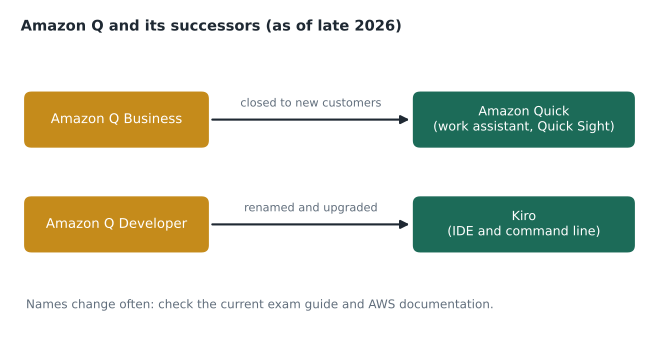
Noor's reply started with a warning that is useful for the exam and for real life: product names in generative AI change quickly. Amazon Q was launched as a family of generative AI assistants, chiefly Amazon Q Business for employees working with company information and Amazon Q Developer for software and AWS work. Since then AWS has moved new business customers to Amazon Quick and has renamed and upgraded the developer tools as Kiro, and the current AI Practitioner exam guide names Amazon Quick and Kiro. This lesson explains what these assistants do, how they differ from building your own application on Amazon Bedrock, and how they handle permissions and data, using the names AWS currently documents and noting the older ones you will still see in study materials.
Ready-made assistants versus building your own
There are two broad ways to bring generative AI to staff. You can build an application on a platform such as Amazon Bedrock, choosing the model, writing prompts, wiring up retrieval and designing the interface, as Cascade Ridge is doing for the overnight summaries. Or you can adopt a ready-made assistant that already has an interface, connectors to common business systems, and built-in permission handling, and configure it rather than program it.
| Build on Amazon Bedrock | Adopt a ready-made assistant | |
|---|---|---|
| Effort to start | Development work needed | Configuration and connectors |
| Flexibility | Full control of model, prompts and workflow | Works within the product's features |
| Typical users | Customers or staff using a purpose-built tool | Employees asking questions and automating work |
| Pricing | Mainly per token used | Mainly per user subscription |
| Good fit | A specific workflow such as call-note summaries | General questions over company documents and data |
Neither is better in general. Andre's need, asking questions of several document collections, is exactly what ready-made assistants are designed for. The overnight summaries, with their strict format, review step and clinical rules, are better served by a purpose-built application.
Amazon Q Business and Amazon Quick
Amazon Q Business was designed as a generative AI assistant for employees. It connects to an organization's data sources, such as file shares, wikis, document libraries, email and ticketing systems, through built-in connectors, indexes the content, and answers questions in a chat interface with citations to the source documents. It can summarize documents, draft content and run simple tasks. Two features made it suitable for businesses, and they carry over to its successor.
- Permission awareness. The assistant respects the access controls of the source systems. If a document is visible only to managers, a question from a front-desk employee will not retrieve it. Answers draw only on content the asking user is allowed to see.
- Administrative controls. Administrators choose the data sources, set which topics or actions are allowed, apply guardrails such as blocked topics, and review usage.
AWS's documentation now states that Amazon Q Business is no longer open to new customers. Existing customers continue to receive bug fixes and security updates, and AWS recommends that they migrate, and that new projects be built, on Amazon Quick. Amazon Quick is described by AWS as an AI assistant for work that brings an organization's data together. It includes chat and research over company content, Quick Sight for business intelligence dashboards and natural-language questions about data, and features for building automated flows and simple apps. Study materials written earlier may still describe Amazon Q Business or "Amazon Q in QuickSight"; on the current exam, expect Amazon Quick.
For Andre, the important points were the same under either name: connect the procedure manual, the handbook and the shift reports; let each clinic manager ask questions in plain language; and trust the assistant to show each person only what their existing permissions allow. Hannah's condition was that client and patient records would not be connected until the group had tested permissions thoroughly.
# Permission-aware retrieval: answers may only draw on documents the asker can see.
docs = [
    {"title": "Procedure: overnight controlled drug count", "groups": {"all-staff"}},
    {"title": "Staff handbook: shift swaps", "groups": {"all-staff"}},
    {"title": "Manager guide: disciplinary process", "groups": {"managers"}},
    {"title": "Payroll schedule 2027", "groups": {"finance"}},
]
users = {"front desk (Calgary/Denver)": {"all-staff"},
         "clinic manager": {"all-staff", "managers"}}

for user, groups in users.items():
    visible = [d["title"] for d in docs if d["groups"] & groups]
    print(user, "->", len(visible), "documents")
    for t in visible:
print(" ", t)front desk (Calgary/Denver) -> 2 documents
Procedure: overnight controlled drug count
Staff handbook: shift swaps
clinic manager -> 3 documents
Procedure: overnight controlled drug count
Staff handbook: shift swaps
Manager guide: disciplinary processWhat this code does
It shows permission-aware retrieval: each document is tagged with the staff groups allowed to see it, and a user only gets documents that share at least one group with them. It lists what the front desk and a clinic manager can each retrieve. An assistant built this way can't quote the manager guide or payroll schedule to someone who isn't allowed to read them.
Amazon Q Developer and Kiro
Amazon Q Developer was AWS's generative AI assistant for software development and AWS operations. In code editors it suggested code as developers typed, explained and documented existing code, generated unit tests, scanned for security problems and helped upgrade older code, for example moving an application to a newer version of its language. In the AWS console and chat tools it answered questions about AWS services and the customer's own resources, and helped investigate errors. A command-line version brought the same help to the terminal.
AWS has since renamed the Amazon Q Developer command-line tool to Kiro, and the Amazon Q Developer subscription console has been redesigned as the Kiro console. Updating the Amazon Q editor extensions and command-line tool to Kiro gives access to new features, which AWS says will be released only in Kiro. Kiro is an AI development environment that works with developers from specification to code: it can turn a description of a feature into requirements and a design, then into tasks and code, using agents that read the project, run tools and propose changes for the developer to review.
Kwame's interest was practical. BookVet, written in Python years ago, needed modernizing before its planned move to serverless functions. An AI development assistant could explain unfamiliar parts of the code, suggest tests before changes, and draft the refactoring, with Kwame reviewing every change. Gwen added two rules from the group's security plan: the assistant works only on the code repository, never with production credentials, and every suggested change goes through the same review and testing as human-written code.
Other members of the family
You may also meet Amazon Q in Connect, which assists agents in Amazon Connect contact centres by suggesting answers and actions during customer calls, and older names such as "Amazon Q in QuickSight", now part of Quick Sight. The pattern across all of them is the same: a generative AI assistant built into a product, using the customer's data under the customer's permissions, so the customer does not have to build the assistant itself.
How these assistants handle data
Hannah asked the same questions about these assistants that she had asked about Bedrock, and the answers follow the same shape. Under AWS's terms for these business services, customer content is used to serve the customer, protected by encryption and access controls, and governed by the organization's administrators; the assistant answers from connected sources the user can access. As always, the specific terms, the Regions where each service runs, and what is stored are documented per service and should be checked before connecting sensitive data. For Cascade Ridge this included confirming whether each service is offered in a Canadian Region before connecting anything containing client information.
The shared responsibility model applies as before: AWS secures the service, and the customer decides which sources to connect, which users and groups exist, what permissions documents carry, and how output is used. A permission mistake in a source system, such as a payroll folder shared with everyone, becomes an answer an assistant can give. Before connecting a file share, the group would therefore review its permissions, which Andre admitted had not been done in years.
Common mistakes
MistakeAssuming a ready-made assistant shows every user every connected document.
InsteadThese assistants respect the source systems' permissions; users see answers only from content they can access.
MistakeExpecting current exam questions to use only the original Amazon Q names.
InsteadThe current exam guide names Amazon Quick and Kiro; know both the old and new names.
MistakeLetting a coding assistant's changes bypass code review.
InsteadAI-suggested code goes through the same review and testing as any other change.
MistakeConnecting file shares before reviewing their permissions.
InsteadAssistants expose existing permission mistakes; fix them first.
Choosing between building and adopting
Noor gave Jonah a short checklist for deciding whether a need calls for a ready-made assistant or a custom application. A ready-made assistant is usually the better choice when the need is general ("help people find and use information"), when the content already lives in common systems that the assistant can connect to, when users are employees who can be trained, and when the organization wants results in weeks rather than months. A custom application is usually the better choice when the output must follow a strict format, when the workflow includes mandatory review or clinical rules, when the users are clients rather than staff, or when the cost per user of a subscription would be high compared with the number of requests.
Cost is worth working through, because the pricing models differ. Ready-made assistants are typically priced per user per month, which is predictable and suits staff who use the assistant often. Custom applications on Bedrock are priced mostly per token, which suits occasional or uneven use and very large numbers of light users, such as clients on a website. For Andre's eleven clinic managers, a per-user subscription was easy to budget. For thousands of website visitors, a per-user model would make little sense, which is one reason client-facing tools, such as the assistant in lesson 12, are usually custom builds.
Governance for workplace assistants
Adopting an assistant still needs governance. Hannah drafted a short policy before any pilot: which data sources may be connected and who approves new ones; that permissions in each source are reviewed before connection; which groups of staff get access first; that answers are checked against the source document before being acted on; how users report wrong or inappropriate answers; and how long conversation history is kept. She also asked for a quarterly review of usage, both to see whether the assistant was worth its subscription cost and to catch uses nobody had approved.
Kwame's coding assistant needed a similar, shorter policy: which repositories it may read, that no production secrets are ever placed in prompts or code it can see, and that its suggestions are reviewed like any colleague's. Noor pointed out that these policies look almost identical to the ones the group already had for human contractors, which is exactly the point: an AI assistant is given access the same careful way a new team member would be.
For the exam, remember three things from this lesson. Know what each assistant is for: employee questions and work over company data, or software development. Know that these assistants respect the permissions of the systems they connect to. And know both the original Amazon Q names and the current names, Amazon Quick and Kiro, because questions may use either depending on when they were written.
Worked problem
Matching needs to tools
Match each need: (a) clinic managers ask plain-language questions of the manual, handbook and shift reports; (b) Kwame modernizes and tests the BookVet code; (c) the emergency hospital gets structured summaries of overnight calls with a review step; (d) Lorraine asks questions about the monthly booking dashboard in plain language.
Show solution
- (a) is general question answering over company documents with permissions: Amazon Quick (formerly Amazon Q Business).
- (b) is software development assistance: Kiro (formerly Amazon Q Developer).
- (c) is a specific workflow with strict format and clinical rules: a custom application on Amazon Bedrock.
- (d) is natural-language business intelligence: Quick Sight within Amazon Quick.
Answer: (a) Amazon Quick; (b) Kiro; (c) a Bedrock application; (d) Quick Sight in Amazon Quick.
Summary and key terms
- Amazon Q began as a family of ready-made generative AI assistants: Amazon Q Business for employees working with company data, and Amazon Q Developer for software development and AWS operations.
- Ready-made assistants are configured rather than programmed and are priced mainly per user, while custom applications on Amazon Bedrock offer full control for specific workflows.
- Amazon Q Business connects to data sources, answers questions with citations and respects source permissions; AWS no longer offers it to new customers and recommends Amazon Quick, an AI assistant for work that includes chat, research, Quick Sight dashboards, flows and apps.
- Amazon Q Developer's command-line tool is now Kiro, an AI development environment that works from specifications to code with developer review.
- These assistants use the customer's data under the customer's permissions, so permissions in connected sources must be reviewed first.
- Amazon Q Business
- An AWS generative AI assistant for employees over company data; closed to new customers, succeeded by Amazon Quick.
- Amazon Quick
- AWS's AI assistant for work, including chat over company data, Quick Sight, flows and apps.
- Amazon Q Developer
- AWS's generative AI assistant for coding and AWS operations, now succeeded by Kiro.
- Kiro
- An AI development environment that turns specifications into code with agents and developer review.
- Connector
- A built-in integration that lets an assistant index and search a data source.
- Permission awareness
- Answering only from content the asking user is allowed to access.
Practice problems
Work each problem on paper first, then reveal the answer to check.
Why would a front-desk employee not see the manager guide in an assistant's answers?
Show answer
The assistant respects source permissions, and that document is restricted to managers.
Which tool does the current exam guide name for developer assistance?
Show answer
Kiro.
When is building on Bedrock better than adopting an assistant?
Show answer
For a specific workflow that needs a strict format, custom rules or review steps.
Lesson quiz · 5 questions
Score 60% or more to complete this lesson.
Create a free account to save your progress, take quizzes and earn a certificate.