
WEB-230 · Lesson 5 of 12 · 23 min
Cross-site request forgery and same-site cookies
▶ Video coming soon A video version of this lesson is on the way.
On Tuesday, January 30, Theo starts with a question for Mira. Suppose Lucy is signed in to Theo's PHP application in one tab, and in another tab she opens a web page that someone has e-mailed her. That page contains a hidden form that posts to the Food Hub's address for deleting a shift, and a line of script that submits it. Lucy's browser sends the request, and with it the session cookie for the Food Hub's site. What stops the shift from being deleted? Mira thinks for a moment and admits that, in the 2026 version of the application, nothing would have.
That is cross-site request forgery, or CSRF, third in the 2025 CWE Top 25. Unlike cross-site scripting, the attacker never runs code on the target site and never sees its responses. The attack works because browsers, by long tradition, attach a site's cookies to every request sent to that site, whichever page started the request. If the site decides who is acting only from the cookie, it cannot tell Lucy's click from a request forged by another page.
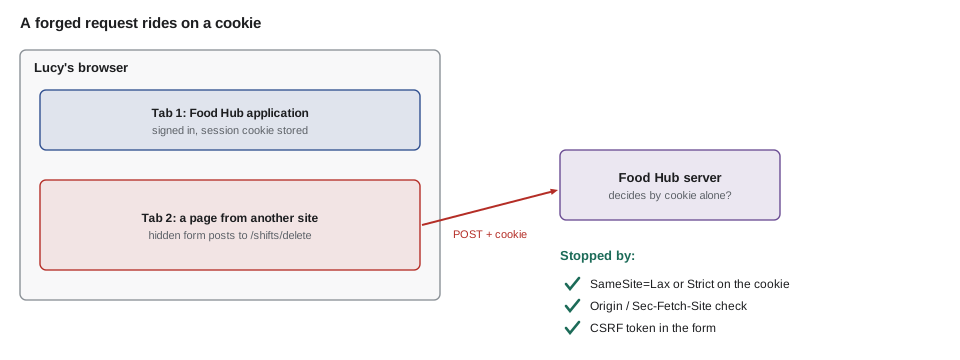
What CSRF can and cannot do
A forged request can do anything the victim could do with a single request that the attacker can predict in full: change an e-mail address, delete a shift, cancel an order, or add a new staff account if the form for that has no other protection. It cannot read the response, because the browser's same-origin policy keeps responses from other origins private, and it cannot add custom headers or a JSON body to a cross-site request without the target site's permission. That limit is useful, and several of the defenses below build on it.
| Request type | Can another site make it? | Cookies attached by default? |
|---|---|---|
| Link or top-level GET navigation | Yes | Yes, unless SameSite=Strict |
| HTML form POST (urlencoded, multipart or plain text) | Yes | Only with SameSite=None |
| fetch with a JSON body or custom header | Only after a CORS preflight that the target allows | Only if the target allows credentials |
| Image, script or iframe load | Yes | Depends on SameSite |
Two older habits make CSRF worse, and the review checks for both. One is changing data with GET requests, such as a link that deletes a shift; links can be triggered by any page, by an image tag, or by a browser prefetching them. GET requests must be safe: they read and never change. The other is allowing CORS with credentials from any origin, which removes the very limit described above.
SameSite cookies
The most important change to the web's defense against CSRF came from browsers. A cookie's SameSite attribute tells the browser when to send it with requests that start on another site. Its three values are Strict, Lax and None. A site here means the scheme and the registrable domain, so app.riverside-food-hub.example and www.riverside-food-hub.example are the same site, while westview.example is a different one.
| SameSite value | Sent with cross-site requests? | Good for |
|---|---|---|
| Strict | Never, not even when following a link from another site | Sessions for sensitive actions; the board's refresh cookie in JS-240 |
| Lax | Only on top-level navigations with safe methods such as following a link | Ordinary sign-in sessions: links from e-mails still arrive signed in |
| None | Always (and the cookie must be Secure) | Cookies that must work inside another site, such as an embedded widget |
Most current browsers treat a cookie with no SameSite attribute as Lax, but not all do, so the Food Hub sets the attribute explicitly on every cookie. The PHP application's session cookie is Lax, so that a volunteer clicking a link in a reminder e-mail arrives signed in. The partner service's staff session from JS-240 is Strict, because nobody needs to follow a link into the middle of the order screens, and Strict blocks every cross-site request.
// Would the browser attach a cookie to this request? (simplified model of SameSite)
function sends(sameSite, req) {
  if (!req.crossSite) return true;
  if (sameSite === 'None') return true;
  if (sameSite === 'Strict') return false;
  // Lax: only top-level navigations with a safe method
  return req.topLevel && (req.method === 'GET' || req.method === 'HEAD');
}

const requests = [
  { what: 'click inside the portal', crossSite: false, topLevel: true, method: 'POST' },
  { what: 'link in a reminder e-mail', crossSite: true, topLevel: true, method: 'GET' },
  { what: 'hidden form on another site', crossSite: true, topLevel: true, method: 'POST' },
  { what: 'image tag on another site', crossSite: true, topLevel: false, method: 'GET' },
];

for (const r of requests) {
  const row = ['Strict', 'Lax', 'None'].map((s) => `${s}:${sends(s, r) ? 'sent' : '-'}`).join(' ');
  console.log(r.what.padEnd(28), row);
}click inside the portal Strict:sent Lax:sent None:sent link in a reminder e-mail Strict:- Lax:sent None:sent hidden form on another site Strict:- Lax:- None:sent image tag on another site Strict:- Lax:- None:sent
What this code does
The model follows the rules in the table: same-site requests always carry the cookie, None always does, Strict never does cross-site, and Lax only does for top-level safe navigations. The hidden form on another site is blocked by both Strict and Lax. That single attribute is why CSRF is much rarer than it was, but it is not the whole defense.
SameSite has limits. It does not help against requests from the same site, such as a page on a subdomain the Food Hub does not fully control, and Lax still allows top-level GET requests, which is why GET must never change data. Older browsers ignore it. So the Food Hub uses it as one layer of several.
Checking where the request came from
Browsers add headers that say where a request started. The Origin header, sent with every cross-origin request and with POST requests generally, contains the scheme, host and port of the page that made the request. The newer Fetch Metadata headers go further: Sec-Fetch-Site says whether the request is same-origin, same-site, cross-site or none (typed by the user or from a bookmark), and Sec-Fetch-Mode says whether it is a navigation, a fetch or something else. A server can refuse state-changing requests that do not come from its own origin.
// Refuse state-changing requests that did not start on our own origin.
const OURS = new Set(['https://riverside-food-hub.example', 'https://partners.riverside-food-hub.example']);
const SAFE = new Set(['GET', 'HEAD', 'OPTIONS']);

function allowRequest(method, headers) {
  if (SAFE.has(method)) return 'allowed (safe method)';
  const site = headers['sec-fetch-site'];
  if (site) return site === 'same-origin' ? 'allowed (same origin)' : `refused (sec-fetch-site: ${site})`;
  const origin = headers.origin;
  if (origin) return OURS.has(origin) ? 'allowed (origin)' : `refused (origin ${origin})`;
  return 'refused (no origin information)';
}

console.log(allowRequest('POST', { 'sec-fetch-site': 'same-origin', origin: 'https://riverside-food-hub.example' }));
console.log(allowRequest('POST', { 'sec-fetch-site': 'cross-site', origin: 'https://offers.example' }));
console.log(allowRequest('POST', { origin: 'https://partners.riverside-food-hub.example' }));
console.log(allowRequest('POST', {}));
console.log(allowRequest('GET', { 'sec-fetch-site': 'cross-site' }));allowed (same origin) refused (sec-fetch-site: cross-site) allowed (origin) refused (no origin information) allowed (safe method)
What this code does
Safe methods are allowed because they must never change data. For other methods, the function prefers the Fetch Metadata header when the browser sends it and falls back to comparing the Origin header with an allowlist. A request with neither is refused, which fails closed for the rare old browser at the cost of asking those users to update.
Whether to refuse requests with no origin information at all is a judgment. Very old browsers and some privacy tools omit the headers, and refusing them blocks a few honest users. Theo's choice for the staff screens is to refuse; for the public contact form, which changes nothing sensitive, he allows them but relies on the token below.
CSRF tokens
The classic defense, and still the most portable, is a CSRF token: an unpredictable value that the server puts into each form, as a hidden field, and checks when the form comes back. A forged request from another site cannot include the token, because the attacker cannot read the Food Hub's pages to learn it. In the synchronizer token pattern, the server stores the token in the user's session and compares. In the signed double-submit pattern, the server does not need to store anything: the token is an HMAC of the session id and a random value, made with a server secret, and the server recomputes and compares it.
// A signed CSRF token: HMAC-SHA256(secret, sessionId + '.' + random), checked on submit.
const enc = new TextEncoder();
const hex = (buf) => [...new Uint8Array(buf)].map((b) => b.toString(16).padStart(2, '0')).join('');

const key = await crypto.subtle.importKey('raw', enc.encode('example-only-server-secret'), { name: 'HMAC', hash: 'SHA-256' }, false, ['sign', 'verify']);

async function makeToken(sessionId, random) {
  const mac = await crypto.subtle.sign('HMAC', key, enc.encode(`${sessionId}.${random}`));
  return `${random}.${hex(mac)}`;
}

async function checkToken(sessionId, token) {
  const [random, mac] = String(token).split('.');
  if (!random || !mac || !/^[0-9a-f]{64}$/.test(mac)) return false;
  const bytes = new Uint8Array(mac.match(/../g).map((h) => parseInt(h, 16)));
  return crypto.subtle.verify('HMAC', key, bytes, enc.encode(`${sessionId}.${random}`));
}

const token = await makeToken('sess-7f2c', 'r9Q2k1');   // in real use, random comes from crypto.getRandomValues
console.log('token:', token.slice(0, 20) + '...');
console.log('same session:', await checkToken('sess-7f2c', token));
console.log('other session:', await checkToken('sess-90ab', token));
console.log('tampered:', await checkToken('sess-7f2c', token.replace('r9Q2k1', 'r9Q2k2')));token: r9Q2k1.08d6168357cb5... same session: true other session: false tampered: false
What this code does
The token joins a random value with an HMAC that binds it to one session, using a secret only the server knows. Checking recomputes the HMAC with crypto.subtle.verify, which compares in constant time. A token copied to another session or changed in any way fails, so a page on another site has no way to produce a valid one.
Most frameworks provide this for you: Laravel and Symfony add and check tokens on every form, and many Node frameworks have middleware for it. Hand-written PHP should still use one function that issues the token, one that checks it, and a rule that every POST handler calls the check first. Tokens must come from a cryptographically secure generator, such as random_bytes in PHP or crypto.getRandomValues in JavaScript, never from Math.random.
<?php
// In the form: one token per session, stored server-side.
if (empty($_SESSION['csrf'])) { $_SESSION['csrf'] = bin2hex(random_bytes(32)); }
echo '<input type="hidden" name="csrf" value="' . h($_SESSION['csrf']) . '">';

// In every POST handler, before doing anything else:
if (!is_string($_POST['csrf'] ?? null) || !hash_equals($_SESSION['csrf'], $_POST['csrf'])) {
    http_response_code(403);
    exit('This form has expired. Please reload the page and try again.');
}
APIs and single-page apps
The portal and the partner pages call JSON APIs with fetch rather than submitting HTML forms. Those calls are harder to forge, because a cross-site page cannot send a JSON content type or a custom header without a CORS preflight, and the Food Hub's APIs do not allow credentialed requests from other origins. The partner service adds a belt to those braces: every state-changing API request must carry a custom header, and the server checks Sec-Fetch-Site or Origin. APIs used by other programs with bearer tokens, such as Northside's import from JS-240, are not exposed to CSRF at all, because the browser does not attach bearer tokens automatically; the risk there is a leaked token, not a forged request.
// Cookie attributes for each Food Hub cookie, checked against the policy.
const cookies = [
  'session=7f2c...; Path=/; Secure; HttpOnly; SameSite=Lax',
  '__Host-partner=91aa...; Path=/; Secure; HttpOnly; SameSite=Strict',
  'portal_prefs=compact; Path=/volunteer/; SameSite=Lax',
  'legacy_admin=1; Path=/',
];

function attrs(header) {
  const [nameValue, ...rest] = header.split(';').map((s) => s.trim());
  const a = Object.fromEntries(rest.map((p) => { const [k, v = true] = p.split('='); return [k.toLowerCase(), v]; }));
  return { name: nameValue.split('=')[0], ...a };
}

for (const c of cookies.map(attrs)) {
  const problems = [];
  if (!c.secure) problems.push('no Secure');
  if (!c.samesite) problems.push('no SameSite');
  if (!c.httponly && !c.name.endsWith('prefs')) problems.push('no HttpOnly');
  console.log(c.name.padEnd(16), problems.length ? problems.join(', ') : 'ok');
}session ok __Host-partner ok portal_prefs no Secure legacy_admin no Secure, no SameSite, no HttpOnly
What this code does
Each Set-Cookie value is split into its name and attributes, with attribute names lower-cased so the checks are reliable. Every cookie should be Secure and have an explicit SameSite, and session-like cookies should also be HttpOnly so page script cannot read them. The preferences cookie is allowed to skip HttpOnly because the portal's script reads it, but it still needs Secure.
The audit finds two issues. The portal's preferences cookie lacks Secure, which is minor because it holds no secret, and an old cookie called legacy_admin, set by a 2019 admin page that Theo thought he had removed, is still issued by one forgotten path. The page is gone by the end of the session, filed as F7 under A02.
Worked problem
Which requests need a token check?
Theo lists the partner service's routes: GET /orders, GET /orders/:id, POST /orders, PATCH /orders/:id, DELETE /orders/:id, POST /uploads, GET /board/stream and POST /board/refresh. Routes that change state need CSRF protection when they are called with cookies. How many need it, and what share of the eight routes is that?
Show solution
- State-changing methods: POST, PATCH and DELETE.
- Routes using them: POST /orders, PATCH /orders/:id, DELETE /orders/:id, POST /uploads and POST /board/refresh, which is 5.
- Share: 5 ÷ 8 = 0.625, or 62.5 in 100.
Answer: Five of the eight routes, or 62.5 in 100, need CSRF protection. The three GET routes need none, provided they never change data.
Common mistakes
MistakeDeciding who is acting from a session cookie alone.
InsteadAdd SameSite, an Origin or Fetch Metadata check, and a CSRF token for state-changing requests.
MistakeChanging data with GET links.
InsteadKeep GET safe: it reads and never changes; use POST, PATCH or DELETE for changes.
MistakeLeaving SameSite unset and relying on browser defaults.
InsteadSet SameSite explicitly on every cookie: Lax or Strict for sessions.
MistakeMaking tokens with Math.random or reusing them across users.
InsteadGenerate them with a secure random source and bind them to the session.
MistakeAllowing credentialed CORS from any origin.
InsteadAllow credentials only for specific trusted origins, or not at all.
Summary and key terms
- Cross-site request forgery makes a victim's browser send a request to a site where the victim is signed in, relying on the browser to attach cookies.
- It can trigger actions but cannot read responses.
- SameSite cookies stop most cross-site requests from carrying sessions: Strict never sends them cross-site, Lax only on top-level safe navigations, and None always (with Secure).
- Checking the Origin and Sec-Fetch-Site headers lets a server refuse state-changing requests from other origins.
- CSRF tokens, either stored in the session or signed with an HMAC, prove that a form came from the site's own pages.
- GET requests must never change data.
- JSON APIs with custom headers and no credentialed CORS are harder to forge, and bearer-token APIs are not exposed to CSRF.
- Cross-site request forgery (CSRF)
- An attack in which another site causes a victim's browser to send a state-changing request that carries the victim's cookies.
- SameSite
- A cookie attribute, Strict, Lax or None, that controls whether the cookie is sent with requests that start on other sites.
- Origin header
- A request header giving the scheme, host and port of the page that started the request.
- Fetch Metadata
- Request headers such as Sec-Fetch-Site that describe where and how a request started.
- CSRF token
- An unpredictable value included in forms and checked by the server to prove the request came from its own page.
- Safe method
- An HTTP method, such as GET or HEAD, that must only read and never change data.
Practice problems
Work each problem on paper first, then reveal the answer to check.
Why can a forged request not read the Food Hub's response?
Show answer
The browser's same-origin policy keeps responses from other origins private.
Why must GET requests never change data?
Show answer
Links, images and prefetching can trigger GET from any page, and SameSite=Lax still allows top-level GET.
How does a signed double-submit token avoid server-side storage?
Show answer
The server recomputes an HMAC of the session id and random value with its secret and compares.
Why are bearer-token APIs not exposed to CSRF?
Show answer
Browsers do not attach bearer tokens automatically, so a forged request has no credentials.
Try it yourself
Same origin?
Complete sameOrigin(originHeader, allowed). allowed is an array of origins such as https://riverside-food-hub.example. Return true only if the header parses as a URL whose origin is exactly in the list.
Return false for a missing or unparsable header.
function sameOrigin(originHeader, allowed) {
  return true;
}

const ok = ['https://riverside-food-hub.example'];
console.log(sameOrigin('https://riverside-food-hub.example', ok));
console.log(sameOrigin('https://riverside-food-hub.example.offers.example', ok));
console.log(sameOrigin('http://riverside-food-hub.example', ok));
console.log(sameOrigin(undefined, ok), sameOrigin('null', ok));
Try it yourself
Fetch Metadata policy
Complete allow(method, site), where site is the value of Sec-Fetch-Site or undefined. Allow GET and HEAD always. For other methods allow only same-origin and none.
If site is undefined, allow the request (older browsers) so another check can decide.
function allow(method, site) {
  return false;
}

console.log(allow('GET', 'cross-site'), allow('POST', 'same-origin'), allow('POST', 'cross-site'));
console.log(allow('DELETE', 'same-site'), allow('POST', 'none'), allow('PATCH', undefined));
Lesson quiz · 5 questions
Score 60% or more to complete this lesson.
Create a free account to save your progress, take quizzes and earn a certificate.