
WEB-230 · Lesson 4 of 12 · 22 min
Preventing cross-site scripting
▶ Video coming soon A video version of this lesson is on the way.
On Thursday, January 25, Gareth joins Theo for the session, because cross-site scripting lives where his front-end work meets Theo's server. Cross-site scripting, almost always shortened to XSS, is injection into a web page: data that should have been displayed as text is instead interpreted by the browser as HTML or script. It ranked first in the 2025 CWE Top 25. It is so common because pages are built from data all the time, and because a single forgotten encoding anywhere in a page is enough.
The harm comes from where the script runs. A script injected into the volunteer portal runs with the portal's origin, as if the studio had written it. It can read anything on the page, make requests with the volunteer's cookies, change what the page shows, or send what the user types to somewhere else. For a staff account, that means acting as the staff member. The defenses are well understood, and the review's job is to check that they are used everywhere.
Three kinds of XSS
| Kind | Where the script comes from | Food Hub example to check |
|---|---|---|
| Reflected | A value in the request, such as a search term, is copied into the response page | The public site's recipe search shows "Results for ..." |
| Stored | A value saved earlier, such as a comment or name, is shown to other users | An agency's order note shown on Rosa's board |
| DOM-based | Script in the page reads a value, such as the address fragment, and writes it into the page | The portal reads ?area= from the address to filter shifts |
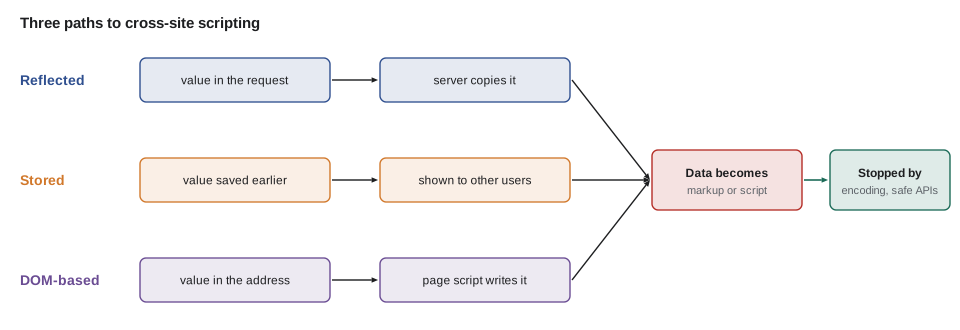
Stored XSS is the most dangerous because one bad value can reach every user who views it, including staff. DOM-based XSS is the easiest to miss in review because the server never sees the value. All three have the same cause, data placed into a page in a way that lets it become markup or script, and the same cure: encode for the output context, or use APIs that never interpret text as markup.
Encoding for HTML contexts
Lesson 3 introduced output contexts. For HTML, two encoders cover most cases. In HTML text, between tags, the characters that matter are the less-than sign, which starts a tag, and the ampersand, which starts an entity; the greater-than sign is usually encoded too. In a quoted attribute value, the quote character must be encoded as well, because it would end the attribute. The safe habit is to use one encoder that handles all five characters for both contexts, and to always put attribute values in quotes.
// An HTML encoder for text and quoted attribute values.
const MAP = { '&': '&', '<': '<', '>': '>', '"': '"', "'": ''' };
const escapeHtml = (value) => String(value).replace(/[&<>"']/g, (c) => MAP[c]);
const note = '<script>alert("hi")</script> Extra bread & no nuts';
const name = '" onmouseover="x';
console.log(`<p>${escapeHtml(note)}</p>`);
console.log(`<input value="${escapeHtml(name)}">`);<p><script>alert("hi")</script> Extra bread & no nuts</p> <input value="" onmouseover="x">
What this code does
The function replaces each of the five special characters with its entity, in one pass so that an ampersand it adds is never encoded again. The order note's script tag becomes harmless text that the browser shows exactly as typed. The second value tries to end the attribute with a quote, but the encoded quote stays inside the attribute as text.
In practice, developers rarely call an encoder by hand, because good templating systems do it automatically. PHP's htmlspecialchars with ENT_QUOTES and UTF-8 does this job, and templating engines such as Twig escape by default. React escapes every value placed in JSX, which is why JS-220's portal is largely safe from this class of bug. The danger is the escape hatches: echoing a variable without htmlspecialchars in PHP, marking a value as safe in a template, or React's dangerouslySetInnerHTML.
<?php
// Encode every value at output. Define a short helper and use it everywhere.
function h(?string $s): string {
    return htmlspecialchars($s ?? '', ENT_QUOTES | ENT_SUBSTITUTE | ENT_HTML5, 'UTF-8');
}
?>
<p>Note from <?= h($order['agency_name']) ?>: <?= h($order['note']) ?></p>
<input name="contact" value="<?= h($contact) ?>">
Building HTML safely in JavaScript
In the browser, the safe DOM methods never interpret text as markup. Setting textContent, creating elements with createElement and setting attributes with setAttribute all treat values as data. The dangerous ones are those that parse a string as HTML: innerHTML, outerHTML, insertAdjacentHTML and document.write. JS-110 already used textContent for Lucy's shift list. When a template string really is the easiest way to build markup, a small tagged template can encode every value automatically, so the safe way is also the easy way.
// A tagged template that encodes every interpolated value.
const MAP = { '&': '&', '<': '<', '>': '>', '"': '"', "'": ''' };
const esc = (v) => String(v).replace(/[&<>"']/g, (c) => MAP[c]);
function html(strings, ...values) {
return strings.reduce((out, s, i) => out + s + (i < values.length ? esc(values[i]) : ''), '');
}
const order = { agency: 'Elm Street Seniors Club', trays: 5, note: '<img src=x onerror=steal()>' };
console.log(html`<li class="order"><strong>${order.agency}</strong>: ${order.trays} trays. ${order.note}</li>`);<li class="order"><strong>Elm Street Seniors Club</strong>: 5 trays. <img src=x onerror=steal()></li>
What this code does
A tagged template function receives the fixed parts of the template and the interpolated values separately. It joins them back together, encoding every value but leaving the fixed markup alone. The order note's image tag, which would run code in an onerror handler if parsed, arrives in the output as visible text.
The tagged template makes the right thing automatic, which is the most reliable kind of defense. A code review rule follows from it: any use of innerHTML or its relatives must either receive output from the safe template or from a sanitizer, and the reason must be written in a comment.
URLs: a context that encoding alone does not fix
Some values are dangerous even when correctly encoded. A link's href attribute accepts URLs, and a URL beginning with javascript: runs script when clicked. Encoding the value as an attribute keeps it inside the attribute, but the browser still treats it as a link to script. The defense is to validate the URL's scheme against an allowlist, usually https and http, plus mailto and tel where they make sense, before using it, and to build relative links only from known paths.
// Allow only safe link schemes in user-supplied URLs.
const ALLOWED = new Set(['https:', 'http:', 'mailto:', 'tel:']);

function safeHref(input, base = 'https://riverside-food-hub.example/') {
  let url;
  try { url = new URL(input, base); } catch { return null; }
  return ALLOWED.has(url.protocol) ? url.href : null;
}

for (const link of ['https://westview.example/menu', '/volunteer/shifts', 'mailto:lucy@riverside-food-hub.example',
                    'javascript:steal()', ' JavaScript:steal()', 'data:text/html,hi']) {
  console.log(JSON.stringify(link).padEnd(42), '->', safeHref(link) ?? 'refused');
}"https://westview.example/menu" -> https://westview.example/menu "/volunteer/shifts" -> https://riverside-food-hub.example/volunteer/shifts "mailto:lucy@riverside-food-hub.example" -> mailto:lucy@riverside-food-hub.example "javascript:steal()" -> refused " JavaScript:steal()" -> refused "data:text/html,hi" -> refused
What this code does
The URL parser resolves relative links against the site's address and normalizes the scheme, so leading spaces and capital letters cannot sneak past. Only the schemes in the allowlist are accepted. The javascript: and data: links are refused whichever way they are written, while ordinary web, mail and relative links pass.
The same idea applies to every attribute that loads or runs something: src on images and frames, action on forms and the various event attributes such as onclick, which should never be built from data at all. And it applies to values placed inside a script block. The safest way to give page script some data from the server is to put it in a data attribute or a JSON block that the script reads, never to write it into script code, because a value containing the closing script tag could end the block early.
<!-- Pass data to script as JSON, never by writing it into code. -->
<script type="application/json" id="portal-config"><?= json_encode($config, JSON_HEX_TAG | JSON_HEX_AMP | JSON_HEX_APOS | JSON_HEX_QUOT) ?></script>
<script type="module">
  const config = JSON.parse(document.getElementById('portal-config').textContent);
</script>
When users need to enter formatted text
Sometimes plain text is not enough. Dev would like agencies to be able to use bold and lists in their notes, and the public site's news posts include links. Encoding would show the tags as text, so the alternative is sanitizing: parsing the HTML and keeping only an allowlist of safe elements and attributes, removing everything else, including scripts, event attributes and dangerous URLs. Writing a sanitizer with regular expressions does not work, because HTML parsing has too many special cases. Use a maintained library built on a real parser, such as DOMPurify in the browser or HTML Purifier in PHP.
Browsers are adding a built-in alternative. The Sanitizer API gives elements a setHTML method that parses a string and removes unsafe content before inserting it. Firefox 148, in February 2026, was the first browser to ship it, and others are expected to follow; until it is available in every browser the Food Hub's users have, a library remains the safe choice. For simple formatting, an even safer design is to accept a restricted format such as Markdown and render it with a library configured to refuse raw HTML.
// A deliberately tiny formatter: encode everything, then allow **bold** and line breaks only.
const MAP = { '&': '&', '<': '<', '>': '>', '"': '"', "'": ''' };
const esc = (v) => String(v).replace(/[&<>"']/g, (c) => MAP[c]);
function formatNote(text) {
return esc(text)
.replace(/\*\*([^*\n]{1,80})\*\*/g, '<strong>$1</strong>')
.replace(/\n/g, '<br>');
}
console.log(formatNote('**No nuts** for 3 trays\nPick-up 11:30 <b onclick=x()>today</b>'));<strong>No nuts</strong> for 3 trays<br>Pick-up 11:30 <b onclick=x()>today</b>
What this code does
The note is encoded first, so any markup the user typed becomes harmless text. Only then are the two allowed patterns turned into tags that the program itself writes. Because the program generates every tag, nothing the user types can add an attribute or a script.
A second layer: Content Security Policy and Trusted Types
Encoding and safe APIs prevent XSS; a Content Security Policy limits the damage when one is missed. A policy sent as a response header tells the browser which scripts may run, for example only scripts from the site itself carrying a random value called a nonce, and blocks inline scripts and event attributes that do not qualify. Lesson 7 builds the Food Hub's policy. A further control, Trusted Types, makes the browser refuse strings passed to dangerous sinks such as innerHTML unless they come from a named policy function, which turns a forgotten encoding into an error that shows up in testing. Chromium-based browsers have supported it for some years and Firefox added it in version 148; it is worth enabling first in report-only mode to find every sink.
// Find the dangerous sinks in a code base, the first step before enabling Trusted Types.
const files = {
  'portal/src/ShiftCard.jsx': 'return <p>{shift.note}</p>;',
  'board/board.js': 'row.innerHTML = `<td>${o.agency}</td><td>${o.note}</td>`;',
  'site/search.js': 'heading.textContent = `Results for ${q}`;',
  'site/news.js': 'body.insertAdjacentHTML("beforeend", post.html);',
};
const SINKS = /\b(innerHTML|outerHTML|insertAdjacentHTML|document\.write|dangerouslySetInnerHTML)\b/g;

for (const [file, code] of Object.entries(files)) {
  const hits = [...new Set(code.match(SINKS) ?? [])];
  console.log(file.padEnd(26), hits.length ? 'REVIEW: ' + hits.join(', ') : 'ok');
}portal/src/ShiftCard.jsx ok board/board.js REVIEW: innerHTML site/search.js ok site/news.js REVIEW: insertAdjacentHTML
What this code does
A regular expression lists the APIs that parse strings as HTML, and each file is searched for them. Files that only use JSX expressions or textContent are fine. The two hits are exactly where the review must check that values are encoded or sanitized, and they are the places Trusted Types would report.
Gareth's search finds one real problem. The order board, written quickly for the July 2028 trial, builds each row with innerHTML and puts the agency's note in it unencoded. A note containing markup would run on Rosa's tablet. Gareth rewrites the row with createElement and textContent the same afternoon, adds a test with a note containing a script tag, and files the finding as F6 under A05.
Worked problem
How many characters does the encoder change?
An agency enters this note: <b>Allergy</b> & "no nuts" (26 characters). Using the five-character encoder, how many characters are replaced and how long is the encoded string?
Show solution
- Less-than signs: 2, each becomes < (4 characters), adding 3 each: 6.
- Greater-than signs: 2, each becomes >, adding 3 each: 6.
- Ampersand: 1, becomes & (5 characters), adding 4.
- Double quotes: 2, each becomes " (6 characters), adding 5 each: 10.
- Characters replaced: 2 + 2 + 1 + 2 = 7; added length 6 + 6 + 4 + 10 = 26; encoded length 26 + 26 = 52.
Answer: Seven characters are replaced and the encoded string is 52 characters long. The browser displays it as the original 26 characters of text.
Common mistakes
MistakeInserting user data with innerHTML or echoing it without htmlspecialchars.
InsteadUse textContent, createElement or a template that encodes by default.
MistakeLeaving attribute values unquoted.
InsteadAlways quote attributes and encode the quote character.
MistakeEncoding a URL and assuming it is safe in an href.
InsteadParse it and allow only safe schemes such as https, http, mailto and tel.
MistakeWriting server data directly into a script block.
InsteadPut it in a JSON block or data attribute and read it with JSON.parse.
MistakeWriting a sanitizer with regular expressions.
InsteadUse a maintained parser-based sanitizer, or a restricted format such as Markdown with raw HTML disabled.
Summary and key terms
- Cross-site scripting is injection into a web page: data interpreted by the browser as markup or script, which then runs with the site's origin.
- It can be reflected from a request, stored and shown to others, or created by page script writing values into the DOM.
- The cure is to encode for the output context, using five-character HTML encoding with quoted attributes, or safe DOM methods such as textContent.
- Templates that encode by default, PHP helpers around htmlspecialchars and React's escaping make the safe way the easy way; escape hatches need review.
- URLs need their scheme checked, data for scripts belongs in JSON blocks, and formatted input needs a parser-based sanitizer or a restricted format.
- Content Security Policy and Trusted Types add a second layer.
- Cross-site scripting (XSS)
- A flaw that lets data be interpreted as HTML or script in a page, so it runs with the site's origin.
- Reflected XSS
- XSS where a value in the request is copied into the response.
- Stored XSS
- XSS where a saved value is shown to other users.
- DOM-based XSS
- XSS where page script writes an untrusted value into the page.
- Sink
- An API that interprets a string as markup or code, such as innerHTML.
- Sanitizing
- Parsing HTML and keeping only an allowlist of safe elements and attributes.
- Trusted Types
- A browser feature that blocks strings from dangerous sinks unless they come from an approved policy.
Practice problems
Work each problem on paper first, then reveal the answer to check.
Why is stored XSS usually more dangerous than reflected XSS?
Show answer
One saved value reaches every user who views it, including staff.
Why does encoding not make a javascript: link safe?
Show answer
The value stays inside the attribute, but the browser still treats the URL as script; the scheme must be checked.
What is the safe way to give page script data from the server?
Show answer
Put it in a JSON block or data attribute and read it with JSON.parse.
What does Content Security Policy add if encoding is already used?
Show answer
A second layer that blocks injected scripts that a missed encoding would let in.
Try it yourself
Attribute encoder
Complete escapeAttr(value) so that it replaces &, <, >, " and ' with &, <, >, " and '.
Values that are not strings should be converted with String first.
function escapeAttr(value) {
  return value;
}

console.log(`<input value="${escapeAttr('" autofocus onfocus="x')}">`);
console.log(`<img alt="${escapeAttr("Rosa's soup & bread")}">`);
console.log(escapeAttr(42));
Try it yourself
Safe links
Complete linkHtml(text, url). Parse url with new URL(url, 'https://riverside-food-hub.example/'). If parsing fails or the scheme is not https: or http:, return the encoded text alone.
Otherwise return <a href="...">...</a> with both the address and the text encoded. An encoder esc is provided.
const esc = (v) => String(v).replace(/[&<>"']/g, (c) => ({ '&': '&', '<': '<', '>': '>', '"': '"', "'": ''' })[c]);
function linkHtml(text, url) {
return `<a href="${url}">${text}</a>`;
}
console.log(linkHtml('Menu & prices', 'https://westview.example/menu?a=1&b=2'));
console.log(linkHtml('Click', 'javascript:steal()'));
console.log(linkHtml('Shifts', '/volunteer/shifts'));Lesson quiz · 5 questions
Score 60% or more to complete this lesson.
Create a free account to save your progress, take quizzes and earn a certificate.