
PYTH-101 · Lesson 4 of 12 · 24 min
Strings and text
▶ Video coming soon A video version of this lesson is on the way.
Most of the data a small business handles is text: coffee names, stock codes, customer names, order notes, lines in a sales file. Python's string type is rich, with dozens of built-in tools for cleaning, searching, slicing and formatting text. This lesson covers the ones you will use every week: how strings are written, how to pick out characters and slices, the most useful string methods, and f-strings, the modern way to build neat output such as a stock report with aligned columns.
By the end of the lesson Jordan will be able to take messy text typed by staff, such as ' sunrise BLEND ', tidy it into Sunrise Blend, pull the coffee number out of a code such as RC-104, and print a report that looks as though it was made by a professional tool.
Writing strings
A string is a sequence of characters inside quotation marks. Python accepts single quotes and double quotes equally, so 'latte' and "latte" are the same string. Having both is convenient: a string that contains an apostrophe is easiest to write in double quotes, as in "Kai's roast", and one that contains double quotes is easiest in single quotes. Triple quotes, either ''' or """, allow a string to run across several lines, which is useful for long messages and help text.
drink = 'latte'
note = "Kai's roast is ready"
menu = """Drip coffee
Latte
Cappuccino"""
print(drink)
print(note)
print(menu)
print(len(menu))latte Kai's roast is ready Drip coffee Latte Cappuccino 28
Some characters cannot be typed directly into a string, so Python uses escape sequences: a backslash followed by a letter. The sequence \n stands for a new line and \t for a tab. To include a backslash itself, write two backslashes. Escape sequences are counted as single characters, so len('a\nb') is 3. A string written with an r before the opening quote, called a raw string, treats backslashes as ordinary characters; raw strings are handy for Windows file paths and for the text patterns you will meet in later courses.
print("Sunrise Blend\t42 bags\nEthiopia Guji\t15 bags")
print(len("a\nb"))
print(r"C:\Ridgeline\new_stock.csv")Sunrise Blend 42 bags Ethiopia Guji 15 bags 3 C:\Ridgeline\new_stock.csv
The empty string, written '' or "", contains no characters at all and has length 0. It is a perfectly good string, and it is what input returns when a person presses Enter without typing anything. Programs often need to check for it, and lesson 5 shows how.
Indexing and slicing
Because a string is a sequence, you can pick out any single character by its position, called its index. Indexes start at 0, not 1, so the first character of 'RC-104' is at index 0 and the sixth is at index 5. Python also counts from the end with negative indexes: -1 is the last character, -2 the one before it, and so on. Asking for an index that does not exist, such as index 6 of a six-character string, raises an IndexError.
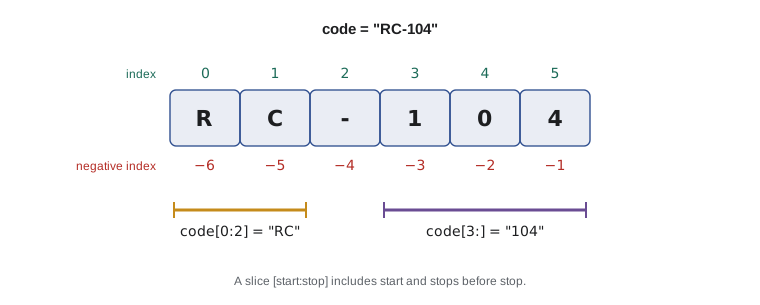
A slice picks out a run of characters. The expression code[start:stop] gives the characters from index start up to but not including index stop. Leaving out start means 'from the beginning', and leaving out stop means 'to the end'. The 'up to but not including' rule feels odd at first, but it has a tidy consequence: code[:3] + code[3:] always gives back the whole string, and the length of code[a:b] is simply b - a.
code = "RC-104"
print(code[0])       # first character
print(code[-1])      # last character
print(code[0:2])     # the prefix
print(code[3:])      # the number part
print(code[:3] + code[3:])
print(int(code[3:]) + 1) # the next code numberR 4 RC 104 RC-104 105
A slice can take a third number, the step, as in text[::2] for every second character or text[::-1] for the string reversed. Slices never raise an IndexError; if the positions run past the end, Python simply stops at the end, so 'RC-104'[3:100] is '104'. That forgiving behavior is convenient, but it also means a wrong slice gives a wrong answer silently, so check slices with a test value.
Strings are immutable: you cannot change a character in place. A line such as code[0] = 'X' raises a TypeError. Instead you build a new string from pieces, as in 'X' + code[1:], and assign it to a name. Every string method you are about to meet works the same way: it returns a new string and leaves the original untouched.
String methods
A method is a function that belongs to a value and is called with a dot, as in name.upper(). Strings have many methods. The table lists those that come up most often in business data, and the listing after it shows them working on the kind of untidy text that staff type into forms.
| Method | What it returns | Example | Result |
|---|---|---|---|
| upper(), lower() | An all-capitals or all-lowercase copy | 'Latte'.upper() | 'LATTE' |
| title() | A copy with each word capitalized | 'sunrise blend'.title() | 'Sunrise Blend' |
| strip() | A copy without spaces at either end | ' mocha '.strip() | 'mocha' |
| replace(old, new) | A copy with every old replaced by new | 'RC 104'.replace(' ', '-') | 'RC-104' |
| startswith(s), endswith(s) | True or False | 'RC-104'.startswith('RC') | True |
| find(s) | Index of the first s, or -1 | 'RC-104'.find('-') | 2 |
| count(s) | How many times s appears | 'espresso'.count('s') | 3 |
| split(sep) | A list of the pieces between separators | 'RC-104,9'.split(',') | ['RC-104', '9'] |
| isdigit() | True if every character is a digit | '42'.isdigit() | True |
typed = "  sunrise BLEND  "
clean = typed.strip().title()
print("[" + typed + "]")
print("[" + clean + "]")
print(clean.upper())
print(clean.lower().replace(" ", "_"))
print(clean.startswith("Sun"), clean.endswith("Dark"))
print("Position of the space:", clean.find(" "))
print("RC-104,Sumatra Dark,20.25,9".split(","))[ sunrise BLEND ] [Sunrise Blend] SUNRISE BLEND sunrise_blend True False Position of the space: 7 ['RC-104', 'Sumatra Dark', '20.25', '9']
Methods can be chained, as in typed.strip().title(): Python calls strip on the original string, gets a new string, then calls title on that. Read a chain from left to right, one step at a time. Chains of two or three methods are common and readable; very long chains are better split across several lines with named steps.
The split method deserves special mention because it is the first step in reading almost any data file. A line such as RC-104,Sumatra Dark,20.25,9 splits on commas into four strings, which can then be converted to the right types. Called with no argument, split breaks on any run of spaces, tabs or new lines, which is how you separate the words of a sentence. Its partner, join, does the reverse: ', '.join(pieces) glues a list of strings together with ', ' between them. Lists themselves are the subject of lesson 8.
The in operator answers whether one string appears inside another: 'Dark' in 'Sumatra Dark' is True. It is case-sensitive like everything else, so a common pattern is to compare lowercase versions, as in 'dark' in name.lower(), when a search should ignore capital letters.
Try it yourself
Tidy a coffee name
Staff type coffee names carelessly. Set clean to a tidied version of typed: no spaces at either end and each word capitalized. For the starter value the result should be Ethiopia Guji.
typed = "   ethiopia GUJI "
clean = typed
print("[" + clean + "]")
Formatting output with f-strings
Joining strings and numbers with + and str quickly becomes clumsy. Python's f-strings solve the problem neatly. Put an f before the opening quote, and anything inside curly braces is worked out as an expression and inserted into the string. You can insert variables, calculations and even method calls.
name = "Sumatra Dark"
price = 20.25
stock = 9
print(f"{name}: {stock} bags at {price} each")
print(f"Value of stock: {price * stock}")
print(f"Upper case: {name.upper()}")Sumatra Dark: 9 bags at 20.25 each Value of stock: 182.25 Upper case: SUMATRA DARK
Inside the braces you can add a format specification after a colon to control how the value looks. The specification .2f means 'a float with two decimal places', which is what money needs. A comma, as in ,.2f, adds thousands separators. A number before the type sets a minimum width, and the symbols <, > and ^ align the value left, right or center within that width. These few codes are enough to produce tidy tables.
| Specification | Meaning | Example | Result |
|---|---|---|---|
| .2f | Two decimal places | f'{18.5:.2f}' | '18.50' |
| ,.2f | Thousands separator and two places | f'{1310.25:,.2f}' | '1,310.25' |
| >8 | Right-aligned in 8 characters | f'{42:>8}' | ' 42' |
| <14 | Left-aligned in 14 characters | f'{"Latte":<14}' | 'Latte ' |
| ^10 | Centered in 10 characters | f'{"Menu":^10}' | ' Menu ' |
| 03d | Integer padded with zeros to 3 digits | f'{7:03d}' | '007' |
| .0% | Fraction shown out of 100 with a % sign | f'{0.15:.0%}' | '15%' |
The .0% specification multiplies a fraction by 100 and adds a % sign, so Kai's 0.15 roast loss prints as 15%. The listing below puts several specifications together into the stock report Theo has wanted for months. Press Edit and run, then try changing a width or the number of decimal places to see the effect.
print(f"{'Coffee':<20}{'Bags':>6}{'Price':>9}{'Value':>11}")
print("-" * 46)
name, bags, price = "Sunrise Blend", 42, 18.50
print(f"{name:<20}{bags:>6}{price:>9.2f}{bags * price:>11,.2f}")
name, bags, price = "Ethiopia Guji", 15, 22.00
print(f"{name:<20}{bags:>6}{price:>9.2f}{bags * price:>11,.2f}")
name, bags, price = "Sumatra Dark", 9, 20.25
print(f"{name:<20}{bags:>6}{price:>9.2f}{bags * price:>11,.2f}")
print("-" * 46)
total = 42 * 18.50 + 15 * 22.00 + 9 * 20.25
print(f"{'Total':<35}{total:>11,.2f}")Coffee Bags Price Value ---------------------------------------------- Sunrise Blend 42 18.50 777.00 Ethiopia Guji 15 22.00 330.00 Sumatra Dark 9 20.25 182.25 ---------------------------------------------- Total 1,289.25
The line name, bags, price = 'Sunrise Blend', 42, 18.50 assigns three variables at once, a convenience called multiple assignment; the values on the right are matched to the names on the left in order. In lesson 6 a loop will remove the repeated print lines, and in lesson 8 the coffees will live in a list instead of being typed out.
A handy debugging feature of f-strings is the equals sign: f'{stock=}' prints stock=9, showing both the expression and its value. When a program misbehaves, sprinkling a few of these through the code is often the fastest way to see what is really happening. Older code uses the format method, as in '{} bags'.format(9), or the % operator, as in '%d bags' % 9; you can read both, but f-strings are clearer and are the standard in modern Python.
Characters and Unicode
Python strings are Unicode, which means they can hold characters from any writing system as well as symbols and emoji. That matters for a café that sells 'Café au lait' and for customers with names such as Zoë or Nguyễn. The function len counts characters, not bytes, so len('Café') is 4. Each character has a numeric code, which the function ord reveals and chr turns back into a character; these codes explain the odd fact that 'Z' < 'a' in comparisons.
drink = "Caf\u00e9 au lait"
print(drink, len(drink))
print(ord("A"), ord("Z"), ord("a"))
print(chr(9749))
print("Zoe" < "zoe", "Zoe".lower() < "adam")Café au lait 12 65 90 97 ☕ True False
When text is saved to a file or sent across a network, it must be turned into bytes using an encoding. UTF-8 is the standard encoding for the web and for modern files, and since Python 3.15 it is the default on every platform. Lesson 10 returns to encodings when Ridgeline's programs start reading and writing files.
Worked problem
Parsing a line from the till
The café till exports each sale as a line such as '2026-11-02 08:14,latte,2,5.25'. Anita wants a script that turns one line into a readable sentence with the line total, such as '08:14 2 x Latte = 10.50'.
Show solution
- Split on commas: parts = line.split(',') gives ['2026-11-02 08:14', 'latte', '2', '5.25'].
- The time is the last five characters of the first part: parts[0][-5:] gives 08:14.
- Convert: qty = int(parts[2]) and price = float(parts[3]); the item is parts[1].title().
- Calculate the line total: qty * price = 10.5.
- Format: f'{time} {qty} x {item} = {qty * price:.2f}' prints the total with two decimal places.
Answer: The script prints '08:14 2 x Latte = 10.50'.
line = "2026-11-02 08:14,latte,2,5.25"
parts = line.split(",")
time = parts[0][-5:]
item = parts[1].title()
qty = int(parts[2])
price = float(parts[3])
print(f"{time} {qty} x {item} = {qty * price:.2f}")08:14 2 x Latte = 10.50
Try it yourself
Next stock code
Stock codes have the form RC- followed by a three-digit number. Given last_code, set next_code to the code with the number one higher, keeping three digits. For RC-106 the answer is RC-107; for RC-009 it would be RC-010.
Use slicing to get the number part, int() to convert it, and an f-string with the 03d specification to build the new code.
last_code = "RC-106"
next_code = ""
print(next_code)
Try it yourself
A receipt line
Print one receipt line for qty items of item at price each. The item name is left-aligned in 12 characters, followed by x, the quantity, and the line total right-aligned in 8 characters with two decimal places. For the starter values the exact output is Cappuccino x3 14.85.
item = "Cappuccino"
qty = 3
price = 4.95
print(item, qty, qty * price)
Common mistakes
MistakeCounting string positions from 1.
InsteadIndexes start at 0; the last character is at index -1 or len(s) - 1.
MistakeExpecting a method to change the string, as in name.strip() on a line by itself.
InsteadStrings are immutable; assign the result: name = name.strip().
MistakeForgetting that slices stop before the end index.
Insteadtext[0:3] gives indexes 0, 1 and 2; its length is 3 - 0.
MistakeComparing text typed by people without normalizing it.
InsteadClean first: answer.strip().lower() == "yes".
MistakeBuilding output with long chains of + and str().
InsteadUse an f-string with format specifications such as {price:.2f}.
MistakeForgetting the f before the quote, so the braces print literally.
InsteadWrite f"{name}", not "{name}".
Summary and key terms
- Strings can use single, double or triple quotes; escape sequences such as \n and \t stand for special characters.
- Indexes start at 0 and negative indexes count from the end; slices s[a:b] stop before b and never raise IndexError.
- Strings are immutable: methods such as strip, title, upper, lower and replace return new strings.
- split breaks text into a list of pieces and join glues pieces back together; in tests whether one string contains another.
- f-strings insert values with {expression} and format them with specifications such as :.2f, :>8 and :,.2f.
- Python strings are Unicode; UTF-8 is the standard encoding when text is stored or sent.
- string
- A sequence of characters, written in quotation marks.
- index
- The position of an item in a sequence, starting at 0.
- slice
- A part of a sequence picked out with [start:stop:step].
- escape sequence
- A backslash code such as \n that stands for a special character.
- method
- A function that belongs to a value and is called with a dot.
- f-string
- A string literal prefixed with f whose {expressions} are evaluated and inserted.
- format specification
- Codes after a colon in an f-string field that control width, alignment and precision.
- Unicode
- The standard that gives a number to every character in every writing system.
- encoding
- A way of turning characters into bytes, such as UTF-8.
- empty string
- The string with no characters, ''.
Practice problems
Work each problem on paper first, then reveal the answer to check.
What are 'Espresso'[0], 'Espresso'[-1] and 'Espresso'[1:4]?
Show answer
'E', 'o' and 'spr'.
Write an expression that gives the batch number 412 as an int from 'B-0412'.
Show answer
int('B-0412'[2:]), which is 412.
What does ' Latte '.strip().upper() give?
Show answer
'LATTE'
What does 'tea,muffin,latte'.split(',') give?
Show answer
['tea', 'muffin', 'latte']
Write an f-string that prints a price of 3.5 as 3.50 right-aligned in 7 characters.
Show answer
f'{3.5:>7.2f}', which gives ' 3.50'.
Why does name[0] = 'S' fail?
Show answer
Strings are immutable; build a new string instead, such as "S" + name[1:].
Lesson quiz · 5 questions
Score 60% or more to complete this lesson.
Create a free account to save your progress, take quizzes and earn a certificate.