
PYTH-101 · Lesson 11 of 12 · 26 min
Errors and exceptions
▶ Video coming soon A video version of this lesson is on the way.
A program that works only when everything goes right is not finished. People type 'two' where a number belongs, files go missing, a stock code arrives with a typo. In lesson 1 you saw that Python stops with a traceback when something goes wrong. This lesson shows how a program can catch those problems and respond sensibly instead: ask again, skip a bad line, use a default, or explain the problem clearly. Python's mechanism for this is the exception, and the statements that handle exceptions are try and except.
You will also learn to raise exceptions yourself, so that your own functions refuse bad input loudly instead of returning wrong answers quietly, and you will pick up a set of debugging habits for the errors that no exception handler can catch: the logic errors in your own code.
Exceptions and tracebacks
When Python meets an operation it cannot carry out, it raises an exception: an object that describes what went wrong. If nothing handles the exception, the program stops and prints a traceback. You have met several types already: ValueError for a value of the right type but the wrong content, such as int('two'); TypeError for an operation on the wrong type; NameError for an unknown name; KeyError for a missing dictionary key; IndexError for a position past the end of a list; ZeroDivisionError; and FileNotFoundError for a file that does not exist.
| Exception | Typical cause at Ridgeline | Example |
|---|---|---|
| ValueError | Text that cannot be converted | int('two') |
| TypeError | Mixing types | 'Bags: ' + 42 |
| KeyError | A stock code that is not in the dictionary | stock['RC-999'] |
| IndexError | A position past the end of a list | parts[4] on a 4-item list |
| ZeroDivisionError | Dividing by a count of zero | total / 0 |
| FileNotFoundError | A misspelled or missing file | open('sales.cvs') |
| NameError | A misspelled variable name | print(stok) |
Read a traceback from the bottom. The last line names the exception type and gives a message. The lines above trace the chain of calls that led there, ending with the line where the problem happened. When the error happens inside a function, the traceback shows the call in the main code and then the line inside the function, which tells you both where the bad value was used and where it came from.
def price_per_bag(total, bags):
    return total / bags

print(price_per_bag(777.0, 42))
print(price_per_bag(0.0, 0))
Traceback (most recent call last):
  File "prices.py", line 5, in <module>
    print(price_per_bag(0.0, 0))
          ~~~~~~~~~~~~~^^^^^^^^
  File "prices.py", line 2, in price_per_bag
    return total / bags
           ~~~~~~^~~~~~
ZeroDivisionError: float division by zero
Handling exceptions with try and except
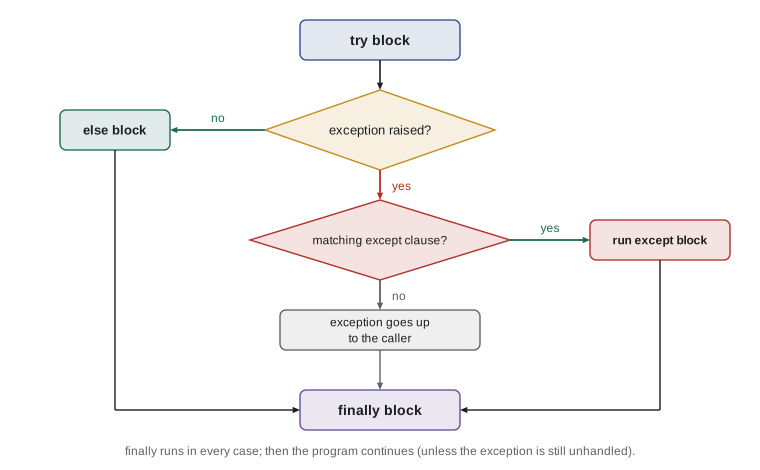
A try statement puts code that might fail in a try block, followed by one or more except blocks. Python runs the try block; if an exception of a type named in an except clause happens, Python stops the try block at that point and runs the matching except block instead of crashing. If no exception happens, the except blocks are skipped. Either way, the program continues after the whole statement.
for text in ["12", "two", "7.5", "30"]:
    try:
        bags = int(text)
        print("Recorded", bags, "bags")
    except ValueError:
print(f"'{text}' is not a whole number of bags; skipped")Recorded 12 bags 'two' is not a whole number of bags; skipped '7.5' is not a whole number of bags; skipped Recorded 30 bags
Always name the exception you expect. A bare except: or except Exception: catches every error, including the NameError from a typo in your own code, and hides it, so the program carries on doing the wrong thing with no clue as to why. Catch the specific exceptions that the code in the try block can reasonably raise, and keep the try block small, so that it is clear which line you are protecting.
The most valuable use of try in everyday programs is input validation. Lesson 6 used isdigit to check typed quantities, which rejects negative numbers and decimals but cannot help with prices. A loop around a try and except handles any conversion: try to convert, and if it fails, explain and ask again.
def ask_price(prompt):
    while True:
        text = input(prompt)
        try:
            price = float(text)
        except ValueError:
            print("Please type a price such as 19.75")
            continue
        if price <= 0:
            print("The price must be more than zero")
            continue
        return price

p = ask_price("New price: ")
print("Price set to", p)New price: nineteen Please type a price such as 19.75 New price: -2 The price must be more than zero New price: 19.75 Price set to 19.75
The loop runs forever until a return statement leaves the function with a good value. Each kind of problem gets its own clear message, which is what turns an irritating program into a helpful one. When you run this in the page, put a few lines in the Input box, such as nineteen, -2 and 19.75, to see each branch.
Several except clauses, else and finally
A try statement can have several except clauses for different exceptions, each with its own response, and one clause can handle several types listed in parentheses. Adding as err binds the exception object to a name, so you can include Python's own message in yours. An else clause runs only if the try block finished without an exception, which keeps the try block focused on the risky line. A finally clause runs no matter what, which suits clean-up work, although the with statement already handles the most common clean-up, closing files.
stock = {"RC-101": 42, "RC-104": 9}

def sell(code, qty_text):
    try:
        qty = int(qty_text)
        left = stock[code] - qty
    except ValueError:
        return f"Quantity '{qty_text}' is not a whole number"
    except KeyError as err:
        return f"No coffee with code {err}"
    else:
        if left < 0:
            return f"Only {stock[code]} bags of {code} in stock"
        stock[code] = left
        return f"Sold {qty} of {code}; {left} left"
    finally:
        print("  (sale attempt logged)")

for code, qty in [("RC-101", "3"), ("RC-999", "1"), ("RC-104", "two"), ("RC-104", "20")]:
print(sell(code, qty))(sale attempt logged) Sold 3 of RC-101; 39 left (sale attempt logged) No coffee with code 'RC-999' (sale attempt logged) Quantity 'two' is not a whole number (sale attempt logged) Only 9 bags of RC-104 in stock
Look at the order of the output: the finally clause prints its log line before each message, because finally runs as the function is leaving, before the caller gets to print the returned value. The else clause holds the code that should run only when the conversion and lookup both worked, which is clearer than piling everything into the try block.
Files and exceptions
Opening a file that does not exist raises FileNotFoundError, one of a family of operating-system errors under the parent type OSError, which also covers missing permissions and full disks. Programs that load saved data usually treat a missing file as a normal first-run situation: start with defaults and create the file when saving. The capstone uses exactly this approach.
import json

def load_stock(path):
    """Return the saved stock, or a starting stock if there is no file yet."""
    try:
        with open(path, encoding="utf-8") as f:
            return json.load(f)
    except FileNotFoundError:
        print(f"No {path} yet; starting with the default stock")
        return {"RC-101": 42, "RC-104": 9}
    except json.JSONDecodeError as err:
        print(f"{path} is damaged ({err}); starting with the default stock")
        return {"RC-101": 42, "RC-104": 9}

print(load_stock("missing_file.json"))
with open("broken.json", "w", encoding="utf-8") as f:
    f.write("[1, 2, oops")
print(load_stock("broken.json"))No missing_file.json yet; starting with the default stock
{'RC-101': 42, 'RC-104': 9}
broken.json is damaged (Expecting value: line 1 column 8 (char 7)); starting with the default stock
{'RC-101': 42, 'RC-104': 9}When reading data files line by line, a common policy is to skip bad lines but report them, so that one typo does not stop a whole import and is not silently lost either. Counting the skipped lines and printing a summary at the end gives Anita a clear picture of how clean the data was.
lines = ["RC-101,42", "RC-102,fifteen", "RC-103,27", "RC-104", "RC-105,12"]
stock = {}
problems = []
for number, line in enumerate(lines, start=1):
    try:
        code, bags = line.split(",")
        stock[code] = int(bags)
    except ValueError as err:
        problems.append(f"line {number} ({line!r}): {err}")
print(stock)
print(len(problems), "lines skipped:")
for p in problems:
print(" ", p){'RC-101': 42, 'RC-103': 27, 'RC-105': 12}
2 lines skipped:
line 2 ('RC-102,fifteen'): invalid literal for int() with base 10: 'fifteen'
line 4 ('RC-104'): not enough values to unpack (expected 2, got 1)Both failures here are ValueErrors, from two different causes: 'fifteen' cannot be converted to an int, and 'RC-104' splits into only one piece, so it cannot be unpacked into two names. Including Python's message in the report, through err, makes each problem easy to diagnose.
Try it yourself
Safe whole number
Write a function to_bags(text) that converts text to an int and returns it, or returns None if the text is not a whole number. Spaces around the number are allowed. to_bags(" 12 ") returns 12, and to_bags("two") and to_bags("7.5") return None. Use try and except, not isdigit, so that negative numbers such as "-3" are converted too.
def to_bags(text):
    return int(text)

print(to_bags("12"), to_bags("two"))
Raising exceptions
Your own functions can raise exceptions with the raise statement, followed by an exception, usually one of the built-in types with a message: raise ValueError('quantity must be positive'). Raising is the right response when a function is given input it cannot sensibly handle. Returning a special value such as -1 or None can work for simple cases, as in lesson 7, but it relies on every caller remembering to check; an exception cannot be ignored by accident.
def sell(stock, code, qty):
    """Remove qty bags of code from stock; raise an error if that is impossible."""
    if code not in stock:
        raise KeyError(code)
    if qty <= 0:
        raise ValueError("quantity must be at least 1")
    if qty > stock[code]:
        raise ValueError(f"only {stock[code]} bags of {code} left")
    stock[code] -= qty

stock = {"RC-101": 42, "RC-104": 9}
for code, qty in [("RC-104", 4), ("RC-104", 10), ("RC-101", 0), ("RC-999", 1)]:
    try:
        sell(stock, code, qty)
        print(f"Sold {qty} of {code}")
    except (KeyError, ValueError) as err:
        print(f"Could not sell {qty} of {code}: {err}")
print(stock)Sold 4 of RC-104
Could not sell 10 of RC-104: only 5 bags of RC-104 left
Could not sell 0 of RC-101: quantity must be at least 1
Could not sell 1 of RC-999: 'RC-999'
{'RC-101': 42, 'RC-104': 5}This division of labor is important. The sell function knows what makes a sale impossible, so it checks and raises. It does not know whether it is being used by a command-line tool, a web page or a test, so it does not print or ask anything. The caller knows how to talk to the user, so it catches the exception and reports it in the right way for its situation. Keeping detection and reporting apart makes functions reusable.
How does raise differ from assert? An assert states something the programmer believes must always be true, and it is used to catch bugs during development and testing; Python can even be run with asserts switched off. Use raise for problems caused by input from outside the program, which can happen however correct the code is, and assert for checks on your own logic.
Debugging logic errors
No exception handler can catch a logic error, where the program runs but gives the wrong answer. Finding those is the skill called debugging. The first step is always to reproduce the problem with a specific input and to know what the right answer would be. Then narrow down where the actual and expected behavior part ways.
The simplest tool is printing intermediate values. f-strings with an equals sign, such as print(f'{total=} {count=}'), show both names and values. Print inside a loop to watch a value change, or before and after a suspicious line. Once you find the line where the value first goes wrong, the bug is usually obvious. Remove the debugging prints afterwards, or, in bigger programs, use the logging module, which PYTH-120 introduces.
sales = [5.25, 3.75, 9.00]
total = 0
for amount in sales:
    total = amount            # bug: should be total += amount
    print(f"{amount=} {total=}")
print("Total:", total)amount=5.25 total=5.25 amount=3.75 total=3.75 amount=9.0 total=9.0 Total: 9.0
Other habits help as much as any tool. Read your code aloud, line by line, or explain it to a colleague, a technique known as rubber-duck debugging because even a toy duck will do: putting the logic into words often reveals the mistake. Test with small, simple inputs whose answers you can work out by hand. Change one thing at a time and rerun. Editors such as Thonny, IDLE and Visual Studio Code also include a debugger, which lets you run a program one line at a time and inspect every variable; PYTH-230 covers debuggers in depth.
Worked problem
Hardening the sale entry
Mei's sale entry asks for a stock code and a quantity. Typos in either crash the program. List the things that can go wrong and decide how the program should respond to each.
Show solution
- A blank code: tell her to type a code and ask again.
- A code in lower case, such as rc-101: normalize with strip().upper() before looking it up, so it simply works.
- An unknown code: KeyError from the lookup; say the code is not on the list and show the valid codes.
- A quantity that is not a whole number: ValueError from int(); ask again with an example such as 2.
- A quantity above the stock: the sell function raises ValueError with the number left; show its message.
Answer: Normalize first, then let the conversion and the sell function raise, and catch KeyError and ValueError with a clear message for each.
Try it yourself
Average that never crashes
Write a function average_sale(amounts) that takes a list of strings typed at the till, ignores any that are not valid numbers, and returns the average of the valid ones rounded to 2 places. If there are no valid amounts it returns 0.0 instead of crashing.
average_sale(["5.25", "oops", "3.75"]) returns 4.5, and average_sale(["x"]) returns 0.0.
def average_sale(amounts):
    values = [float(a) for a in amounts]
    return round(sum(values) / len(values), 2)

print(average_sale(["5.25", "oops", "3.75"]))
Common mistakes
MistakeUsing a bare except: that hides every error, including your own typos.
InsteadCatch the specific exceptions you expect, such as ValueError.
MistakeWrapping a whole program in one big try block.
InsteadKeep try blocks small, around the line that can fail.
MistakeReturning a magic value such as -1 for errors and forgetting to check it.
InsteadRaise an exception that the caller must handle.
MistakePrinting error messages deep inside reusable functions.
InsteadRaise in the function and decide how to report in the caller.
MistakeIgnoring the traceback and guessing.
InsteadRead the last line first, then the line numbers above it.
MistakeDebugging by changing several things at once.
InsteadChange one thing, rerun and compare; reproduce the problem with a small input first.
Summary and key terms
- An exception is raised when an operation fails; unhandled, it stops the program with a traceback.
- try runs risky code; except catches specific exception types; as err gives access to the message.
- else runs when no exception happened; finally always runs.
- Validation loops combine while True, try and except to ask until the input is good.
- A missing or damaged file can be handled with FileNotFoundError and json.JSONDecodeError.
- raise ValueError("message") lets your own functions refuse bad input; callers decide how to report it.
- assert checks the programmer's assumptions; raise handles bad input from outside.
- Debug logic errors by reproducing them, printing intermediate values and changing one thing at a time.
- exception
- An object representing an error, raised when an operation fails.
- traceback
- The report of the calls that led to an unhandled exception.
- try statement
- A statement that runs code and handles exceptions it raises.
- except clause
- The part of a try statement that handles a particular exception type.
- finally clause
- Code in a try statement that always runs.
- raise
- The statement that signals an exception.
- ValueError
- The exception for a value of the right type but unacceptable content.
- FileNotFoundError
- The exception raised when opening a file that does not exist.
- input validation
- Checking data from outside the program before using it.
- debugging
- Finding and fixing the cause of incorrect behavior.
Practice problems
Work each problem on paper first, then reveal the answer to check.
What exception does int("3.5") raise?
Show answer
ValueError.
Write a try statement that prints "missing" if stock["RC-999"] fails.
Show answer
try: print(stock["RC-999"]) except KeyError: print("missing")
When does an else clause on a try statement run?
Show answer
When the try block completes without raising an exception.
Write a line that raises an error when bags is negative.
Show answer
if bags < 0: raise ValueError("bags cannot be negative")
Why is except: on its own risky?
Show answer
It catches every exception, hiding bugs such as NameErrors from typos.
A loop total is always equal to the last amount. What is the likely bug?
Show answer
total = amount instead of total += amount.
Lesson quiz · 5 questions
Score 60% or more to complete this lesson.
Create a free account to save your progress, take quizzes and earn a certificate.