
PMP-130 · Lesson 5 of 12 · 25 min
Defining and sequencing activities
The WBS tells us what will be produced. The schedule tells us when, and building it starts by breaking work packages into activities and working out the order in which they must happen. This lesson covers activity definition, activity attributes and milestones, the precedence diagramming method, the four types of logical relationship, leads and lags, types of dependency, and how to build and check a network diagram. The next lessons add durations and resources, then calculate the critical path.
From work packages to activities
An activity is a distinct, scheduled portion of work performed during the project. Activities are actions, usually described with a verb and a noun: "pour slab", "install kiosks", "train staff". Each work package is decomposed into the activities needed to produce its deliverable. The aim is activities that can be estimated, assigned and tracked, typically lasting from a day or two to a few weeks. As with the WBS, the team and experts should be involved, and templates from similar projects help.
The activity list records each activity with a unique identifier, a description and its WBS code. Activity attributes add detail: predecessors and successors, logical relationships, leads and lags, resource requirements, imposed dates, constraints, assumptions, location and the person responsible. Attributes grow as planning proceeds; early on an activity may have only a name and a WBS link.
Milestones are significant points or events in a project, with zero duration. They mark the completion of major deliverables, decision points, contractual dates or external events. For Project Compass, milestones include lease signed, permit issued, construction complete, occupancy permit issued, soft opening and grand opening. A milestone list identifies which milestones are mandatory, such as contractual or regulatory dates, and which are optional, such as internal checkpoints.
| ID | Activity | WBS | Duration (wd) | Predecessors |
|---|---|---|---|---|
| A | Design fit-out | 2.1 | 15 | - |
| B | Obtain building permit | 2.2 | 20 | A |
| C | Order shelving and RFID gear | 3.1, 3.2 | 30 | A |
| D | Demolition | 2.3 | 10 | B |
| E | Electrical and data rough-in | 2.3 | 15 | D |
| F | HVAC upgrade | 2.3 | 20 | D |
| G | Finishes | 2.3 | 15 | E, F |
| H | Install shelving and RFID | 2.4, 3.2 | 10 | C, G |
| I | Staff training | 5.1 | 10 | C |
| J | Collection move-in | 5.2 | 8 | H |
| K | Soft opening | 5.3 | 2 | I, J |
This network is deliberately simplified so that later calculations can be followed by hand. A real fit-out schedule would have a few hundred activities, but the logic is the same.
The precedence diagramming method
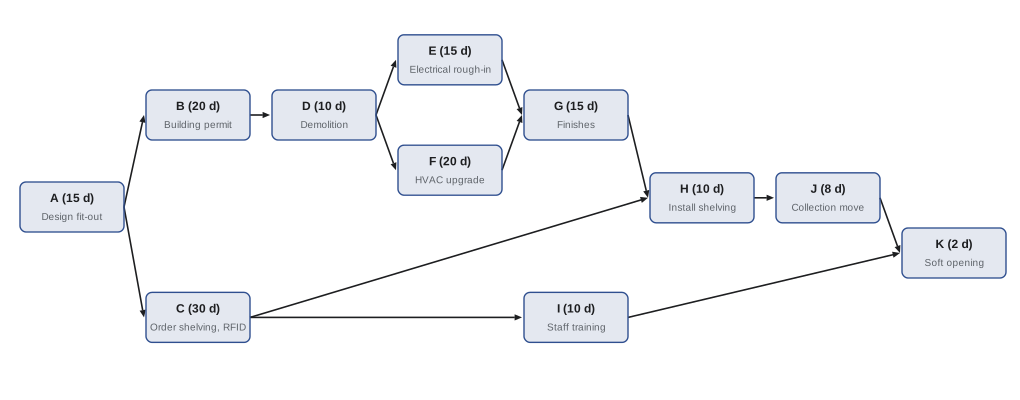
The precedence diagramming method (PDM) represents activities as nodes (boxes) and dependencies as arrows. It is sometimes called activity-on-node. Each node can show the activity name, duration and the early and late dates calculated later. An older method, activity-on-arrow, put activities on the arrows and needed dummy activities to show some dependencies; it is rarely used now and you are unlikely to need it on the exam.
Four types of relationship
PDM supports four logical relationships between a predecessor and a successor activity.
| Relationship | Meaning | Example |
|---|---|---|
| Finish-to-start (FS) | The successor cannot start until the predecessor finishes | Install shelving cannot start until finishes are complete |
| Start-to-start (SS) | The successor cannot start until the predecessor starts | Quality inspection of tagging can start once tagging starts |
| Finish-to-finish (FF) | The successor cannot finish until the predecessor finishes | Writing the training manual cannot finish until the kiosk configuration is finished |
| Start-to-finish (SF) | The successor cannot finish until the predecessor starts | The old security guard contract cannot end until the new gate monitoring starts |
Finish-to-start is used for most links. Start-to-finish is rare and often confusing; it appears mainly in handovers and shift changes. When reading an exam question, identify which activity is the predecessor and which is the successor, then ask which end of each is constrained.
Leads and lags
A lead is the amount of time a successor can be advanced relative to its predecessor; a lag is the amount of time a successor must be delayed. Leads and lags modify relationships without changing the activities themselves. A finish-to-start relationship with a 5-day lag means the successor starts 5 days after the predecessor finishes, for example to let paint cure. A finish-to-start relationship with a 5-day lead means the successor starts 5 days before the predecessor finishes, for example starting to move shelving into one zone while finishes are completed in another.
Leads and lags should be documented with their reasons and should not replace proper activities. A two-week lag for "waiting for approval" hides real work; it is better modeled as an activity such as "landlord reviews drawings" with a responsible party. Leads are one way to fast-track a schedule, a compression technique covered in lesson 8, and they add risk because work overlaps.
Worked problem
Reading a relationship with lag
Activity P (pour concrete floor topping) finishes on day 30. Activity Q (install floor finish) has a finish-to-start relationship with P and a 7-day lag. Activity R (install signage) has a start-to-start relationship with Q and a 3-day lag. When can Q and R start at the earliest?
Show solution
- FS + 7: Q can start 7 days after P finishes, so Q starts at the end of day 37 (day 38 if counting days as in a calendar).
- SS + 3: R can start 3 days after Q starts, so 3 days after the start of Q.
- Using the convention that day 30 is the finish point, Q starts at time 37 and R at time 40.
Answer: Q starts at time 37 and R at time 40, using the same convention as the critical path calculations in lesson 7, where finish times and the next start share a value.
Types of dependency
Dependencies have four characteristics, combined in pairs. Mandatory dependencies are required by contract or inherent in the work (hard logic): walls must be framed before drywall goes up. Discretionary dependencies are chosen by the team based on best practice or preference (soft or preferential logic): installing the service desk before the shelving is a preference, not a necessity. External dependencies involve something outside the project team's control, such as the building department issuing a permit or a supplier delivering kiosks. Internal dependencies are within the team's control.
| Internal | External | |
|---|---|---|
| Mandatory | Electrical rough-in before finishes | Permit before demolition |
| Discretionary | Train staff after kiosks are installed (preferred, not required) | Wait for the landlord's preferred contractor schedule before roof work |
The distinction matters when compressing a schedule. Discretionary dependencies can be changed to allow fast tracking; mandatory ones cannot. External dependencies are a common source of risk because the project cannot control them; they should be watched closely and, where possible, managed through agreements.
Building and checking the network
A network diagram is only useful if its logic is sound. Every activity except the first should have at least one predecessor, and every activity except the last should have at least one successor. Activities without a successor (dangling activities) or predecessor (open starts) make the critical path unreliable. Loops, where an activity eventually depends on itself, make it impossible to calculate. Scheduling software flags these problems, but understanding why they matter helps when reviewing a schedule.
# Building and checking the Project Compass fit-out network (finish-to-start links)
acts = {  # id: (description, duration in working days, predecessors)
    "A": ("Design fit-out", 15, []),
    "B": ("Obtain building permit", 20, ["A"]),
    "C": ("Order shelving and RFID gear", 30, ["A"]),
    "D": ("Demolition", 10, ["B"]),
    "E": ("Electrical and data rough-in", 15, ["D"]),
    "F": ("HVAC upgrade", 20, ["D"]),
    "G": ("Finishes", 15, ["E", "F"]),
    "H": ("Install shelving and RFID", 10, ["C", "G"]),
    "I": ("Staff training", 10, ["C"]),
    "J": ("Collection move-in", 8, ["H"]),
    "K": ("Soft opening", 2, ["I", "J"]),
}

def topo(acts):
    order, placed = [], set()
    while len(order) < len(acts):
        ready = [a for a, (_, _, p) in acts.items()
                 if a not in placed and all(x in placed for x in p)]
        if not ready:
            raise ValueError("no activity can be scheduled next; check for a loop among " + ", ".join(sorted(set(acts) - placed)))
        for a in sorted(ready):
            order.append(a); placed.add(a)
    return order

succ = {a: [b for b, (_, _, p) in acts.items() if a in p] for a in acts}
print("Order:", " ".join(topo(acts)))
print("Start activities:", [a for a, v in acts.items() if not v[2]])
print("Finish activities:", [a for a in acts if not succ[a]])
print("Merge points:", [a for a, v in acts.items() if len(v[2]) > 1])
print("Burst points:", [a for a in acts if len(succ[a]) > 1])

bad = dict(acts); bad["A"] = ("Design fit-out", 15, ["G"])   # a mistaken link
try:
    topo(bad)
except ValueError as e:
print("Check found:", e)Order: A B C D I E F G H J K Start activities: ['A'] Finish activities: ['K'] Merge points: ['G', 'H', 'K'] Burst points: ['A', 'C', 'D'] Check found: no activity can be scheduled next; check for a loop among A, B, C, D, E, F, G, H, I, J, K
The script finds the order in which activities can be scheduled, confirms there is a single start (A) and finish (K), and lists merge points (activities with several predecessors) and burst points (activities with several successors). Merge points matter for risk: G, H and K each wait for several paths, so a delay on any one of them can hold up the merge. The final check shows what happens if someone mistakenly makes design depend on finishes: no activity can be scheduled, because the logic contains a loop.
Other checks are worth making. Are there hard-coded dates (constraints) that override logic? Are lags long and unexplained? Are there activities with no resources? Does every work package have at least one activity? The schedule should be reviewed with the people doing the work, who often spot missing activities such as inspections, approvals, deliveries and handovers.
Sequencing in adaptive work
Adaptive teams sequence work differently. Within a sprint, the team decides how to organize the work. Across sprints, the product owner orders the backlog by value, risk and dependencies, and teams identify technical dependencies during backlog refinement. Large programs use dependency boards or big-room planning to make cross-team dependencies visible. In hybrid projects, the interface points between adaptive and predictive work become milestones in the network. For Project Compass, "app release 1 published" is an external-to-the-fit-out milestone that must be complete before the soft opening, and "kiosk interface specification approved" is a dependency from the technology work to the app team.
Reviewing a contractor's schedule
On contracted work, the project often receives a schedule from the contractor rather than building it. Reviewing it uses the same ideas as this lesson. Check that every activity is linked, that relationships make sense, that lags are explained, that milestones match the contract, that the owner's own activities (such as approvals, owner-supplied equipment and inspections) appear with realistic durations, and that the critical path runs through the work you would expect. For Project Compass, the project manager's review of the general contractor's first schedule found that the landlord's approval of the HVAC roof curb was missing and that shelving delivery was shown as a contractor activity, although the library was buying the shelving directly. Both were corrected before the schedule was accepted as the basis for progress payments.
Many organizations and contracts specify schedule quality checks, such as limits on the share of activities with lags, missing links or hard constraints. These checks do not guarantee a good schedule, but a schedule that fails them is almost certainly unreliable.
Common mistakes
MistakeDescribing activities as nouns copied from the WBS.
InsteadUse verb-noun descriptions of actions that produce work package deliverables.
MistakeUsing long lags in place of real activities such as approvals.
InsteadModel reviews and approvals as activities with owners and durations.
MistakeLeaving activities with no successor.
InsteadLink every activity so that its delay affects the finish date if it should.
MistakeTreating discretionary dependencies as fixed.
InsteadDocument why each discretionary link exists so it can be changed when compressing the schedule.
MistakeOverriding logic with fixed dates everywhere.
InsteadLet the network logic drive dates, using imposed dates only where truly required.
Summary and key terms
- Activities are actions derived from work packages; milestones have zero duration and mark significant events.
- Activity attributes record predecessors, relationships, resources, constraints and owners.
- The precedence diagramming method shows activities as nodes and dependencies as arrows.
- Relationships are finish-to-start (most common), start-to-start, finish-to-finish and start-to-finish.
- Leads advance and lags delay successors; document the reason for each.
- Dependencies are mandatory or discretionary, and internal or external.
- Check the network for open ends, loops and unexplained constraints before calculating the schedule.
- Activity
- A distinct, scheduled portion of work performed during a project.
- Milestone
- A significant point or event in a project with zero duration.
- Activity attributes
- Multiple attributes associated with each activity, such as predecessors, resources and constraints.
- Precedence diagramming method
- A technique representing activities as nodes linked by logical relationships.
- Finish-to-start
- A relationship in which a successor cannot start until a predecessor finishes.
- Lead
- The time a successor activity can be advanced relative to its predecessor.
- Lag
- The time a successor activity must be delayed relative to its predecessor.
- Mandatory dependency
- A dependency required by contract or inherent in the nature of the work.
- Discretionary dependency
- A dependency chosen on the basis of best practice or preference.
- External dependency
- A dependency between project activities and non-project activities or parties.
Practice problems
Work each problem on paper first, then reveal the answer to check.
What is the duration of a milestone?
Show answer
Zero.
Classify: training cannot finish until the training environment is finished.
Show answer
Finish-to-finish.
Classify: the new help desk must start before the old one can finish.
Show answer
Start-to-finish.
Activity X finishes at time 20; Y is FS with a 4-day lag. When does Y start?
Show answer
Time 24.
Same X; Z is FS with a 3-day lead. When does Z start?
Show answer
Time 17.
Is waiting for a city permit internal or external?
Show answer
External.
Which dependencies can be changed to fast-track a schedule?
Show answer
Discretionary dependencies.
Name the merge points in the Project Compass network.
Show answer
G, H and K.
Why are merge points risky?
Show answer
A delay on any converging path can delay the merge activity.
What problem does a loop cause?
Show answer
The schedule cannot be calculated because an activity depends on itself.
Lesson quiz · 5 questions
Score 60% or more to complete this lesson.
Create a free account to save your progress, take quizzes and earn a certificate.