
PHOT-301 · Lesson 9 of 12 · 26 min
Inkjet printers and inks
For most photographers today, the fine print is an inkjet print, sometimes called a pigment print or giclée. Modern photo inkjet printers produce prints with smooth tones, wide gamuts, deep blacks and permanence rivalling or exceeding traditional photographic prints, on a great variety of papers. Understanding how they work helps you choose a printer, set it up, maintain it, troubleshoot problems and estimate costs. This lesson covers inkjet technologies, pigment and dye inks, ink sets and gamut, black inks and the photo/matte black switch, screening and resolution, printer formats and features, the printing path from application to driver or RIP, maintenance and nozzle health, the cost of printing, and other print processes you may encounter at labs.
How inkjet printers work
Inkjet printers form images from tiny droplets of ink fired through thousands of nozzles in a printhead that moves across the paper. Two technologies dominate. Piezoelectric printheads, used by Epson, use a crystal that flexes when voltage is applied, pushing a precise droplet out of each nozzle; droplet size can be varied, and the heads are permanent. Thermal printheads, used by Canon and HP, heat a tiny volume of ink to form a bubble that ejects a droplet; the heads are often user-replaceable. Both can produce droplets of a few picolitres and vary droplet size to render smooth tones. Photo printers place droplets of several inks in carefully controlled patterns so that, at normal viewing distances, the eye blends them into continuous tones and colors.
Pigment and dye inks
Inks fall into two families. Dye inks dissolve colorant molecules in the liquid; they produce brilliant colors and high gloss uniformity on glossy papers, but are generally less resistant to light, ozone and humidity, so prints may fade or shift faster. Pigment inks suspend tiny particles of colorant, coated with resin, in the liquid; the particles sit on or in the paper's receiving layer and are much more resistant to fading, which is why pigment inks dominate fine art and professional photo printing. Pigment prints on glossy papers can show bronzing, a metallic sheen in dark areas viewed at an angle, and gloss differential, where inked and uninked areas reflect differently; many printers add a gloss optimizer or chroma optimizer clear coat to reduce these effects. Choose printers with pigment inks for work intended to last.
| Property | Dye inks | Pigment inks |
|---|---|---|
| Color on glossy paper | Very vivid, uniform gloss | Vivid, wide gamut; may need gloss optimizer |
| Light fastness | Lower | Much higher |
| Resistance to ozone and humidity | Lower | Higher |
| Bronzing and gloss differential | Rare | Possible on glossy papers |
| Typical use | Consumer photo printers | Professional and fine art printers |
Ink sets and gamut
Professional photo printers use eight to twelve inks. A typical set includes cyan, magenta and yellow; light cyan and light magenta for smooth highlights and skin tones without visible dots; photo black and matte black; light black (gray) and light light black for neutral grays and smooth monochrome prints; and extended-gamut inks such as red, orange, green, blue or violet that widen the gamut in specific areas. Some printers add a chroma optimizer clear ink. Extended inks matter: printers with orange and green inks reproduce saturated oranges and greens beyond Adobe RGB, and those with blue or violet inks improve deep blues. The gamut also depends heavily on the paper (Lesson 10): the same printer reproduces a much larger gamut on glossy paper than on matte.
Black inks and monochrome printing
Glossy and luster papers need a photo black ink that sits on the surface for a deep, glossy black, while matte and fine art papers need a matte black ink that absorbs into the surface to give a deep, dense black; using the wrong black gives weak, gray blacks. Some printers have both inks installed and switch between them automatically, wasting a small amount of ink at each switch; others keep both permanently loaded on separate channels; older designs required physically swapping cartridges. Gray and light gray inks allow neutral black-and-white prints with minimal color inks, reducing metameric tints. Manufacturer black-and-white modes, such as Epson's Advanced Black and White Photo mode, use the gray inks to produce very neutral or deliberately toned monochrome prints with fine control (Lesson 11).
Screening and resolution
Printers do not print continuous tones; they print dots, and the driver uses screening (dithering) algorithms to arrange them so that the eye sees smooth tones. Printer resolution in dots per inch (dpi), such as 2,880 × 1,440 dpi or 2,400 × 1,200 dpi, describes the placement grid for droplets, not the image resolution required. The image resolution in pixels per inch (ppi) sent to the printer is a separate matter: drivers resample data to a native input resolution, typically 360 ppi for Epson and 300 ppi for Canon and HP printers, or 720 and 600 ppi in their finest modes. Sending images at the native resolution, or a simple fraction of it, and sharpening at that resolution gives the driver the best data. Viewing distance also matters: the eye resolves roughly one arcminute of detail, so a print viewed at 50 cm needs less resolution than one examined at 25 cm.
Worked problem
Resolution and viewing distance
How many pixels per inch can the eye resolve at a viewing distance of 300 mm (close inspection) and 1,000 mm (a large print on a wall), assuming one arcminute acuity? What file size is needed for a 24 × 16 inch print viewed at 1 m?
Show solution
- One arcminute: \(\tan(1/60^{\circ}) \approx 0.000291\).
- At 300 mm: \(1 / (300 \times 0.000291) \approx 11.5\) lines per mm, about 290 ppi.
- At 1,000 mm: \(1 / (1000 \times 0.000291) \approx 3.4\) lines per mm, about 87 ppi.
- For a 24 × 16 inch print at 1 m, about 100–150 ppi is enough: 2,400–3,600 × 1,600–2,400 pixels. Printing at 300 ppi (7,200 × 4,800) adds safety for closer viewing.
Answer: About 290 ppi at 300 mm and about 87 ppi at 1 m; a 24 × 16 inch print viewed at 1 m needs roughly 2,400–3,600 pixels wide, more for close viewing.
Printer formats and features
Photo printers are described by the maximum paper width they handle: desktop printers print up to A3+ (13 inches) or 17 inches wide on sheets, while large-format printers take rolls from 24 inches to 64 inches or more. Manufacturers such as Epson (SureColor P series), Canon (imagePROGRAF PRO series) and HP offer professional ranges, with models changing every few years; check current models and reviews when buying. Useful features include roll paper support with automatic cutting; a straight-through or front path for thick fine art papers and board; permanent black inks for switching between paper types; high-capacity ink cartridges, which lower cost per milliliter; built-in calibration sensors; and network connectivity. Larger printers have much lower ink costs per print because cartridges are larger, but need regular use to keep nozzles healthy.
The printing path: application, driver and RIP
Images reach the printer through an application, a print driver or a RIP. In a typical photographer's workflow, Photoshop, Lightroom or a dedicated print utility such as Epson Print Layout or Canon Professional Print and Layout converts the image to the printer profile, then the manufacturer's driver translates the data into ink commands, with its own color management turned off. A RIP (raster image processor), such as Mirage, ImagePrint or ColorBurst, replaces the driver: it handles color management, screening, ink limits, linearization and layout, often supporting more precise control, monochrome profiles and efficient nesting of multiple prints on rolls. RIPs are common in labs and studios printing large volumes. Printing from a well-configured application with the manufacturer driver is entirely capable of exhibition-quality work.
Maintenance and nozzle health
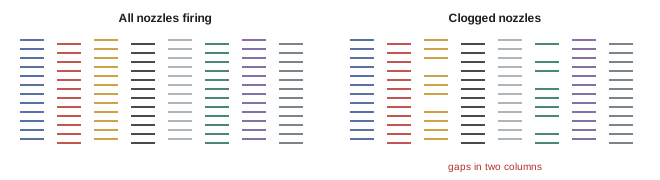
Inkjet printers depend on thousands of tiny nozzles. A clogged or deflected nozzle causes fine horizontal lines (banding) or color shifts. Run a nozzle check pattern before important prints; if gaps appear, run a head cleaning cycle, which uses ink, and check again. Printers that sit unused for weeks are more prone to clogs, especially in dry environments; printing something at least weekly, keeping the room humidity around 40 to 60 %, and leaving the printer switched on so it can perform automatic maintenance all help. Other maintenance includes replacing the maintenance tank that collects waste ink, cleaning paper feed rollers and the platen, aligning printheads when prints look soft or show doubled lines, and keeping paper and printer free of dust. Use manufacturer inks or high-quality alternatives with suitable profiles; incompatible inks can damage printheads and void warranties.
The cost of printing
Ink is a major cost of inkjet printing. Cost per print depends on the ink price per milliliter, ink usage per area, which depends on image content and paper, and waste from cleaning, maintenance and black ink switching. Paper costs vary from under $1 per letter-size sheet for basic papers to several dollars per sheet for fine art papers, and rolls reduce cost per square meter. A useful habit is to calculate cost per square meter for your printer and papers, so that you can price prints sensibly for sale.
Worked problem
Estimating cost per print
A 17-inch printer uses cartridges of 150 mL costing $95 each. An average photographic print uses about 1.5 mL of ink per 100 square inches, plus 15 % for cleaning and maintenance. Fine art paper costs $4.50 per 13 × 19 inch sheet. What is the approximate cost of a full-sheet 13 × 19 inch print?
Show solution
- Ink price: \(95 / 150 \approx \$0.63\) per mL.
- Area: \(13 \times 19 = 247\) square inches; ink \(\approx 247 / 100 \times 1.5 \approx 3.7\) mL.
- With 15 % waste: \(3.7 \times 1.15 \approx 4.3\) mL, costing about \(4.3 \times 0.63 \approx \$2.70\).
- Total with paper: \(2.70 + 4.50 \approx \$7.20\), before labor, proofs and overhead.
Answer: About $7 in ink and paper for a 13 × 19 inch fine art print, before proofs, labor and overhead.
Other print processes
Labs offer other processes worth knowing. Chromogenic prints (C-prints or "lightjet" prints) expose color photographic paper with lasers or LEDs and process it chemically, producing continuous-tone images on papers such as Fujicolor Crystal Archive and Kodak Endura, popular for large volumes and face-mounted acrylic prints. Dye sublimation printers transfer dye into special paper or onto aluminum for metal prints, and are used by event photographers for fast prints. Silver gelatin prints from digital files can be made by exposing traditional black-and-white paper with laser or LED printers. UV-cured inkjet printers print directly onto rigid materials such as wood, acrylic and metal. Each process has its own color management, often through lab-supplied profiles.
Choosing a photo printer
When choosing a printer, consider the largest print size you will make regularly, whether you need roll paper, the ink set and black ink arrangement, ink cartridge size and cost, the paper paths for thick media, how often you will print, available profiles for your preferred papers, and service support in your area. A printer used rarely may suffer clogs and waste ink in cleaning, so outsourcing occasional large prints to a lab is often more economical than owning a large-format printer.
Printer environment
Printers perform best in clean, stable environments. Dust can settle on paper and cause white specks; low humidity increases nozzle clogging and static; high humidity slows drying and can cause paper cockle. Keep the printer covered when idle, away from windows, heaters and air vents, and store papers nearby so that they share the same conditions.
Common mistakes
MistakeChoosing dye inks for work meant to last.
InsteadUse pigment inks for archival prints.
MistakeUsing photo black on matte paper.
InsteadUse matte black for matte and fine art papers.
MistakeConfusing printer dpi with image ppi.
InsteadSend images at the driver's native ppi.
MistakePrinting without a nozzle check.
InsteadCheck nozzles before important prints.
MistakePricing prints without knowing costs.
InsteadCalculate ink and paper cost per area.
Summary and key terms
- Piezoelectric and thermal printheads fire tiny variable droplets.
- Pigment inks last far longer than dye inks.
- Ink sets of eight to twelve inks, including grays and extended colors, widen gamut and smoothness.
- Photo black suits glossy papers; matte black suits matte papers.
- Printer dpi differs from image ppi; send data at the native ppi.
- Regular use, nozzle checks and humidity control keep printheads healthy.
- Know your cost per print and other processes such as C-prints and dye sublimation.
- Piezoelectric printhead
- Printhead using flexing crystals to eject ink.
- Thermal printhead
- Printhead using heat bubbles to eject ink.
- Pigment ink
- Ink with suspended colorant particles.
- Dye ink
- Ink with dissolved colorants.
- Gloss optimizer
- Clear ink reducing bronzing and gloss differential.
- Light black ink
- Gray ink improving neutral tones.
- Screening
- Arranging dots to simulate continuous tone.
- Native resolution
- Driver input resolution, such as 300 or 360 ppi.
- Nozzle check
- Test pattern revealing clogged nozzles.
- C-print
- Chromogenic print on photographic paper.
Practice problems
Work each problem on paper first, then reveal the answer to check.
Name the two main printhead technologies.
Show answer
Piezoelectric and thermal.
Why are pigment inks preferred for fine art?
Show answer
Greater resistance to fading.
What is bronzing?
Show answer
A metallic sheen in dark areas of pigment prints.
What do light black inks improve?
Show answer
Neutral grays and monochrome prints.
Which black for matte paper?
Show answer
Matte black.
Native ppi of Epson and Canon drivers?
Show answer
About 360 and 300 ppi.
Resolvable ppi at 500 mm?
Show answer
About 175 ppi.
What causes fine horizontal lines?
Show answer
Clogged or deflected nozzles.
Ink cost for 5 mL at $0.60 per mL?
Show answer
$3.00.
What is a C-print?
Show answer
A chromogenic print on color photographic paper.
Lesson quiz · 5 questions
Score 60% or more to complete this lesson.
Create a free account to save your progress, take quizzes and earn a certificate.