
PHOT-202 · Lesson 9 of 12 · 25 min
Product and commercial retouching
Product images sell. Online shops, catalogs, packaging and advertisements depend on photographs that show products clearly, accurately and attractively, and customers judge quality, color and detail from them before buying. Product retouching differs from portrait retouching: it aims for flawless surfaces, precise edges, exact color and consistency across hundreds of images, while staying truthful to the product. This lesson covers the goals of product retouching, cleaning and dust removal, color accuracy, cut-outs and clipping paths, backgrounds and shadows, reflections, focus stacking, composite product shots, e-commerce consistency and batch workflows, and the line between enhancement and misrepresentation.
Goals of product retouching
Product retouching aims to present a product as it is, at its best. Typical goals include removing dust, scratches, fingerprints and manufacturing marks that would not be visible in normal use; making colors match the real product precisely; creating clean edges and backgrounds that meet platform requirements; controlling reflections and highlights to reveal shape and material; ensuring every part of the product is sharp; and making a set of images consistent in size, position, lighting and color. Retouching should not change the product's features, size, color or performance in ways that would mislead buyers, an important legal and ethical boundary discussed at the end of this lesson and in Lesson 12.
Cleaning and dust removal
Even carefully cleaned products show dust, lint, fingerprints and tiny scratches under studio lighting and high-resolution cameras. Cleaning the product before shooting, using microfiber cloths, air blowers, lint rollers and gloves, saves hours in retouching. In editing, the spot healing brush, healing brush, clone stamp and AI remove tools clean small marks. A useful technique is to temporarily add a high-contrast curves adjustment layer or the visualize spots view in raw processors, which exaggerates dust and marks so that none are missed. For smooth surfaces such as glossy plastic, metal and glass, the clone stamp and painting with soft brushes on masked layers often produce cleaner results than healing tools, which can smear gradients. Retouchers often rebuild smooth gradients on reflective surfaces from scratch with gradient fills and masks, producing perfectly clean results.
Color accuracy
Color accuracy is critical in e-commerce: products returned because their color did not match the photographs cost retailers money and damage trust. Achieving accurate color involves consistent, high-quality lighting with a high color rendering index; a color chart photographed under the shooting light and a custom profile (Lesson 4); white balance set from a neutral reference; a calibrated monitor and a viewing booth with standard lighting for comparing the screen with the physical product; and careful HSL adjustments for colors that remain off, such as saturated blues, purples and fluorescent dyes, which cameras often struggle to reproduce. Clients may supply physical samples or reference color values, such as Pantone colors, that the images must match. Images are delivered in sRGB for the web, after editing in a wider space.
Cut-outs and clipping paths
Many product images require the product to be separated from its background: for placement on pure white for marketplaces, on transparent backgrounds for design use, or on new backgrounds for lifestyle composites. Methods include:
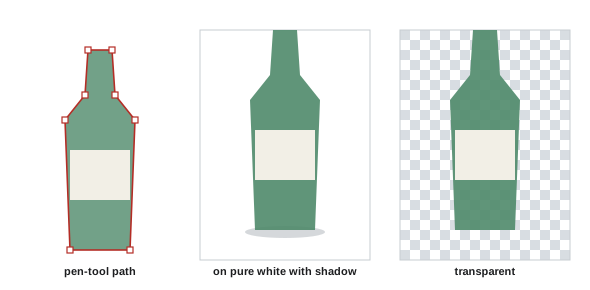
- Clipping paths drawn with the pen tool: precise vector outlines that produce clean, hard edges, the industry standard for products with defined shapes, and delivered with the file for use in layout software.
- AI selections such as Select Subject and remove background tools: fast and increasingly accurate, but they may need refinement around complex edges, reflections and transparent parts.
- Channel-based and color-range masks: useful for products on contrasting backgrounds and for fine edges.
- Shooting on contrasting or backlit white backgrounds: a backlit white background creates a strong silhouette that makes selection easier.
Edges should be smooth and slightly anti-aliased, with no halos of the old background, which is especially visible when a product shot on gray is placed on white. Semi-transparent elements such as glass, sheer fabrics and fur need careful masking to preserve transparency.
Backgrounds and shadows
Marketplaces such as Amazon require main product images on pure white backgrounds, with RGB values of 255, 255, 255, and the product filling a large proportion of the frame; other platforms and brands set their own requirements. Achieving pure white can be done in camera, by lighting the background about 1 to 1.5 stops brighter than the product, or in editing, by placing the cut-out product on a white layer. A product floating on white with no shadow can look unnatural; adding a realistic shadow grounds it. Natural shadows can be preserved from the original shot by masking the background separately; drop shadows and contact shadows can be created with soft brushes, blurred selections and multiply layers. Reflection shadows, a mirrored, fading reflection beneath the product, suit glossy products such as electronics and cosmetics. Keep shadows consistent in direction, softness and density across a product range.
Worked problem
Preparing a marketplace main image
A photographer has shot a pair of headphones on a light gray sweep. The marketplace requires a pure white background (255, 255, 255) with the product filling at least 85 % of the frame. What steps are needed?
Show solution
- Clean the product of dust and fingerprints with healing and clone tools on a separate layer.
- Create a precise selection or clipping path of the headphones, refining the edges of the cable and ear cushions.
- Place the cut-out on a pure white layer and confirm the background reads 255, 255, 255 with the info panel.
- Add a soft contact shadow beneath the headphones on a multiply layer at low opacity.
- Crop so the product fills about 85–90 % of the longest dimension, then export in sRGB at the required size.
Answer: Clean, cut out precisely, place on pure white with a subtle contact shadow, crop to fill about 85–90 % of the frame and export in sRGB.
Reflections and highlights
Reflective products, such as jewelry, watches, glass, bottles, cosmetics packaging and electronics, are defined by their reflections and highlights. Photographers control reflections with large diffused lights, white and black cards and flags; retouchers refine them by removing unwanted reflections, such as the camera, studio equipment or the photographer; smoothing highlights into clean, even gradients; strengthening dark edges that define shape; and sometimes combining several exposures, each lit to show different surfaces at their best, into one image. Glass and liquids often need separate passes for the edges, the label and the liquid, combined in layers with masks. Watches typically need many retouching layers to clean dials, polish metal, and show the hands at the conventional 10:10 position.
Focus stacking
Small products, jewelry and food shot at close range often have very shallow depth of field, even at small apertures, and stopping down too far causes diffraction softening (PHOT-201). Focus stacking combines several images taken at different focus distances into one image that is sharp from front to back. The photographer shoots a series on a tripod, shifting focus a little each time, manually, with a focusing rail or with the camera's automatic focus bracketing mode; software such as Photoshop, Helicon Focus or Zerene Stacker aligns the images and combines the sharpest parts of each. Stacks can contain from a few to dozens of frames. Artifacts such as halos around edges and overlapping transitions need retouching from individual frames. Focus stacking is standard in jewelry, watch, cosmetics and macro product photography.
Composite product shots
Advertising product images are often composites. A bottle may be shot in several passes: one for the overall shape and highlights, one for the label lit evenly, one with backlight for the liquid, and one for splashes or condensation, combined in layers. Ingredients, props and backgrounds may be photographed separately and assembled. Computer-generated product renders are increasingly common, especially for products that do not yet exist physically, and are sometimes combined with photographed elements. Compositing skills (Lesson 10) such as matching light, perspective and color are essential for commercial retouchers.
E-commerce consistency and batch workflows
Online catalogs may contain hundreds or thousands of images, and consistency matters: products should appear at the same scale, position, angle, lighting, color and background, so that the shop looks professional and customers can compare items. Workflows include shooting with a fixed camera and lighting setup, using templates for framing; applying the same raw settings to all images in a set; using Photoshop actions to automate repetitive steps such as resizing, canvas extension, sharpening and saving; batch processing with scripts or dedicated e-commerce software; and quality control checks for background values, margins, file names and color. Large retailers often outsource retouching to specialized studios, which work from detailed style guides that specify every aspect of the finished image.
| Element | Typical style guide specification |
|---|---|
| Background | Pure white 255, 255, 255 or brand color |
| Margins | Product fills 85–90 % of frame; equal margins |
| Shadow | Soft contact shadow, consistent direction |
| Size and format | For example 2000 × 2000 px, sRGB JPEG |
| Naming | SKU_view number, for example 12345_01.jpg |
| Retouching | Remove dust, lint and creases; keep stitching and texture |
Enhancement or misrepresentation
Product images must remain truthful. Cleaning dust, correcting color to match the product, and removing a reflection of the camera are legitimate; changing a product's color to one that does not exist, hiding defects that the customer will receive, exaggerating the size or quantity of food, or making a cosmetic's effect look stronger than it is are not. Consumer protection and advertising laws in Canada and the United States prohibit false or misleading representations in advertising, and advertising standards bodies have upheld complaints against retouched product and cosmetic advertisements. Food photography is a particular area of concern: while styling techniques are traditional, advertisements must not misrepresent the actual product. Retouchers should follow the client's brief, but raise concerns when instructions would mislead customers. Lesson 12 discusses the legal frameworks in more detail.
Ghost mannequin and apparel retouching
Clothing retailers often show garments as if worn by an invisible person, a technique called ghost mannequin or invisible mannequin photography. The garment is photographed on a mannequin, then again inside-out or with the mannequin removed to capture the inside of the neckline and other hidden areas; in retouching, the mannequin is removed and the inner parts are composited in, creating a three-dimensional shape. Apparel retouching also includes removing lint and creases, adjusting shape and symmetry within reason, correcting color to match the garment, and ensuring consistency across colorways of the same product, which are sometimes created by recolouring one image, a practice that must reproduce each actual color accurately.
Jewelry retouching
Jewelry is among the most demanding product categories. Small size, reflective metals and transparent gemstones show every flaw, and customers expect brilliance and sparkle. Jewelry retouching typically involves focus stacking, removing dust and scratches, cleaning and polishing metal surfaces, controlling reflections with painted gradients, enhancing the sparkle and color of stones without misrepresenting them, and creating clean shadows or reflections on white. Gemstone color and clarity must not be exaggerated, since these properties determine value, and misrepresenting them can mislead buyers.
Food retouching
Food images for menus, packaging and advertising are often retouched to remove crumbs, smudges and blemishes, enhance color and texture, and add steam, condensation or highlights. Food styling traditions, such as undercooking vegetables to keep them bright or using substitutes for melting ice cream, have long been used, but advertising standards require that the image represent the actual product customers receive, particularly in size, quantity and ingredients. Retouchers should be careful not to enlarge portions, add ingredients that are not included, or misrepresent what is served.
Outsourcing and working with retouching studios
Many photographers and brands outsource retouching to specialist studios, which can handle large volumes with consistent quality. Successful outsourcing requires a clear brief and style guide, sample images showing expected results, agreed turnaround times and prices per image or per hour, secure file transfer, and a review and revision process. Photographers remain responsible for the final result and for the honesty of the images, so reviewing outsourced work carefully is essential.
Common mistakes
MistakeRelying on retouching instead of cleaning products.
InsteadClean thoroughly before shooting.
MistakeLeaving gray halos around cut-outs on white.
InsteadRefine edges and check against white and black.
MistakeColor not matching the physical product.
InsteadUse charts, profiles and a viewing booth.
MistakeInconsistent margins and shadows across a range.
InsteadFollow a style guide with templates and actions.
MistakeAltering product features to look better than reality.
InsteadEnhance presentation without misrepresenting the product.
Summary and key terms
- Product retouching aims for clean, accurate, consistent images that remain truthful.
- Clean products before shooting and use visualization layers to find dust.
- Color accuracy relies on charts, profiles, calibrated monitors and viewing booths.
- Pen-tool paths and AI selections create cut-outs; check edges for halos.
- Marketplace main images often require pure white backgrounds with realistic shadows.
- Reflections, focus stacking and multi-pass composites perfect commercial images.
- Style guides, actions and batch processing ensure consistency.
- Clipping path
- Vector outline used to cut out a product.
- Pen tool
- Tool for drawing precise vector paths.
- Pure white
- RGB 255, 255, 255 background.
- Contact shadow
- Shadow where a product touches the surface.
- Reflection shadow
- Mirrored reflection beneath a glossy product.
- Focus stacking
- Combining images focused at different distances.
- Focus bracketing
- Automatic sequence of focus-shifted shots.
- Style guide
- Specification for consistent product images.
- Action
- Recorded sequence of Photoshop steps.
- Viewing booth
- Standardized lighting for comparing colors.
Practice problems
Work each problem on paper first, then reveal the answer to check.
Why clean products before shooting?
Show answer
It saves hours of retouching.
How can hidden dust be revealed?
Show answer
A temporary high-contrast curves layer or visualize spots.
Name three tools for color accuracy.
Show answer
High-CRI lights, color chart and profile, calibrated monitor, viewing booth.
Why use the pen tool for products?
Show answer
Precise, clean vector edges.
What RGB values are pure white?
Show answer
255, 255, 255.
Why add a shadow to a cut-out?
Show answer
It grounds the product and looks natural.
What is focus stacking?
Show answer
Combining shots focused at different distances.
Why shoot bottles in several passes?
Show answer
To light shape, label and liquid optimally.
Name three style guide elements.
Show answer
Background, margins, shadow, size, naming, retouching level.
Give an example of misleading product retouching.
Show answer
Changing color, hiding defects, exaggerating food or results.
Lesson quiz · 5 questions
Score 60% or more to complete this lesson.
Create a free account to save your progress, take quizzes and earn a certificate.