
PHOT-202 · Lesson 6 of 12 · 25 min
Local adjustments, masking and dodging and burning
Global adjustments affect the whole image equally, but light in the real world is rarely even, and photographs rarely look their best with uniform treatment. Local adjustments let photographers brighten a face, darken a sky, warm a sunset, reduce a distraction or draw the eye along a path, just as darkroom printers dodged and burned their prints. Modern raw processors combine traditional brushes and gradients with AI-powered masks that select subjects, skies, people and objects in seconds. This lesson covers the purposes of local adjustments, brushes, linear and radial gradients, AI subject, sky, background, people and object masks, range masks, combining and refining masks, dodging and burning for light and shape, and guiding the viewer's eye.
Why local adjustments matter
Viewers look first at the brightest, sharpest, most contrasting and most saturated parts of an image, and at faces. Local adjustments use this to guide attention: brightening and sharpening the subject while subtly darkening and softening the surroundings makes the subject stand out without obvious manipulation. Local adjustments also correct uneven light, such as a bright sky over a darker landscape, a face in partial shade, or a vignette from the lens; balance color in mixed lighting; and shape form, adding dimension to faces, products and landscapes by enhancing highlights and shadows. The skill is subtlety: good local adjustments are rarely noticed, while heavy-handed ones create halos and an artificial look.
Brushes
The adjustment brush paints an adjustment onto specific areas. Brush settings include size; feather, which softens the edge of the brush stroke; flow, which builds the effect gradually with repeated strokes; and density, which limits the maximum strength. An auto mask option restricts the brush to areas similar in tone and color to where you begin painting, helping you stay within edges, though it can produce patchy results in textured areas. Brushes are used for dodging and burning, brightening eyes, reducing redness in skin, darkening distracting highlights, adding warmth to specific areas and many other tasks. Using a pen tablet with pressure sensitivity gives natural, controlled strokes. Showing the mask overlay while painting reveals exactly where the adjustment is applied.
Linear and radial gradients
A linear gradient applies an adjustment that fades smoothly from full strength to nothing across a band, like a graduated neutral density filter on a lens. It is ideal for darkening skies, balancing bright foregrounds, and adding gradual changes in light. A radial gradient applies an adjustment inside or outside an ellipse, with a feathered edge: inside to brighten or sharpen a subject, outside to create a custom vignette that darkens the surroundings. Gradients can be combined with range masks or erased with a brush where they overlap objects, such as darkening a sky without darkening mountains that rise into it.
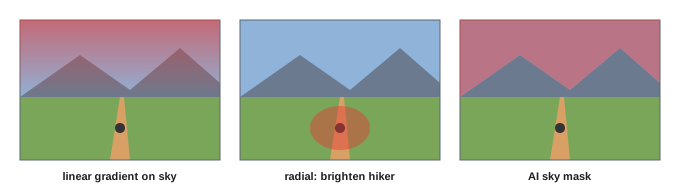
AI-powered masks
Recent raw processors include masks generated by machine learning. With a single click, they can select:
- The subject: the main person, animal or object in the image.
- The sky, following complex edges such as trees and buildings.
- The background, everything except the subject.
- People, with options to select individual people and specific parts such as face skin, body skin, eyes, irises, eyebrows, lips, teeth, hair and clothing.
- Objects, by brushing roughly or drawing a box around them.
These masks save enormous time compared with manual brushing: brightening every face in a group photo, whitening teeth slightly, adding contrast to clothing, or darkening the sky in hundreds of landscape images can be done in seconds, and some software can apply AI masks across a batch of images, recalculating the mask for each image. AI masks are not perfect: they may miss fine hair, include parts of the background, or select the wrong subject, so check the mask overlay and refine it with brushes or intersections. Masks that depend on image content need updating if the image is cropped or changed significantly.
Range masks
Range masks limit an adjustment to areas of a particular brightness (luminance range) or color (color range). A luminance range mask on a gradient lets you darken only the brightest parts of a sky; a color range mask lets you adjust only the green foliage or only a blue jacket. Depth range masks, available for images that contain depth information, such as some smartphone portrait images, limit adjustments by distance. Range masks are useful for precise adjustments where AI masks or brushes would be slow, and they can be combined with other mask types.
Combining and refining masks
Masks can be combined using add, subtract and intersect operations. For example, you can select the sky with an AI mask and subtract a brush stroke where a flag pole crosses it; create a radial gradient around a subject and intersect it with a luminance range to affect only its highlights; or select a person and subtract their face to adjust only clothing. Inverting a mask selects the opposite area, such as everything except the subject. Each mask can carry many adjustments at once: exposure, contrast, highlights, shadows, clarity, texture, dehaze, white balance, saturation, sharpness, noise and color tint. Naming masks clearly and keeping their number manageable helps when revisiting edits later. Copying masks between similar images, then adjusting them, speeds up work on a series.
Worked problem
Editing a backlit landscape with people
A landscape at sunset shows a bright sky, a darker valley and two hikers in the foreground who are almost silhouettes. How can masks balance the image naturally?
Show solution
- Select the sky with an AI sky mask and reduce exposure and highlights slightly to deepen color.
- Create a linear gradient from the bottom of the frame and raise shadows in the valley, intersected with a luminance range to avoid lifting the brightest areas.
- Select the people with an AI people mask and raise exposure and shadows slightly so their faces and clothing show detail, keeping them darker than the sky.
- Add a radial gradient around the hikers, inverted, to darken the frame edges subtly.
- Check every mask overlay for halos around the mountain ridge and the hikers, and refine with a brush.
Answer: Combine an AI sky mask, a gradient with luminance range for the valley, an AI people mask for the hikers and an inverted radial vignette, then refine edges.
Dodging and burning
Dodging (lightening) and burning (darkening) are the oldest and most expressive local techniques. Beyond correcting exposure, they shape light: brightening the lit side of a face and darkening the shadow side adds dimension; brightening a path and darkening its surroundings leads the eye; burning the edges of a print, a technique called edge burning, keeps attention within the frame. In raw processors, dodging and burning are done with brushes set to small exposure changes of about a third to half a stop, built up gradually with low flow. In Photoshop, a common non-destructive method uses a separate layer filled with 50 % gray and set to soft light or overlay blend mode, painted with white to dodge and black to burn at low opacity (Lesson 7). Detailed dodging and burning on skin, used in high-end portrait retouching, is covered in Lesson 8.
| Technique | Tool | Typical use |
|---|---|---|
| Dodge | Brush with positive exposure | Brighten faces, eyes, highlights, paths |
| Burn | Brush with negative exposure | Darken distractions, edges, shadows |
| Edge burn | Inverted radial or gradients | Keep the eye inside the frame |
| Light shaping | Paired dodge and burn | Add dimension to faces and objects |
Guiding the viewer's eye
Local adjustments are compositional tools. Consider the path a viewer's eye will take through the image, and use adjustments to support it: the brightest area should usually be the subject or lead toward it; areas of high contrast and saturation should not compete with the subject; bright patches at the edges of the frame, which pull the eye out of the image, can be burned down; and distracting colors can be desaturated locally. Squinting at the image, or viewing it as a small thumbnail or upside down, reveals its tonal structure and shows whether the eye goes where you intend. Comparing before and after views often reveals how much a few subtle local adjustments improve an image.
Avoiding common artifacts
Local adjustments can create artifacts if pushed too far. Halos, bright or dark rims along edges, appear when masks do not follow edges accurately, especially between sky and land; refine masks, reduce strength, or use luminance range masks. Banding can appear in smooth gradients such as skies when large adjustments stretch tones. Unnatural skin appears when masks over-brighten or over-smooth faces. Mismatched color or noise between adjusted and unadjusted areas can reveal edits. Viewing masks, zooming in on edges and toggling adjustments on and off help catch problems. When an image needs many large local adjustments to work, consider whether it would be better reshot or composited from exposures (Lesson 10).
Local white balance and color
Masks can carry white balance and color adjustments as well as tone. In mixed lighting, a face lit by window light may look correct while the background lit by tungsten bulbs looks orange; a mask on the background with cooler temperature can neutralize it, or a mask on the face can warm it to match a warm background. Local color tools can also reduce redness in cheeks and hands, add warmth to a sunset sky, cool shadows in a landscape, or add a color tint to a specific area for creative effect. Matching color between masked and unmasked areas at the boundary is important to avoid visible edges.
Dodging and burning for landscapes
Landscape photographers often spend more time on dodging and burning than on any other adjustment. Light in landscapes falls unevenly, and enhancing the natural light on ridges, trees and water, while burning down areas in shadow, adds depth and a three-dimensional feeling. Techniques include painting light along the sunlit side of mountains and trees, darkening foreground areas that are brighter than the subject, brightening paths, rivers and lines that lead into the image, and burning the corners and edges. Many landscape photographers use luminosity masks in Photoshop to limit dodging to highlights and burning to shadows, keeping the effect natural.
Batch masking and presets with masks
Recent raw processors can save masks within presets, recalculating AI masks for each image the preset is applied to. A portrait photographer might create a preset that selects face skin and reduces texture slightly, selects irises and brightens them, and selects teeth and reduces yellow, then apply it to a whole session, with each mask adapted to each face. A landscape photographer might create a preset that selects the sky and adds contrast and depth. Batch masking saves enormous time on large shoots, but results must be checked, since AI masks occasionally select the wrong area or miss subjects.
When to move to Photoshop
Raw processors now handle many local tasks that once required Photoshop, but some still benefit from a pixel editor: complex selections with fine hair; blending multiple exposures; precise dodging and burning with luminosity masks; detailed skin retouching; removing large or complex distractions; and compositing. A practical rule is to do as much as possible in the raw processor, where edits stay non-destructive and synchronized with the catalog, and move to Photoshop when you need layers, precise pixel work or multiple images.
Common mistakes
MistakeHeavy local adjustments that create halos.
InsteadUse subtle amounts and refine mask edges.
MistakeTrusting AI masks without checking.
InsteadView overlays and refine with brushes and intersections.
MistakeDarkening skies with gradients that darken mountains.
InsteadSubtract or intersect with AI or range masks.
MistakeDodging and burning at high flow.
InsteadBuild effects gradually at low flow.
MistakeLeaving bright distractions at the frame edges.
InsteadBurn them down to keep the eye inside.
Summary and key terms
- Local adjustments guide attention, correct uneven light and shape form.
- Brushes paint adjustments with control over size, feather, flow and density.
- Linear and radial gradients apply gradual or elliptical adjustments.
- AI masks select subjects, skies, people and features in seconds.
- Range masks limit adjustments by brightness, color or depth.
- Masks combine through add, subtract, intersect and invert.
- Dodging and burning shape light and guide the viewer's eye.
- Local adjustment
- Adjustment applied to part of an image.
- Mask
- Selection that limits where an adjustment applies.
- Feather
- Softness of a mask edge.
- Flow
- Rate at which a brush builds up an effect.
- Linear gradient
- Adjustment fading across a band.
- Radial gradient
- Adjustment inside or outside an ellipse.
- AI mask
- Mask generated automatically by machine learning.
- Range mask
- Mask limited by luminance, color or depth.
- Dodging
- Selectively lightening.
- Burning
- Selectively darkening.
Practice problems
Work each problem on paper first, then reveal the answer to check.
What do viewers look at first?
Show answer
The brightest, sharpest, most contrasting areas and faces.
What does auto mask do on a brush?
Show answer
Restricts painting to similar tones and colors.
What filter does a linear gradient imitate?
Show answer
A graduated ND filter.
How do you create a custom vignette?
Show answer
Radial gradient applied outside the ellipse.
Name four AI mask types.
Show answer
Subject, sky, background, people, objects.
What does a luminance range mask do?
Show answer
Limits an adjustment to a brightness range.
Name three mask operations.
Show answer
Add, subtract, intersect, invert.
Typical exposure change per dodge or burn stroke?
Show answer
About a third to half a stop.
What is edge burning?
Show answer
Darkening frame edges to keep the eye inside.
How can you check tonal structure?
Show answer
Squint, view small or view upside down.
Lesson quiz · 5 questions
Score 60% or more to complete this lesson.
Create a free account to save your progress, take quizzes and earn a certificate.