
MSBA-304 · Lesson 8 of 12 · 21 min
Working with agents and MCP servers
▶ Video coming soon A video version of this lesson is on the way.
On Wednesday, August 11, the session moved from asking Copilot for code to letting it do work. The first course had introduced agent mode in the editor and the coding agent on GitHub.com. This session was about using them well: how to frame a task for an agent, how agents use tools, what the Model Context Protocol adds, how to keep an agent safe, and how to judge the result. Priya chose a modest task for the demonstration: add a closures section to the weekly summary email, the change the refactor in lesson 5 had prepared for. "Agents are good at well-defined chores," she said, "and bad at deciding what the chore should be. We decide; it does."
Ask, edit and agent: a quick recap
Editors such as VS Code offer chat in several modes. In ask mode, Copilot answers questions and suggests code that you copy or apply yourself. In edit mode, you choose files and Copilot proposes changes across them for you to review. In agent mode, Copilot plans the work, decides which files to read and change, runs tools such as the terminal or tests, looks at the results and keeps going until the task is done or it needs your input. Some editors also offer a plan mode, which produces a step-by-step plan for approval before any change is made. The coding agent, which recent GitHub documentation calls Copilot in the cloud, runs on GitHub.com: you assign it an issue or task, it works in a separate environment and returns its work as a branch and a pull request.
| Mode | Who decides which files change | Runs tools | Result |
|---|---|---|---|
| Ask | You | No | Answers and suggested code |
| Edit | You choose the files; Copilot proposes changes | No | A diff to accept or reject |
| Agent (editor) | Copilot, within your workspace | Yes, with approval for risky actions | Changes in your workspace |
| Coding agent (cloud) | Copilot, in its own environment | Yes, in that environment | A branch and a pull request |
How an agent works
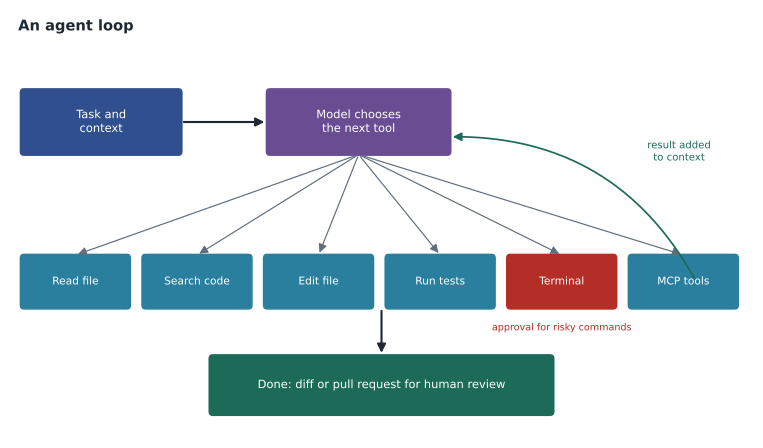
An agent is a loop around a model. The model is given the task, the context and a list of tools it may call, such as reading a file, searching the code, running a terminal command or calling a test runner. At each step it decides which tool to call; the client runs the tool and adds the result to the context; the model decides the next step. The loop ends when the model judges the task complete or when it needs a person. Everything from lesson 2 about context applies with extra force, because tool results can fill the context quickly, and everything from lesson 3 about instructions matters, because AGENTS.md tells the agent how to build and test and what "done" means.
Framing a task for an agent
A task for an agent needs everything a good prompt needs and three things more: a definition of done, the boundaries of what it may change, and how it should check its own work. Vague tasks produce sprawling changes. Priya wrote the closures task as she would for a new colleague.
Add a "Closures" section to the weekly summary email.

Context: trails/summary.py builds the email; closures are reports with
condition "closed" or "washout" in the last 7 days. See AGENTS.md for how to test.

Done means:
- A Closures section lists each closed trail with the date of the latest report.
- If there are no closures, the section is left out entirely.
- New tests cover: one closure, several closures, and none.
- All existing tests still pass. Do not modify existing test files.

Only change trails/summary.py, templates/summary.txt and add tests/test_closures.py.
The boundaries line, "only change these files", is often the most valuable. It keeps the diff reviewable and stops the agent from tidying unrelated code. The instruction not to modify existing tests protects against the failure mode from lesson 6, where an agent makes tests pass by changing them.
Worked problem
Scoping a task
Lena proposed three agent tasks: (1) "improve TrailCheck", (2) "add pagination to the trail list page, 20 trails per page, with tests", and (3) "fix every issue labeled bug". Which is a good agent task as written, and how should the others change?
Show solution
- Task 1 has no definition of done and no boundaries; it needs a specific goal or should not go to an agent at all.
- Task 2 is specific, testable and bounded: a good agent task.
- Task 3 bundles many unrelated changes; split it into one task per issue so each pull request can be reviewed on its own.
Answer: Task 2. Task 1 needs a real goal; task 3 should become several small tasks.
Choosing between the editor agent and the cloud agent is mostly about where the work should happen. Agent mode suits tasks you want to watch and steer, because it works in your own workspace and you see each step. The coding agent suits tasks you can describe fully in an issue and review later, because it works on its own branch while you do something else. Tidewater had the coding agent switched on only in trailcheck and open-trail-report, so for anything touching trail-notes, agent mode in the editor was the only option.
Approvals and the terminal
In the editor, agent mode asks for approval before running terminal commands unless you allow them, and you can review each proposed edit. It is tempting to approve everything to save time. Priya's rule was to approve read-only and test commands freely and to read anything that installs packages, deletes files, changes configuration or touches the network. Copilot CLI follows the same pattern in the terminal, asking before commands that change things. In the cloud, the coding agent works in its own environment, its pull requests are subject to the repository's rulesets, and a person must review and merge them.
| Command type | Approve? | Example |
|---|---|---|
| Read-only | Usually yes | ls, cat, git status, searching code |
| Run tests or checks | Usually yes | pytest -q, python tools/validate_data.py |
| Install or upgrade packages | Read first | pip install, changing requirements.txt |
| Delete or move files | Read first | rm, git mv on many files |
| Network or deployment | Read first, often refuse | curl to an external service, deploy scripts |
| Anything with secrets | Refuse | Commands that print or send credentials |
The Model Context Protocol
The Model Context Protocol (MCP) is an open standard for connecting AI applications to data sources and tools. An MCP server is a small program that offers tools through the protocol, for example "search issues", "read a database table" or "open a web page in a browser". A client such as Copilot in VS Code, Copilot CLI or the cloud agent can connect to MCP servers and make their tools available to the model. That is how an agent can do more than edit files: it can look up an issue, query a test database or check a deployed page.
GitHub publishes the GitHub MCP server, which offers tools for repositories, issues, pull requests and more. It can be used remotely through Copilot Chat in VS Code without local setup, or run locally in any MCP-compatible editor, and Copilot CLI includes it. GitHub recommends enabling only the toolsets you need, which improves tool choice, reduces the context taken up by tool descriptions and limits what the agent can do. On GitHub.com, repository settings configure MCP servers for the cloud agent and code review; the GitHub MCP server and a Playwright browser server are configured by default there.
{
  "servers": {
    "github": {
      "type": "http",
      "url": "https://api.githubcopilot.com/mcp/",
      "headers": { "X-MCP-Toolsets": "issues,pull_requests" }
    }
  }
}
MCP policy and trust
An MCP server is code that runs with access to whatever it connects to, so choosing servers is a security decision. For organizations, the "MCP servers in Copilot" policy controls whether members with Business or Enterprise seats can use MCP at all, and GitHub documents it as disabled by default. It does not govern individual plans such as Free or Pro. GitHub also runs an MCP Registry, a curated list of partner and community servers, which was in public preview when the course was written.
Tidewater had decided in the first course to allow only the GitHub MCP server. Rosa enabled the policy for the organization on that basis, and the decision was written in the admin repository: no other servers without a review covering who publishes the server, what data it can reach, what credentials it needs and whether its tools can change anything. A server that only reads public documentation is low risk; a server that can write to a database is not.
Worked problem
Is this MCP server worth the risk?
Owen wants a community MCP server that reads and writes the trail data spreadsheet. It needs an access token with write permission to the shared drive. Apply the review questions.
Show solution
- Publisher: an individual on a code hosting site, with no security policy file. Unknown trust.
- Data: the spreadsheet includes a volunteer contacts tab, which is personal data.
- Credentials: a write token to the whole shared drive, far broader than needed.
- Actions: its tools can overwrite rows, so a bad tool call could damage the data.
Answer: Not as proposed. A safer route is a read-only export of the trail tab into the repository, which the existing tools can already use.
Measuring agent work
Agent tasks use more AI credits than a single chat answer, because each step sends context and receives a response. Since June 2026 that usage draws on the organization's pooled credits, so Priya wanted a rough sense of cost before agent use became routine. The figures below are illustrative estimates for one task, not GitHub's published rates.
steps = [
    ("read summary.py and tests", 6000, 400),
    ("plan the change", 7500, 900),
    ("edit summary.py", 9000, 1500),
    ("write tests", 10500, 1800),
    ("run tests, read failure", 12000, 600),
    ("fix and rerun", 12500, 900),
]
total_in = sum(i for _, i, _ in steps)
total_out = sum(o for _, _, o in steps)
print("steps:", len(steps))
print("input tokens:", total_in)
print("output tokens:", total_out)
print("share of tokens that are input:", round(total_in / (total_in + total_out) * 100), "in 100")steps: 6 input tokens: 57500 output tokens: 6100 share of tokens that are input: 90 in 100
What this code does
The example lists the six steps an agent took for the closures task with invented token counts for what was sent to the model and what came back at each step. It adds up each column and works out what share of all tokens were input. The output shows about 57,500 tokens sent and 6,100 received, with input making up about 90 in every 100 tokens, because the growing context is sent again at every step.
The pattern matters more than the numbers: input grows at every step because the context accumulates, so long agent runs cost more than their output suggests. Keeping tasks small and context focused is the main lever, and it is the same advice that makes agents more accurate.
Reviewing what an agent did
The closures task finished in a few minutes. Copilot produced a diff touching the three allowed files and a new test file, and the tests passed. Priya reviewed it like any colleague's pull request, with one addition: she read the agent's session log, which shows the steps it took, the commands it ran and the files it read. The log showed it had considered changing the date helper from lesson 5 and decided not to, which was right. The review found one problem: the closures section sorted trails by name instead of by the date of the latest report, as the task said. A one-line follow-up fixed it. Lesson 9 covers reviewing AI-generated code in detail.
Common mistakes
MistakeGiving an agent a vague goal such as "improve the app".
InsteadGive a specific task with context, a definition of done and boundaries.
MistakeApproving every terminal command to save time.
InsteadApprove read-only and test commands; read anything that installs, deletes, changes config or uses the network.
MistakeAdding MCP servers because they look useful.
InsteadReview publisher, data, credentials and actions first; enable only needed toolsets.
MistakeLetting an agent change tests to make them pass.
InsteadForbid changes to existing tests in the task and in AGENTS.md.
MistakeMerging an agent's pull request because the tests passed.
InsteadReview the diff and the session log like any other contribution.
Summary and key terms
- Ask mode answers, edit mode proposes changes to chosen files, agent mode plans and acts with tools, and the coding agent works in the cloud and returns a pull request.
- An agent loops: choose a tool, run it, read the result, decide again.
- Good agent tasks include context, a definition of done, boundaries and a way to check the work.
- Approve safe commands freely and read anything risky; never approve commands that expose secrets.
- MCP is an open standard for giving models tools; the GitHub MCP server offers repository tools and should be limited to needed toolsets.
- The "MCP servers in Copilot" policy is off by default for business plans; every server is a trust decision.
- Agent mode
- An editor chat mode in which Copilot plans, uses tools and changes files until a task is done.
- Coding agent
- Copilot working on GitHub.com in its own environment, returning a branch and pull request.
- Tool
- An action an agent may call, such as reading a file or running tests.
- Model Context Protocol (MCP)
- An open standard for connecting AI applications to tools and data sources.
- MCP server
- A program that offers tools to AI clients through MCP.
Practice problems
Work each problem on paper first, then reveal the answer to check.
What three things does an agent task need beyond a normal prompt?
Show answer
A definition of done, boundaries on what may change, and a way to check the work.
Why does GitHub recommend enabling only the MCP toolsets you need?
Show answer
It improves tool choice, saves context space and limits what the agent can do.
Who must approve and merge a coding agent's pull request?
Show answer
A person with the right permissions; repository rulesets apply as for any pull request.
Lesson quiz · 5 questions
Score 60% or more to complete this lesson.
Create a free account to save your progress, take quizzes and earn a certificate.