
MSBA-304 · Lesson 6 of 12 · 20 min
Debugging with Copilot
▶ Video coming soon A video version of this lesson is on the way.
On Friday, August 6, Priya brought a real bug to the session. A volunteer in northern New England had reported that the TrailCheck page for Cove Path showed the trail as closed, even though three reports that week said it was dry. The code that decided a trail's status was short, the tests passed, and nobody could see the problem by reading it. "Good," said Priya. "Then this is a debugging lesson, not a reading lesson." This lesson covers how to give Copilot what it needs to help with a bug, the /fix and test-failure commands, reading errors and stack traces, forming and testing hypotheses, debugging in the terminal, and the limits of an assistant that cannot run your program unless you let it.
The debugging loop
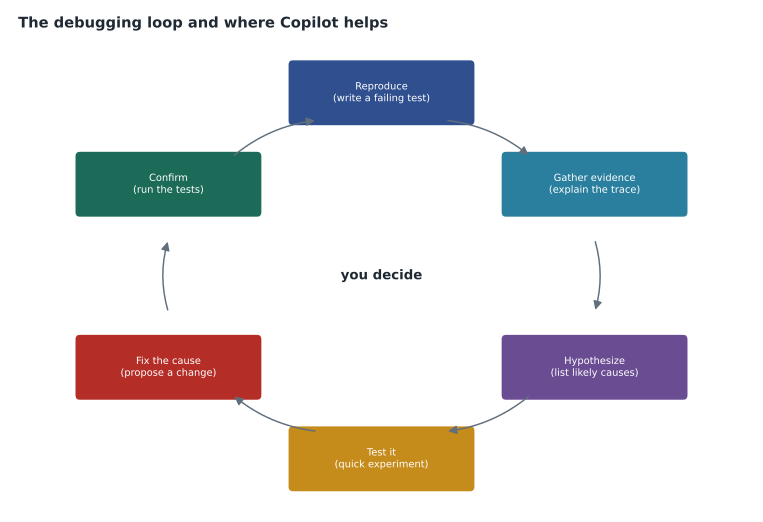
Debugging is a loop, whether or not an assistant is involved: reproduce the problem, gather evidence, form a hypothesis about the cause, test the hypothesis, fix the cause and confirm the fix. Copilot can speed up every step, but it cannot skip the first one. If you cannot reproduce a bug, any explanation Copilot offers is a guess about code it can only read, not observe. Priya's rule was "no fix without a failing test first", because a failing test is a reproduction you can run again and again.
Giving Copilot the evidence
A bug report to Copilot needs the same things a bug report to a colleague needs: what you expected, what happened instead, how to make it happen, and any error output. "It does not work" is the debugging version of the vague prompt from lesson 1. Error messages and stack traces are especially valuable, because they say where the program failed and often why. Paste them in full, or in VS Code use a reference such as #terminalLastCommand or select the output, rather than paraphrasing.
#file:trails/status.py #file:tests/test_status.py
Expected: Cove Path shows "open". Reports this week: dry (Aug 2), dry (Aug 4),
dry (Aug 5). One older report from July 27 says "washout".
Actual: the page shows "closed".
Tests pass. Today in the reproduction is 2027-08-06.
What could make trail_status return "closed" here? List likely causes
before suggesting a fix.
Asking for causes before a fix matters. If you ask only "fix it", the model may produce a plausible change that hides the symptom without addressing the cause. A list of possible causes gives you hypotheses to test. Copilot's list for Cove Path had three entries: the washout report is still being counted because the date window is wrong; the reports are sorted the wrong way so the oldest wins; or "closed" is triggered by any washout ever recorded rather than a recent one.
Testing hypotheses
Each hypothesis suggests a quick experiment. If the window is wrong, a report exactly eight days old should be counted when it should not. If sorting is wrong, reversing the input order should change the result. Dmitri asked Copilot to write a failing test for the first hypothesis, using the data from the bug report. It failed, which confirmed the cause. The window check used the number of days between dates in the wrong direction, so an older report produced a negative number, which passed the "seven days or fewer" test.
from datetime import date

def trail_status_buggy(reports, today):
    recent = [c for d, c in reports if (date.fromisoformat(d) - today).days <= 7]
    if "washout" in recent:
        return "closed"
    return "open" if recent else "unknown"

def trail_status_fixed(reports, today):
    recent = [c for d, c in reports if 0 <= (today - date.fromisoformat(d)).days <= 7]
    if "washout" in recent:
        return "closed"
    return "open" if recent else "unknown"

cove = [("2027-07-27", "washout"), ("2027-08-02", "dry"), ("2027-08-04", "dry"), ("2027-08-05", "dry")]
today = date(2027, 8, 6)
print("buggy:", trail_status_buggy(cove, today))
print("fixed:", trail_status_fixed(cove, today))
print("days old:", [(today - date.fromisoformat(d)).days for d, c in cove])buggy: closed fixed: open days old: [10, 4, 2, 1]
What this code does
Both functions take a list of reports, each a date and a condition, and decide whether a trail is open, closed or unknown by looking only at reports from the last seven days. The buggy version subtracts today from the report date, so a ten-day-old washout gives a negative number and is wrongly treated as recent; the fixed version subtracts the other way and also ignores dates in the future. The output shows the buggy version saying closed, the fixed version saying open, and the age of each report in days, confirming that the washout was ten days old.
The fix was one line, but the evidence made it convincing: a failing test built from the real data, an explanation of why the old code passed the existing tests (none of them had a report older than seven days), and a confirming run. Dmitri added the failing test to the suite permanently, so the bug cannot quietly return.
Slash commands for fixing
Editors offer shortcuts for common debugging requests. GitHub's cheat sheet lists /fix in VS Code, Visual Studio, JetBrains IDEs and Xcode, which proposes a fix for the selected code or the problem under the cursor, and /fixTestFailure in VS Code, which looks at a failing test and suggests a fix. Visual Studio has /optimize for performance problems. Many editors also show a Copilot action next to an error squiggle or a failing test that starts the same conversation with the error already in context.
| Shortcut or feature | What it does | Use it when |
|---|---|---|
| /fix | Proposes a fix for selected code or a reported problem | You can point to where the problem is |
| /fixTestFailure (VS Code) | Uses a failing test as context to propose a fix | A test reproduces the bug |
| /explain | Explains code or an error message | You do not yet understand the failure |
| Fix action on an error | Starts chat with the diagnostic in context | The editor already shows the error |
| @terminal or terminal chat | Helps with a failing command or its output | The problem is in a command, script or build |
A proposed fix is still a suggestion. The first /fix Dmitri tried on Cove Path wrapped the date calculation in abs(), which made the test pass and would have counted future-dated reports as recent. That would have reintroduced the bug from lesson 4 by a different route. The habit of asking "does this fix the cause or the symptom?" caught it.
Reading errors and stack traces
Copilot is particularly helpful when an error message is cryptic. Lena hit one in the same week: a KeyError deep inside a library while generating the summary email. She pasted the full stack trace and asked "explain this stack trace and tell me which frame is in our code". The answer pointed to the first frame inside TrailCheck's own code, where a dictionary lookup used a trail name that had been renamed in the data. Stack traces are long and the interesting line is often in the middle; a model is quick at finding it.
Worked problem
Reading a stack trace
A stack trace has 14 frames. Frames 1 to 5 are in the web framework, 6 to 9 in TrailCheck, and 10 to 14 in the email library, where the KeyError is raised. Where should Lena look first, and why?
Show solution
- The error is raised in the email library (frame 14), but library code is rarely the cause.
- The last frame in TrailCheck's own code before the library is frame 9; that is where TrailCheck passed something to the library.
- Inspect what frame 9 passed: the trail name used as a dictionary key.
Answer: Frame 9, the last frame in the team's own code. The library raised the error, but the bad input came from TrailCheck.
Debugging in the terminal and with agents
Many bugs show up as failed commands: a test run, a build, a database migration. Copilot can help in the terminal in two ways. In VS Code, terminal chat and the @terminal participant explain a failed command and suggest a corrected one. Copilot CLI, covered in the first course, works directly in a terminal session and asks for approval before running commands that change anything. Agent mode, covered in lesson 8, can run the tests itself, read the failure, propose a change, and run the tests again, in a loop you approve step by step.
Letting an agent run tests is powerful for debugging, because it closes the gap between reading and observing: the agent can reproduce the bug rather than guess. It also needs care. An agent that is told "make the tests pass" may change the tests instead of the code, so Priya's instruction to agents was "make the failing test pass without changing any test files", written into AGENTS.md as well as the prompt.
Performance and security bugs
The GH-300 guide also lists suggesting security improvements and performance optimizations. Copilot can spot common performance problems, such as a query run inside a loop or a file read repeatedly, and common security problems, such as building SQL from user input or logging a secret. For performance, ask for measurement first: "suggest how to time this function and find the slow part" is better than "make it faster", because optimizing the wrong part is a classic mistake. For security, lesson 9 covers reviewing AI-generated code, including the vulnerabilities generated code is prone to.
Worked problem
Is the fix worth it?
The trail list page takes 1.8 seconds to load. Timing shows 1.5 seconds are spent reading the conditions file once per trail for 30 trails. Copilot suggests reading it once. Estimate the new load time if one read takes the same time as before.
Show solution
- Time per read: 1.5 / 30 = 0.05 seconds.
- After the change: one read, 0.05 seconds, instead of 1.5.
- New load time: 1.8 - 1.5 + 0.05 = 0.35 seconds.
Answer: About 0.35 seconds, roughly a fifth of the original. Measuring first showed where the time went, so the fix was aimed at the right place.
Bugs that come and go
The hardest bugs are intermittent: they happen sometimes and not others. In TrailCheck the classic case was a test that failed about once in twenty runs. Intermittent failures usually come from something that varies between runs, such as the current time, the order of items in a set, a random number, a race between two tasks, or a network call that is sometimes slow. Copilot is useful here as a checklist generator. Dmitri asked it to "list everything in this test and the code it calls that could differ between two runs", and the list included the clock, an unsorted set of trail names and a cache that kept state between tests. The cause turned out to be the set: when two trails had the same status, their order in the output depended on the set's internal ordering. The fix was to sort the names, and the test that proved it ran the function two hundred times in a loop and checked that every result was identical. That pattern, turning "sometimes" into "every time" by repeating or controlling the varying input, is worth remembering, because a bug you can trigger on demand is a bug you can fix.
What Copilot cannot see
A model reading code cannot see the state of your running program unless you show it: the values of variables at the moment of failure, the contents of the database, the version of a library actually installed, the network response that came back. Many hard bugs live in exactly that state. Use a debugger or print statements to capture it, then give it to Copilot. When Dmitri was stuck on a bug that only happened on the production server, the answer came when he pasted the actual installed library versions, which differed from the ones in requirements.txt.
Common mistakes
MistakeAsking Copilot to "fix it" without saying what was expected and what happened.
InsteadGive expected behavior, actual behavior, reproduction steps and the full error.
MistakeAccepting a fix that makes the test pass without understanding why.
InsteadCheck that the fix addresses the cause, not just the symptom.
MistakeFixing a bug without a test that reproduces it.
InsteadWrite a failing test first and keep it in the suite.
MistakeLetting an agent change tests to make them pass.
InsteadTell it not to modify test files, in the prompt and in AGENTS.md.
MistakeOptimizing code before measuring where the time goes.
InsteadTime it first, then fix the slow part.
Summary and key terms
- Debugging is a loop: reproduce, gather evidence, hypothesize, test, fix and confirm.
- Give Copilot expected and actual behavior, reproduction steps and full error output.
- Ask for likely causes before fixes, then test each hypothesis with a quick experiment or a failing test.
- /fix, /fixTestFailure and editor fix actions start a fix with context; the result is still a suggestion.
- Copilot reads stack traces quickly; look first at the last frame in your own code.
- Copilot cannot see runtime state unless you capture and provide it; agents can run tests to observe.
- Reproduction
- A reliable way to make a bug happen, ideally as an automated test.
- Stack trace
- The list of function calls active when an error occurred.
- Hypothesis
- A proposed cause of a bug that can be tested.
- Symptom fix
- A change that hides the visible problem without removing its cause.
- /fix
- A chat slash command that proposes a fix for selected code or a reported problem.
Practice problems
Work each problem on paper first, then reveal the answer to check.
Why ask Copilot for likely causes before asking for a fix?
Show answer
Causes give hypotheses you can test; asking only for a fix invites a change that may hide the symptom.
In a stack trace that ends inside a library, where should you usually look first?
Show answer
The last frame in your own code before the library, because that is where your code passed in the input.
What instruction should an agent get when asked to fix a failing test?
Show answer
To make the test pass without changing any test files.
Lesson quiz · 5 questions
Score 60% or more to complete this lesson.
Create a free account to save your progress, take quizzes and earn a certificate.